Establishing secure connection…Loading editor…Preparing document…

Party Wall Agreement Form

This template is fully customizable. Edit the text, fill out the fields, and send it for signature. Give it a try!
Party Wall Agreement Form

What the Party Wall Agreement Form Is and When It’s Used

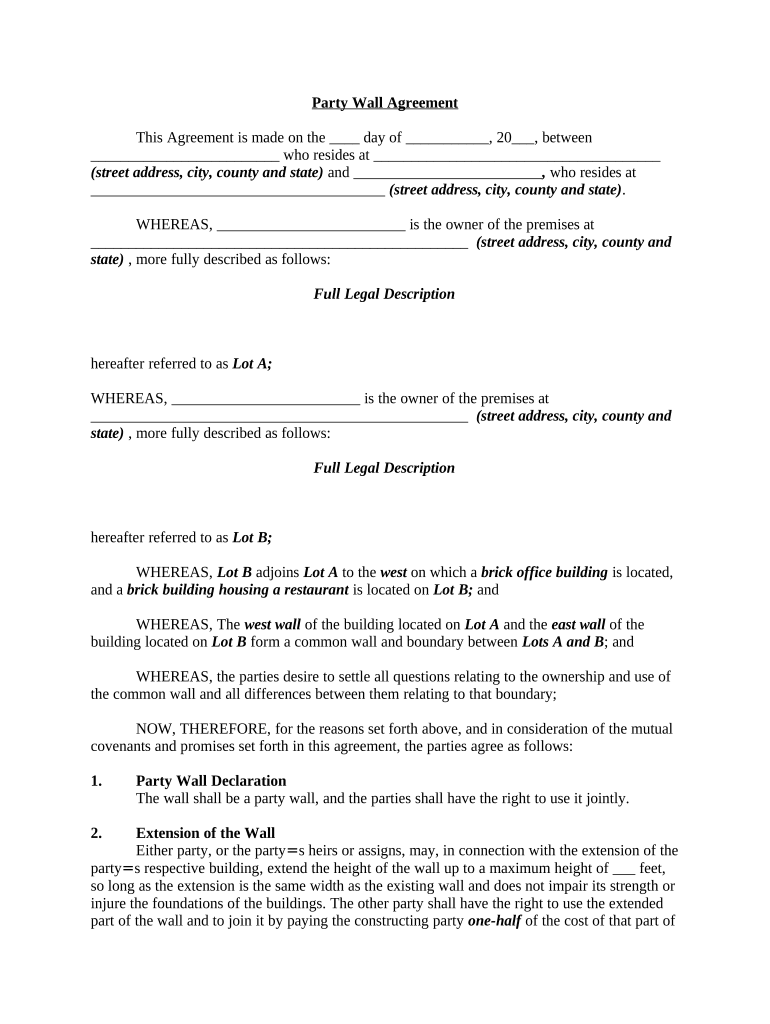
A Party Wall Agreement Form documents rights and responsibilities between neighboring property owners when work affects a shared or adjoining wall, fence, or boundary. In the United States this agreement allocates access, construction methods, liability for damage, and repair obligations, and it clarifies who pays for work and remedial measures. The form is typically executed by the property owner carrying out the work and the adjoining owner, and is retained as evidence of negotiated terms for future owners, lenders, or insurers. It is a private contract rather than a mandatory government filing in most U.S. jurisdictions.

Why a Clear Party Wall Agreement Matters

A written agreement reduces dispute risk by defining scope, access, compensation, and repair responsibilities before work begins. It provides documentary proof for insurers, mortgage lenders, and contractors.

Why a Clear Party Wall Agreement Matters

Who Typically Prepares and Signs This Form

The Party Wall Agreement Form is most often prepared when construction touches a shared wall or boundary and when neighboring owners must coordinate work.

  • Homeowners and adjoining property owners negotiating access and responsibility for shared structures.
  • General contractors or subcontractors coordinating work affecting party walls or adjoining foundations.
  • Title companies, lenders, or insurers reviewing encumbrances during transactions or claims processing.

Core Elements to Include in a Professional Party Wall Agreement Form

A complete form balances technical project detail with clear legal terms so all parties understand obligations, timing, and remedies.

Parties

Full legal names and contact information for the owner doing work and the adjoining owner, including mailing address and email for notices.
Property

Precise property description, including street address, lot number or legal description, and diagram or exhibit showing the party wall location.

Scope of Work

Detailed description of planned work, methods, materials, working hours, and access routes to avoid ambiguity during construction.

Access and Entry

Terms for entry onto adjoining property, timing, supervision requirements, and restoration of disturbed areas after completion.

Liability and Insurance

Allocation of risk, required insurance limits, indemnity language, and procedures for inspection and remediation of damage.

Payment and Security

Compensation, deposits, holdbacks, or repair bonds, plus dispute resolution and costs for independent inspections.

Step-by-Step: Completing and Executing the Party Wall Agreement

Follow these steps to prepare, review, and finalize the agreement with minimal disputes.

  • 01
    Draft Agreement: Describe parties, work, schedule, and remedies in clear terms.
  • 02
    Share with Neighbor: Provide the adjoining owner a copy for review and written feedback.
  • 03
    Arrange Inspection: Optional pre- and post-work inspections to document existing conditions.
  • 04
    Sign and Date: Execute with required signatures, notarization, or witnessing as applicable.

How to Configure an Online Workflow for This Form

Set up an e-signature workflow that enforces fields, maintains chain of custody, and notifies all parties automatically.

Field Validation Require full-name, date, and address fields to reduce incomplete submissions.
Authentication Use email or SMS code for signer verification; escalate to ID check if needed.
Template Use Save the agreement as a template for repeat use with variable fields for parties and dates.
Signing Order Define sequential or parallel signing depending on negotiation flow.
Notifications Enable automated reminders and final signed copies distribution to all parties.

Where to Send and Who Receives Copies

After execution, route signed copies to all parties and retain originals for title and insurance purposes.

  • Primary Owner: Send fully signed original to the owner performing the work.
  • Adjoining Owner: Provide the adjoining owner a signed copy for their records.
  • Contractor: Supply contractors or subcontractors with the agreement to follow access rules.
  • Insurer/Lender: Share copies with insurers or lenders if required by coverage or financing terms.

Delivery Options and Technical Requirements

Choose delivery channels that preserve the audit trail and support your required signer authentication level.

  • Document Formats: PDF, DOCX, or PDF/A supported
  • Integrations: Salesforce, NetSuite, Google Workspace integrations
  • Authentication Options: Email, SMS, KBA, or ID credential checks

Essential Information to Capture on the Form

Party Names: Full legal names
Property ID: Address or parcel number
Work Details: Scope and methods
Effective Date: Agreement start date
Financials: Deposit or payment terms
Signatures: Signed and dated

Common Errors to Avoid When Preparing This Form

  • Using vague work descriptions that leave room for differing interpretations and later dispute.
  • Failing to include a clear access schedule, which can lead to contractor delays and neighbor complaints.
  • Omitting insurance and indemnity terms, which can shift unexpected costs after property damage occurs.
  • Not documenting pre-existing conditions with photos or inspection reports before work begins.

Risks and Consequences of an Incomplete or Incorrect Agreement

Property Damage Liability: Potential out-of-pocket repair costs
Work Delays: Contractor disputes and schedule overruns
Invalid Signatures: Enforceability challenges in court
No Notarization: Reduced evidentiary weight in some jurisdictions
Recording Omission: Title search surprises for future buyers
Ambiguous Scope: Costly litigation over interpretation

Typical Timeframes and Deadlines to Note

Establish clear dates and response windows so work and rights are not disputed later.

Notice Period:

Specify how many days prior to work notice must be given

Response Window:

Allow a set number of days for the adjoining owner to accept or negotiate

Commencement Date:

Date when construction may begin

Completion Date:

Target completion or milestone dates

Inspection Timing:

Pre- and post-work inspection windows for damage assessment

eSignature Pricing and Feature Comparison for Executing This Form

Choose an eSignature provider that supports required authentication, audit trails, and retention. The table compares typical starting prices and core capabilities.

signNow DocuSign Adobe Sign PandaDoc HelloSign
Starting Price $8/user/mo $15/user/mo $14/user/mo $19/user/mo $15/user/mo
Free Trial 7-day free trial Varies by plan Varies by plan Varies by plan Varies by plan
Bulk Send Yes Yes Yes Yes No
Audit Trail Yes Yes Yes Yes Yes
HIPAA Compliant Yes Yes Yes No No

Frequently Asked Questions About the Party Wall Agreement Form

Answers to common questions about enforceability, signatures, notarization, and practical next steps when neighbors disagree.


Need help? Contact support

be ready to get more
Join over 28 million airSlate SignNow users