Establishing secure connection…Loading editor…Preparing document…

Louisiana Petition to Disavow Paternity

This template is fully customizable. Edit the text, fill out the fields, and send it for signature. Give it a try!
Louisiana Petition to Disavow Paternity

What the Louisiana Petition to Disavow Paternity Is

The Louisiana Petition to Disavow Paternity is a family‑court pleading filed in the parish where the child resides or where the paternity determination was entered. It asks a judge to overturn or contest legal parentage based on new evidence, mistaken identity, or definitive genetic test results. The petition initiates court review of support, custody, and civil records so the legal record can be aligned with biological facts and appropriate orders can be modified or vacated.

Why this Petition Matters in Family‑Court Matters

A successful petition corrects the legal record, can relieve an obligor of ongoing support obligations when appropriate, and protects the child’s legal status by aligning custody, visitation, and records with established facts rather than an incorrect adjudication.

Why this Petition Matters in Family‑Court Matters

Who Commonly Files a Petition to Disavow Paternity

Typical filers include alleged fathers disputing parentage, mothers seeking accurate birth records, and custodial parties addressing support or custody impacts.

  • Alleged fathers disputing genetic parentage and seeking judicial resolution
  • Mothers requesting correction of a birth record after new evidence
  • Custodial parties or guardians seeking to modify support or custody orders

Step‑by‑Step: Preparing and Filing the Petition

Follow these steps to prepare, verify, and submit a Louisiana Petition to Disavow Paternity with the parish court handling family matters.

  • 01
    Prepare Petition: Draft factual allegations, specify relief sought, and cite supporting facts succinctly.
  • 02
    Attach Evidence: Include DNA reports, medical records, affidavits, and any corroborating documents.
  • 03
    File in Court: Submit the petition to the parish clerk and pay applicable filing fees.
  • 04
    Serve Parties: Arrange service of process on the respondent according to parish rules.

Configuring an Online Filing Workflow for the Petition

Set up a clear online workflow to collect signatures, evidence, and contact details while preserving an audit trail for court submission.

Field Configuration
Document template and version selection Use the parish form or court‑approved template when available.
Signer authentication and verification method Choose email link with optional SMS code for stronger attribution.
Evidence upload and exhibit labeling Require PDF uploads and standardized exhibit names for clarity.
Final output and storage location Export a single PDF and store with audit trail attached.

Filing Path: From Petition Draft to Court Hearing

This sequence shows the typical path a petition follows from drafting to a resolution or hearing in parish family court.

  • Draft: Prepare petition with precise factual allegations and relief requested.
  • File: File with the parish clerk and pay any filing fees.
  • Serve: Effect legal service on respondent per local rules.
  • Hearing: Appear at the scheduled hearing with exhibits and witnesses.

Core Elements of a Professional Petition to Disavow Paternity

A complete petition organizes facts, evidence, relief requested, and proper procedural steps so the court can assess parentage issues efficiently.

Caption

Court caption and case identifier placed at top; list parties, parish name, docket number if known, and document title to ensure correct case assignment and clerical handling.
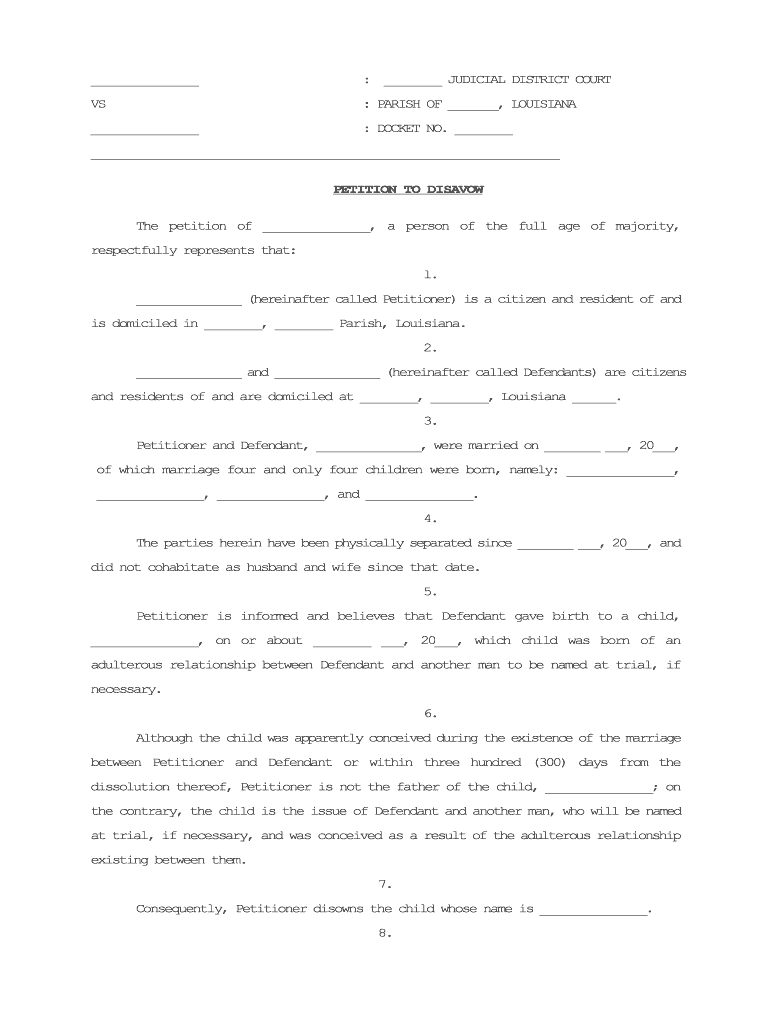
Statement of Facts

Concise chronological narrative of relevant facts, including dates and events that support the disavowal claim and explain how earlier paternity was determined or recorded.

Relief Requested

Clear, specific requests such as vacatur of paternity finding, amendment of birth record, modification of support orders, or other declaratory relief the court can grant.

Exhibits

Numbered exhibits that include laboratory DNA reports, medical records, affidavits, and any chain‑of‑custody documentation needed to support biological parentage claims.

Jurisdictional Allegations

Statements showing the parish has subject matter and personal jurisdiction and confirming venue is proper to avoid early dismissal for procedural defects.

Verification and Signature

A verification clause or sworn affidavit and signature block showing the petitioner attests to truth of facts under penalty of perjury as required by local rules.

Supporting Documents and Evidence to Include

Assemble a concise evidence set and label each exhibit to correspond to petition references and witness testimony for a streamlined court review.

Laboratory DNA Report

Provide certified laboratory results with chain‑of‑custody details and a concise explanation of the statistic or probability of paternity to aid adjudication.

Medical and Hospital Records

Include birth records, prenatal care documentation, or medical reports that corroborate identity, timeline, or biological relationships relevant to the petition.

Affidavits and Declarations

Attach sworn statements from witnesses, custodial parents, or experts that summarize observations, testing arrangements, and attestations supporting the petition.

Prior Court Orders

Include any existing paternity, custody, or support orders so the court can compare current records and identify orders that may need modification.

Typical Timing and Processing Expectations

Timelines vary by parish; the schedule below describes common milestones petitioners should expect during the disavowal process.

Filing and Intake:

Clerk assigns case number upon filing; time to assignment varies by parish.

Service Deadline:

Respondent must be served according to parish rules; timelines for service may be measured in days to weeks.

Pretrial or Hearing:

Courts commonly set hearings within 30 to 90 days, depending on backlog and case complexity.

Evidence Exchange:

Courts may order discovery or pretrial exchange of DNA and documents.

Appeal Period:

Following final judgment, appeal timing is governed by Louisiana appellate rules and can vary by case.

Key Milestones from Filing to Final Order

Track these numbered stages to monitor progress and prepare required items at each milestone.

01

1. Petition Filed

Case opened and clerk issues a case number and initial scheduling information.

02

2. Service Completed

Respondent is formally served and given time to answer or respond to allegations.

03

3. Evidence Submitted

DNA reports and exhibits are filed and served to opposing parties per court orders.

04

4. Hearing and Ruling

Court conducts hearing, evaluates evidence, and issues a decision on disavowal requests.

Common Pitfalls to Avoid When Preparing the Petition

  • Failing to attach primary evidence such as certified DNA reports delays adjudication and may cause dismissal
  • Using incorrect party names or incomplete child information leads to misdirected service and jurisdictional objections
  • Neglecting to follow parish filing requirements or local rules results in clerical rejection or need to refile
  • Relying on unsigned or unaffirmed affidavits weakens evidentiary support and may be excluded at hearing

Key Risks and Legal Consequences to Consider

False Statements: Perjury exposure
Existing Support: Obligations remain until order modified
Costs: Litigation expenses increase with delay
Evidence Loss: Unavailable proof weakens claims
Denial Risk: Court may deny relief
Venue Errors: Wrong parish can cause dismissal

Essential Information Fields Required in the Petition

Petitioner Name: Full legal name required
Respondent Name: Full legal name required
Child Details: Full name, DOB, birth place
Relief Sought: Specific orders requested
Evidence List: Exhibit labels and descriptions
Signature and Date: Signed and dated MM/DD/YYYY

Digital Filing and eSubmission Considerations

Courts and clerks vary in acceptance of electronically signed petitions and scanned exhibits; confirm acceptable formats before eSubmission.

  • Accepted Formats: PDF and court‑approved templates
  • Authentication Options: Email link with SMS or stronger methods
  • Integration Needs: Court e‑filing portals or secure storage

Comparing eSignature Providers for Petition Workflows

Basic pricing and feature availability for common eSignature platforms used to collect signatures and manage petition document workflows; signNow is listed first per vendor ordering requirements.

signNow DocuSign Adobe Sign PandaDoc HelloSign
Starting Price $8/user/mo $15/user/mo $14/user/mo $19/user/mo $15/user/mo
Free Trial Yes, 7-day free trial Varies by vendor Varies by vendor Varies by vendor Varies by vendor
Bulk Send Yes Yes Yes Yes No
Audit Trail Yes Yes Yes Yes Yes
HIPAA Compliant Yes Yes Yes No No

Frequently Asked Questions About the Louisiana Petition to Disavow Paternity

Answers to common procedural and technical questions encountered when preparing or submitting a petition in Louisiana family court.


Need help? Contact support

be ready to get more
Join over 28 million airSlate SignNow users