Establishing secure connection…Loading editor…Preparing document…

Personnel File Inspection Requirements

This template is fully customizable. Edit the text, fill out the fields, and send it for signature. Give it a try!
Personnel File Inspection Requirements

What Personnel File Inspection Requirements Cover

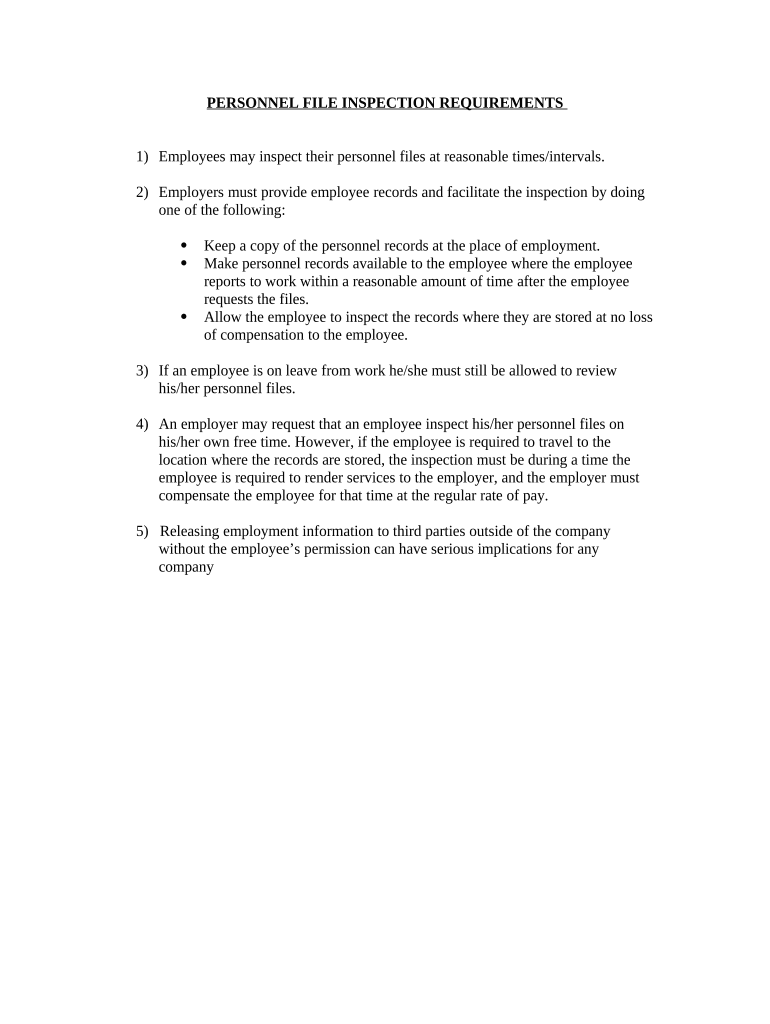
Personnel File Inspection Requirements set the standards employers must follow when an employee requests access to their employment records. These requirements typically define which records are inspectable, the format for inspection or copies, reasonable timelines for responding, and any permissible fees or redactions. Rules vary by jurisdiction and may intersect with federal recordkeeping obligations such as I-9 retention or HIPAA for health-related records. Employers should document request handling and maintain an audit trail to demonstrate compliance with applicable state statutes and federal record rules.

Why Clear Inspection Procedures Matter

Consistent inspection procedures reduce legal risk, improve employee trust, and simplify record production for audits or disputes. A documented process clarifies timelines, copy fees, and redaction practices so requests are handled uniformly and defensibly across locations.

Why Clear Inspection Procedures Matter

Who Needs This Policy and When to Apply It

Employers, HR professionals, in-house counsel, and payroll or benefits administrators use personnel file inspection guidance to respond to employee requests and to prepare for regulatory reviews.

  • HR teams and managers who process access requests and provide copies of personnel records within required timeframes.
  • Legal and compliance staff needing a documented chain of custody for records produced in litigation or audits.
  • Payroll and benefits administrators who must locate and redacted sensitive financial or health-related entries before release.

Apply these requirements whenever an employee requests access, when responding to subpoenas, or during internal audits that review personnel records.

Core Elements of a Professional Inspection Procedure

A robust personnel file inspection process includes defined scope, request intake steps, authentication checks, copying and redaction rules, timelines for response, and recordkeeping of the request and delivery.

Scope

Specify which documents are included (personnel records, performance notes) and which are excluded (medical files, employer privileged notes).
Request Intake

Standardize how employees submit requests (written/email) and capture the request date and desired output (inspection vs copies).

Identity Verification

Require reasonable identity proof before releasing records; use employee ID, government ID, or secure company authentication.

Redaction Rules

Define what to redact (third-party personal data, privileged legal notes) and who approves redaction decisions.

Response Timelines

Set internal deadlines that meet or beat statutory response windows and assign responsible owners for each step.

Recordkeeping

Log each request, the documents provided, any fees charged, and copies of communications for compliance audits.

Step-by-Step: Processing an Inspection Request

Follow these steps to receive, verify, and fulfill a personnel file inspection request while documenting each action.

  • 01
    Receive: Log the request date and requested scope immediately in a tracking system.
  • 02
    Verify: Confirm requester identity using company ID or government ID before retrieving records.
  • 03
    Review: Search files, identify third-party data, and flag items that may require redaction.
  • 04
    Deliver: Provide inspection access or copies and record delivery method and timestamp.

Configuring an Online Inspection Workflow

When you set up a digital workflow, map each step to a system action and required approval to ensure auditability and secure delivery.

Field Configuration
Request Intake Secure web form with required fields and date-stamped submission.
Authentication Single sign-on or two-factor verification before file access.
Redaction Approval Role-based approval step before producing copies.
Delivery Secure PDF with audit log entry and optional watermarking.

Typical Record-Delivery Flow

A predictable sequence improves speed and reduces errors; automate where possible while retaining manual checks for sensitive records.

  • Submission: Employee completes request form and submits electronically.
  • Authentication: System verifies identity via SSO or uploaded ID.
  • Document Retrieval: HR locates files, marks items for redaction if needed.
  • Release: Provide access or deliver copies with an audit trail.

Technical Basics for Digital Inspection and Delivery

Choose platforms that support secure file access, audit logs, and configurable redaction to meet legal and privacy obligations.

  • File Formats: Support searchable PDF and DOCX outputs to allow meaningful review and electronic redaction.
  • Audit Trail: Capture timestamps, user IDs, and IP addresses for every access and download event.
  • Authentication: Support SSO, multi-factor authentication, and ID upload for strong signer verification.

Integrations with HRIS, document management, and eSignature systems reduce manual work and maintain a defensible audit record of how and when records were produced.

Required Record Elements and Security Controls

Employee Identifier: Full name and unique ID
Request Timestamp: Date/time of request
Authentication Method: SSO or ID check
Delivery Log: Method and date delivered
Redaction Notes: Items redacted and rationale
Retention Tag: Retention schedule and legal basis

Common Compliance Risks and Consequences

Statutory Violation: Fines or penalties
Data Breach: Regulatory and reputation risk
Missing Records: Inability to defend employment actions
Improper Redaction: Disclosure of third-party data
Delayed Response: State penalties or claims
Incorrect Fees: Overcharging can trigger sanctions

Common Mistakes to Avoid When Preparing Files

  • Failing to verify requester identity before releasing records, which can result in inadvertent disclosure of personal data.
  • Searching only active personnel folders and missing archived or scanned records stored elsewhere, delaying compliance with response timelines.
  • Applying inconsistent redaction rules across locations, creating litigation exposure for selective disclosure or unequal treatment.
  • Charging excessive per-page fees or failing to disclose copy fees in advance, which can violate state statutes or employer policies.

Key Deadlines Employers Should Track

Timely handling meets statutory windows and reduces exposure. Record the request date and calculate response deadlines per jurisdiction and document type.

Employee Request Response:

Many states require inspection or copies within 21–30 days; California requires 30 days (Cal. Lab. Code §1198.5).

I-9 Retention:

Retain I-9s for 3 years after hire or 1 year after termination, whichever is later (8 CFR §274a.2).

HIPAA Records:

Maintain access logs and retain PHI records per HIPAA: 6 years (45 CFR §164.530(j)).

Tax Reporting:

Keep payroll and tax records per IRS guidance—typically at least 3 years from filing (IRC §6501(a)).

Litigation Holds:

Suspend routine destruction when litigation or audit is reasonably anticipated; preserve relevant records immediately.

Real-World Examples of Process Improvements

Organizations across sectors standardized inspection procedures to reduce turnaround time and improve audit readiness.

Optica Ventures — Faster Responses

Optica implemented a standardized intake form and digital delivery to cut lookup time.

  • Results showed shorter processing cycles.
  • The firm reported improved internal coordination and fewer disputes over record production, enabling consistent, auditable responses to employee requests.

Fertility Centers of Illinois — Security Focus

The center centralized record access and added role-based approvals for sensitive items.

  • Access control reduced accidental disclosures.
  • Improved logging and restricted delivery processes strengthened compliance with healthcare privacy expectations and simplified attorney defense when records were requested.

eSignature Vendor Pricing Snapshot

Basic pricing and feature availability for common eSignature vendors; signNow appears first for comparison. Confirm vendor plans and features directly with each provider for exact terms.

signNow DocuSign Adobe Sign PandaDoc HelloSign
Starting Price $8/user/mo $15/user/mo $14/user/mo $19/user/mo $15/user/mo
Free Trial 7-day free trial Varies Varies Varies Varies
Bulk Send Yes Yes Yes Yes No
Audit Trail Yes Yes Yes Yes Yes
HIPAA Compliant Yes Yes Yes No No

FAQs: Frequently Asked Questions on Personnel File Access

Answers to common questions about inspection rights, timelines, redaction, and secure delivery for personnel records.


Need help? Contact support

be ready to get more
Join over 28 million airSlate SignNow users