Establishing secure connection…Loading editor…Preparing document…

Petition for Termination of Guardianship

This template is fully customizable. Edit the text, fill out the fields, and send it for signature. Give it a try!
Petition for Termination of Guardianship

What a Petition for Termination of Guardianship Is

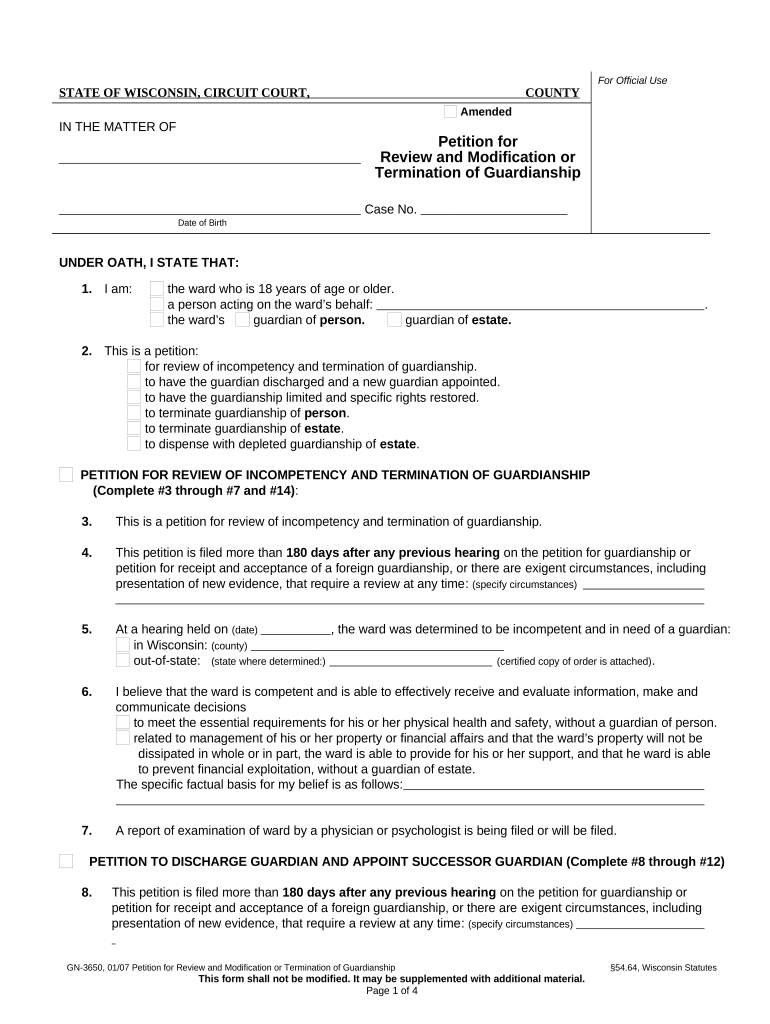
A Petition for Termination of Guardianship is a formal court filing asking a probate or family court to end an existing guardianship or conservatorship over an adult or minor. The petition explains why the guardian’s authority should end, identifies the person or estate affected, and summarizes evidence such as changed capacity, restoration of rights, or a better-placed alternative. Courts review the petitioner’s standing, notice to interested parties, medical or financial reports, and whether termination is in the ward’s best interests before issuing an order vacating or modifying the prior appointment.

Why filing a formal termination petition matters

A properly prepared petition creates a clear legal record, notifies interested parties, and gives the court evidence to restore the ward’s rights or appoint a successor arrangement.

Why filing a formal termination petition matters

Who typically files a Petition for Termination of Guardianship

People and entities closest to the ward usually initiate termination petitions when circumstances change.

  • Family members or the formerly incapacitated person seeking restoration of legal rights and independence.
  • Current or former guardians who believe the guardianship is no longer necessary or was improperly granted.
  • Public guardians, social services, or attorneys ad litem seeking proper case disposition and protection of the ward.

Courts favor petitions with complete notice and supporting documentation so that all interested parties can be heard before a decision.

Step-by-step: completing the petition

Follow this sequence to prepare a complete filing and reduce the likelihood of continuance or rejection.

  • 01
    Gather records: Collect medical, financial, and probate documents supporting termination.
  • 02
    Draft petition: Complete caption, factual basis, attachments, and requested orders.
  • 03
    Serve parties: Arrange service to guardian, ward, relatives, and interested agencies.
  • 04
    Attend hearing: Present evidence and witness testimony at the scheduled court hearing.

How the petition moves through the court system

The typical process involves filing, notice and service, a court hearing, and the court’s written order after evaluation of evidence.

  • Filing: Clerk accepts petition and assigns a case number.
  • Service: Petitioner serves required parties using approved methods.
  • Hearing: Judge hears testimony and reviews reports.
  • Order: Court issues an order terminating or modifying the guardianship.

Checklist for a digital filing workflow

Configure a repeatable workflow to assemble filings, attach exhibits, and route for signatures and notarization.

Item Configuration
Document assembly Merge petitioner and ward data into a standard petition template.
Authentication Add signer verification method and notarization step if required.
Service tracking Record service dates and proof of delivery in the case file.
Court copy Generate certified copy and proposed order for the judge.

Digital filing and signing: technical considerations

Verify the court’s rules for electronic filing, remote notarization, and accepted file formats before submitting.

  • Accepted formats: PDF or PDF/A files required.
  • Authentication: Use email plus SMS or ID proofing when court rules require stronger verification.
  • Integrations: Connect storage and case management for reliable evidence handling.

Keep court-specific technical requirements on hand: some courts limit RON, require in-person notarization, or mandate particular PDF/A versions for filings.

Common timing elements to track when filing

Timing obligations vary by jurisdiction; track filing date, service deadlines, hearing windows, and appeal periods carefully.

Filing date:

Date you submit petition to the clerk; starts scheduling and notice requirements.

Service deadline:

Local rules set how long after filing service must be completed.

Hearing notice:

Courts typically set a hearing date or order a status conference.

Court order entry:

Order is entered in docket and determines effective termination date.

Appeal period:

Post-order timelines for appeal vary by state and court.

Key milestones from filing to final order

Track these milestones in sequence to keep stakeholders informed and comply with court schedules.

01

Prepare petition

Assemble facts, reports, and exhibits before filing.

02

File and docket

Clerk assigns a case number and scheduling information.

03

Serve notice

Provide required notice to all interested parties.

04

Final hearing

Judge decides whether to terminate or modify guardianship.

Essential components for a professional termination petition

A complete petition combines clear facts, verified identity, signed affidavits, and court-ready exhibits to enable judicial review.

Case caption

Include correct court name, division, case number, and caption listing petitioner and ward to tie the filing to the active guardianship matter.
Statement of jurisdiction

Explain why the court has authority to act, citing the original guardianship order and the statutory basis for termination in concise terms.

Factual allegations

Detail events or medical findings supporting termination with dates; avoid conclusory language without evidentiary support or exhibits.

Supporting reports

Attach medical evaluations, capacity assessments, accountings, and care plans as exhibits to substantiate your factual assertions.

Service list

Provide names and addresses of all persons entitled to notice and include proof of service or a proposed plan for serving any unserved parties.

Proposed order

Submit a clear, signed proposed order terminating or modifying guardianship that the judge can enter if findings support relief.

Security and compliance elements to protect case data

Encryption: TLS 1.2/1.3; AES-256 at rest
Audit trail: Time‑stamped signing log
HIPAA options: BAA available where PHI included
ESIGN/UETA: Compliant record and signature handling
Access controls: Role-based permissions
Retention flags: Legal-hold and export options

Consequences and risks of an incorrect or incomplete petition

Denial or continuance: Judge may delay or deny relief for inadequate proof
Service defects: Improper service can void proceedings
Contempt risk: Failing to comply with notice orders risks sanctions
Costs and fees: Additional filings and attorney time increase expense
Loss of rights: Improper termination timing may harm ward’s protections
Record errors: Inaccurate filings can complicate future proceedings

Common preparation errors to avoid

  • Failing to attach essential medical or capacity reports, which often results in continuance or requests for supplementation.
  • Serving an incorrect party or using an improper method, causing service defects and procedural delays.
  • Using inconsistent names or dates across filings and exhibits, complicating docket clerks’ ability to match records.
  • Neglecting to propose a clear order or failing to give the court a concise remedy the judge can enter.

eSignature vendor comparison for court-ready petitions

Compare starting price, trial availability, bulk-send, audit trail, and HIPAA support when selecting an eSignature provider for filings.

signNow DocuSign Adobe Sign PandaDoc HelloSign
Starting Price $8/user/mo $15/user/mo $14/user/mo $19/user/mo $15/user/mo
Free Trial 7-day free trial Varies Varies Varies Varies
Bulk Send Yes Yes Yes Yes No
Audit Trail Yes Yes Yes Yes Yes
HIPAA Compliant Yes Yes Yes No No

FAQs and troubleshooting for petition filing

Answers to frequent questions about preparation, service, electronic signing, and court procedures for termination petitions.


Need help? Contact support

be ready to get more
Join over 28 million airSlate SignNow users