Establishing secure connection…Loading editor…Preparing document…

Motion to Dismiss Due to Abuse of Grand Jury and Prosecutorial Misconduct

This template is fully customizable. Edit the text, fill out the fields, and send it for signature. Give it a try!
Motion to Dismiss Due to Abuse of Grand Jury and Prosecutorial Misconduct

What this motion is and when it applies

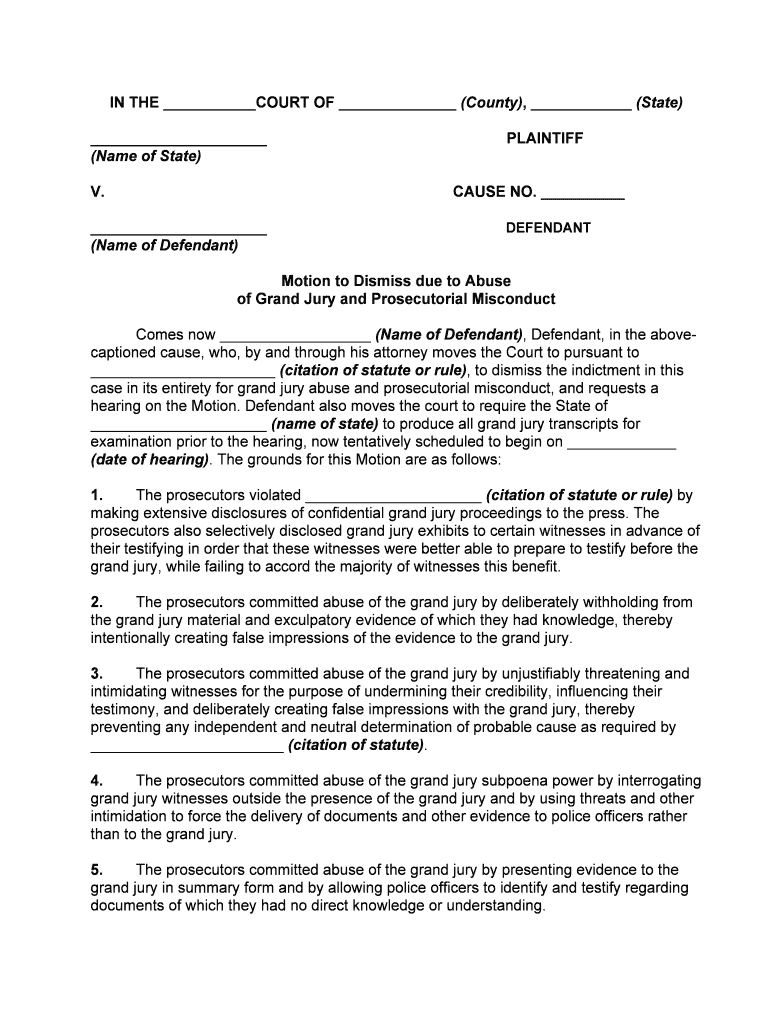
A Motion to Dismiss Due to Abuse of Grand Jury and Prosecutorial Misconduct asks a trial court to dismiss an indictment or charge because the grand jury process or prosecutorial conduct violated legal or constitutional standards. Typical bases include withholding Brady material, presenting false testimony, witness tampering, improper influence of grand jurors, or use of illegally obtained evidence. The motion outlines the factual record, cites governing law, attaches supporting exhibits or affidavits, and requests dismissal with or without prejudice. Filing preserves rights for appeal and may prompt evidentiary hearings or further discovery before disposition.

Why counsel or a movant will file this motion

This motion protects constitutional due process and seeks to remove charges founded on unfair or illegal grand jury or prosecutorial practices. It preserves appellate issues and can resolve cases without trial when misconduct prejudices the defendant’s rights.

Why counsel or a movant will file this motion

Who typically prepares and benefits from this motion

The motion is usually prepared by criminal defense counsel or the defendant when prosecutorial conduct or grand jury procedure is contested.

  • Criminal defense attorneys representing indigent or retained clients where evidence suggests prosecutorial overreach.
  • Self-represented defendants filing pro se motions to preserve constitutional objections before trial.
  • Civil-rights or appellate organizations intervening when systemic grand jury abuses affect multiple cases.

Courts, prosecutors, and defenders all use the motion as part of pretrial practice to resolve whether an indictment stands given allegations of misconduct.

Primary signatories and filing parties

Defense Counsel

A licensed criminal defense attorney signs and files the motion on a client’s behalf and certifies service. The attorney frames constitutional and statutory arguments and attaches evidentiary exhibits to support the motion and any requested hearing.

Pro Se Defendant

A defendant representing themselves may prepare and file the motion but must comply with local rules and procedural requirements; courts often require clear factual support and adherence to filing, service, and timing rules.

Step-by-step process to prepare and file the motion

Follow these steps to build a fact-based motion and comply with court filing rules.

  • 01
    Review the Record: Confirm indictment, discovery, and grand jury materials available.
  • 02
    Draft the Motion: State facts, legal bases, and relief requested plainly.
  • 03
    Assemble Exhibits: Attach affidavits, transcripts, and discovery with clear labels.
  • 04
    File and Serve: File per local e-filing rules and serve prosecution and clerk.

How to customize the motion for online completion

When completing the motion online, configure fields and attachments to mirror court filing requirements and preserve metadata and audit trails.

Upload Source Document Use PDF or DOCX format with searchable text.
Add Signature Fields Place attorney signature and date fields for each signer.
Attach Exhibits Upload exhibits as separate marked files for clarity.
Set Signer Roles Assign signer as filer, counsel, or movant depending on role.
Enable Audit Trail Record timestamps, IPs, and signed copies for the record.

Technical considerations for e-filing and e-signing

Confirm the court accepts electronic filing and whether signatures must meet local authentication standards before submitting a motion electronically.

  • File Formats: PDF and DOCX are widely accepted.
  • Authentication: Courts may require multifactor or e-filing account authentication.
  • Integrations: Platforms often connect to document management systems.

Preserve native copies, export signed PDFs with certificates, and keep secure backups to meet retention and possible appellate record requests.

Where to file and how to serve the motion

Select the correct filing channel and follow local service rules to ensure the court and prosecution receive the motion and exhibits.

  • Court E-filing System: Upload via the court’s CM/ECF or local e-filing portal.
  • Clerk’s Office: Some courts accept in-person filings at the clerk’s counter.
  • Mail or Overnight: Use certified or overnight mail if permitted by local rules.
  • Service to Prosecutor: Serve opposing counsel per local rules and certificate of service.

Essential components of a professional motion

A complete motion combines accurate captioning, a clear statement of facts, precise legal arguments, and exhibits that establish prejudice or misconduct before the court.

Caption

Complete court heading and docket number; identifies parties and ensures the motion is associated with the correct file and judge for proper processing and service.
Statement of Facts

Chronological, concise facts tied to discovery and grand jury materials with citations to specific exhibits and timestamps where misconduct is alleged or shown by evidence.

Legal Argument

Organized statutory and constitutional analysis linking facts to authority such as due process, Brady doctrine, or other controlling precedent supporting dismissal.

Exhibits

Affidavits, transcripts, discovery logs, emails, or audio/video files labeled and paginated to support factual claims and establish chain of custody where necessary.

Relief Sought

Specific request for dismissal with or without prejudice, or alternatively suppression or other remedies; explain how requested relief remedies the prejudice.

Certification and Service

Certificate of service and signature block confirming filing method, parties served, and compliance with local procedural requirements to avoid rejection.

Security, confidentiality, and record integrity

Encryption: TLS 1.2/1.3; AES-256 at rest.
Audit Trail: Timestamp, IP, and action history retained.
HIPAA BAA: Required for health-related exhibits.
Access Controls: Role-based permissions for sensitive files.
Document Integrity: Tamper-evident signed PDFs preferred.
Retention Policy: Preserve signed records per legal timelines.

Consequences of procedural or substantive mistakes

Motion Denial: Loss of dismissal remedy.
Waiver: Failure to timely raise issues may waive them.
Sanctions: Court may impose fees or sanctions for frivolous filings.
Evidentiary Loss: Improper attachments risk exclusion.
Appeal Limits: Appealability may be restricted.
Public Disclosure: Sensitive exhibits may enter public record if filed.

Common pitfalls to avoid when preparing the motion

  • Relying on unsworn statements rather than affidavits or verified exhibits can reduce persuasive force and lead the court to deny evidentiary consideration.
  • Failing to attach or cite the specific portions of transcripts or discovery that demonstrate misconduct makes the legal argument speculative and less likely to prompt dismissal.
  • Overbroad or conclusory allegations of misconduct without factual support invite sanctions and may prejudice the defendant’s credibility with the court.
  • Neglecting local rules for formatting, page limits, or filing procedures can cause administrative rejection or delayed hearings, diminishing remedy options.

Timing considerations and typical deadlines

Deadlines vary by jurisdiction and case posture; timely filing and service per local criminal practice rules is essential to preserve defenses and appellate rights.

Pretrial Motion Window:

File as soon as practicable after discovery; many courts expect pretrial motions prior to trial scheduling.

Local Rule Limits:

Some courts set fixed windows (e.g., 30–60 days before trial); confirm the applicable local rule.

Immediate Relief:

If urgent, request expedited hearing or temporary relief in the motion.

Appeal Preservation:

Timely filing preserves appellate review of dismissal or denial.

Service Deadlines:

Serve opposing counsel and file certificate of service per court requirements.

Key milestones from filing to potential appeal

This sequential view highlights the main procedural stages after filing a motion to dismiss based on grand jury abuse or misconduct.

01

Record Review

Court and parties examine discovery and grand jury materials for alleged misconduct.

02

Motion Filing

Movant files the motion, attaches exhibits, and serves the prosecution.

03

Hearing and Ruling

Court holds a hearing, evaluates evidence, and issues a written or oral ruling.

04

Post-Ruling Appeals

If denied, movant preserves issues for appeal or seeks interlocutory review when available.

eSignature provider comparison for filing and signing legal motions

Pricing and key feature availability for common eSignature vendors. Confirm enterprise or plan-level details directly with each vendor when selecting a solution.

signNow DocuSign Adobe Sign PandaDoc HelloSign
Starting Price $8/user/mo $15/user/mo $14/user/mo $19/user/mo $15/user/mo
Free Trial 7-day free trial Varies by plan Varies by plan Varies by plan Varies by plan
Bulk Send Yes (Premium) Yes Yes Yes No
Audit Trail Yes Yes Yes Yes Yes
HIPAA Compliant Yes Yes Yes No No
Envelope Cap No cap 100 envelopes/user/year Varies by plan Varies by plan Varies by plan

Practical examples of motion use in real cases

Two anonymized examples illustrate how the motion can be structured and the relief that may follow.

Public Defender Example

A public defender discovered withheld witness statements indicating a Brady violation

  • Motion asserted suppression and dismissal
  • Court ordered a hearing, suppression granted for key evidence, and the prosecution later dismissed without prejudice after remedial disclosure and review.

Civil-Rights Counsel

A civil-rights organization alleged systematic grand jury coercion in multiple indictments

  • Motion consolidated facts and requested discovery of grand jury materials
  • The court ordered limited disclosure for cause and scheduled evidentiary hearings to assess misconduct claims.

Practical tips to strengthen your motion

Adopt these practices to improve clarity, procedural compliance, and persuasive effect when litigating a motion to dismiss for grand jury abuse or prosecutorial misconduct.

Document a clear factual timeline
Prepare a concise, dated chronology of events tied to specific discovery items and exhibit references to show how prosecutorial actions affected the indictment or grand jury proceedings.
Use sworn affidavits and transcripts
Support allegations with sworn witness affidavits or authenticated transcripts rather than unverified statements to meet the court’s evidentiary thresholds.
Cite controlling authority
Frame arguments around constitutional doctrines, relevant case law, and statutory standards to show how facts meet legal dismissal criteria.
Preserve the record for appeal
File and serve all supporting materials, obtain written rulings when possible, and follow up with motions for reconsideration or timely appeals if needed.

Frequently asked questions and practical answers

Answers to common questions about timing, evidence, electronic filing, and next steps after a court ruling on the motion.


Need help? Contact support

be ready to get more
Join over 28 million airSlate SignNow users