Establishing secure connection…Loading editor…Preparing document…

Restraining Order

This template is fully customizable. Edit the text, fill out the fields, and send it for signature. Give it a try!
Restraining Order

What a Restraining Order Is and When It Applies

A Restraining Order is a court-issued legal order that limits or prohibits contact, stalking, harassment, or other forms of unwanted conduct by a named person. Common forms include emergency (ex parte) orders, temporary orders pending hearing, and permanent orders after a full hearing. Courts tailor relief—no-contact directives, stay-away distances, vacate-home mandates, or temporary custody/possession instructions—based on statutory standards and the evidence presented.

Why a Properly Prepared Restraining Order Matters

A correctly completed Restraining Order clarifies requested protections for the court, speeds processing, and improves enforceability by law enforcement. Precision in parties, dates, and specified prohibited behaviors reduces the risk of delays, denials, or limited relief.

Why a Properly Prepared Restraining Order Matters

Who Typically Prepares or Files a Restraining Order

People pursue restraining orders in diverse situations and may get help from different professionals.

  • Individuals seeking protection — survivors of domestic violence, stalking, or harassment who need immediate court relief.
  • Attorneys and legal aid organizations — prepare petitions, present evidence, and represent petitioners at hearings.
  • Law enforcement and victim advocates — provide documentation, police reports, and court notification assistance.

Knowing which party prepares each section helps avoid omissions and strengthens the petition at the initial filing stage.

Core Sections Found in Most Restraining Orders

Most restraining order forms follow a consistent structure so judges can quickly evaluate risk and grant appropriate relief. The elements below appear in state court templates with modest local variation.

Caption

Court name, case number, and full party names to ensure the order applies to the correct individuals and record.
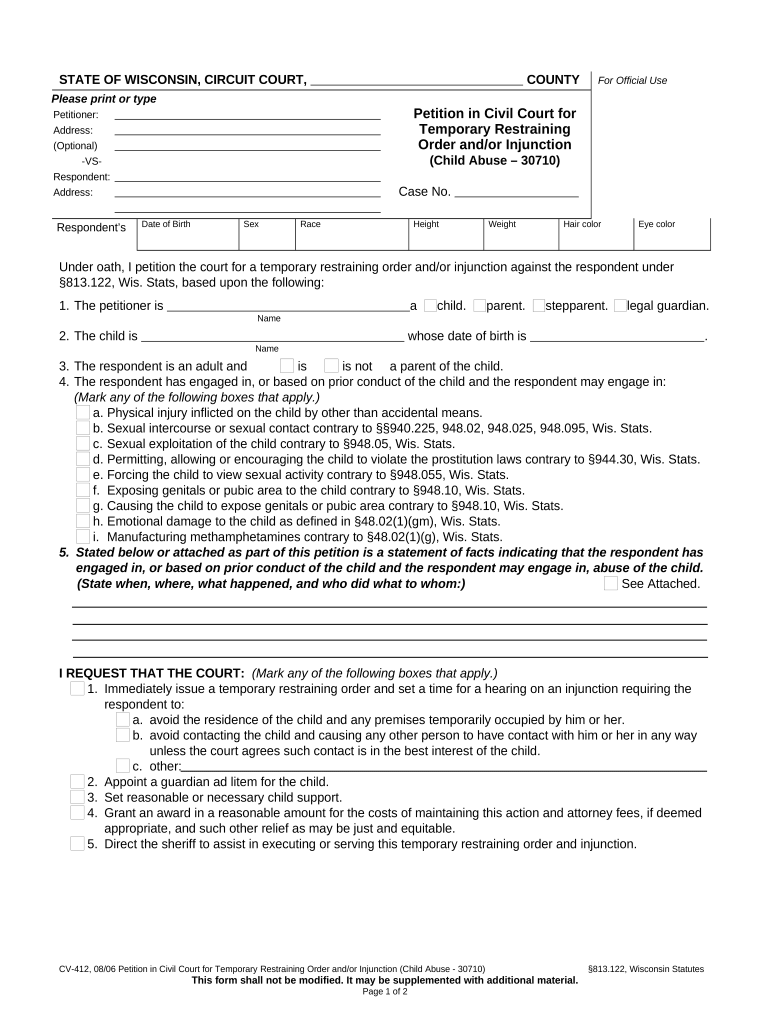
Statement of Facts

Concise, dated incidents describing threats, abuse, or harassment. Include dates, locations, witnesses, and supporting evidence such as police reports or messages.

Requested Relief

Specific prohibitions (no contact, stay-away, firearm restrictions) and temporary custody, possession, or residence directives requested of the judge.

Duration

Dates for temporary and potential permanent relief; specify when a temporary order expires and when a hearing is scheduled.

Service Instructions

How the respondent will be notified (sheriff, process server) and any restrictions on method or timing of service.

Judge's Findings

Space for the court’s factual findings, specified prohibitions, and enforcement language signed and dated by the judge.

Essential Information to Include on the Form

Petitioner Name: Full legal name of the person seeking protection
Respondent Name: Full legal name of the person from whom protection is sought
Incident Dates: Specific dates or date ranges of alleged conduct
Locations: Addresses or places where incidents occurred
Requested Orders: Precise prohibitions and remedies requested
Supporting Evidence: Police reports, photos, texts, or witness names

Step-by-Step: Completing a Restraining Order Petition

Follow these sequential steps to prepare a court-ready petition; local court rules may require additional forms or attachments.

  • 01
    Gather Evidence: Collect police reports, photos, messages, and witness names before drafting the petition.
  • 02
    Complete Caption: Enter the correct court name, county, case number (if available), and full party names.
  • 03
    Describe Incidents: Write dated, factual incident descriptions without legal conclusions or hearsay.
  • 04
    Specify Relief: State exact prohibitions, distance requirements, and any custody or possession requests.

Customizing the Form for Online Filing and eSubmission

Configure fields and attachments to match your court's e-filing requirements before submitting electronically.

Field Configuration
Date Fields Use MM/DD/YYYY and make required where courts enforce strict formats
Attachment Field Allow PDF uploads for police reports and photos
Signature Field Enable e-signature or typed-signature depending on court rules
Service Instructions Include a field for preferred service method and proof of service upload

Where to File and How the Filing Process Flows

Different courts and counties offer in-person, mail, and electronic filing options; follow the court’s specified procedure for restraining order petitions.

  • Initial Filing: File petition with the county superior or family court clerk’s office where incidents occurred
  • Ex Parte Review: Judge reviews petition for immediate emergency order without respondent present
  • Service on Respondent: Sheriff or process server delivers the order and notice of hearing
  • Hearing and Final Order: Court hears evidence; judge may confirm, modify, or deny relief

Digital Signing and eFiling Considerations

Courts differ on whether they accept electronically signed petitions and digital attachments; verify the local court’s e-filing rules.

  • Accepted Formats: PDF and DOCX are commonly accepted for attachments
  • Authentication: Courts may require signer email, password, or multi-factor authentication
  • Record Retention: Ensure e-submissions produce a tamper-evident PDF and an audit trail

When e-filing, produce and retain the court-stamped confirmation and the platform audit trail that documents signer attribution and timestamps.

Timing and Deadlines to Watch

Key deadlines vary by order type: emergency orders may be immediate, temporary orders typically expire at the scheduled hearing, and final orders last as the court specifies.

Ex Parte Orders:

Immediate effect; often lasts until the temporary hearing date

Temporary Order Hearing:

Hearing scheduled within days to weeks depending on jurisdiction

Permanent Order Duration:

May be time-limited (months, years) or indefinite depending on statute and judge

Service Timelines:

Respondent must be served before the hearing per local rules

Appeal Period:

Limited window exists to seek appellate review; varies by state court rules

Key Processing Milestones

A typical restraining order case follows sequential milestones from filing to resolution; track each to meet court deadlines.

01

File Petition

Petitioner files the initial petition and any emergency request.

02

Judge Review

Judge may issue ex parte relief after reviewing the petition.

03

Service of Process

Respondent must be personally served with the order and hearing notice.

04

Full Hearing

Judge conducts a hearing and issues temporary or final orders.

Common Mistakes to Avoid

  • Leaving incident descriptions vague or undated, which weakens evidentiary weight before the judge.
  • Using shorthand or initials for names and addresses, which can prevent proper service.
  • Failing to attach supporting documents (police reports, medical records) that corroborate claims.
  • Assuming all courts accept electronic signatures without confirming local e-filing rules.

Consequences of Incomplete or Incorrect Filings

Delayed Relief: Incomplete petitions can delay emergency protection and scheduling of hearings
Denial of Order: Lack of specific facts or evidence can lead the court to deny requested relief
False Statements: Making knowingly false allegations may result in criminal or civil penalties
Service Failures: Incorrect respondent info can void service and reschedule hearings
Enforcement Gaps: Orders missing precise enforcement language may be hard for police to act on
Recordkeeping Issues: Failure to retain stamped orders and proof of service complicates later enforcement

Real-World Examples of Restraining Order Use

The cases below show how careful preparation and supporting evidence affect the court’s decision and enforcement options.

Optica Ventures Example

A business owner documented repeated threats with dated emails and CCTV timestamps

  • court issued a temporary stay-away order
  • the petitioner retained certified copies and coordinated with local police for enforcement, improving compliance at the workplace.

Martin Properties Example

A property manager submitted witness statements and dated text messages alleging harassment

  • judge granted an ex parte order pending hearing
  • a judge-signed order allowed the sheriff to remove the respondent from the premises and schedule a full hearing.

Practical Tips to Strengthen Your Petition

Use clear, dated facts and corroborating documents to make a persuasive petition and reduce the chance of dismissal or limited relief.

Be Specific
Describe each incident with date, time, location, and witness names to aid credibility and judicial assessment.
Attach Evidence
Attach police reports, screenshots, photos, and medical records where available to corroborate your account.
Confirm Service Info
Provide precise addresses and known aliases to ensure correct respondent service and avoid delays.
Retain Records
Keep court confirmations, stamped orders, and proof of service in a secure location for enforcement or appeals.

Electronic Signature Vendors for Completing and Submitting Restraining Orders

Some courts allow e-signatures and electronic attachments; the table below compares common eSignature vendors and basic plan traits relevant to secure submission and recordkeeping.

signNow DocuSign Adobe Sign PandaDoc HelloSign
Starting Price $8/user/mo $15/user/mo $14/user/mo $19/user/mo $15/user/mo
Free Trial 7-day free trial Yes Yes Yes Yes
Bulk Send Yes Yes Yes Yes No
Audit Trail Yes Yes Yes Yes Yes
HIPAA Compliant Yes Yes Yes No No

Frequently Asked Questions About Restraining Orders

Answers below address common filing, service, and enforcement questions related to restraining orders in U.S. courts.


Need help? Contact support

be ready to get more
Join over 28 million airSlate SignNow users