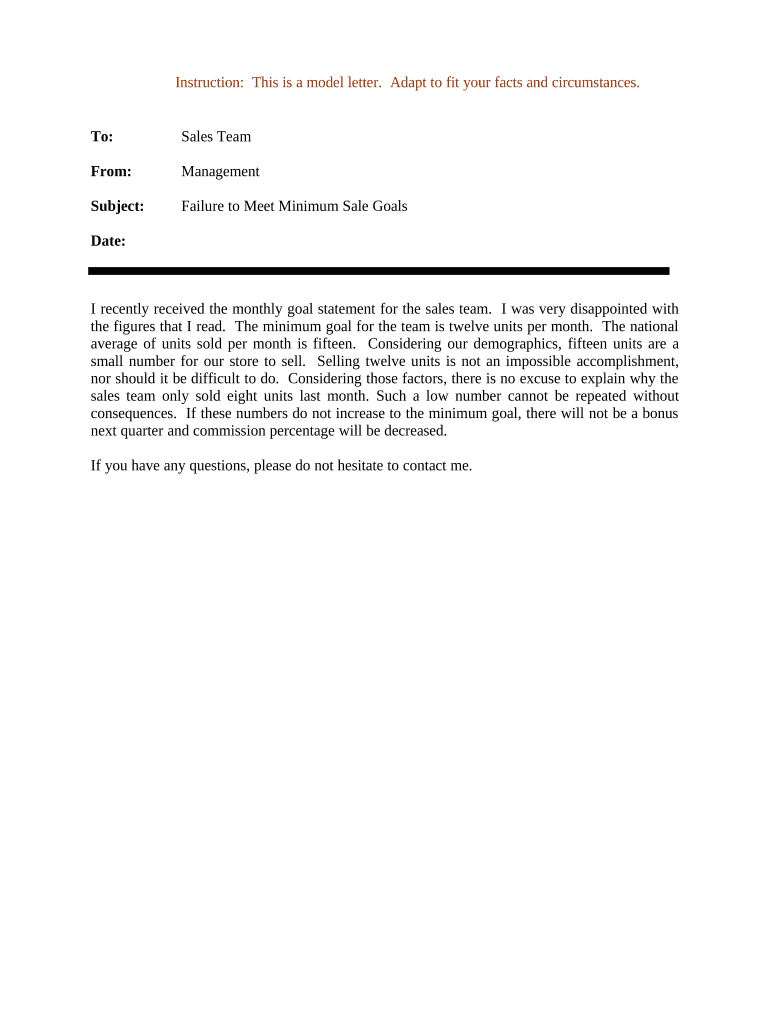
Letter Regarding Failure to Meet Minimum Sales Goals
What the Letter Regarding Failure to Meet Minimum Sales Goals Is
Why this Letter Matters for Contract Compliance
Using a clear, consistent notice letter preserves legal rights, creates an auditable record of nonperformance, and gives the other party an opportunity to cure before harsher remedies are applied.
Who Typically Prepares or Receives This Notice
Internal and external stakeholders use this letter to enforce contractual sales obligations while documenting the timeline and expectations.
- Sales managers and account executives who monitor quotas and escalate persistent shortfalls to legal or operations.
- Channel partners and independent sales agents who receive formal notices when minimum thresholds are not met.
- Contract managers or in-house counsel who review, approve, and archive notices for enforcement.
The letter supports consistent enforcement across accounts and helps avoid disputes by focusing on facts, dates, and the contract clause at issue.
Step-by-Step: Preparing and Sending the Letter
-
01Gather Evidence: Collect sales reports, contract terms, and prior communications supporting the shortfall.
-
02Draft Notice: Cite the contract clause, quantify the shortfall, and state remedial steps and timeframe.
-
03Obtain Authorization: Have legal or contract owner review and an authorized officer sign the letter.
-
04Deliver and Record: Send via tracked method and save proof of delivery and the signed final copy.
Configure an Online Workflow for Notice Letters
| Field | Configuration |
|---|---|
| Template | Prebuilt letter template with fillable fields |
| Authentication | Email or SMS code to verify recipient identity |
| Notifications | Auto-notify sales, legal, and account owner on send and completion |
| Retention | Auto-archive signed copies to secure document repository |
How Notice Delivery Typically Works
-
Draft Letter: Populate template fields with contract and sales data.
-
Internal Review: Legal confirms accuracy and authority to send notice.
-
Deliver: Send via registered mail, courier, or eSignature with audit trail.
-
Archive: Store signed copy and delivery proof in secure records.
Technical Considerations for Digital Delivery
Use platforms that support signed audit trails, secure storage, and authentication options appropriate to the document's risk level.
- File Formats: PDF or DOCX for legible, unalterable originals
- Authentication: Email link, SMS code, or stronger KBA when required
- Integrations: Connect to CRM or document management for archiving
Select settings that preserve an immutable audit trail (timestamps, IPs, signer identity) and configure retention to meet legal and internal policy requirements.
Typical Timelines and Deadlines to Include
Notice Date:
Enter the date the letter is delivered or deemed delivered.
Review Period:
Allow the recipient reasonable time (commonly 10–30 days) to investigate and respond.
Cure Period:
Specify the exact cure period (for example, 30 days from receipt) using MM/DD/YYYY.
Follow-up:
State when a follow-up will occur if no action is taken.
Enforcement Date:
Indicate when contractual remedies may commence after cure period expires.
Common Mistakes to Avoid
- Failing to cite the exact contract clause and measurement period, which weakens the link between shortfall and contractual duty.
- Using vague cure language such as 'reasonable steps' instead of specifying measurable actions and timelines.
- Delivering notice without documented authorization from an appropriate company officer or without legal review.
- Sending by an untraceable method that provides no verifiable proof of delivery or receipt.
Potential Consequences of an Incorrect or Untimely Notice
eSignature Pricing and Feature Comparison for Delivering Notices
| signNow | DocuSign | Adobe Sign | PandaDoc | HelloSign | |
|---|---|---|---|---|---|
| Starting Price | $8/user/mo | $15/user/mo | $14/user/mo | $19/user/mo | $15/user/mo |
| Free Trial | 7-day free trial | No | No | Yes, limited | Yes, limited |
| Bulk Send | Yes | Yes | Yes | Yes | No |
| Audit Trail | Yes | Yes | Yes | Yes | Yes |
| HIPAA Compliant | Yes | Yes | Yes | No | No |
Illustrative Use Cases for the Notice Letter
Distributor Shortfall
A regional distributor missed quarterly minimums despite prior warnings; the company documented sales shortfalls and offered a 30-day cure period.
- The distributor was given a specific remediation plan.
- After timely performance the account retained its status; the letter provided the necessary record to support either reinstatement or future enforcement.
Channel Partner Cure
A channel partner fell below annual volume thresholds and failed to meet activation milestones; management issued a formal notice with data attachments.
- The partner proposed corrective marketing steps.
- The documented timeline and attachments enabled a negotiated amended plan and avoided immediate contract termination.
Practical Tips for Accurate and Efficient Notices
Frequently Asked Questions About the Letter Regarding Failure to Meet Minimum Sales Goals
-
When is notarization necessary?
Most internal notices do not require notarization. If the contract explicitly requires notarized notice or if the letter will be used for a notice requiring authentication under state law, obtain notarization per state rules.
-
Can I send the letter by email?
Yes, if the contract allows electronic notice and the electronic delivery method creates a verifiable timestamp and receipt. Otherwise follow the contract's specified notice method.
-
What happens if the recipient cures late?
If cure occurs after the stated period, remedies may depend on contract language and waiver analysis; document the late cure and consult counsel before accepting or rejecting it.
-
Is an eSignature legally valid here?
Yes. Under the ESIGN Act (15 U.S.C. ch. 96) and UETA, electronic signatures are generally valid for commercial contracts unless an exception applies.
-
How long should records be kept?
Keep signed notices and delivery proof for the contract term plus at least three years; retain longer if litigation or regulatory obligations apply.
-
Who should sign the notice?
An authorized company officer or contract manager should sign. Ensure internal authority is documented to avoid challenges to notice validity.