Establishing secure connection…Loading editor…Preparing document…

Letter of Congratulations on Recognition

This template is fully customizable. Edit the text, fill out the fields, and send it for signature. Give it a try!
Letter of Congratulations on Recognition

What the Letter of Congratulations on Recognition Is

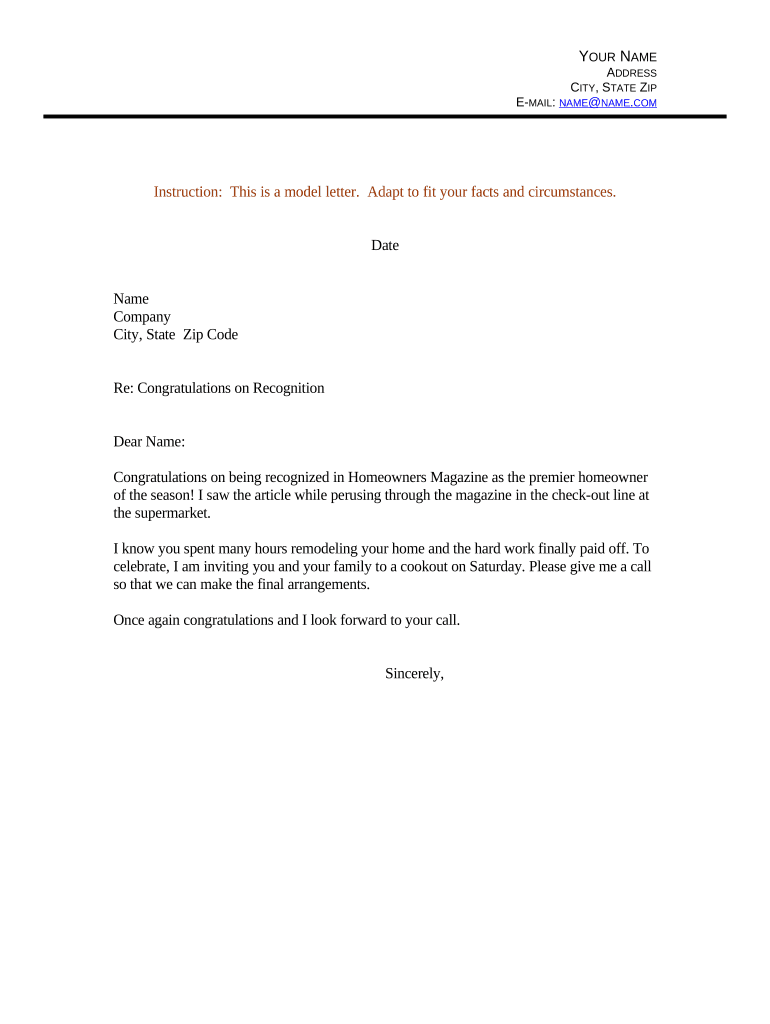
A Letter of Congratulations on Recognition is a formal written message acknowledging an individual or group's award, milestone, promotion, or public recognition. It records the reason for recognition, names the recipient(s), and communicates appreciation or endorsement from an individual, team, or organization. The letter may serve both interpersonal and official purposes: boosting morale, documenting an event for personnel files, and providing a concise, dated record that can be archived with organizational records.

Why a Clear, Professional Congratulations Letter Matters

A well-crafted letter formalizes recognition, promotes goodwill, and creates a short authoritative record of the award or honor. It helps avoid misunderstandings, supports internal HR records, and reinforces organizational values without requiring formal legal language.

Why a Clear, Professional Congratulations Letter Matters

Who Typically Sends or Uses This Letter

Organizations and individuals use this letter when they want to formally acknowledge achievement while preserving a record for personnel or public files.

  • Human resources and people operations teams issuing formal employee recognitions or promotions.
  • Managers and supervisors recognizing team members for performance, milestones, or awards.
  • Boards, committees, and organizational leaders acknowledging public honors or community awards.

Use the letter as a stand-alone communication or as an attachment to an employee file, press release, or award packet depending on audience and policy.

Core Elements to Include in Every Letter

A concise, professional structure keeps the letter readable and useful as a record. Include identifying details, a specific description of the recognition, context for the award, and a dated signature block so the letter can be archived or relied on later.

Heading

Clear subject or heading such as 'Letter of Congratulations' plus organization name and date for quick reference.
Recipient

Full legal name and role or affiliation to ensure the award is attributed to the correct person or group.

Recognition Details

Concise description of the award, achievement, or recognition including the awarding body or event and specific accomplishments.

Context

Brief explanation of why the recognition was granted and any relevant standards, contributions, or project outcomes.

Personalization

A short, personalized sentence or two that acknowledges the recipient's individual contributions or significance to the organization.

Signature Block

Name, title, organization, date, and a signature line. Include contact details if follow-up is expected.

Step-by-Step: Preparing and Sending the Letter

Follow these four steps to draft, approve, sign, and distribute a Letter of Congratulations on Recognition efficiently and accurately.

  • 01
    Draft Message: Compose a concise message including reason for recognition and key facts.
  • 02
    Personalize Content: Add a personalized sentence about the recipient's contribution.
  • 03
    Proofread & Approve: Verify names, dates, and any referenced awards or organizations.
  • 04
    Deliver & Archive: Send via chosen channel and save a dated copy in records.

How to Set Up an Online Completion Workflow

Configure a simple digital workflow to collect signatures, log approvals, and archive the final letter in a secure location.

Field Configuration
Format PDF or DOCX with fillable fields
Authentication Email link or SMS code for signer verification
Delivery Method Email, secure link, or portal upload
Archive Location Encrypted cloud storage or HR records system

Digital Signing Considerations and Platform Needs

Choose a platform that supports common file formats, provides an audit trail, and complies with applicable privacy or health regulations when needed.

  • File Formats: PDF, DOCX supported
  • Authentication Options: Email, SMS code, or stronger methods
  • Integrations: Salesforce, Google Workspace, Microsoft 365

Verify the platform's security and privacy features for your use case — for PHI workflows require a BAA and for personnel records check access controls.

Typical Digital Distribution Flow

A standard online process reduces delay and provides a verifiable record of delivery, acceptance, and signature events.

  • Create Template: Upload the letter and add fillable fields.
  • Insert Signatures: Place signature and date fields for required signers.
  • Select Delivery: Choose email, secure link, or internal portal.
  • Send and Track: Monitor completion and store the signed copy.

Recommended Timing and Follow-up Deadlines

Timely issuance preserves relevance. These guidelines help coordinate with ceremonies, publicity, and personnel records.

Issue Promptly:

Send within 7 days of the event or decision when possible.

Before Public Announcement:

Deliver to recipient prior to public release if policy requires.

Response Tracking:

Allow 7–14 days for acknowledgment or corrections.

Follow-up Reminder:

If no response, send one reminder after 10–14 days.

Archival Date:

File final signed copy immediately after completion.

Key Milestones from Draft to Archive

This sequence shows the main stages and where approvals or records are typically captured for a Letter of Congratulations on Recognition.

01

Draft Preparation

Write the letter and confirm recognition details with stakeholders.

02

Internal Approval

Obtain any required manager or HR sign-off before sending.

03

Signature and Delivery

Collect signatures and deliver the signed letter to the recipient.

04

Record Retention

Save the dated signed copy in the appropriate records system.

Common Mistakes to Avoid

  • Using generic or boilerplate language that fails to reference specific achievements and weakens the letter's perceived sincerity and record value.
  • Misspelling or using an informal name instead of the recipient's legal name which can complicate personnel records or public citations.
  • Omitting the date, awarding organization, or event name, which reduces the letter's usefulness as a contemporaneous record.
  • Sharing sensitive information about health or performance without required safeguards, potentially triggering privacy or compliance issues.

Potential Risks and Consequences

Name errors: Misattributed recognition
Privacy breach: Unintentional PHI exposure
Misattribution: Incorrect award details
Record loss: Missing archival copy
Regulatory breach: Noncompliance with PHI rules
Reputational harm: Public confusion or dispute

Security and Compliance Features to Consider

Encryption: TLS 1.2/1.3 in transit; AES-256 at rest
Audit Trail: Timestamped IP and action logs
ESIGN/UETA: Compliant with ESIGN and UETA
HIPAA: BAA required for PHI workflows
Access Controls: Role-based permissions and SSO
Certifications: SOC 2 Type II and ISO 27001

Practical Examples: How Organizations Use the Letter

Two illustrative scenarios show how the letter can be adapted for internal and external recognition while preserving an official record.

Employee Recognition

A manager documents an employee promotion with role details and effective date

  • Includes a specific accomplishment metric and team contribution
  • The signed letter is filed in HR records and shared privately with the employee before public announcement.

Community Award

A nonprofit issues a congratulatory letter to a volunteer honored at a civic ceremony

  • Notes the award name and date
  • The organization keeps a copy for grant reporting and posts a redacted public version on its website.

Tips for Accurate and Efficient Completion

Follow these best practices to create letters that are concise, authoritative, and easy to archive.

Use Accurate Legal Names
Always use the recipient's full legal name as used in personnel or official records. Confirm spelling and preferred professional styling to avoid later corrections and ensure the letter matches other records.
Be Specific About the Recognition
Describe the award, event, or achievement clearly with dates and the awarding body. Specifics improve the letter's value as an evidentiary record and reduce ambiguity about what is being recognized.
Limit Sensitive Information
Do not include protected health information, disciplinary details, or private evaluations unless authorized. For PHI, ensure a BAA is in place and follow HIPAA requirements for disclosures and retention.
Archive the Signed Copy
Save the final signed letter in a secure records system with restricted access. Include the date of issuance and identify the signer to maintain a reliable audit trail for future reference.

eSignature Platform Pricing Snapshot for Letter Distribution

Platforms vary by price model and feature set. This comparison shows starting prices and common capabilities for distributing and signing Letters of Congratulations on Recognition.

signNow DocuSign Adobe Sign PandaDoc HelloSign
Starting Price $8/user/mo $15/user/mo $14/user/mo $19/user/mo $15/user/mo
Free Trial 7-day free trial Varies by plan Varies by plan Varies by plan Varies by plan
Bulk Send Yes Yes Yes Yes No
Audit Trail Yes Yes Yes Yes Yes
HIPAA Compliant Yes Yes Yes No No

Frequently Asked Questions and Troubleshooting

Answers to common operational and compliance questions about creating, signing, and storing a Letter of Congratulations on Recognition.


Need help? Contact support

be ready to get more
Join over 28 million airSlate SignNow users