Establishing secure connection…Loading editor…Preparing document…

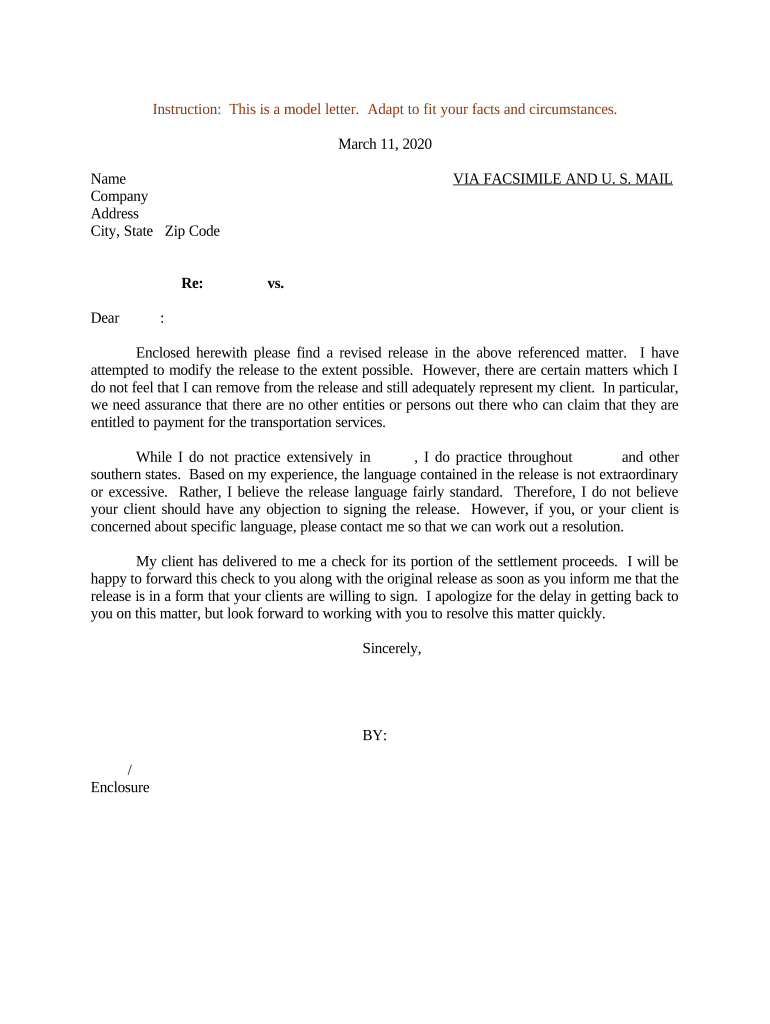
Letter Regarding Revised Release

This template is fully customizable. Edit the text, fill out the fields, and send it for signature. Give it a try!
Letter Regarding Revised Release

What a Letter Regarding Revised Release Is and When It’s Used

A Letter Regarding Revised Release is a written amendment or clarification that modifies the scope, effective date, or terms of an earlier release of claims or liabilities. It is commonly used in settlements, employment separations, insurance claim resolutions, and vendor disputes to correct drafting errors, narrow or expand released claims, or confirm previously agreed changes. The letter should reference the original release, state the precise revisions, identify the parties, specify effective dates, and show clear execution to avoid ambiguity or future disputes.

Why a Clear Revised Release Letter Matters

A concise revised release preserves the parties’ intent, reduces litigation risk, and documents a mutual change to an existing settlement or release. Precise language limits future disputes and supports enforceability under ESIGN and UETA where electronic execution applies.

Why a Clear Revised Release Letter Matters

Typical Parties Who Prepare or Sign a Revised Release

Organizations and individuals use revised release letters to alter prior settlement or waiver terms without drafting a wholly new agreement.

  • Employers and HR teams handling separation agreements and post-employment releases.
  • Plaintiffs, defense counsel, and claims adjusters updating settlement terms.
  • Vendors or contractors modifying previously released project claims or payment terms.

Identify decision-makers and retained counsel early; their involvement determines whether notarization, witness statements, or additional approvals are required.

Essential Parts of a Professional Revised Release Letter

A well-structured letter contains discrete sections that identify the original document, describe precisely what is revised, state consideration if any, declare the effective date, and record execution details for each party.

Title

Clear heading naming the original release and indicating this document amends or revises that release, for immediate context.
Recitals

Brief factual background referencing the original release by date and parties to show the operative context for the revisions.

Revised Terms

Explicit clause(s) listing the exact language replaced or the scope change; use redline or quoted text to avoid ambiguity.

Consideration

If new consideration is provided, state the amount or non-monetary exchange and confirm mutual acceptance of the change.

Effective Date

Specify the date when the revision takes effect and whether it is retroactive or prospective to avoid timing disputes.

Execution Block

Signature lines for all parties, printed names, titles, dates, and any required witness or notary acknowledgements.

Step-by-Step: How to Prepare and Execute a Revised Release Letter

Follow a clear sequence to draft, review, and execute the revision so all parties and counsel can confirm agreement and proper authentication.

  • 01
    Draft: Identify original release and draft precise replacement language.
  • 02
    Review: Circulate to counsel and relevant stakeholders for confirmation and legal review.
  • 03
    Authenticate: Decide on notarization, witnesses, or electronic authentication.
  • 04
    Execute: Obtain signatures, record the executed copy, and distribute to parties.

How to Configure an Online Workflow for a Revised Release

Set up a repeatable digital workflow that captures signatures, records audit trails, and stores the executed amendment securely.

Field Configuration
Template Create reusable template with revision placeholders.
Signers Add signer roles and order (sequential or parallel).
Authentication Choose email link, SMS code, or KBA as needed.
Notifications Enable reminders and receipt emails after signing.

Where to Send, File, and Distribute the Executed Letter

Direct distribution and recordkeeping depend on the parties and whether the revision affects third-party filings or recorded documents.

  • Primary Parties: Send executed copies to all signers and counsel for their files.
  • Claims Files: Attach to insurance or claim files if the release affects a claim.
  • Court Filings: File with the court only if the original release was part of court-ordered settlement.
  • Third Parties: Provide to lienholders or escrow agents if the revision alters payment or release scope.

Digital Signing and File Format Considerations

Choose a platform that supports PDFs and Word DOCX, provides an audit trail, and complies with ESIGN and UETA for enforceability.

  • File Formats: PDF and DOCX are standard and preserve layout for signatures.
  • Audit Trail: Capture timestamps, IP, and signer actions for evidentiary support.
  • Authentication: Use multi-factor or KBA where higher assurance is required.

Ensure the chosen platform supports export to PDF/A for long-term storage, provides tamper-evident signed PDFs, and offers optional notarization or RON integrations if required by state law.

Timing and Deadlines to Watch When Issuing a Revised Release

Some revisions affect filing deadlines, tax reporting, or limitation periods; identify and calendar any time-sensitive actions before execution.

Effective Date Selection:

Choose MM/DD/YYYY to set when changes take effect.

Review Period:

Allow sufficient time for counsel review before signing.

Tax Reporting Impact:

Confirm whether consideration triggers 1099 reporting by Jan 31.

Notarization Window:

Schedule notary or RON session before signature expiry.

Recordkeeping Start:

Begin retention from execution date or original release date.

Key Processing Stages from Draft to Final Distribution

Track each milestone to ensure timely review and execution, with a clear owner for every stage in the sequence.

01

Draft Preparation

Draft precise revision language and reference original release.

02

Internal Approval

Obtain approvals from legal, finance, or HR as required.

03

Signature Execution

Complete signatures with chosen authentication and notarization.

04

Final Distribution

Distribute executed copies and update relevant records.

Common Mistakes to Avoid When Preparing a Revised Release Letter

  • Using vague language that fails to specify which clauses are replaced or how scope changes, creating ambiguity.
  • Failing to reference the original release date and parties precisely, which can lead to disputes about applicability.
  • Overlooking whether new consideration is required; silent amendments can be challenged for lack of consideration.
  • Neglecting state-specific notarization or witness requirements, especially when a release affects real property or POA matters.

Consequences of an Incorrect or Incomplete Revised Release

Unenforceable Terms: Court may refuse to enforce ambiguous revisions.
Tax Exposure: Incorrect reporting can trigger IRC §6721 penalties.
Fraud Risk: Improper execution could expose parties to fraud claims.
Delay Costs: Settlement implementation may be delayed, increasing costs.
Third-Party Liability: Changed scope may affect third-party rights.
Recordkeeping Failure: Missing documents complicate audits and compliance.

Required Information to Include in the Letter Regarding Revised Release

Original Release: Title and date of the original release.
Full Parties: Complete legal names of all parties.
Revised Text: Exact language being replaced or added.
Consideration: Clear statement of any new consideration.
Effective Date: MM/DD/YYYY effective date.
Signatures: Signatures, printed names, and dates.

Typical eSignature Pricing and Feature Comparison for Executing Revised Releases

Use an eSignature provider that meets your authentication, audit trail, and compliance needs; the table below summarizes basic starting prices and selected features for common vendors.

signNow DocuSign Adobe Sign PandaDoc HelloSign
Starting Price $8/user/mo $15/user/mo $14/user/mo $19/user/mo $15/user/mo
Free Trial 7-day free trial Varies by vendor Varies by vendor Varies by vendor Varies by vendor
Bulk Send Yes Yes Yes Yes Varies
Audit Trail Yes Yes Yes Yes Yes
HIPAA Compliant Yes Yes Yes No No
Envelope Cap No cap 100 envelopes/user/year Varies by plan Varies by plan Varies by plan

How Organizations Use a Revised Release Letter in Practice

Real-world examples illustrate common scenarios where a revision letter clarifies or modifies a release without reopening the entire settlement.

Optica Ventures — Operational Amendment

Optica referenced the original release by date and replaced a payment schedule with new dates.

  • The change preserved the settlement amount while adjusting timing.
  • The clear amendment language avoided renegotiation and allowed both parties to update accounting and close the matter administratively.

Martin Properties — Lease Release Update

Martin Properties used a revision to narrow the scope of a tenant release concerning damage claims.

  • The revision specified excluded claim categories.
  • This prevented future disputes by clarifying scope, enabling both parties to proceed without further litigation or escrow withholding.

Frequently Asked Questions About Letters Regarding Revised Release

Answers to common questions about execution, authentication, and enforceability to help reduce errors during drafting and signing.


Need help? Contact support

be ready to get more
Join over 28 million airSlate SignNow users