Establishing secure connection…Loading editor…Preparing document…

Letter Regarding Settlement Proceeds

This template is fully customizable. Edit the text, fill out the fields, and send it for signature. Give it a try!
Letter Regarding Settlement Proceeds

What the Letter Regarding Settlement Proceeds Is and When It’s Used

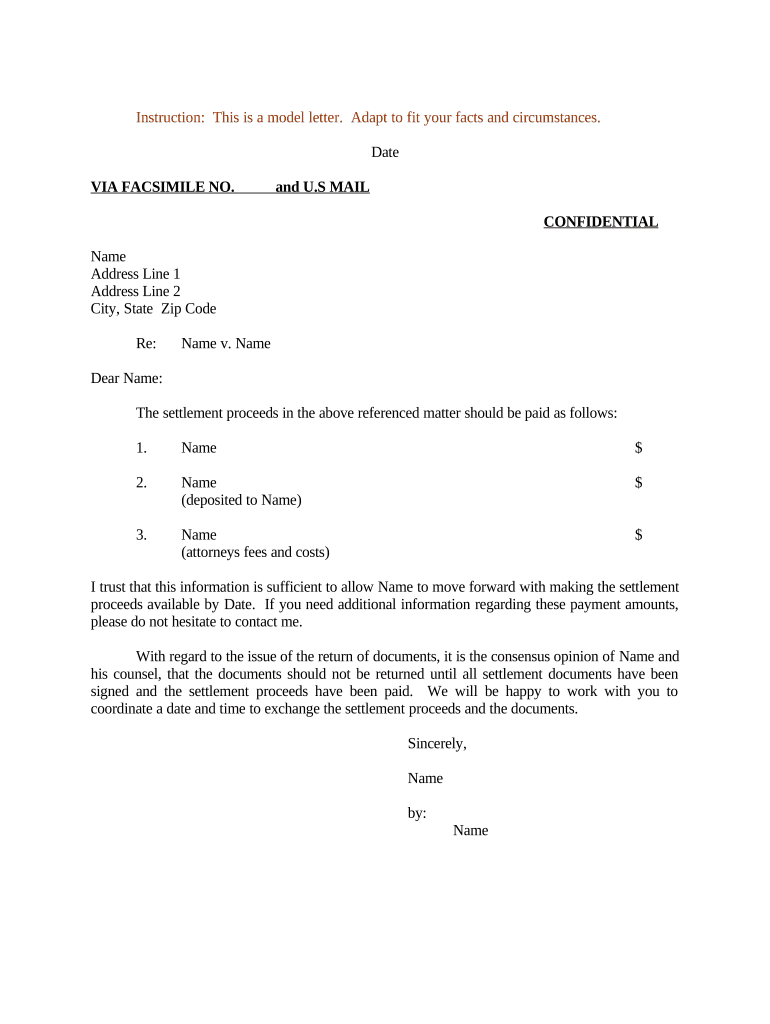
A Letter Regarding Settlement Proceeds is a formal written notice that documents the amount, payee, timing, and any deductions related to funds distributed after a legal settlement, insurance claim, or negotiated resolution. The letter typically states the gross settlement amount, itemizes withholdings (taxes, liens, fees), identifies the recipient and payer, sets a disbursement date or schedule, and references the release or settlement agreement. Organizations use the letter to create an auditable record for accounting, tax reporting, and to confirm that parties have received the correct net proceeds under the settlement terms.

Why a Clear Settlement-Proceeds Letter Matters

A precise letter reduces disputes, supports tax reporting, and documents obligations for both payer and payee under the settlement, creating a clear, auditable trail for compliance and recordkeeping.

Why a Clear Settlement-Proceeds Letter Matters

Who Typically Prepares or Receives This Letter

Use this letter when formalizing distributions after settlements, claims, or negotiated financial resolutions; multiple stakeholders rely on it.

  • Plaintiffs / Claimants — Receive itemized proceeds and tax withholding details.
  • Attorneys / Claims administrators — Prepare, approve, and route the letter for signature and disbursement.
  • Financial institutions / Escrow agents — Use the letter to release funds and reconcile accounting entries.

Keep a signed copy with the settlement file and share it with payroll/tax teams to ensure accurate reporting and withholding.

Essential Security and Compliance Details to Include

Encryption in Transit: TLS 1.2 / 1.3 for data transport
Encryption at Rest: AES-256 encrypted storage
Audit Trail: Detailed timestamps and IP logs
HIPAA BAA: Business Associate Agreement required
Regulatory Standards: ESIGN, UETA, 21 CFR Part 11 support
Certifications: SOC 2 Type II and ISO 27001

Key Legal and Financial Risks If the Letter Is Incorrect

1099 Penalties: $60–$330 per form (IRC §6721)
Backup Withholding: 24% withholding if invalid TIN
Tax Misreporting: Incorrect payee/TIN causes IRS disputes
Breach Claims: Disputed distributions may trigger litigation
Notarization Errors: Invalid acknowledgements can delay disbursement
Recordkeeping Failures: Noncompliance with retention rules

Common Preparation Errors to Avoid

  • Using an incorrect or mismatched taxpayer identification number (TIN) that triggers backup withholding and complicates IRS reporting.
  • Failing to itemize deductions, liens, or attorney fees clearly, which creates reconciliation problems and potential disputes.
  • Sending the letter before required approvals or the executed release are in place, leading to reversals or return of funds.
  • Neglecting to record the signed letter in the official settlement file, which impedes audits and regulatory reviews.

Step-by-Step: How to Complete the Letter Regarding Settlement Proceeds

Follow these core steps to prepare a compliant, auditable letter that supports disbursement and tax reporting.

  • 01
    1. Identify Payee: Enter full legal name as on ID and tax records.
  • 02
    2. State Amounts: List gross settlement, itemized deductions, and net payable.
  • 03
    3. Cite Authority: Reference the settlement agreement and release by date and paragraph.
  • 04
    4. Sign & Date: Obtain authorized signature and execution date before distribution.

Where to Send or File the Letter After Signing

A consistent routing approach reduces delays: distribute to internal finance, tax, the payee, and any escrow or trustee handling funds.

  • Internal Finance: Retain original in accounting and disbursement files.
  • Tax Department: Share to prepare 1099 reporting as required.
  • Payee: Provide signed copy for the recipient’s records.
  • Escrow / Bank: Deliver to the paying agent to authorize release.

How to Configure an Online Workflow for the Letter

Set up a digital workflow that captures signatures, authentication, and storage to create an auditable end-to-end record.

Field Configuration
Document template Use a standard template with locked key fields
Signer order Define role-based sequential approvals
Authentication Email plus optional SMS code or KBA
Storage location Encrypted cloud with retention tags

Digital Signing and Delivery Considerations

Ensure the chosen platform supports required authentication, audit trails, and secure storage before e-submitting settlement letters.

  • File formats: PDF, DOCX accepted
  • Integrations: Salesforce, NetSuite, Google Workspace, Box
  • Authentication: Email, SMS code, or advanced methods

Prefer a solution that provides tamper-evident signed PDFs, an audit trail of signer actions, and the ability to store records under compliance controls.

Typical Timelines and Reporting Deadlines to Watch

Plan around internal approval cycles and statutory tax filing dates to avoid late submission penalties.

Provide W-9:

Request/payee supplies W-9 upon payment request

Issue 1099 forms:

Prepare 1099-NEC/MISC reporting by Jan 31

Disbursement window:

Commonly 30–60 days after release and clearances

File retention start:

Begin retention from execution date of letter

Tax filing:

Coordinate with tax calendar for year-of-payment reporting

Core Elements to Include in a Professional Letter

A complete letter combines factual detail, legal references, and clear instructions for disbursement to prevent ambiguity or dispute.

Payee Identification

Full legal name, address, and TIN or SSN (as required) to match tax records and prevent backup withholding issues.
Settlement Summary

Gross amount, itemized deductions (attorney fees, liens, taxes), and the resulting net amount payable to the recipient.

Legal Reference

Explicit reference to the settlement agreement, release date, and any clause authorizing disbursement to validate authority.

Distribution Terms

Timing, method (check, ACH), contingency conditions, and instructions for returned or undeliverable funds.

Tax Reporting

Statement about whether amounts are reportable and any withholding or 1099 treatment, to assist recipient tax compliance.

Signature Block

Authorized signatory, title, date, and, if required, notarization or witness lines to satisfy jurisdictional formalities.

Key Processing Milestones from Draft to Disbursement

Track milestones in sequence to ensure approvals, tax compliance, and timely payment to recipients.

01

Draft and Review

Prepare the letter and confirm itemized amounts with counsel and accounting

02

Obtain Approvals

Secure settlement signoffs, release execution, and internal finance authorization

03

Execute Signatures

Collect authorized signatures and notarizations as required by jurisdiction

04

Disburse Funds

Release proceeds via escrow or paying agent and record the transaction

eSignature Vendor Pricing and Feature Snapshot for Settlement Letters

Compare common vendor starting prices and feature availability relevant to secure signing, bulk sending, audit trails, and HIPAA support. Do not rely on this table as a comprehensive feature matrix.

signNow DocuSign Adobe Sign PandaDoc HelloSign
Starting Price $8/user/mo $15/user/mo $14/user/mo $19/user/mo $15/user/mo
Free Trial 7-day free trial Varies by plan Varies by plan Trial available Trial available
Bulk Send Yes Yes Yes Yes No
Audit Trail Yes Yes Yes Yes Yes
HIPAA Compliant Yes Yes Yes No No

Frequently Asked Questions About Letters Regarding Settlement Proceeds

Answers to common questions about legal effect, tax reporting, signatures, and practical follow-up for settlement-proceeds letters.


Need help? Contact support

be ready to get more
Join over 28 million airSlate SignNow users