Session Details
Provide clear date, start and end time, time zone, exact location or virtual access link, and instructions for late arrival or missed sessions.
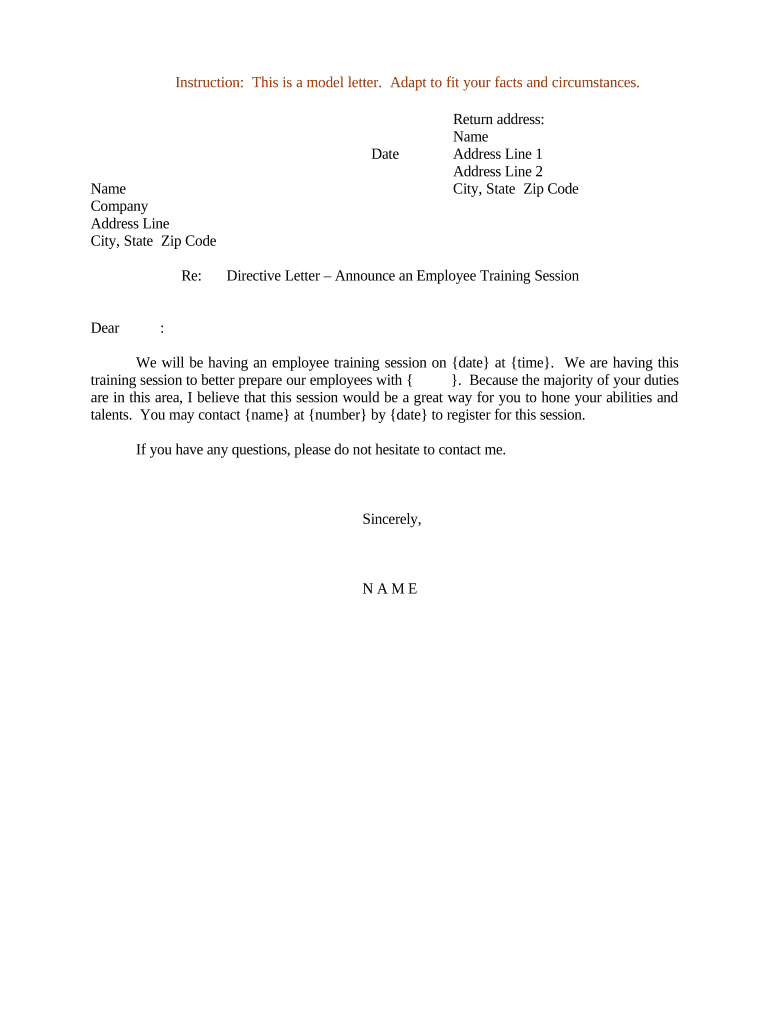
A concise directive letter clarifies obligations, reduces ambiguity about mandatory training, supports enforcement of internal policy, and creates an auditable record. Properly drafted letters help HR and compliance teams track attendance and demonstrate due diligence for regulatory or safety requirements.

Recipients are individual employees, contracted staff, or defined groups; distribution and acknowledgement procedures should match internal policy and legal requirements.
As issuing authority, the HR Director or delegated HR manager typically authorizes the directive, confirms policy alignment, and retains the official copy for personnel records and compliance auditing.
Department or team managers confirm attendee lists, enforce attendance, and may sign acknowledgements that training occurred or that employees refused, creating a supervisory record.
Provide clear date, start and end time, time zone, exact location or virtual access link, and instructions for late arrival or missed sessions.
List concise objectives or topics covered so employees understand expected outcomes and any prerequisites they must complete before attending.
State whether attendance is mandatory or optional, describe disciplinary or corrective steps for noncompliance, and cite relevant policy references.
Specify required reading, assessments, or system access needed before the session and deadlines for completing preparatory items.
Include a signature block or eSignature field for acknowledgement of receipt and understanding; note who signs on behalf of the organization if needed.
Reference applicable laws, required certifications, or internal policy codes that make the training necessary for role or regulatory compliance.
| Field | Configuration |
|---|---|
| Signature Block | Require eSignature and date field for each recipient |
| Authentication | Email verification or SMS code for signer identity |
| Reminders | Automated reminders at set intervals |
| Retention | Auto-archive to HR file repository after signing |
Match platform settings to your compliance needs; for PHI include a signed BAA and stronger access controls.
| signNow | DocuSign | Adobe Sign | PandaDoc | HelloSign | |
|---|---|---|---|---|---|
| Starting Price | $8/user/mo | $15/user/mo | $14/user/mo | $19/user/mo | $15/user/mo |
| Free Trial | 7-day free trial | Available | Available | Available | Available |
| Bulk Send | Yes | Yes | Yes | Yes | Yes |
| Audit Trail | Yes | Yes | Yes | Yes | Yes |
| HIPAA Compliant | Yes | Yes | Yes | No | No |
| Envelope Cap | No cap | 100 envelopes/user/year | Varies | Varies | Varies |
Provide at least 10 business days for mandatory sessions
Request attendee confirmations 5 business days before session
Require preparatory tasks 48 hours prior to session
Record attendance and capture eSignature for completion
Collect signed acknowledgement within 7 days after training