Establishing secure connection…Loading editor…Preparing document…

Transmittal Letter

This template is fully customizable. Edit the text, fill out the fields, and send it for signature. Give it a try!
Transmittal Letter

What a Transmittal Letter Is and when it accompanies documents

A Transmittal Letter is a concise cover note that accompanies submitted materials to explain purpose, list enclosed items, and provide routing or contact instructions. It clarifies who is sending the package, who should receive or process attachments, and any deadline or required action. Transmittal letters are used with proposals, regulatory filings, contract packages, permits, loan documents, and procurement responses. A clear transmittal letter reduces processing delays, helps recipients verify completeness, and creates a single reference for tracking and recordkeeping across departments and external agencies.

Why include a Transmittal Letter with submissions

A Transmittal Letter creates a single point of clarity for recipients, documents the sender’s intent, and reduces processing errors by itemizing enclosures and actions required.

Why include a Transmittal Letter with submissions

Who typically prepares and receives Transmittal Letters

Several departments and external parties rely on transmittal letters to ensure accurate delivery, tracking, and acceptance of document packages.

  • Procurement teams and bidders — use transmittals to list RFP attachments and certify inclusion of required forms.
  • Legal and contracts teams — send executed agreements, schedules, and exhibits with an itemized cover for countersignature routing.
  • Finance and accounting — submit invoices, tax forms, or payment requests with a cover letter that specifies payment terms and PO references.

The sender should be the person or team responsible for the package; recipients include the named reviewer, contract administrator, or filing office.

Essential parts of a professional Transmittal Letter

A properly formatted Transmittal Letter is short, factual, and organized so recipients can confirm receipt, understand actions required, and trace documents back to the sender.

Header

Sender name, organization, full address, telephone, and email placed at the top so recipients can easily identify and contact the sender if clarification is needed.
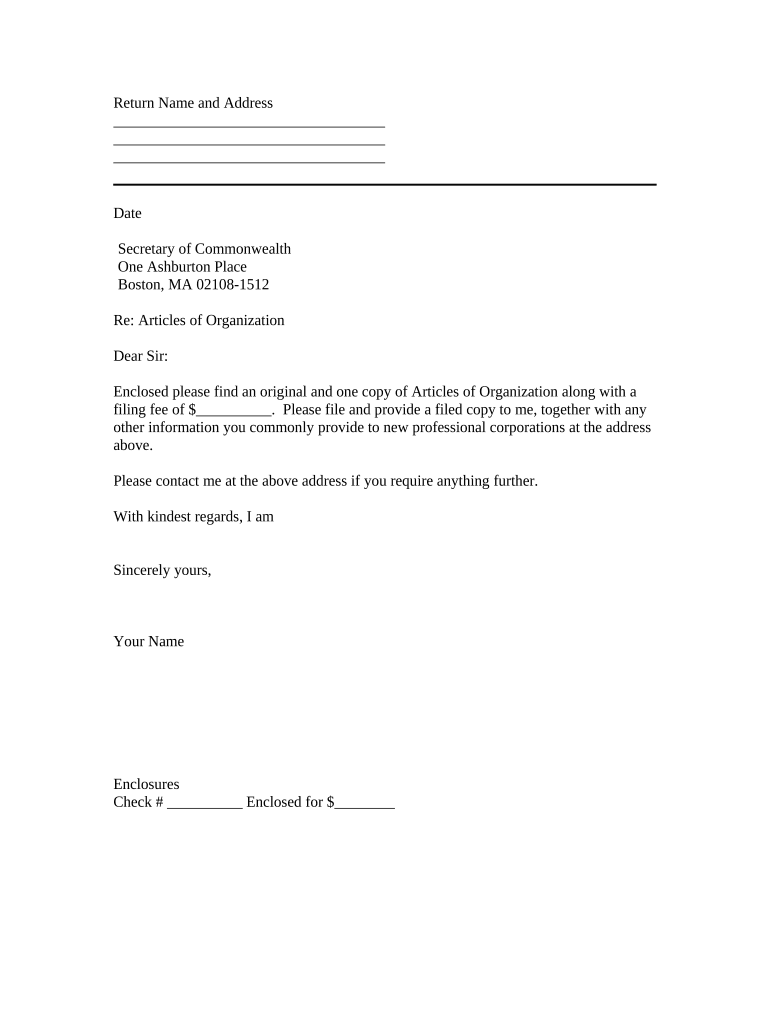
Date

Clear transmission date in MM/DD/YYYY format that establishes when the package was sent and can affect deadlines and statutory filing periods.

Recipient

Addressee name, title, department, and mailing or delivery address to ensure correct routing inside the recipient organization.

Purpose

One-sentence explanation of why documents are being sent (for example: submission, response to request, filing, or transmittal of executed documents).

Enclosures

Numbered, itemized list of each attached document including file names, version numbers, and page counts to simplify verification and inventory.

Action Required

Specify any requested action, deadline, return instructions, and contact for follow-up so recipients know how to proceed and by when.

Required information to include on the Transmittal Letter

Sender identity: Full legal name
Recipient identity: Full name or department
Document list: Itemized attachments
Transmission date: MM/DD/YYYY
Reference numbers: PO, contract, or filing ID
Contact details: Phone and email

Step-by-step: preparing and sending a Transmittal Letter

Follow these steps to assemble a complete package and confirm delivery using durable records.

  • 01
    Prepare package: Assemble all documents and verify versions.
  • 02
    Draft letter: Complete required fields and attach enclosure list.
  • 03
    Add authentication: Include signature, date, and any notary if required.
  • 04
    Send and confirm: Deliver via chosen method and retain proof of transmission.

Configuring an electronic workflow for Transmittal Letters

Set up common workflow fields so the transmittal follows a predictable routing and approval path.

Field Configuration
Signature Field Require signer email and date stamp
Date Field Auto-fill MM/DD/YYYY on signature
Attachments Allow PDF, DOCX; include checklist
Authentication Email link or SMS OTP optional

Where to send or file the Transmittal Letter

Choose the destination and delivery channel that matches the recipient’s filing requirements and internal processing.

  • Email submission: Attach letter and documents to a single email with subject referencing the PO or filing ID.
  • Portal upload: Upload combined PDF to the recipient’s secure portal and confirm upload receipt.
  • Physical delivery: Ship with cover letter and tracking number when originals are required.
  • Archive copy: Store a signed PDF in your document management system for records.

Technical considerations for digital completion and distribution

Use an eSignature-enabled workflow that supports PDF and DOCX, produces an audit trail, and stores a tamper-evident signed copy.

  • File formats: PDF and DOCX supported
  • Integrations: CRM and cloud storage compatible
  • Authentication: Email link or SMS OTP

Ensure the chosen platform supports required compliance standards for your industry and preserves audit trails, signer attribution, and downloadable signed records for future reference.

Typical timelines and processing expectations

Transmittal timing depends on the recipient’s service levels, statutory filing windows, and any contractual deadlines specified in the package.

Submission deadline:

Meet the contract or regulator date listed on the transmittal.

Recipient acknowledgement:

Request confirmation within 3–5 business days.

Internal processing:

Allow 7–14 business days for review on complex packages.

Follow-up window:

Plan a follow-up after 10 business days if no acknowledgement.

Retention start:

Retention schedules begin on the transmission date.

Common mistakes to avoid when preparing a Transmittal Letter

  • Omitting a complete enclosure list, which forces recipients to request missing items and delays processing.
  • Using ambiguous addressee information that results in internal routing errors or misdirected packages.
  • Failing to include reference numbers (PO, contract, or filing ID), causing reconciliation problems for accounting or compliance teams.
  • Not preserving a signed copy or delivery receipt, which complicates dispute resolution and audit requests.

Risks and consequences of an incorrect or incomplete Transmittal Letter

Processing delay: Missed deadlines
Rejection: Document returned unread
Financial penalty: Late fees possible
Regulatory issue: Noncompliance risk
Audit exposure: Missing proof of submission
Dispute impact: Weakened position

Real-world examples showing how transmittal letters are used

Practical examples illustrate how concise transmittals help organizations close workflows and maintain audit trails.

Optica Ventures — Brian Fitzgibbons

A small investment firm sends structured transmittals to accompany investor documents and subscription packages.

  • "The interface is simple and easy-to-use for our team; more importantly, it is just as easy for our customers."
  • The clear transmittal reduced back-and-forth on missing attachments and helped the firm reconcile investor paperwork faster while documenting receipt for audits and investor relations.

Martin Properties — Tim Martin

A real estate owner uses transmittals to transmit leases and tenant addenda to staff and counsel.

  • "I can process and execute all of these documents online with 100% compliance and built-in security."
  • The practice created a consistent record trail for lease amendments and accelerated landlord-tenant workflows while preserving signed copies for later recording or dispute resolution.

Comparing common eSignature providers for completing transmittal letters electronically

Platform pricing and core capabilities vary; comparison focuses on starting price, trial availability, bulk send, audit trail, HIPAA compliance, and envelope limits.

signNow DocuSign Adobe Sign PandaDoc HelloSign
Starting Price $8/user/mo $15/user/mo $14/user/mo $19/user/mo $15/user/mo
Free Trial Yes, 7-day free trial No No Yes, limited Yes, limited
Bulk Send Yes Yes Yes Yes No
Audit Trail Yes Yes Yes Yes Yes
HIPAA Compliant Yes Yes Yes No No

Frequently asked questions about Transmittal Letters

Answers to common operational, legal, and technical questions encountered when preparing or sending a transmittal letter.


Need help? Contact support

be ready to get more
Join over 28 million airSlate SignNow users