Establishing secure connection…Loading editor…Preparing document…

Washington Sealed Confidential Guardianship Document Cover Sheet

This template is fully customizable. Edit the text, fill out the fields, and send it for signature. Give it a try!
Washington Sealed Confidential Guardianship Document Cover Sheet

What the Washington Sealed Confidential Guardianship Document Cover Sheet Is

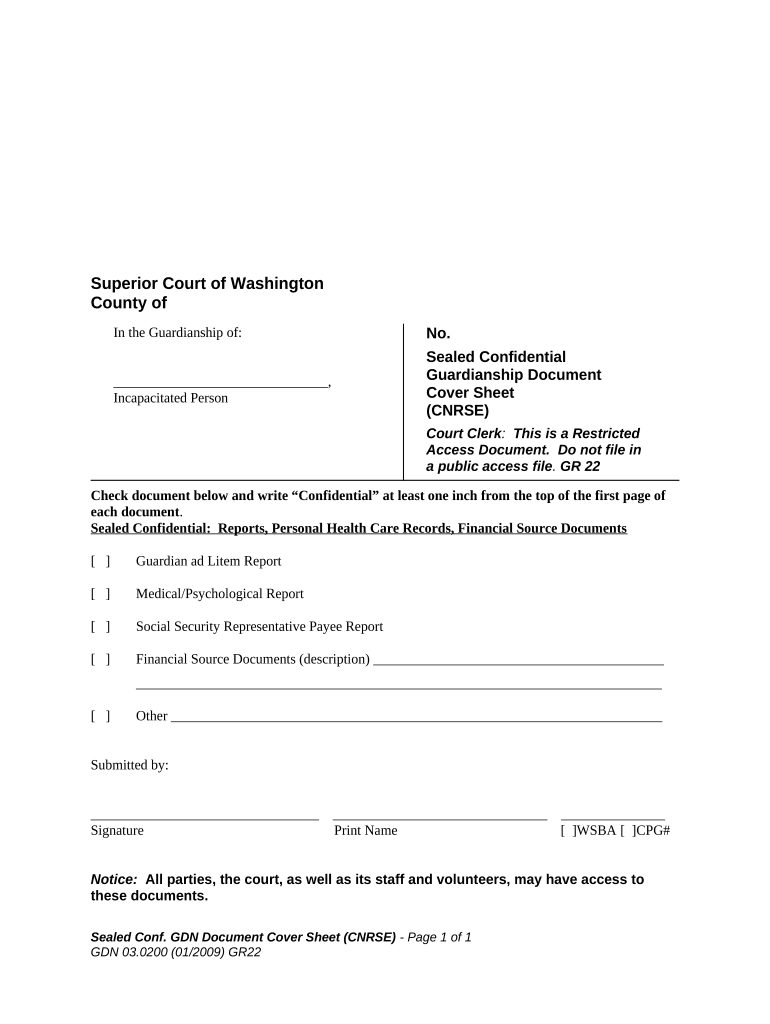
The Washington Sealed Confidential Guardianship Document Cover Sheet is a court-facing cover page used to identify a guardianship filing while requesting restricted public access. It accompanies petitions, inventories, and supporting affidavits and signals to the clerk and judge that some or all case records should be filed under seal or marked confidential. The cover sheet lists the parties, case number if known, and reasons for sealing or confidentiality and helps court staff route documents into the appropriate sealed docket or redaction workflow.

Why a Sealed Confidential Cover Sheet Matters

Using the cover sheet lets the court quickly identify privacy concerns, protects sensitive health and financial records, and documents the filer’s request for restricted access without exposing details in the public case index.

Why a Sealed Confidential Cover Sheet Matters

Who Typically Prepares and Handles This Cover Sheet

Several roles interact with the cover sheet during a guardianship filing, from initial filer to court staff.

  • Petitioners and family members filing for guardianship who want privacy for medical or financial information.
  • Attorneys and guardians ad litem preparing sealed exhibits and redaction requests for the court record.
  • Court clerks and judicial staff who use the sheet to route and apply sealing or restricted-access procedures.

Each party should complete the fields relevant to their role and retain a copy of the cover sheet for the case file.

Representative Signers and Contacts

Petitioner — Family Member

A family member or close contact files the guardianship petition and completes the cover sheet to identify the protected person, provide contact information, and explain why records should be sealed to protect privacy and medical details during court proceedings.

Attorney — Guardianship Counsel

An attorney representing a petitioner or proposed guardian fills the sheet as part of the court filing, supplies professional contact details, and notes confidential exhibits, enabling court staff to apply local sealing rules and notify interested parties appropriately.

Step-by-Step: Completing the Cover Sheet

Follow these steps in order to prepare a clear, court-ready cover sheet and reduce processing delays.

  • 01
    Prepare Documents: Assemble petition, exhibits, and proposed orders to attach to the cover sheet.
  • 02
    Complete Fields: Enter petitioner, protected person, court, and sealing reason accurately.
  • 03
    Mark Confidential Items: Identify each exhibit or page to be sealed or redacted.
  • 04
    File with Court: Submit per local court rules—electronically or in-person—and keep a copy for your records.

Where the Cover Sheet Goes and How It’s Used

The cover sheet accompanies the filing and instructs court staff on handling, routing, and sealing the accompanying materials.

  • Filing: Attach to the front of the petition and exhibits submitted to the court clerk.
  • Clerk Review: Clerk checks completeness, applies a sealed docket entry if requested and allowed.
  • Judge Consideration: Judge examines sealing justification during hearing or ex parte review.
  • Record Control: Clerk restricts public access, controls redaction, and logs sealing order.

Configuring an Electronic Workflow for Online Filing

Set up an e-filing workflow to include the cover sheet, sealed exhibits, and notifications to counsel and the clerk.

Sealed Flag Mark documents as 'sealed' in the e-filing system configuration
Signers Assign roles: petitioner, attorney, guardian, and court recipient
Authentication Require email and optional SMS or ID verification
Retention Set PDF/A archival and secure storage policies
Notifications Auto-notify clerk, counsel, and petitioner upon acceptance

Digital Submission Considerations and Platforms

Confirm the e-filing portal’s accepted file formats and authentication requirements before preparing electronic submissions.

  • File Formats: PDF/A preferred; DOCX sometimes accepted
  • Authentication: Email plus SMS code or ID proofing recommended
  • Integrations: Integrates with common cloud storage and court e-filing systems

Choose a platform that supports sealed PDFs, audit trails, and secure long-term storage to meet court and privacy expectations.

Typical Timing and Processing Expectations

Timelines vary by county and court; use the cover sheet to request expedited handling where statutes or local rules allow.

Initial Filing:

File when petition and supporting exhibits are ready; check local e-filing cutoffs

Service/Notice Period:

Provide required notice to interested parties per local rules

Hearing Scheduling:

Court may schedule an initial hearing within 30–90 days depending on caseload

Sealing Rulings:

Judge may rule at hearing or after in-camera review

Record Entry:

Clerk updates public index and restricted access tags after order

Key Milestones from Filing to Final Order

A typical guardianship filing progresses through a small set of repeatable stages; the cover sheet should be present at each stage.

01

Prepare Petition

Assemble petition, exhibits, and sealing justification before submission

02

File & Request Seal

Submit petition with cover sheet marked confidential or sealed

03

Court Hearing

Judge reviews petition and sealing request during scheduled hearing

04

Entry of Order

Court issues guardianship order and any sealing directives

Common Preparation Errors to Avoid

  • Failing to list sealed exhibits precisely, which can lead to improper public disclosure or clerical misfiling and additional court motions.
  • Using inconsistent names or dates between the petition and cover sheet, causing confusion and potential rejection by the clerk.
  • Assuming all records will be sealed without stating the legal basis or narrow scope for sealing; courts may deny overbroad requests.
  • Not verifying e-filing portal format and authentication requirements, resulting in file rejections or processing delays.

Consequences of Incorrect or Incomplete Cover Sheets

Filing Rejection: Missing fields can result in clerk refusal to accept the submission
Disclosure Risk: Public exposure of sensitive records if sealing not properly requested
Hearing Delay: Incomplete filing may postpone scheduling and prolong proceedings
Sanctions: Court may sanction parties for improper redaction or false statements
Privacy Liability: Potential civil claims for privacy breaches in some circumstances
Administrative Fees: Extra clerk fees or photocopy charges for corrected filings

Essential Elements of a Professional Cover Sheet

A clear, complete cover sheet improves clerk routing, protects privacy, and documents the legal basis for sealed treatment of records.

Case Header

Full court and case identification to ensure accurate docketing and to link sealed materials to the correct file and judge.
Party Details

Accurate names, addresses, and counsel information for petitioner, protected person, and proposed guardian to support service and notifications.

Sealing Scope

Concise description of what is to be sealed or redacted and the narrow justification for restricting access.

Exhibit Index

Numbered list of exhibits with page ranges and a clearly indicated sealed status for each attachment.

Signature Block

Signed and dated signature block for filer or attorney verifying the request and authorizing the filing.

Filer Certificate

Statement confirming service, any attempted notices, and compliance with local sealing rules or statutes.

Supporting Documents and File Formats to Include

Provide the cover sheet with commonly requested attachments and use court-accepted formats to avoid rejections.

Attachments Required

Petition, medical records, financial statements, and proposed orders with exhibit indexes

Optional Addenda

Affidavits of service, guardianship plans, and letters from service providers

Preferred Format

PDF or PDF/A for sealed exhibits and signed orders

Redaction Notes

Provide a redaction key or proposed redacted copy for clerk review

Practical Examples of Cover Sheet Use

Two short scenarios illustrate how a cover sheet helps clerks and judges manage sealed guardianship records.

County Court Filing

A petitioner files medical and financial exhibits under a sealed cover sheet to protect health details

  • Clerk tags exhibits sealed and notifies parties
  • Judge reviews limited unredacted copies in camera and issues a sealing order to restrict public access.

Agency Referral

A social services agency attaches sensitive caseworker reports with a confidential cover sheet

  • Filer lists exhibits with page ranges for clerk processing
  • Court approves narrow sealing for records tied to ongoing protective services, reducing public exposure.

Practical Tips for Accurate and Efficient Filing

Adopt consistent routines and checklists to reduce delays, protect privacy, and meet court formatting expectations.

Use Exact Names
Always match names to government IDs and prior case entries. Inconsistencies can cause clerk rejections and slow proceedings; verify spelling and middle initials.
Narrow the Request
Request sealing only for specifically sensitive exhibits or pages. Courts are more likely to grant narrowly tailored confidentiality.
Provide a Redaction Key
Submit a redacted public version plus an unredacted sealed set and a redaction key so the clerk can apply consistent public indexing.
Confirm E-Filing Rules
Review the local court’s e-filing requirements for sealed documents, accepted formats, and authentication before submission to avoid technical rejections.

Required Cover Sheet Data at a Glance

Case Number: Enter existing case number
Court Name: Full county and court
Protected Person: Full legal name
Petitioner: Name and contact info
Sealing Reason: Concise justification
Exhibit List: Numbered sealed exhibits

eSignature Vendor Pricing Snapshot for Sealed Filings

Compare common vendor price points and feature lines relevant to secure document signing and sealed submissions. signNow is listed first per vendor comparison conventions.

signNow DocuSign Adobe Sign PandaDoc HelloSign
Starting Price $8/user/mo $15/user/mo $14/user/mo $19/user/mo $15/user/mo
Free Trial 7-day free trial Varies Varies Varies Varies
Bulk Send Yes Yes Yes Yes Yes
Audit Trail Yes Yes Yes Yes Yes
HIPAA Compliant Yes Yes Yes No No

Frequently Asked Questions About the Cover Sheet

Answers to common questions about sealing, filing, and digital submission help reduce re-filings and clerical delays.


Need help? Contact support

be ready to get more
Join over 28 million airSlate SignNow users