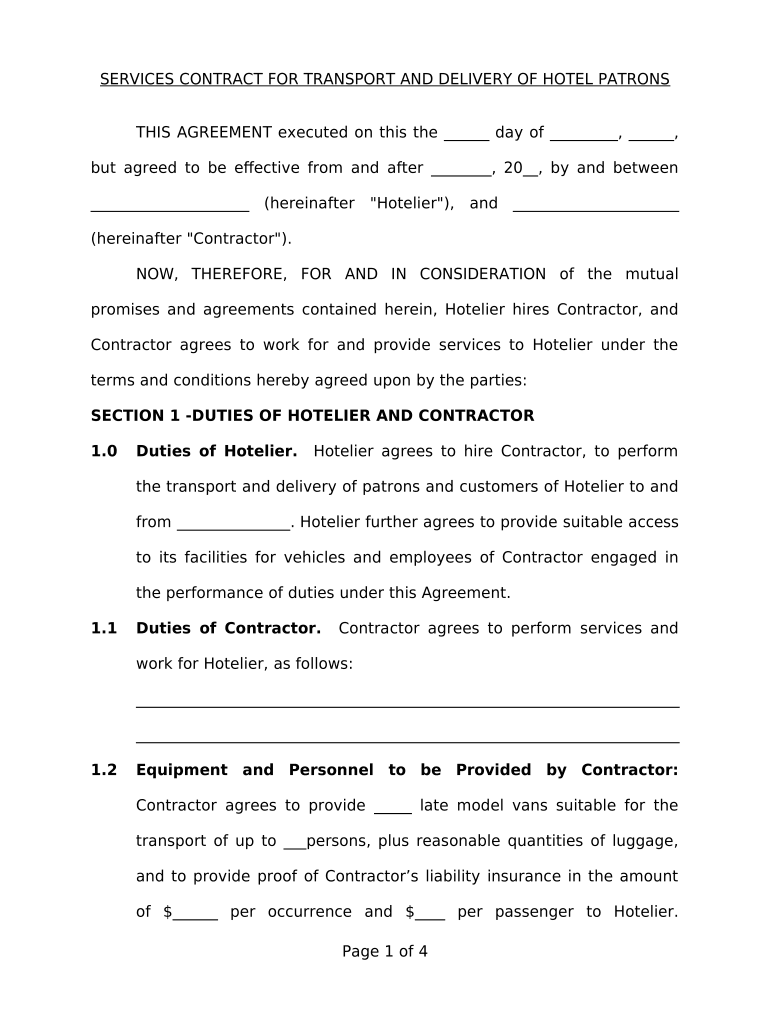
SERVICES CONTRACT FOR TRANSPORT AND DELIVERY OF HOTEL PATRONS
THIS AGREEMENT executed on this the ______ day of _________, ______,
but agreed to be efective from and after ________, 20__, by and between
_____________________ (hereinafter "Hotelier"), and ______________________
(hereinafter "Contractor").
NOW, THEREFORE, FOR AND IN CONSIDERATION of the mutual
promises and agreements contained herein, Hotelier hires Contractor, and
Contractor agrees to work for and provide services to Hotelier under the
terms and conditions hereby agreed upon by the parties:
SECTION 1 -DUTIES OF HOTELIER AND CONTRACTOR
1.0 Duties of Hotelier. Hotelier agrees to hire Contractor, to perform
the transport and delivery of patrons and customers of Hotelier to and
from _______________. Hotelier further agrees to provide suitable access
to its facilities for vehicles and employees of Contractor engaged in
the performance of duties under this Agreement.
1.1 Duties of Contractor. Contractor agrees to perform services and
work for Hotelier, as follows:
________________________________________________________________________
________________________________________________________________________
1.2 Equipment and Personnel to be Provided by Contractor:
Contractor agrees to provide _____ late model vans suitable for the
transport of up to ___persons, plus reasonable quantities of luggage,
and to provide proof of Contractor’s liability insurance in the amount
of $______ per occurrence and $____ per passenger to Hotelier.
Page 1 of 4
Contractor agrees to provide suitable drivers to load, unload and drive
the vans used for the transport of hotel patrons and customers.
1.3 Term and Termination . The services to be performed by
Contractor shall continue from the efective date of this Agreement as frst
above recited and shall extend until midnight on the ___ day of _________,
20__ unless extended by a further written agreement signed by both parties
hereto. In the event of a material breach of this Agreement by either party,
the party sufering such default shall be permitted to terminate this
Agreement by providing written notice of such termination ten (10 ) days
prior to the efective date thereof. Such notice shall be deemed efective
upon receipt and shall be made by registered or restricted United States
mail, national courier service with receipt required or by personal service to
the respective address of a party, as follows:
Hotelier’s Name and Address: Contractor’s Name and
Address:
______________________ ______________________
______________________ ______________________
______________________ ______________________
______________________ ______________________
SECTION 2 - COMPENSATION
2.0 Compensation Due to Contractor . In consideration of all services
to be rendered by Contractor to the Hotelier, the Hotelier shall pay to
the Contractor the sum of $______________.
Page 2 of 4
Said compensation shall be paid on the following
basis:___________________
________________________________________________________________.
(Note: Benefts include such additional compensation terms as bonus
payments, special
events, courier services, courtesy travel to other locations not within
usual route).
2.1 Withholding . Contractor is an Independent Contractor and shall be
responsible for its own income taxes and other employment taxes.
SECTION 3 - INDEPENDENT CONTRACTOR STATUS
3.0 Contractor acknowledges that its status is that of an independent
contractor and that it is not an agent, partner, joint venturer nor
employee of Hotelier. Contractor shall have no authority to bind or
otherwise obligate Hotelier in any manner nor shall Contractor
represent to anyone that it has a right to do so.
SECTION 4 - REPRESENTATIONS OF WARRANTIES OF CONTRACTOR
4.0 Contractor represents and warrants to Hotelier regarding the services
to be performed as follows: _(herein include additional information
regarding performance bond, indemnity/liability insurance,
licensing/background checks of contractor’s drivers,
etc.)____________________.
SECTION 5 - MISCELLANEOUS PROVISIONS
Page 3 of 4
5.0 The provisions of this Agreement shall be binding upon and endured
to the beneft of the heirs, personal representatives, successors and
assigns of the parties.
5.1 In the event of a default under this Agreement, the defaulted party
shall reimburse the non-defaulting party or parties for all costs and
expenses reasonably incurred by the non-defaulting party or parties in
connection with the default, including without limitation, attorney's
fees. Additionally, in the event a suit or action is fled to enforce this
Agreement or with respect to this Agreement, the prevailing party or
parties shall be reimbursed by the other party for all costs and
expenses incurred in connection with the suit or action, including
without limitation, reasonable attorney's fees at the trial level and on
appeal.
5.2 No waiver of any provision of this Agreement shall be deemed, or shall
constitute, a waiver of any other provision, whether or not similar, nor
shall any waiver constitute a continuing waiver. No waiver shall be
binding unless executed in writing by the party making the waiver.
5.3 This Agreement shall be governed by and shall be construed in
accordance with the laws of the State of ______________.
5.4 This Agreement constitutes the entire agreement between the parties
pertaining to its subject matter and it supersedes all prior
contemporaneous agreements, representations and understandings of
the parties. No supplement, modifcation or amendment of this
Agreement shall be binding unless executed in writing by all parties.
Page 4 of 4
WITNESS OUR SIGNATURES, this the ____ day of ___________, ____.
Hotelier: Contractor:
_________________________ ________________________
By:______________________ By:_____________________
Title:_____________________ Title:___________________
Page 5 of 4
Useful suggestions for finalizing your ‘Services Contract’ online
Are you fed up with the difficulties of handling paperwork? Look no further than airSlate SignNow, the ultimate electronic signature solution for individuals and small to medium-sized businesses. Say farewell to the lengthy routine of printing and scanning documents. With airSlate SignNow, you can conveniently fill out and sign documents online. Make use of the robust features embedded in this user-friendly and cost-effective platform and transform your method of document management. Whether you need to authorize forms or collect electronic signatures, airSlate SignNow manages everything seamlessly, needing only a few clicks.
Follow this detailed guide:
Access your account or sign up for a free trial of our service.
Click +Create to upload a document from your device, cloud storage, or our template repository.
Edit your ‘Services Contract’ in the editor.
Click Me (Fill Out Now) to finish the form on your end.
Add and designate fillable fields for other participants (if needed).
Continue with the Send Invite options to request eSignatures from others.
Save, print your copy, or convert it into a multi-use template.
Don’t be concerned if you need to collaborate with your teammates on your Services Contract or send it for notarization—our platform provides everything required to carry out such tasks. Create an account with airSlate SignNow today and elevate your document management to new levels!
FAQs
Here is a list of the most common customer questions. If you can’t find an answer to your question, please don’t hesitate to reach out to us.
A Services Contract is a legally binding agreement outlining the terms of service between two parties. airSlate SignNow simplifies the creation and signing of Services Contracts, allowing businesses to efficiently manage their agreements with an easy-to-use platform. With our eSignature features, you can ensure that your Services Contracts are signed quickly and securely.
airSlate SignNow offers a range of features for managing Services Contracts, including customizable templates, automated workflows, and secure eSigning. These tools make it easy to create, send, and track your Services Contracts, ensuring that you never miss a deadline. Additionally, our platform allows for real-time collaboration, making it simple to work with multiple stakeholders.
airSlate SignNow offers flexible pricing plans to accommodate businesses of all sizes looking to manage Services Contracts. Our plans are designed to be cost-effective, providing various features that scale with your needs. You can choose from monthly or annual subscriptions, ensuring you only pay for what you need.
Yes, airSlate SignNow is fully compliant with legal standards, ensuring that all Services Contracts signed through our platform are legally binding. We utilize industry-standard encryption and security protocols to protect your data, giving you peace of mind when handling sensitive agreements. Trust our platform to ensure your Services Contracts meet all necessary legal requirements.
Absolutely! airSlate SignNow offers seamless integration with a variety of business tools, including CRM systems, project management software, and cloud storage solutions. This means you can easily manage your Services Contracts alongside your existing workflows, improving efficiency and collaboration across your organization.
Using airSlate SignNow for Services Contracts offers numerous benefits, including faster turnaround times, reduced paperwork, and enhanced security. Our eSignature solution eliminates the need for physical signatures, allowing you to finalize agreements quickly and efficiently. Additionally, tracking features help you stay organized and informed throughout the contract lifecycle.
airSlate SignNow takes security seriously, employing advanced encryption and security measures to protect your Services Contracts. Our platform is designed to safeguard sensitive information and ensure that all signed documents are stored securely. You can trust airSlate SignNow to keep your data safe while managing your business contracts.
The best way to complete and sign your services contract form
Save time on document management with airSlate SignNow and get your services contract form eSigned quickly from anywhere with our fully compliant eSignature tool.
How to complete and sign forms online
Previously, working with paperwork required lots of time and effort. But with airSlate SignNow, document management is fast and easy. Our powerful and user-friendly eSignature solution enables you to easily fill out and electronically sign your services contract form online from any internet-connected device.
Follow the step-by-step guide to eSign your services contract form template online:
1.Register for a free trial with airSlate SignNow or log in to your account with password credentials or SSO authorization option.
2.Click Upload or Create and add a form for eSigning from your device, the cloud, or our form catalogue.
3.Click on the file name to open it in the editor and utilize the left-side toolbar to complete all the empty fields appropriately.
4.Place the My Signature field where you need to approve your form. Type your name, draw, or import a photo of your handwritten signature.
5.Click Save and Close to finish editing your completed document.
As soon as your services contract form template is ready, download it to your device, save it to the cloud, or invite other individuals to electronically sign it. With airSlate SignNow, the eSigning process only requires a few clicks. Use our robust eSignature tool wherever you are to deal with your paperwork effectively!
How to complete and sign documents in Google Chrome
Completing and signing paperwork is simple with the airSlate SignNow extension for Google Chrome. Adding it to your browser is a fast and productive way to deal with your paperwork online. Sign your services contract form template with a legally-binding eSignature in just a few clicks without switching between programs and tabs.
Follow the step-by-step guidelines to eSign your services contract form in Google Chrome:
1.Go to the Chrome Web Store, search for the airSlate SignNow extension for Chrome, and install it to your browser.
2.Right-click on the link to a form you need to approve and choose Open in airSlate SignNow.
3.Log in to your account with your credentials or Google/Facebook sign-in buttons. If you don’t have one, sign up for a free trial.
4.Utilize the Edit & Sign menu on the left to complete your template, then drag and drop the My Signature field.
5.Upload a photo of your handwritten signature, draw it, or simply type in your full name to eSign.
6.Make sure all data is correct and click Save and Close to finish modifying your paperwork.
Now, you can save your services contract form template to your device or cloud storage, email the copy to other people, or invite them to eSign your document with an email request or a secure Signing Link. The airSlate SignNow extension for Google Chrome improves your document processes with minimum time and effort. Try airSlate SignNow today!
How to fill out and sign documents in Gmail
When you get an email with the services contract form for approval, there’s no need to print and scan a document or save and re-upload it to another tool. There’s a better solution if you use Gmail. Try the airSlate SignNow add-on to rapidly eSign any paperwork right from your inbox.
Follow the step-by-step guidelines to eSign your services contract form in Gmail:
2.Install the program with a related button and grant the tool access to your Google account.
3.Open an email containing an attachment that needs signing and utilize the S symbol on the right panel to launch the add-on.
4.Log in to your airSlate SignNow account. Choose Send to Sign to forward the file to other people for approval or click Upload to open it in the editor.
5.Drop the My Signature option where you need to eSign: type, draw, or upload your signature.
This eSigning process saves time and only takes a couple of clicks. Take advantage of the airSlate SignNow add-on for Gmail to adjust your services contract form with fillable fields, sign forms legally, and invite other individuals to eSign them al without leaving your inbox. Boost your signature workflows now!
How to fill out and sign paperwork in a mobile browser
Need to rapidly fill out and sign your services contract form on a smartphone while doing your work on the go? airSlate SignNow can help without the need to install extra software programs. Open our airSlate SignNow tool from any browser on your mobile device and add legally-binding electronic signatures on the go, 24/7.
Follow the step-by-step guide to eSign your services contract form in a browser:
1.Open any browser on your device and go to the www.signnow.com
2.Register for an account with a free trial or log in with your password credentials or SSO option.
3.Click Upload or Create and import a file that needs to be completed from a cloud, your device, or our form collection with ready-to go templates.
4.Open the form and fill out the empty fields with tools from Edit & Sign menu on the left.
5.Put the My Signature field to the sample, then enter your name, draw, or add your signature.
In a few easy clicks, your services contract form is completed from wherever you are. When you're finished editing, you can save the document on your device, build a reusable template for it, email it to other people, or ask them to electronically sign it. Make your documents on the go quick and productive with airSlate SignNow!
How to complete and sign paperwork on iOS
In today’s business community, tasks must be done rapidly even when you’re away from your computer. With the airSlate SignNow mobile app, you can organize your paperwork and sign your services contract form with a legally-binding eSignature right on your iPhone or iPad. Install it on your device to conclude agreements and manage forms from just about anywhere 24/7.
Follow the step-by-step guidelines to eSign your services contract form on iOS devices:
1.Open the App Store, find the airSlate SignNow app by airSlate, and install it on your device.
2.Launch the application, tap Create to import a template, and choose Myself.
3.Opt for Signature at the bottom toolbar and simply draw your autograph with a finger or stylus to eSign the form.
4.Tap Done -> Save right after signing the sample.
5.Tap Save or take advantage of the Make Template option to re-use this document later on.
This process is so easy your services contract form is completed and signed within a couple of taps. The airSlate SignNow application works in the cloud so all the forms on your mobile device remain in your account and are available whenever you need them. Use airSlate SignNow for iOS to improve your document management and eSignature workflows!
How to fill out and sign documents on Android
With airSlate SignNow, it’s easy to sign your services contract form on the go. Install its mobile application for Android OS on your device and start boosting eSignature workflows right on your smartphone or tablet.
Follow the step-by-step guidelines to eSign your services contract form on Android:
1.Go to Google Play, find the airSlate SignNow app from airSlate, and install it on your device.
2.Sign in to your account or register it with a free trial, then import a file with a ➕ option on the bottom of you screen.
3.Tap on the uploaded document and select Open in Editor from the dropdown menu.
4.Tap on Tools tab -> Signature, then draw or type your name to electronically sign the sample. Complete empty fields with other tools on the bottom if required.
5.Utilize the ✔ key, then tap on the Save option to finish editing.
With an easy-to-use interface and full compliance with main eSignature laws and regulations, the airSlate SignNow app is the perfect tool for signing your services contract form. It even works without internet and updates all form changes when your internet connection is restored and the tool is synced. Complete and eSign forms, send them for eSigning, and make multi-usable templates whenever you need and from anywhere with airSlate SignNow.
We use cookies to improve security, personalize the user experience, enhance our marketing activities (including cooperating with our 3rd party partners) and for other business use. Click here to read our Cookie Policy. By clicking “Accept“ you agree to the use of cookies.... Read moreRead less