Establishing secure connection…Loading editor…Preparing document…

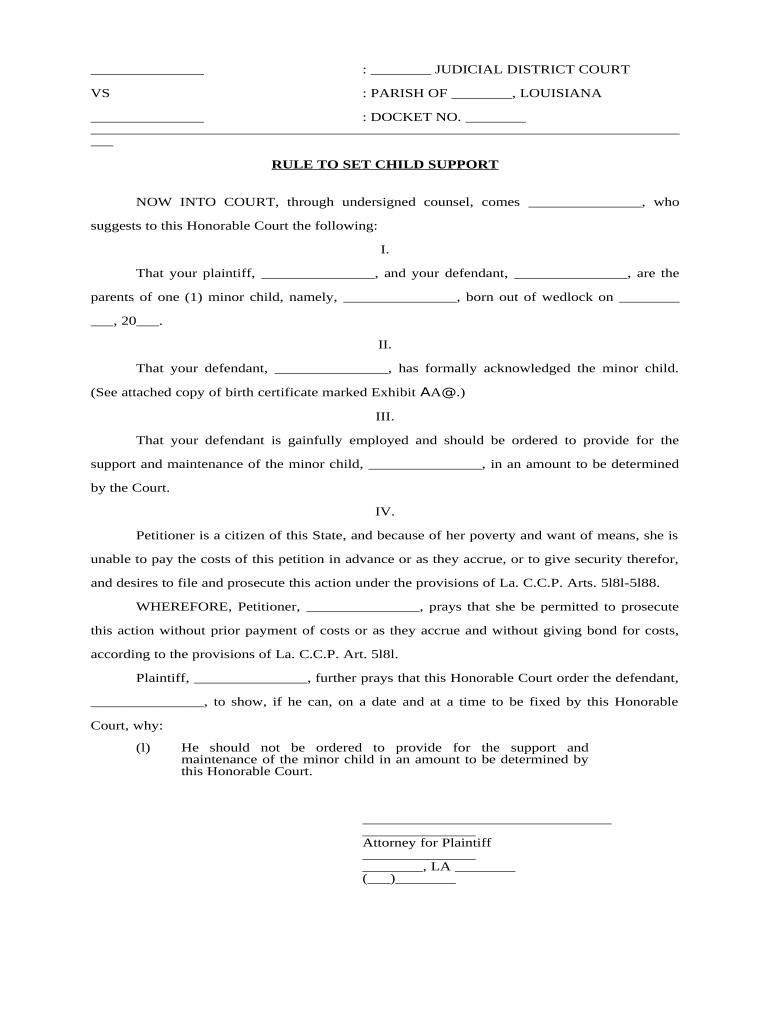
Louisiana Rule to Set Child Support

This template is fully customizable. Edit the text, fill out the fields, and send it for signature. Give it a try!
Louisiana Rule to Set Child Support

Overview: What the Louisiana Rule to Set Child Support Is

The Louisiana Rule to Set Child Support is a court-directed worksheet and procedural form used in Louisiana family courts to calculate a child support obligation based on state guidelines, parental income, custody arrangement, and allowable deductions. It codifies inputs such as gross income, adjustments (healthcare, childcare, insurance), number of children, and parenting time to produce a guideline amount, which the judge may adopt, modify, or depart from with written findings. The rule aligns with Louisiana Children's Code and local court administrative orders and is the primary tool judges and clerks use to prepare enforceable support orders.

Why the Rule Matters for Accurate Support Orders

Using the Louisiana Rule to Set Child Support ensures calculations follow statutory guidelines, creates a transparent record for the court, and helps avoid later disputes over how support was computed. Accurate completion reduces the risk of remand or modification and supports enforceability of the resulting order under state law.

Why the Rule Matters for Accurate Support Orders

Who Completes and Relies on This Rule

Multiple parties prepare or review the rule: attorneys, self-represented litigants, child support enforcement agencies, and clerks of court.

  • Custodial and noncustodial parents completing income and expense data for the court.
  • Family law attorneys verifying calculations and assembling supporting pay records.
  • Child support enforcement units and clerks using the worksheet to generate enforceable orders.

Accurate completion benefits all stakeholders by documenting assumptions, sources, and the final guideline amount used in the court order.

Step-by-Step: Completing the Rule Correctly

Follow these sequential steps to gather documents, enter data, and produce a defensible support calculation for the court.

  • 01
    Gather Documents: Collect paystubs, tax returns, benefit statements, and insurance invoices.
  • 02
    Enter Income: Record gross income in required pay-period and annual formats.
  • 03
    Apply Deductions: Enter allowable deductions and verify amounts with supporting documents.
  • 04
    Verify and Sign: Review calculations, attach sources, sign, and date the worksheet.

How the Calculation and Filing Flow Works

The typical workflow moves from data collection to calculation, court submission, and integration into the final order and enforcement systems.

  • Prepare: Assemble financial records and insurance documentation.
  • Compute: Apply Louisiana guideline formulas to derive monthly obligation.
  • File: Submit worksheet with motion or proposed order to family court clerk.
  • Enforce: Court adopts order; clerk issues wage withholding and enforcement notices.

Key Sections of a Professional Louisiana Rule to Set Child Support

A complete worksheet contains clearly labeled sections capturing income, deductions, credit allocation, final computation, and signatory attestations to support judicial findings.

Case Information

Case caption, docket number, parish, and judge or division to ensure correct court routing and record association.
Income Breakdown

Gross wages, self-employment income, and other earnings presented by period and annualized for guideline tables.

Adjustments

Health insurance, mandatory retirement, childcare, and other allowable deductions clearly itemized with supporting totals.

Parenting Time & Credits

Allocation of custody percentages or parenting time used to calculate credits or deviations from basic guideline amount.

Computation Summary

Stepwise arithmetic showing how the guideline figure was derived and any deviations with reasons.

Certification

Signatures, dates, and certification that attached documents are true and accurate under penalty of perjury where applicable.

Essential Data Elements to Include

Case Caption: Plaintiff v. Defendant
Docket Number: Court-assigned identifier
Income Source: Employer or self-employment
Deduction Type: Health, childcare, retirement
Computation Dates: Period covered by calculation
Signature: Signer name and date

Common Pitfalls to Avoid

  • Using estimated rather than documented income without clear note and supporting evidence can prompt recalculation or court rejection.
  • Failing to attach paystubs, tax returns, or insurance invoices leads to verification delays and possible evidentiary challenges.
  • Mixing pre-tax and post-tax amounts causes calculation errors; consistently use gross income definitions required by the rule.
  • Unsigned worksheets or missing dates are treated as incomplete and may be disregarded by the court.

Potential Consequences of Errors or Misrepresentation

Enforcement Actions: Wage withholding or income assignment
Contempt Risks: Court sanctions for noncompliance
Arrearages: Accumulation of unpaid support balances
Recalculation Costs: Attorney fees and court time
Credit/Tax Impacts: State offsets or intercepts
Criminal Exposure: Potential misdemeanor or contempt penalties

Timelines, Processing, and Typical Court Deadlines

Timing varies by parish and court; plan for evidence collection, filing lead times, and the court's scheduling needs to avoid delays.

Document Preparation:

Collect records 7–21 days before filing to ensure completeness

Filing Lead Time:

Clerks may require 3–14 business days to docket and schedule hearings

Service of Process:

Allow 7–30 days for proper service and proof filing

Review and Hearing:

Courts typically schedule 14–60 days after filing based on backlog

Enforcement Activation:

Wage withholding usually processed within 7–30 days after order

eSignature Vendor Pricing Snapshot for Filing and Signing Worksheets

Comparison of starting prices and core features relevant to signing and submitting the Louisiana Rule to Set Child Support. signNow appears first per platform comparison guidelines.

signNow DocuSign Adobe Sign PandaDoc HelloSign
Starting Price $8/user/mo $15/user/mo $14/user/mo $19/user/mo $15/user/mo
Free Trial 7-day free trial Varies Varies Varies Varies
Bulk Send Yes Yes Yes Yes No
Audit Trail Yes Yes Yes Yes Yes
Envelope Cap No cap 100 envelopes/user/year Varies Varies Varies

Digital Signing and eSubmission Options

Electronic signing shortens turnaround and can be compatible with court e-filing when combined with required attachments and local clerk procedures.

  • Upload: Convert the completed worksheet to PDF for signing and submission.
  • Place Fields: Add signature, date, and initial fields for each party and witness if required.
  • Authenticate: Use email or SMS authentication; stronger methods available for higher-assurance needs.
  • Export: Save a signed PDF and the audit trail for filing with the court clerk.

FAQs and Troubleshooting for the Louisiana Rule to Set Child Support

Answers to common questions about completing, signing, and filing the worksheet, plus practical steps when problems arise.


Need help? Contact support

be ready to get more
Join over 28 million airSlate SignNow users