Establishing secure connection…Loading editor…Preparing document…

Sex Offender Registration Form

This template is fully customizable. Edit the text, fill out the fields, and send it for signature. Give it a try!
Sex Offender Registration Form

What the Sex Offender Registration Form Is and when it applies

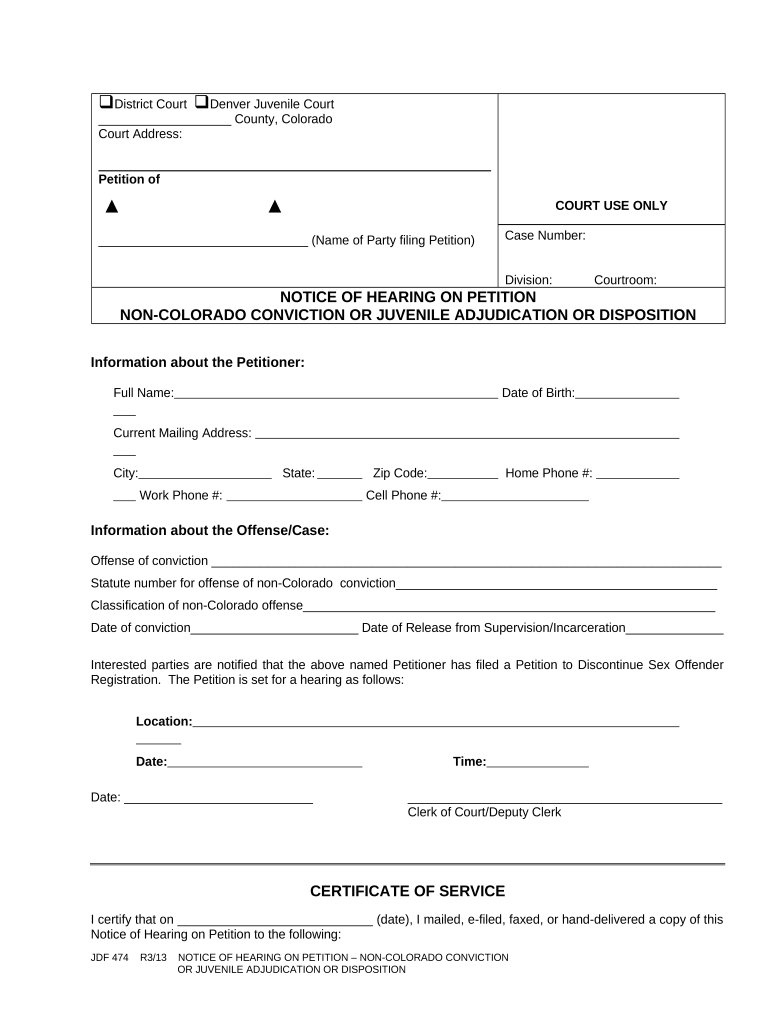
The Sex Offender Registration Form is a statutory document used to collect and record identifying and residency information from individuals required by law to register as sex offenders. It captures personal details, offense information, current address and employment, and any travel or school attendance restrictions. Agencies use the form to maintain registration databases that support community notification, law enforcement monitoring, and compliance verification. Procedures, deadlines, and required fields vary by state; many jurisdictions also allow electronic submission and updates where permitted by statute or administrative rule.

Why accurate completion matters

Completing the Sex Offender Registration Form accurately ensures compliance with statutory reporting obligations, supports public safety objectives, and avoids criminal or civil penalties for late or incorrect reporting. Clear, complete information reduces administrative rework and helps law enforcement maintain current records.

Why accurate completion matters

Core elements included in a professional registration form

A well-structured Sex Offender Registration Form groups data logically, uses mandatory markers for critical fields, and provides space for official annotations and verification. It should be suitable for both paper and electronic workflows and support secure transmission to the registering agency.

Registrant identity

Full legal name, aliases, date of birth, and government-issued ID information for positive identification.
Contact details

Current residential address, mailing address if different, phone numbers, and email where allowed.

Offense data

Conviction information, statute violated, jurisdiction, and date of conviction or release.

Employment & school

Current employer or school name and address, position, and work hours if required by state law.

Verification fields

Signature, date, reporting officer block, and space for notary or witness where required.

Agency use

Internal tracking numbers, verification stamps, and audit log entries for updates.

Required information and how agencies typically label it

Full name: Legal name as on ID
Date of birth: MM/DD/YYYY format
Home address: Street, city, state, ZIP
Offense details: Statute and conviction date
Employment: Employer name and address
Signature: Registrant signature and date

Step-by-step: completing a registration form

Follow this sequence to complete and submit the form accurately and in compliance with typical state procedures.

  • 01
    Gather documents: Collect ID, conviction documents, and proof of address.
  • 02
    Enter personal data: Complete name, DOB, and contact fields carefully.
  • 03
    Record offense details: Enter statute, court, and conviction dates.
  • 04
    Sign and submit: Sign, date, and send to the designated agency.

How online completion and routing are commonly configured

When using an electronic workflow, configure field validation, signer authentication, and routing rules to match statutory requirements and agency intake processes.

Field Configuration
Name fields Required; exact-match validation
Date fields MM/DD/YYYY format enforced
Signature eSignature with audit trail required
Destination Auto-route to agency email or upload API

Digital signing and eSubmission: technical considerations

Electronic submission requires secure transmission, signer authentication, and an audit trail that supports legal enforceability.

  • Authentication: Email code, SMS OTP, or stronger KBA methods
  • Document formats: PDF/A preferred for long-term storage
  • Integrations: API or secure upload to agency portals

Choose a platform that supports required authentication strength, preserves audit logs, and exports tamper-evident signed records for agency acceptance.

Where to file and how the submission process works

Submission paths vary: some states allow online filing to a central registry, others require in-person or mail delivery to a local law-enforcement office.

  • Online portal: Upload signed PDF to the state registry portal if supported.
  • Email submission: Send to official intake address only where permitted.
  • In-person delivery: Bring originals to local law enforcement for verification.
  • Mail: Use certified mail to document receipt when allowed.

Who completes and who reviews this form

The form is completed by registrants but may be prepared with assistance from legal counsel, probation officers, or agency staff.

  • Registrant: completes personal and contact fields; signs where required.
  • Probation/parole officers: verify offense details and submit updates.
  • Agency clerks: receive filings, confirm identity, and record entries in the registry.

Reviewers must confirm identity documents and ensure entries meet statutory content requirements before final acceptance.

Penalties and legal risks for incomplete or late reporting

Criminal penalties: Misdemeanor or felony prosecution
Fines: Monetary penalties may apply
Probation impact: Violations can trigger supervision sanctions
Registration status: Failure to update can extend reporting period
Civil consequences: Injunctions or civil court actions
Detention risk: Possible arrest for noncompliance

Common mistakes that delay processing

  • Using a nickname or inconsistent name spelling that prevents matching to court records and triggers rejection.
  • Entering incomplete address information or using a PO Box where a physical residence is required by statute.
  • Failing to sign, date, or notarize when the state or local rule requires a wet signature or notarized acknowledgement.
  • Submitting to the wrong agency or via an unsupported channel, resulting in lost or unprocessed filings.

Typical timelines, deadlines, and processing expectations

Timelines differ by jurisdiction; the following are common deadlines and expectations to plan around.

Initial registration:

Often required within 3–10 days of release or sentencing

Address updates:

Often required within 3–10 days of a move

Employment reporting:

Report within 3–10 days of job start or change

Periodic verification:

Quarterly, semiannual, or annual check-ins depending on risk tier

Processing time:

Agency review can range from 1 business day to several weeks

Key milestones from intake to record update

A clear milestone sequence helps registrants and agencies track compliance from initial filing through record confirmation.

01

Intake submission

Registrant submits completed form and identification for initial intake.

02

Agency verification

Agency confirms identity, conviction record, and data accuracy.

03

Record entry

Verified information is entered into the registry database.

04

Confirmation notice

Agency issues confirmation to the registrant and records retention begins.

Selected eSignature vendor comparison for completing registration forms

Compare common vendor attributes for secure electronic signature and submission. signNow appears first to align with platform-specific compliance and pricing data.

signNow DocuSign Adobe Sign PandaDoc HelloSign
Starting Price $8/user/mo $15/user/mo $14/user/mo $19/user/mo $15/user/mo
Free Trial 7-day free trial Free trial available Free trial available Free trial available Free trial available
Bulk Send Yes Yes Yes Yes No
Audit Trail Yes Yes Yes Yes Yes
HIPAA Compliant Yes Yes Yes No No

Real-world scenarios for using the registration form

Practical examples show how different users interact with the form in routine workflows.

Local Law Enforcement

A county sheriff’s office processes an intake packet for a newly released registrant

  • Intake officer verifies ID and enters data into the statewide registry
  • The office issues a written confirmation and updates public-facing registry entries consistent with agency procedures and retention policies.

Probation Office

A probation officer assists a supervisee with an address update

  • Officer obtains the registrant’s signature and validates employment information
  • The officer uploads the signed form to the supervision case file and notifies the registry to ensure timely compliance.

Practical tips to reduce errors and speed acceptance

Follow these recommendations to improve accuracy, meet deadlines, and maintain an auditable record of submissions.

Verify identity documents
Confirm government-issued photo ID matches the name and DOB on the form to avoid processing delays.
Use full addresses
Provide complete street addresses with ZIP codes; avoid PO Boxes unless explicitly allowed by statute.
Keep copies
Retain signed copies and audit logs of electronic submissions for your records and any future verification requests.
Match court records
Enter offense and conviction details exactly as they appear on official court documents to ensure matching.

Frequently asked questions and common resolutions

Answers to routine questions about completing, submitting, and fixing issues with the Sex Offender Registration Form.


Need help? Contact support

be ready to get more
Join over 28 million airSlate SignNow users