Appointee Identity
Full legal name, business or court title, and contact information to eliminate confusion about who will serve.
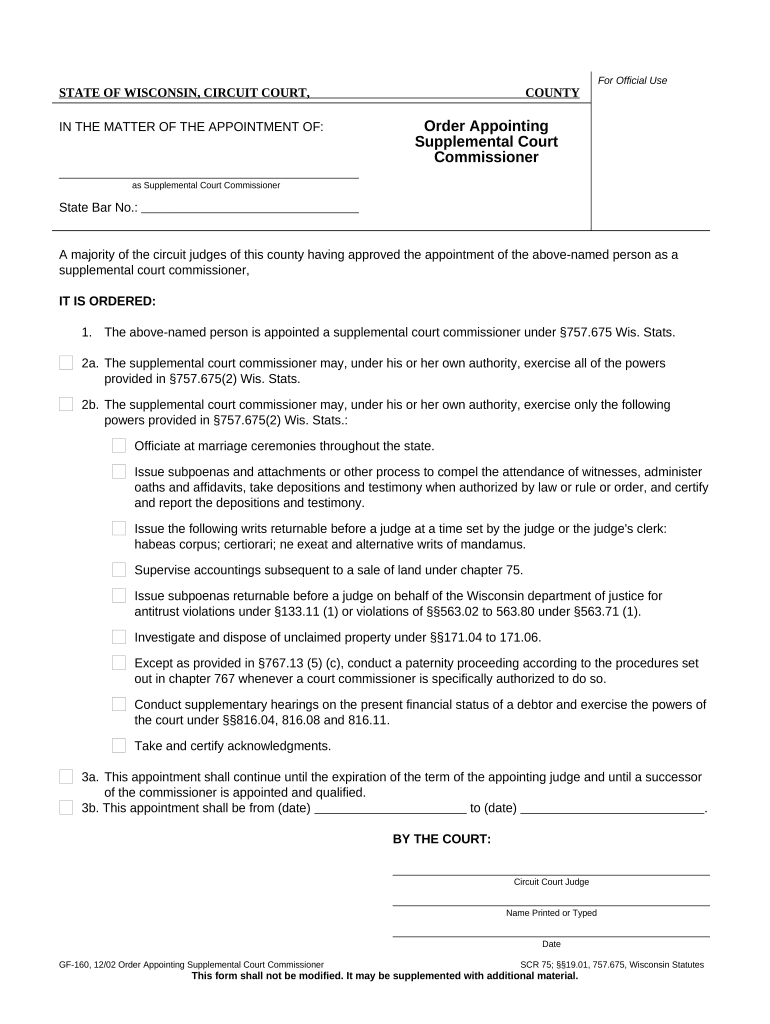
An appointment streamlines docket management, permits specialized handling of routine or evidentiary hearings, and documents the commissioner’s authority so clerks and parties know who may preside, enter recommended findings, or take testimony.

Typical users include judges, court clerks, assigned supplemental commissioners, attorneys of record, and litigants; each party reads the order to confirm scope and authority.
The judge signs to enter the appointment on the docket and to delegate authorities to the supplemental court commissioner. The judge determines scope, duration, and any reporting requirements to the court.
The clerk files the signed order, posts it to the case record, and serves counsel per local rules. The clerk ensures the appointment is visible in the public docket and available for parties.
Full legal name, business or court title, and contact information to eliminate confusion about who will serve.
Precise description of tasks authorized (e.g., take testimony, preside over settlement conferences, make findings of fact).
Start and end dates or an event-based trigger that defines when the commissioner’s authority begins and ends.
Instructions on whether the commissioner files recommended findings, transmits verbatim transcripts, or reports to the judge.
How the order will be served on parties and whether filing with the clerk constitutes notice.
Judge’s signature block and date, plus any attestation required by local court rules.
| Field | Configuration |
|---|---|
| Case Number Field | Required; single-line text with validation |
| Appointee Block | Required; multi-line text for title and contact |
| Judge Signature | Signature field with date stamp |
| Audit Trail | Enable IP, timestamp, and action log |
Courts typically accept PDF/A or court-specific PDF formats; confirm local e-filing rules before submission.
Typically filed promptly; timing varies by county
Serve per local rule; often within 24–72 hours
Effective on judge’s signature unless otherwise stated
Timelines for objections follow court scheduling orders
Submission deadlines set by the ordering judge
Create a clear draft that lists appointee and duties
Judge reviews and signs the order, confirming scope
Clerk files the signed order into the case record
Serve parties and execute any follow-on tasks
| signNow | DocuSign | Adobe Sign | PandaDoc | HelloSign | |
|---|---|---|---|---|---|
| Starting Price | $8/user/mo | $15/user/mo | $14/user/mo | $19/user/mo | $15/user/mo |
| Free Trial | 7-day free trial | No | No | Yes, limited | Yes, limited |
| Bulk Send | Yes | Yes | Yes | Yes | No |
| Audit Trail | Yes | Yes | Yes | Yes | Yes |
| HIPAA Compliant | Yes | Yes | Yes | No | No |