Establishing secure connection… Loading editor… Preparing document…
Navigation

Fill and Sign the Surrogate Form

Fill and Sign the Surrogate Form

How it works

Open the document and fill out all its fields.
Apply your legally-binding eSignature.
Save and invite other recipients to sign it.

Rate template

4.7
67 votes
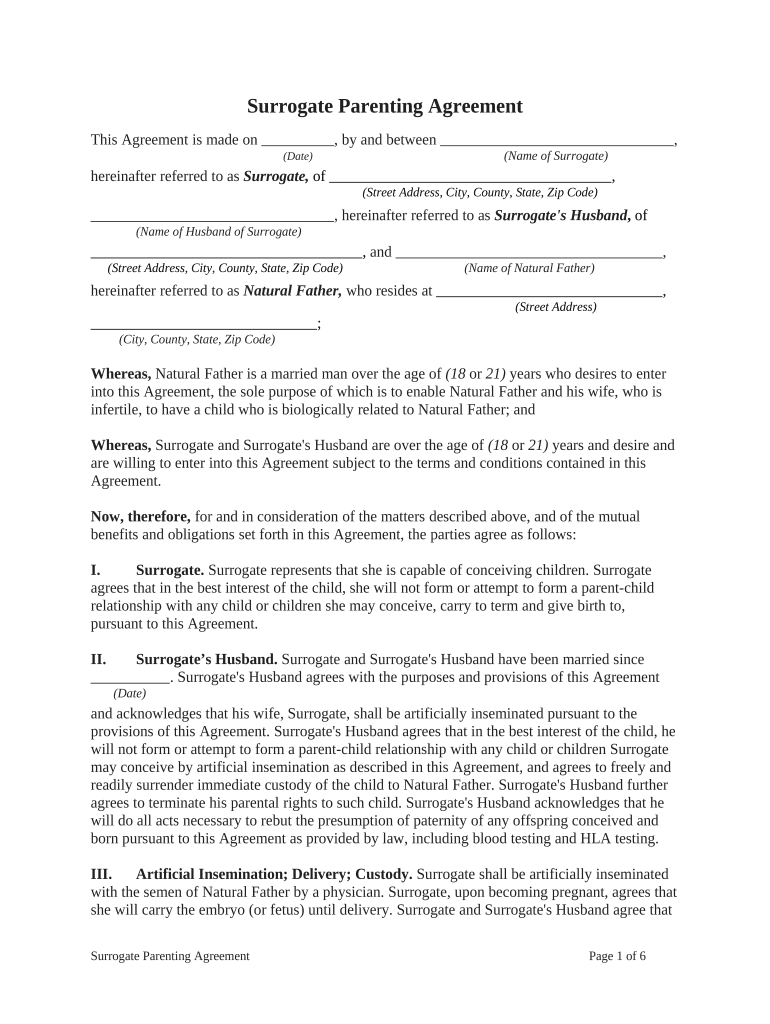
Surrogate Parenting Agreement This Agreement is made on       , by and between       , (Date) (Name of Surrogate) hereinafter referred to as Surrogate, of       , (Street Address, City, County, State, Zip Code)       , hereinafter referred to as Surrogate's Husband , of (Name of Husband of Surrogate)       , and       , (Street Address, City, County, State, Zip Code) (Name of Natural Father) hereinafter referred to as Natural Father, who resides at       , (Street Address)       ; (City, County, State, Zip Code) Whereas, Natural Father is a married man over the age of (18 or 21) years who desires to enter into this Agreement, the sole purpose of which is to enable Natural Father and his wife, who is infertile, to have a child who is biologically related to Natural Father; and Whereas, Surrogate and Surrogate's Husband are over the age of (18 or 21) years and desire and are willing to enter into this Agreement subject to the terms and conditions contained in this Agreement. Now, therefore, for and in consideration of the matters described above, and of the mutual benefits and obligations set forth in this Agreement, the parties agree as follows: I. Surrogate. S urrogate represents that she is capable of conceiving children. Surrogate agrees that in the best interest of the child, she will not form or attempt to form a parent-child relationship with any child or children she may conceive, carry to term and give birth to, pursuant to this Agreement. II. Surrogate’s Husband. Surrogate and Surrogate's Husband have been married since       . Surrogate's Husband agrees with the purposes and provisions of this Agreement (Date) and acknowledges that his wife, Surrogate, shall be artificially inseminated pursuant to the provisions of this Agreement. Surrogate's Husband agrees that in the best interest of the child, he will not form or attempt to form a parent-child relationship with any child or children Surrogate may conceive by artificial insemination as described in this Agreement, and agrees to freely and readily surrender immediate custody of the child to Natural Father. Surrogate's Husband further agrees to terminate his parental rights to such child. Surrogate's Husband acknowledges that he will do all acts necessary to rebut the presumption of paternity of any offspring conceived and born pursuant to this Agreement as provided by law, including blood testing and HLA testing. III. Artificial Insemination; Delivery; Custody. Surrogate shall be artificially inseminated with the semen of Natural Father by a physician. Surrogate, upon becoming pregnant, agrees that she will carry the embryo (or fetus) until delivery. Surrogate and Surrogate's Husband agree that Surrogate Parenting Agreement Page 1 of 6 they will co-operate with any background investigation into the Surrogate's medical, family and personal history and warrants the information to be accurate to the best of their knowledge. Surrogate and Surrogate's Husband agree to surrender custody of the child to Natural Father, and to institute and co-operate in proceedings to terminate their respective parental rights to such child, and sign any and all necessary affidavits, documents, and papers in order to further the intent and purposes of this Agreement. It is understood by Surrogate, and Surrogate's Husband, that the child to be conceived is being done so for the sole purpose of giving such child to Natural Father, its natural and biological father. Surrogate and Surrogate's Husband agree to sign all necessary affidavits and other documents prior to and after the birth of the child and voluntarily participate in any paternity proceedings necessary to have Natural Father's name entered on the child's birth certificate as the natural or biological father. IV. Compensation. The consideration for this Agreement, which is compensation for services and expenses, and in no way is to be construed as a fee for termination of parental rights or a payment in exchange for a consent to surrender the child for adoption, in addition to other provisions contained in this Agreement, shall be as follows: A. $       shall be paid to Surrogate, upon surrender of custody to Natural Father, of the child born pursuant to the provisions of this Agreement for Surrogate services and expenses in carrying out Surrogate's obligations under this Agreement. B. The consideration to be paid to Surrogate shall be deposited with       , hereinafter called the Custodian, the (Name of Custodian) representative of Natural Father, at the time of the signing of this Agreement, and held in escrow until completion of the duties and obligations of Surrogate as provided for in this Agreement. C. Natural Father shall pay the expenses incurred by Surrogate, pursuant to her pregnancy, more specifically defined as follows: 1. All medical, hospitalization, pharmaceutical, laboratory, and therapy expenses incurred as a result of Surrogate's pregnancy, not covered or allowed by her present health and major medical insurance, including all extraordinary medical expenses and all reasonable expenses for treatment of any emotional or mental conditions or problems related to such pregnancy, but in no case shall any such expenses be paid or reimbursed after a period of       months has (number) elapsed since the date of the termination of the pregnancy. This Agreement specifically excludes any expenses for lost wages or other non-itemized incidentals related to such pregnancy. 2. Natural Father shall not be responsible for any medical, hospitalization, pharmaceutical, laboratory, and therapy expenses occurring       (number of months) Surrogate Parenting Agreement Page 2 of 6 months after the birth of the child, unless the medical problem incident to such expenses was known and treated by a physician prior to the expiration of such       -month period and written notice of such treatment is given (number of months) to custodian, as representative of Natural Father, by certified mail, return receipt requested, advising of this treatment. 3. Natural Father shall be responsible for the total costs of all paternity testing. Such paternity testing may, at the option of Natural Father be required prior to release of the Surrogate fee from escrow. If Natural Father is conclusively determined not to be the biological Father of the child as a result of an HLA test, this Agreement will be deemed breached and Surrogate shall not be entitled to any fee, and Natural Father shall be entitled to reimbursement of all medical and related expenses from Surrogate and Surrogate's Husband. 4. Natural Father shall be responsible for Surrogate's reasonable travel expenses incurred at the request of Natural Father, pursuant to this Agreement. V. Risks. Surrogate and Surrogate's Husband are aware of, understand and agree to assume all risks, including the risks of death, which are incidental to conception, pregnancy, childbirth, including but not limited to, complications subsequent to such childbirth. VI. Psychiatric Evaluation. Surrogate and Surrogate's Husband agree to undergo psychiatric evaluation by       , a psychiatrist, as designated by Natural (Name of Psychiatrist) Father. Natural Father shall pay for the cost of such psychiatric evaluation. Surrogate and Surrogate's Husband shall sign, prior to their evaluations, a medical release permitting dissemination of the report prepared as a result of such psychiatric evaluations to custodian or Natural Father and his wife. VII. Naming of Child. Surrogate and Surrogate's Husband agree that it is the exclusive and sole right of Natural Father to name such child. VIII. Definition of Child. Child as referred to in this Agreement shall include all children born simultaneously pursuant to the inseminations contemplated in this Agreement. IX. Death of Father. In the event of the death of Natural Father, prior or subsequent to the birth of such child, it is agreed by Surrogate and Surrogate's Husband that the child will be placed in the custody of Natural Father's wife. X. Miscarriage. If the child is miscarried prior to the       months of pregnancy, no (number) compensation, as enumerated in Section IV, Paragraph A, of this Agreement, shall be paid to Surrogate. However, the expenses enumerated in Section IV, Paragraph C, shall be paid or reimbursed to Surrogate. If the child is miscarried, dies or is stillborn subsequent to the       months of pregnancy and such child does not survive, the Surrogate shall receive Surrogate Parenting Agreement Page 3 of 6 (number) $       in lieu of the compensation enumerated in Section IV, Paragraph A. In the event of a miscarriage or stillbirth as described above, this Agreement shall terminate and neither Surrogate nor Natural Father shall be under any further obligation under this Agreement. XI. Physical Examination. Surrogate and Natural Father shall undergo complete physical and genetic examination and evaluation, under the direction and supervision of a licensed physician, to determine whether the physical health and well-being of each is satisfactory. Such physical examination shall include testing for AIDS and venereal diseases, specifically including but not limited to, syphilis, herpes and gonorrhea. Such AIDS and venereal disease testing shall be done prior to, but not limited to, each series of inseminations. XII. No Pregnancy within Reasonable Time. If pregnancy has not occurred within a reasonable time, in the opinion of Natural Father, this Agreement shall terminate by written notice to Surrogate, at the residence provided to the custodian by the Surrogate, from Custodian, as representative of Natural Father. XIII. Abortion. Surrogate agrees that she will not abort the child once conceived except, if in the professional medical opinion of the inseminating physician, such action is necessary for the physical health of Surrogate or the child has been determined by such physician to be physiologically abnormal. Surrogate further agrees, upon the request of such physician, to undergo amniocentesis or similar tests to detect genetic and congenital defects. If such test reveals that the fetus is genetically or congenitally abnormal, Surrogate agrees to abort the fetus on demand of Natural Father in which event, the fee paid to the Surrogate will be in accordance to Section X. If Surrogate refuses to abort the fetus upon demand of Natural Father, Natural Father's obligations as stated in this Agreement shall cease, except as to obligations of paternity imposed by statute. Natural Father recognizes that some genetic and congenital abnormalities may not be detected by amniocentesis or other tests, and therefore, if proven to be the biological Father of the child, assumes the legal responsibility for any child who may possess genetic or congenital abnormalities. XIV. Medical Instructions. S urrogate agrees to adhere to all medical instructions given to her by the inseminating physician as well as her independent obstetrician. Surrogate also agrees not to smoke cigarettes, drink alcoholic beverages, use illegal drugs, or take nonprescription medications or prescribed medications without written consent from her physician. Surrogate agrees to follow a prenatal medical examination schedule to consist of no fewer visits than: one visit per month during the first seven months of pregnancy, and two visits (each to occur at two- week intervals) during the eighth and ninth months of pregnancy. XV. Legal Consultation. Prior to signing this Agreement, each party has been given the opportunity to consult with an attorney of his or her own choice concerning the terms and legal significance of the Agreement, and the effect that it has upon any and all interests of the parties. XVI. Free and Voluntary Act. Each party acknowledges that he or she has carefully read and understood every word in this Agreement and its legal effect, and each party is signing this Agreement freely and voluntarily and that neither party has any reason to believe that the other Surrogate Parenting Agreement Page 4 of 6 party or parties did not understand fully the terms and effects of this Agreement, or that the other party did not freely and voluntarily execute this Agreement. XVII. Triplicates. This Agreement shall be executed in three copies, each of which shall be deemed an original. One copy shall be given to custodian, another to Natural Father, and the third to Surrogate. XVIII. Severability. The invalidity of any portion of this Agreement will not and shall not be deemed to affect the validity of any other provision. If any provision of this Agreement is held to be invalid, the parties agree that the remaining provisions shall be deemed to be in full force and effect as if they had been executed by both parties subsequent to the expungement of the invalid provision. XIX. No Waiver. The failure of either party to this Agreement to insist upon the performance of any of the terms and conditions of this Agreement, or the waiver of any breach of any of the terms and conditions of this Agreement, shall not be construed as subsequently waiving any such terms and conditions, but the same shall continue and remain in full force and effect as if no such forbearance or waiver had occurred. XX. Governing Law. This Agreement shall be governed by, construed, and enforced in accordance with the laws of the State of       . (Name of State) XXI. Notices. Unless provided herein to the contrary, any notice provided for or concerning this Agreement shall be in writing and shall be deemed sufficiently given when sent by certified or registered mail if sent to the respective address of each party as set forth at the beginning of this Agreement. XXII. Mandatory Arbitration . Any dispute under this Agreement shall be required to be resolved by binding arbitration of the parties hereto. If the parties cannot agree on an arbitrator, each party shall select one arbitrator and both arbitrators shall then select a third. The third arbitrator so selected shall arbitrate said dispute. The arbitration shall be governed by the rules of the American Arbitration Association then in force and effect. XXIII. Entire Agreement . This Agreement shall constitute the entire agreement between the parties and any prior understanding or representation of any kind preceding the date of this Agreement shall not be binding upon either party except to the extent incorporated in this Agreement. XXIV. Modification of Agreement. Any modification of this Agreement or additional obligation assumed by either party in connection with this Agreement shall be binding only if placed in writing and signed by each party or an authorized representative of each party. XXV. Assignment of Rights. The rights of each party under this Agreement are personal to that party and may not be assigned or transferred to any other person, firm, corporation, or XXVI. Compliance with Laws. In performing under this Agreement, all applicable governmental laws, regulations, orders, and other rules of duly-constituted authority will be followed and complied with in all respects by both parties. Surrogate Parenting Agreement Page 5 of 6 We have read the foregoing Agreement consisting of       pages including this (Number of Pages) page, and it is our collective intention by affixing our signatures below, to enter into a binding legal obligation. WITNESS our signatures as of the day and date first above stated. By: By: (Signature of Name of Surrogate ) (Signature of Surrogate’s Husband )             (P rinted Name of Name of Surrogate ) (P rinted Name of Surrogate’s Husband ) By: (Signature of Natural Father)       (P rinted Name of Natural Father) (Acknowledgments) Surrogate Parenting Agreement Page 6 of 6

Valuable advice on finalizing your ‘Surrogate Form’ online

Are you fed up with the complications of handling paperwork? Look no further than airSlate SignNow, the premier eSignature solution for individuals and enterprises. Bid farewell to the lengthy process of printing and scanning documents. With airSlate SignNow, you can effortlessly complete and sign documents online. Take advantage of the powerful features integrated into this user-friendly and economical platform and transform your strategy for document management. Whether you need to authorize forms or gather electronic signatures, airSlate SignNow manages it all with ease, requiring only a few clicks.

Follow this comprehensive guide:

  1. Log into your account or initiate a free trial with our service.
  2. Click +Create to upload a file from your device, cloud, or our form library.
  3. Access your ‘Surrogate Form’ in the editor.
  4. Click Me (Fill Out Now) to prepare the document on your end.
  5. Add and designate fillable fields for other participants (if necessary).
  6. Continue with the Send Invite settings to solicit eSignatures from others.
  7. Save, print your copy, or convert it into a multi-use template.

No need to worry if you want to collaborate with your coworkers on your Surrogate Form or send it for notarization—our solution offers everything required to achieve such tasks. Create an account with airSlate SignNow today and enhance your document management to a new level!

Here is a list of the most common customer questions. If you can’t find an answer to your question, please don’t hesitate to reach out to us.

Need help? Contact Support

The best way to complete and sign your surrogate form

Save time on document management with airSlate SignNow and get your surrogate form eSigned quickly from anywhere with our fully compliant eSignature tool.

How to Sign a PDF Online How to Sign a PDF Online

How to fill out and sign forms online

Previously, coping with paperwork took lots of time and effort. But with airSlate SignNow, document management is quick and simple. Our powerful and user-friendly eSignature solution lets you effortlessly fill out and eSign your surrogate form online from any internet-connected device.

Follow the step-by-step guidelines to eSign your surrogate form template online:

  • 1.Sign up for a free trial with airSlate SignNow or log in to your account with password credentials or SSO authorization option.
  • 2.Click Upload or Create and import a file for eSigning from your device, the cloud, or our form collection.
  • 3.Click on the file name to open it in the editor and utilize the left-side menu to fill out all the empty fields properly.
  • 4.Place the My Signature field where you need to eSign your sample. Type your name, draw, or import an image of your regular signature.
  • 5.Click Save and Close to accomplish modifying your completed form.

After your surrogate form template is ready, download it to your device, export it to the cloud, or invite other people to electronically sign it. With airSlate SignNow, the eSigning process only takes several clicks. Use our robust eSignature solution wherever you are to deal with your paperwork effectively!

How to Sign a PDF Using Google Chrome How to Sign a PDF Using Google Chrome

How to complete and sign paperwork in Google Chrome

Completing and signing documents is simple with the airSlate SignNow extension for Google Chrome. Installing it to your browser is a quick and beneficial way to manage your forms online. Sign your surrogate form sample with a legally-binding electronic signature in a couple of clicks without switching between tools and tabs.

Follow the step-by-step guidelines to eSign your surrogate form template in Google Chrome:

  • 1.Navigate to the Chrome Web Store, search for the airSlate SignNow extension for Chrome, and install it to your browser.
  • 2.Right-click on the link to a form you need to approve and choose Open in airSlate SignNow.
  • 3.Log in to your account with your password or Google/Facebook sign-in option. If you don’t have one, sign up for a free trial.
  • 4.Utilize the Edit & Sign menu on the left to complete your template, then drag and drop the My Signature option.
  • 5.Upload a picture of your handwritten signature, draw it, or simply type in your full name to eSign.
  • 6.Make sure all data is correct and click Save and Close to finish editing your form.

Now, you can save your surrogate form template to your device or cloud storage, email the copy to other individuals, or invite them to eSign your form via an email request or a secure Signing Link. The airSlate SignNow extension for Google Chrome improves your document workflows with minimum effort and time. Start using airSlate SignNow today!

How to Sign a PDF in Gmail How to Sign a PDF in Gmail How to Sign a PDF in Gmail

How to complete and sign paperwork in Gmail

Every time you receive an email containing the surrogate form for approval, there’s no need to print and scan a document or download and re-upload it to a different tool. There’s a much better solution if you use Gmail. Try the airSlate SignNow add-on to quickly eSign any paperwork right from your inbox.

Follow the step-by-step guide to eSign your surrogate form in Gmail:

  • 1.Go to the Google Workplace Marketplace and look for a airSlate SignNow add-on for Gmail.
  • 2.Install the tool with a related button and grant the tool access to your Google account.
  • 3.Open an email with an attachment that needs approval and utilize the S symbol on the right sidebar to launch the add-on.
  • 4.Log in to your airSlate SignNow account. Choose Send to Sign to forward the file to other people for approval or click Upload to open it in the editor.
  • 5.Drop the My Signature option where you need to eSign: type, draw, or import your signature.

This eSigning process saves time and only takes a couple of clicks. Take advantage of the airSlate SignNow add-on for Gmail to adjust your surrogate form with fillable fields, sign forms legally, and invite other parties to eSign them al without leaving your inbox. Improve your signature workflows now!

How to Sign a PDF on a Mobile Device How to Sign a PDF on a Mobile Device How to Sign a PDF on a Mobile Device

How to complete and sign forms in a mobile browser

Need to rapidly fill out and sign your surrogate form on a smartphone while working on the go? airSlate SignNow can help without needing to set up extra software applications. Open our airSlate SignNow solution from any browser on your mobile device and create legally-binding eSignatures on the go, 24/7.

Follow the step-by-step guidelines to eSign your surrogate form in a browser:

  • 1.Open any browser on your device and follow the link www.signnow.com
  • 2.Register for an account with a free trial or log in with your password credentials or SSO authentication.
  • 3.Click Upload or Create and pick a file that needs to be completed from a cloud, your device, or our form library with ready-made templates.
  • 4.Open the form and fill out the blank fields with tools from Edit & Sign menu on the left.
  • 5.Add the My Signature area to the form, then enter your name, draw, or upload your signature.

In a few easy clicks, your surrogate form is completed from wherever you are. Once you're done with editing, you can save the document on your device, create a reusable template for it, email it to other people, or ask them to electronically sign it. Make your paperwork on the go speedy and productive with airSlate SignNow!

How to Sign a PDF on iPhone How to Sign a PDF on iPhone

How to fill out and sign forms on iOS

In today’s business world, tasks must be completed quickly even when you’re away from your computer. Using the airSlate SignNow application, you can organize your paperwork and sign your surrogate form with a legally-binding eSignature right on your iPhone or iPad. Set it up on your device to conclude contracts and manage documents from just about anywhere 24/7.

Follow the step-by-step guidelines to eSign your surrogate form on iOS devices:

  • 1.Go to the App Store, find the airSlate SignNow app by airSlate, and set it up on your device.
  • 2.Launch the application, tap Create to add a template, and select Myself.
  • 3.Select Signature at the bottom toolbar and simply draw your autograph with a finger or stylus to eSign the sample.
  • 4.Tap Done -> Save after signing the sample.
  • 5.Tap Save or take advantage of the Make Template option to re-use this document later on.

This method is so easy your surrogate form is completed and signed in a couple of taps. The airSlate SignNow app works in the cloud so all the forms on your mobile device remain in your account and are available any time you need them. Use airSlate SignNow for iOS to boost your document management and eSignature workflows!

How to Sign a PDF on Android How to Sign a PDF on Android

How to fill out and sign forms on Android

With airSlate SignNow, it’s simple to sign your surrogate form on the go. Install its mobile app for Android OS on your device and start boosting eSignature workflows right on your smartphone or tablet.

Follow the step-by-step guidelines to eSign your surrogate form on Android:

  • 1.Navigate to Google Play, search for the airSlate SignNow app from airSlate, and install it on your device.
  • 2.Log in to your account or register it with a free trial, then upload a file with a ➕ key on the bottom of you screen.
  • 3.Tap on the uploaded file and choose Open in Editor from the dropdown menu.
  • 4.Tap on Tools tab -> Signature, then draw or type your name to electronically sign the template. Complete empty fields with other tools on the bottom if needed.
  • 5.Use the ✔ button, then tap on the Save option to finish editing.

With a user-friendly interface and full compliance with primary eSignature requirements, the airSlate SignNow app is the perfect tool for signing your surrogate form. It even operates without internet and updates all document changes when your internet connection is restored and the tool is synced. Complete and eSign documents, send them for approval, and create re-usable templates whenever you need and from anywhere with airSlate SignNow.

Sign up and try Surrogate form
  • Close deals faster
  • Improve productivity
  • Delight customers
  • Increase revenue
  • Save time & money
  • Reduce payment cycles