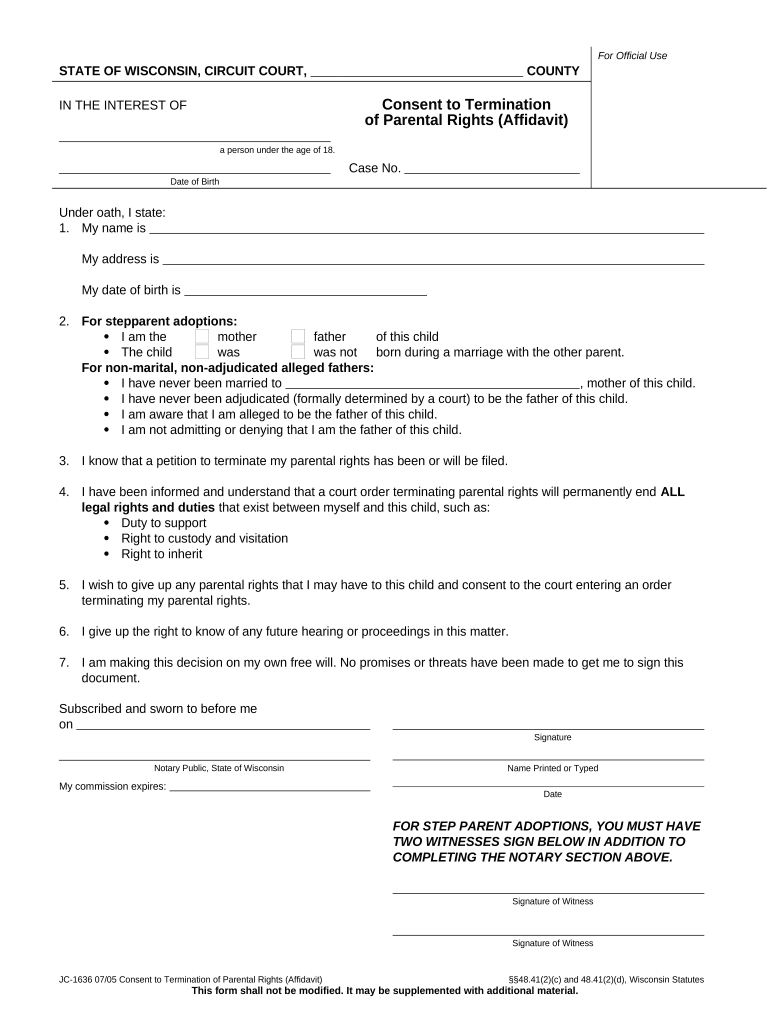
Termination of Parental Rights
What the Termination of Parental Rights document is
Why accurate completion matters and legal effect
Properly drafted and filed termination paperwork ensures the court can enter an enforceable order ending parental rights and allow subsequent actions such as adoption or guardianship. Electronic execution is permissible in many contexts but family-law exceptions may limit e-signature use; confirm applicability under ESIGN (15 U.S.C. ch.96) and state rules such as UETA or a state ESRA.
Who typically prepares and files this document
In most cases legal counsel is recommended because courts require specific pleading formats, service of process, and proof of grounds or consent.
- Attorneys and family law firms handling custody, adoption, or relinquishment matters
- State or county child welfare agencies pursuing agency-initiated terminations
- Parents or guardians consenting to voluntary termination when adoption or guardianship follows
Key signers and roles
Petitioner — Attorney
An attorney filing on behalf of a parent or agency drafts the petition, verifies facts under penalty of perjury, and represents the petition at hearing; accuracy in pleading and service is critical to avoid dismissal or appeal.
Respondent — Parent
The parent whose rights may be terminated must be properly served and afforded notice; the parent’s consent, appearance, or absence determines whether the matter proceeds as voluntary consent or contested termination.
Step-by-step: preparing and filing the petition
-
01Gather records: Collect birth certificate, prior orders, agency reports, and IDs
-
02Draft petition: State parties, child details, statutory grounds, and relief requested
-
03Arrange service: Serve respondent according to state rules and file proof of service
-
04Attend hearing: Present evidence; obtain written order if court grants termination
Where to file and how the court process flows
-
File with court: Submit petition to the family court clerk for the child's residence county
-
Serve respondent: Complete service per state statute and file proof of service
-
Pretrial steps: Respondent may file a response or the court may set mediation
-
Hearing and order: Judge hears evidence and issues a written termination order
Configuring an online workflow for document completion
| Field | Configuration |
|---|---|
| Signature field | Require signer name and date fields |
| Identity check | Enable multi-factor or ID verification |
| Audit trail | Capture IP, timestamp, and actions |
| Document export | Produce court-ready PDF with certificate |
Sharing, signing, and technical requirements
Ensure the chosen workflow can produce an unalterable court-ready copy, attach supporting exhibits, and store the audit trail for the retention period required by regulators and local court rules.
- File formats: PDF and DOCX
- Integrations: Supports case management systems
- Security: TLS in transit, AES-256 at rest
Consequences of incorrect or improper filing
Common preparation mistakes to avoid
- Using inconsistent names or dates across exhibits, which can prevent the court from matching records and delay proceedings.
- Failing to file or attach proof of service; courts require clear sworn proof that the respondent received notice.
- Relying on a basic electronic signature where state rules or the court require notarized or in-court verification.
- Skipping counsel where statutory grounds are contested; contested terminations often require complex evidence and legal procedure.
eSignature vendor comparison for court-ready documents
| signNow | DocuSign | Adobe Sign | PandaDoc | HelloSign | |
|---|---|---|---|---|---|
| Starting Price | $8/user/mo | $15/user/mo | $14/user/mo | $19/user/mo | $15/user/mo |
| Free Trial | 7-day free trial | Varies by vendor | Varies by vendor | Varies by vendor | Varies by vendor |
| Bulk Send | Yes (Business Premium) | Yes | Yes | Yes | No |
| Audit Trail | Yes | Yes | Yes | Yes | Yes |
| HIPAA Compliant | Yes | Yes | Yes | No | No |
| Envelope Cap | No cap | 100 envelopes/user/year | Varies by plan | Varies by plan | Varies by plan |
Real-world examples of electronic workflows in legal contexts
Optica
Brian Fitzgibbons found the interface easy for both staff and clients to use
- Workflow automation reduced manual handoffs during filings
- The firm preserved audit trails and produced court-ready PDFs to streamline clerk review and reduce return cycles.
Fertility
John Butler praised the platform’s API and compliance posture
- Integration automated patient consent collection
- The practice produced signed records with timestamps and secure storage to meet regulatory and court disclosure needs.
Frequently asked questions about preparing and filing termination paperwork
-
Can I e-sign a termination petition?
Possibly, but check state rules and the court’s local filing requirements. Family law matters are often treated as exceptions; verify ESIGN compliance and whether the court accepts electronically signed pleadings.
-
Who must be served and how?
All respondents and interested parties must be served according to state statute. Common methods include personal service, certified mail, or publication; file proof of service before the hearing.
-
Is notarization required?
Some affidavits or consents require notarization; requirements vary. If using remote notarization, confirm the state permits RON and follow identity-proofing and record-retention rules.
-
What if a parent revokes consent?
A revocation of voluntary consent may complicate proceedings; courts will evaluate whether consent was knowing and voluntary and whether statutory withdrawal mechanisms apply.
-
How long until the court issues an order?
Timing depends on docketing, notice periods, and contested issues; cases may resolve in weeks for uncontested matters but take months if contested or if additional evidence is required.
-
How should records be stored?
Keep signed originals, certified court orders, and electronic audit trails secure; follow federal standards where applicable and local retention rules, including HIPAA requirements for medical records.