Establishing secure connection…Loading editor…Preparing document…

Termination of Parental Rights Wisconsin

This template is fully customizable. Edit the text, fill out the fields, and send it for signature. Give it a try!
Termination of Parental Rights Wisconsin

What the Termination of Parental Rights Wisconsin document is

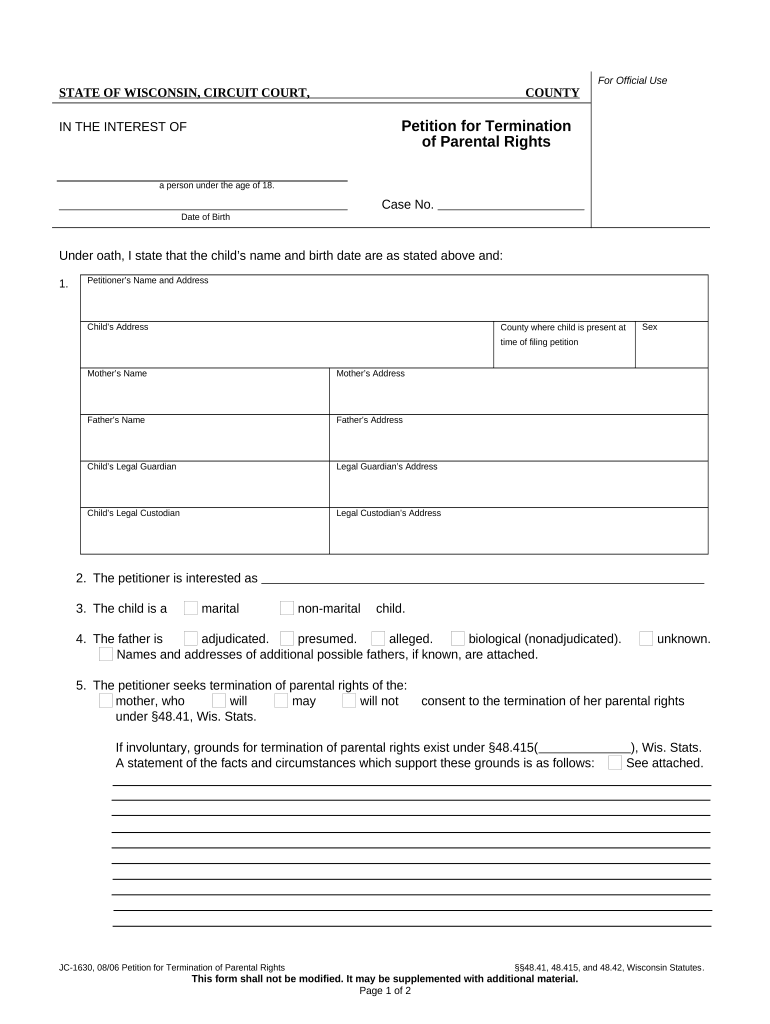
The Termination of Parental Rights Wisconsin document is a court petition used to permanently end the legal parent-child relationship under Wisconsin law. It initiates a judicial proceeding in circuit court and requests a court finding that termination is in the child's best interests or justified by statutory grounds. The process includes petition drafting, service on the parent, evidentiary hearings, and a written order. Outcomes affect custody, visitation, and adoption eligibility and may trigger post-judgment recordkeeping and agency obligations.

Why understanding this form matters for case outcomes

Accurate completion clarifies allegations and evidence, supports appropriate service and hearing scheduling, and reduces procedural objections. Proper drafting helps courts evaluate statutory grounds, protects parties' procedural rights, and ensures orders are enforceable for custody, adoption, and agency records.

Why understanding this form matters for case outcomes

Who commonly prepares or files this petition

Typical filers include county child welfare agencies, guardians ad litem, and private attorneys acting for petitioning parties.

  • County child welfare agency filings on behalf of the state to protect child safety and welfare.
  • Private attorneys representing prospective adoptive parents or guardians initiating guardianship-related petitions.
  • Self-represented parents or relatives filing petitions in limited circumstances pro se.

Roles that sign or approve the document

County Social Worker

A county social worker or child welfare caseworker often prepares factual affidavits, compiles agency records, and coordinates evidence and service for the petition; the worker typically provides sworn statements at hearing.

Private Attorney

An attorney for a petitioner drafts pleadings, ensures statutory grounds are pled, arranges service, and represents the petitioner at hearing; counsel may file supporting motions and handle appeals as needed.

Essential information to include on the petition

Child Details: Full legal name, date of birth
Parent Details: Full legal name, last known address
Case Number: Court-assigned docket number
Grounds Alleged: Statutory basis for termination
Relief Requested: Specific orders sought
Signature: Petitioner or counsel signature

Short risks from incomplete or incorrect filings

Dismissal Risk: Procedural defects may lead to dismissal
Service Defect: Improper service can void proceedings
Delayed Relief: Errors can cause hearing continuances
Appeal Exposure: Faulty orders increase appeal risk
Record Accuracy: Missing facts impair judicial findings
Confidentiality: Improper disclosure harms privacy

Common preparation pitfalls to avoid

  • Failing to include full identifying information for the child and parents causes confusion about subject identity and may delay hearing scheduling or service.
  • Relying on vague or conclusory allegations instead of specific factual allegations undermines the court's ability to find statutory grounds by the required evidentiary standard.
  • Neglecting to attach supporting affidavits, agency records, or proof of prior services often requires the court to continue or dismiss the petition without prejudice.
  • Using incorrect venue, failing to check local circuit court filing requirements, or missing required local forms results in clerk rejections or procedural delays.

How to complete and submit the petition — stepwise

Follow these key steps when preparing, serving, and presenting a Termination of Parental Rights Wisconsin petition to the circuit court.

  • 01
    Draft Petition: State parties, facts, grounds, and relief clearly
  • 02
    Gather Evidence: Attach affidavits, agency records, and exhibits
  • 03
    Serve Parties: Complete lawful service per court rules
  • 04
    Attend Hearing: Present evidence and obtain written order

Where the form goes and what happens next

After filing, the court assigns a date, parties receive notice, and the matter proceeds to evidentiary hearing; outcomes result in a signed court order affecting parental rights.

  • File with Court: Clerk files petition in circuit court
  • Service of Process: Certified or statutory service methods used
  • Pretrial Steps: Motions, discovery, or agency reviews occur
  • Final Hearing: Judge issues findings and order

Primary sections and features of a professional petition

A professionally prepared Termination of Parental Rights Wisconsin petition is organized to present jurisdiction, parties, statutory grounds, factual allegations, requested relief, and supporting exhibits in a clear legal format.

Caption

Court name, case number, and party designations must match official court records and appear at the top of every page for clarity and docketing accuracy.
Jurisdictional Allegations

State the court's jurisdictional basis such as residency or agency authority so the court can confirm it has power to hear and decide the petition.

Statutory Grounds

Cite the specific statutory provisions or standards relied upon and describe facts that support each element required under Wisconsin law.

Factual Statement

Provide a concise chronology of material facts, services provided, prior orders, and relevant interactions with child welfare or other agencies.

Relief Claimed

Specify requested orders including termination, transfer of custody, sealing of records, or adoption eligibility language to guide the court's discretion.

Exhibits and Affidavits

Include sworn affidavits and documentary exhibits that corroborate allegations; label and paginate exhibits for efficient judicial review.

Typical tasks and who performs them

A clear task-responsibility table helps coordinate petition preparation, service, and court appearances across agency and private parties.

Task Responsible Party
Prepare petition County agency or petitioning attorney
Compile exhibits Caseworker or counsel compiles records
Arrange service Process server or law enforcement
Attend hearing Petitioner, counsel, witnesses

How to share, sign, and archive the petition electronically

Courts and agencies accept electronic copies differently; check local rules before e-filing or e-signing.

  • File formats: PDF, PDF/A, DOCX supported
  • Authentication: Audit trail and signer identity useful
  • Integrations: Supports common court e-filing systems

Typical timeline elements and scheduling expectations

Timing varies by county and docket load; plan for document preparation, service windows, pretrial deadlines, and potential continuances when scheduling your case.

Document preparation:

Allow multiple days for drafting and attachments

Service window:

Service periods depend on method and local rule

Pretrial motions:

Motions and responses follow local filing deadlines

Hearing scheduling:

Courts set hearings per calendar availability

Order entry:

Judge signs written order after hearing concludes

Documents to attach and saving options for records

Attach core supporting documents and save copies in standard formats for court, agency, and future reference; index exhibits and maintain secure backups.

Birth Certificate

Certified copy of the child's birth certificate confirms identity and parentage; file both a paper certified copy if required and a searchable PDF for the record.

Service Proof

File proof of service or signed affidavit from the process server showing date, method, and recipient to establish valid service.

Affidavits

Sworn witness statements or caseworker affidavits summarizing facts and observations should be signed, dated, and notarized when required by local rule.

Agency Records

Child welfare records, treatment histories, and prior orders provide context; produce redacted copies as required for privacy and sealed filings where appropriate.

Key milestones from filing to final order

A typical case follows sequential milestones; each stage may take days to months depending on court schedules and complexity.

01

Petition Filed

Clerk accepts and dockets the petition; initial case number assigned

02

Service Completed

All required parties receive lawful service and proof is filed with the court

03

Pretrial Proceedings

Motions, discovery, and evidentiary preparations occur before final hearing

04

Final Hearing

Judge hears evidence, issues findings, and enters judgment or order

eSignature solution pricing comparison for petition workflows

Compare basic pricing and feature availability for common eSignature platforms used to collect sworn affidavits and petitioner signatures; signNow appears first per table policy.

signNow DocuSign Adobe Sign PandaDoc HelloSign
Starting Price $8/user/mo $15/user/mo $14/user/mo $19/user/mo $15/user/mo
Free Trial 7-day free trial Varies by vendor Varies by vendor Varies by vendor Varies by vendor
Bulk Send Yes Yes Yes Yes No
Audit Trail Yes Yes Yes Yes Yes
HIPAA Compliant Yes Yes Yes No No

Frequently asked questions about Termination of Parental Rights Wisconsin

Answers to common questions on who can file, necessary evidence, service, e-signature use, and post-judgment effects to help avoid procedural errors.


Need help? Contact support

be ready to get more
Join over 28 million airSlate SignNow users