Establishing secure connection…Loading editor…Preparing document…

Notice to Beneficiaries in Texas

This template is fully customizable. Edit the text, fill out the fields, and send it for signature. Give it a try!
Notice to Beneficiaries in Texas

What the Notice to Beneficiaries in Texas Is and When It’s Used

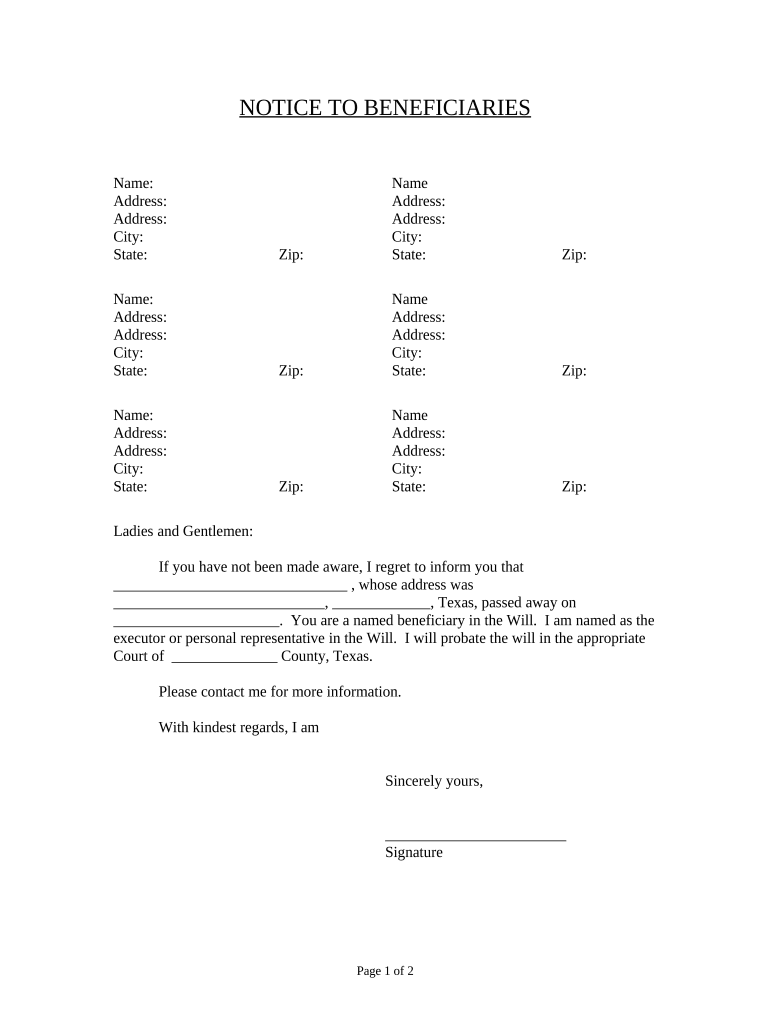
A Notice to Beneficiaries in Texas is a written communication provided to persons entitled to receive information about an estate, trust, or probate matter. It typically informs beneficiaries about the appointment of an executor or trustee, the existence of probate or administration proceedings, deadlines to make claims, and steps for submitting required documentation. The notice satisfies statutory or procedural requirements under Texas Estates Code or trust administration best practices, and helps ensure beneficiaries receive due process and have the opportunity to participate in estate or trust administration.

Why Issuing a Clear Notice Matters

Providing a timely, accurate notice reduces disputes, preserves statutory deadlines, and documents that beneficiaries received essential information. A correct notice helps the personal representative or trustee meet legal obligations and supports transparent administration of assets.

Why Issuing a Clear Notice Matters

Who Typically Prepares and Receives This Notice

Executors, trustees, probate attorneys, and fiduciaries commonly prepare and send these notices to identified beneficiaries and potential heirs.

  • Executors and personal representatives preparing estate administration notices to heirs and beneficiaries.
  • Trustees managing distributions and informing beneficiaries under a trust instrument.
  • Probate attorneys and law firms communicating formal court or administration updates to interested parties.

Typical Signatories and Their Roles

Executor / Administrator

The personal representative of the decedent who signs and serves notices required during probate. Responsibilities include identifying beneficiaries, filing required documents with the court, and responding to beneficiary inquiries about distributions and deadlines.

Trustee / Fiduciary

An appointed trustee who manages trust assets and communicates with beneficiaries. The trustee issues notices when distributions, accountings, or amendments affect beneficiary rights and must act in accordance with the trust instrument and applicable Texas law.

Core Components of a Professional Notice to Beneficiaries

A well-constructed notice contains identification, legal basis, actionable deadlines, contact information, signature, and required attachments for verification.

Case ID

Court cause number or trust identification used to connect the notice to the probate file or trust document; include county and court when applicable.
Decedent / Trust Name

Full legal name of the decedent or trust as shown in the will or trust instrument to avoid ambiguity and ensure accurate record matching.

Beneficiary Details

Names and addresses of notified beneficiaries, their relationship to the decedent or trust, and any share or interest description if available.

Key Deadlines

Clear statement of timelines to file claims, object, or request accountings, with date format and consequences for failure to act.

Contact Info

Name, mailing address, phone, and email of the personal representative, trustee, or attorney handling the matter for beneficiary follow-up.

Attachments

Copies of the will, order of appointment, trust excerpt, or a certificate of service when the notice is filed or served.

Required Data Elements to Include

Recipient Name: Full legal name
Recipient Address: Street, city, state, ZIP
Document Date: MM/DD/YYYY
Fiduciary Name: Executor or trustee name
Case Identifier: Court cause number
Signature: Signed and dated

Step‑by‑Step: Preparing and Sending the Notice

Follow a clear sequence from document preparation through delivery and recordkeeping to reduce errors and satisfy statutory obligations.

  • 01
    Gather Records: Assemble will, trust, appointment, and beneficiary list.
  • 02
    Draft Notice: Populate required fields and state deadlines clearly.
  • 03
    Authenticate Signer: Ensure signer authority; notarize if required.
  • 04
    Send and File: Serve beneficiaries, retain proof of service.

Workflow Overview: From Draft to Proof of Service

A streamlined workflow reduces friction: prepare, sign, distribute, and archive along with proof of delivery and audit records.

  • Prepare: Populate notice fields and attach supporting documents.
  • Sign: Signer authenticates and signs the notice document.
  • Deliver: Mail, email, or RON-based notarized delivery as required.
  • Record: Retain copies and proof of service in the estate file.

Typical Digital Workflow Settings

Common settings help ensure a compliant, auditable e‑delivery and signature process for beneficiary notices.

Field Configuration
Signing Order Sequential by role to ensure executor signs before distribution notices
Authentication Method Email link with optional SMS code for added verification
Audit Trail Enable full event logging including IP and timestamps
Document Retention Store signed PDF/A with certificate and attachments

Digital Delivery and eSignature Considerations

When using electronic delivery and signatures, verify legal acceptability, authentication strength, and retention capability before sending notices.

  • Authentication: Use email, SMS, or KBA as appropriate
  • Document Format: Export as PDF/A for long-term preservation
  • Audit Records: Preserve time stamps, IP addresses, and signer metadata

Common Deadlines to Include and Monitor

Specify statutory or procedural dates clearly; incorrect deadlines can forfeit rights or trigger objections. Use explicit calendar dates wherever possible.

Claim Filing Deadline:

State the date claimants must file claims against the estate.

Objection Period:

Provide the deadline to contest probate actions or accountings.

Accounting Request Window:

Indicate timeframe beneficiaries have to request accountings.

Distribution Date:

Note expected or scheduled distribution dates if known.

Service Verification:

Date by which proof of service will be filed with the court

Risks and Legal Consequences of Incorrect Notices

Missed Deadlines: May forfeit claims
Service Defects: Invalidates notice
Incorrect Parties: Leads to contested distributions
Privacy Breaches: HIPAA exposure if PHI present
Court Sanctions: Possible fines or orders
Attorney Fees: Increased litigation costs

Common Mistakes to Avoid When Preparing Notices

  • Using nicknames or initials instead of full legal names can cause returned notices and delay administration.
  • Failing to specify an exact date format leads to confusion about deadlines and may be construed against the drafter.
  • Relying solely on email without confirming delivery or consent can leave no admissible proof of service in some courts.
  • Omitting the court cause number or trust date makes it harder for beneficiaries and counsel to verify the matter.

eSignature Vendor Pricing Snapshot for Notice Workflows

Compare core pricing and feature availability for common eSignature vendors when selecting a solution for beneficiary notice distribution and secure signing.

signNow DocuSign Adobe Sign PandaDoc HelloSign
Starting Price $8/user/mo $15/user/mo $14/user/mo $19/user/mo $15/user/mo
Free Trial 7-day free trial Varies by vendor Varies by vendor Varies by vendor Varies by vendor
Bulk Send Yes Yes Yes Yes Limited
Audit Trail Yes Yes Yes Yes Yes
HIPAA Compliant Yes Yes Yes No No

Frequently Asked Questions About Notices to Beneficiaries in Texas

Answers to commonly asked operational and legal questions about preparing, sending, and validating beneficiary notices in Texas.


Need help? Contact support

be ready to get more
Join over 28 million airSlate SignNow users