Establishing secure connection…Loading editor…Preparing document…

Tax Organizer

This template is fully customizable. Edit the text, fill out the fields, and send it for signature. Give it a try!
Tax Organizer

What the Tax Organizer Is and when it matters

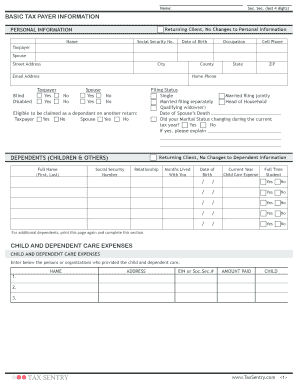
A Tax Organizer is a structured questionnaire used by tax preparers to collect the personal, income, deduction, and documentation details needed to prepare federal and state tax returns. It consolidates information such as taxpayer and spouse names, Social Security Numbers or EINs, filing status, income sources, adjustments, credits, and required attachments so returns can be completed accurately and on time.

Why use a Tax Organizer for return accuracy

A consistent Tax Organizer reduces missing items, speeds preparation, and helps document the basis for deductions and credits required by the IRS and state tax authorities.

Why use a Tax Organizer for return accuracy

Who typically completes and relies on a Tax Organizer

Tax preparers, accounting firms, individual filers, and employers use the organizer to systematize data collection before preparing returns.

  • Individual taxpayers preparing their own returns or assembling documents for a preparer
  • Certified public accountants and enrolled agents collecting client income and deduction details
  • Payroll or HR teams gathering year-end compensation and benefit information for employee tax reporting

What a professional Tax Organizer contains

A complete organizer is organized into logical sections and includes fields and prompts that match common IRS information return categories to reduce follow-up and improve documentation.

Taxpayer Details

Full legal names, SSN/EIN, birthdates, addresses, and contact information for all filing parties.
Income Summary

Wages, 1099s, interest, dividends, rental income, unemployment, and business or farm revenue.

Adjustments & Deductions

Retirement contributions, student loan interest, educator expenses, and itemized deduction prompts.

Credits and Payments

Child tax credit, education credits, estimated tax payments, and prior-year refund applied.

Supporting Documents

List of attachments: W-2s, 1099s, K-1s, receipts, and statements required to substantiate items.

Signature Block

Signature lines and authorization to file, and space for preparer or POA information if applicable.

Step-by-step: completing the Tax Organizer

Follow these sequential steps to gather documents, fill fields accurately, and deliver the organizer to your tax preparer.

  • 01
    Collect Documents: Gather W-2s, 1099s, K-1s, receipts, and last year’s return.
  • 02
    Complete Fields: Enter names, TINs, income, deductions, and credits per instructions.
  • 03
    Attach Support: Upload PDFs or scans of information returns and receipts.
  • 04
    Review & Send: Confirm accuracy, sign, and transmit to preparer or retain per agreement.

Configuring an online Tax Organizer workflow

Set up the digital organizer to validate key fields, require attachments, and capture an audit trail for each submitted package.

Field Configuration
Auto-validate TIN Use pattern checks and prompts for nine digits
Conditional Sections Show business income fields only for self-employed filers
Authentication Email plus SMS or KBA for higher assurance
File format Accept PDF, DOCX, and high-resolution image uploads

How the organizer moves from client to filing

A typical flow captures data, collects signatures, and routes completed files to the preparer who compiles returns and submits to tax authorities.

  • Client Completes: Client fills organizer and uploads supporting PDFs
  • Sign & Authorize: Client eSigns authorization and preparer engagement
  • Preparer Reviews: Preparer verifies entries, requests clarifications as needed
  • File Returns: Preparer e-files federal and state returns on client’s behalf

Digital submission and platform considerations

Choose a platform that supports required file types, strong authentication, and an auditable signing process for tax documents.

  • File types: PDF, DOCX, XLSX supported
  • Integrations: Connects to cloud storage and CRM systems
  • Authentication: Email, SMS, and advanced options

Security and compliance for Tax Organizer data

Encryption: TLS 1.2/1.3 in transit; AES-256 at rest
Certifications: SOC 2 Type II, ISO 27001, PCI DSS
HIPAA BAA: Available where protected health data applies
Audit Trail: Timestamps, IP addresses, and action logs
Access Controls: Role-based permissions and SSO/SAML
Retention Options: Configurable export and archival settings

Key tax deadlines to consider with the organizer

Use the organizer early to meet reporting deadlines for information returns and individual income tax filings.

W-9 timing:

No IRS filing deadline — provide on payer request

1099-NEC deadline:

Recipient and IRS due Jan 31 each year

1099-MISC deadlines:

Recipient Jan 31; IRS paper Feb 28; IRS electronic Mar 31

Form 1040 deadline:

April 15; extension to Oct 15 with Form 4868

FBAR deadline:

April 15 with automatic extension to Oct 15

Penalties and risks tied to incorrect organizer data

1099 late penalty: $60–$330 per form (IRC §6721)
Intentional disregard: $660+ per form, no maximum
Backup withholding: 24% withholding if TIN missing/incorrect
I-9 paperwork fines: $281–$2,789 per violation
Fraud exposure: Indefinite record retention if fraud found
Identity risk: Incorrect SSNs can trigger IRS verification letters

Common mistakes to avoid when preparing the organizer

  • Entering nicknames or abbreviated names instead of legal names, which causes identity mismatches and slowdowns.
  • Providing partial or formatted TINs (with spaces or separators) that fail automated checks and trigger manual review.
  • Omitting supporting documents for large deductions, which increases audit risk and requires later substantiation.
  • Failing to sign or date the authorization section, leaving preparers without explicit filing authorization or POA evidence.

Representative examples of Tax Organizer use in practice

Real-world examples show how organizers reduce back-and-forth, standardize intake, and speed return completion.

Optica Ventures — COO

Optica used a standardized organizer to consolidate client submissions and reduce follow-ups.

  • The interface simplified intake steps and built consistency.
  • "The interface is simple and easy-to-use for our team; more importantly, it is just as easy for our customers," said Brian Fitzgibbons, demonstrating reduced turnaround time and fewer missing items.

Martin Properties — Founder

A real estate firm used an organizer for rental schedules and client documents.

  • The firm processed leases and K-1 details more quickly.
  • Tim Martin noted that he could process and execute documents online with compliance and security, enabling efficient return assembly and client delivery.

eSignature vendor comparison for Tax Organizer workflows

Comparison of baseline pricing and core features relevant to signing and distributing Tax Organizers. Vendor placement shows typical starting points and common compliance capabilities.

signNow DocuSign Adobe Sign PandaDoc HelloSign
Starting Price $8/user/mo $15/user/mo $14/user/mo $19/user/mo $15/user/mo
Free Trial 7-day free trial Varies by vendor Varies by vendor Varies by vendor Varies by vendor
Bulk Send Yes Yes Yes Yes No
Audit Trail Yes Yes Yes Yes Yes
HIPAA Compliant Yes Yes Yes No No

Who is authorized to sign the Tax Organizer or related filings

Client — Individual Taxpayer

The taxpayer signs to authorize information disclosure and filing. When a return is e-filed, the filer’s signature authorizes preparer actions and affirms accuracy under penalties of perjury; mismatches may trigger IRS verification.

Authorized Representative — Preparer / POA

A preparer with a valid power of attorney (Form 2848) or written authorization may sign certain items on behalf of the taxpayer; include POA documentation and date ranges to validate representative authority.

Frequently asked questions about using the Tax Organizer

Answers to common questions about completing, signing, and retaining the Tax Organizer to reduce delays and compliance issues.


Need help? Contact support

be ready to get more
Join over 28 million airSlate SignNow users