Establishing secure connection…Loading editor…Preparing document…

Notice to Landowner of Damaged Tree

This template is fully customizable. Edit the text, fill out the fields, and send it for signature. Give it a try!
Notice to Landowner of Damaged Tree

What the Notice to Landowner of Damaged Tree Is

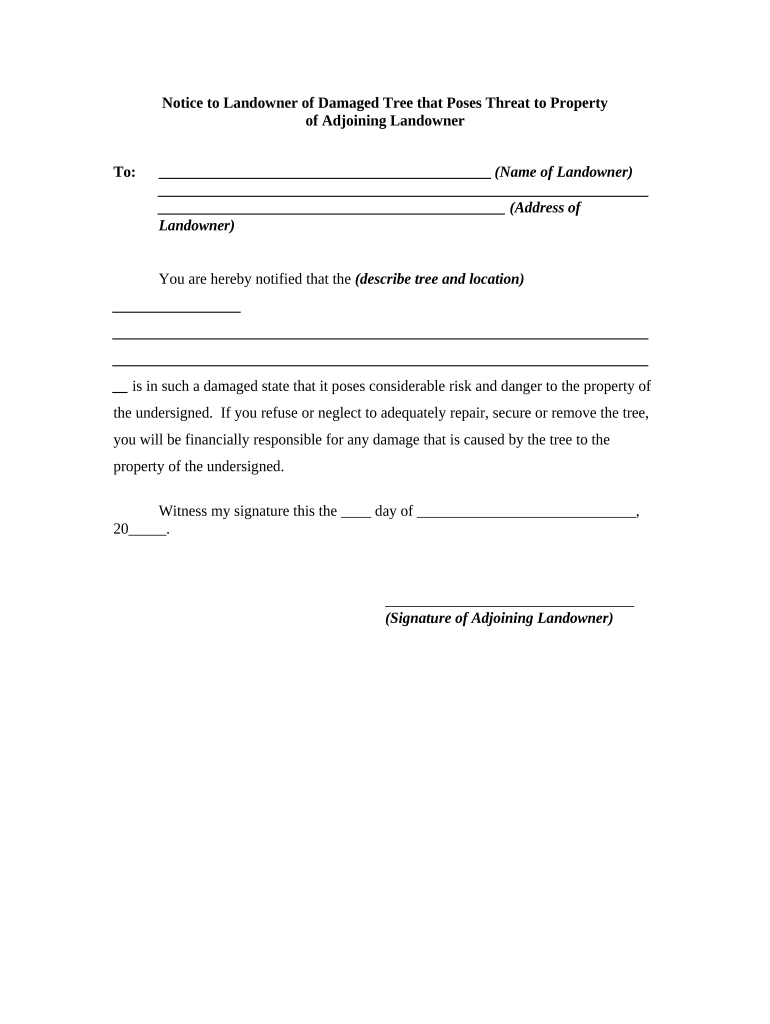
A Notice to Landowner of Damaged Tree is a written record delivered to the owner of property where a tree has been damaged, fallen, or poses a safety hazard. The notice documents the date, location, observable damage, and requested remedial action or inspection. It preserves evidence for insurance claims, municipal code enforcement, or future legal steps and helps set expectations about timing and responsibility. The form is often used by neighbors, contractors, municipalities, and insurance claimants to create a clear, dated paper trail of the condition and any immediate risks.

Why a Clear Notice Matters for Liability and Remediation

A formal notice creates a dated record that can support insurance claims, prompt corrective action, and reduce misunderstandings. It protects the sender by documenting observed hazards and the requested response while giving the landowner a clear opportunity to inspect or repair the damage.

Why a Clear Notice Matters for Liability and Remediation

Who Typically Prepares and Receives This Notice

The form is used by individuals and organizations that observe tree damage or need an official record of hazardous conditions.

  • Homeowners and neighbors who witness damage or falling limbs and want a formal record for insurance or safety.
  • Tree service contractors who document observed damage before arranging removal or repair work for liability protection.
  • Municipal code officers or property managers who issue notices to compel remediation under local ordinances.

The notice is appropriate for private disputes, insurance processes, contractor engagements, and municipal compliance actions.

Primary Signers and Their Roles

Homeowner

An individual reporting damage on or adjacent to their property. Signs to attest to observation, request remediation, and preserve evidence for insurance or legal purposes.

Property Manager

A manager or agent for a commercial or multiunit property who signs to document hazards, request contractor action, and trigger internal or municipal repair processes.

Essential Elements to Include in a Professional Notice

A well‑constructed notice is concise, factual, and supported by dated evidence; include enough detail to allow inspection and possible remediation without speculative language.

Incident Details

State the date and time the damage was observed, who observed it, and whether it was witnessed as an active event or discovered after the fact.
Exact Location

Describe the tree location precisely: street address, parcel identifier if known, and a clear description of which portion of the property the tree occupies or affects.

Damage Description

Provide objective details about the damage (split trunk, uprooted, hanging limbs), safety concerns, and whether the tree threatens structures, utilities, or persons.

Photographic Evidence

Attach dated photos or video and label each file. Photos should show context, close‑ups of defects, and nearby structures or boundaries.

Requested Remedy

Identify the action requested (inspect, prune, remove, secure) and a reasonable timeframe for response based on urgency and local codes.

Signature Block

Include the sender name, contact information, signature, and date. If an agent signs, note their authority and contact for follow up.

Required Information and Fields at a Glance

Landowner Name: Full legal name
Landowner Address: Street, city, state, ZIP
Tree Location: Specific property location
Date Observed: MM/DD/YYYY format
Damage Summary: Concise factual description
Attachments: Photos, sketches, permits

Step-by-Step: Preparing and Sending a Notice

Follow a simple sequence to ensure the notice is effective, timestamped, and verifiable for insurance or legal use.

  • 01
    Document the Scene: Take dated photos and notes immediately.
  • 02
    Draft the Notice: Use clear, factual language and include required fields.
  • 03
    Attach Evidence: Include photos, map, or brief contractor estimates.
  • 04
    Deliver and Retain: Send by traceable method and keep a signed copy.

Customizing the Notice for Online Completion

Configure a digital template with required fields, attachments, and signer authentication so the notice is complete and auditable.

Field Configuration
Name and Contact Fields Make fields required and set validation rules.
Date and Location Fields Use MM/DD/YYYY and structured address fields.
Attachments Allow JPG, PNG, PDF uploads with size limits.
Signer Authentication Enable email or SMS code verification for attribution.

Where to Send or File the Notice

Choose the recipient and delivery method based on the purpose: private request, insurance claim, contractor engagement, or municipal enforcement.

  • Direct to Landowner: Send by certified mail or tracked e‑delivery to owner address.
  • Insurance Notification: Notify insurer per policy terms with attached evidence.
  • Contractor or Arborist: Send to service provider when requesting an estimate.
  • Municipal Code Office: Submit complaint to local permitting or forestry office if required.

Delivery Options and Platform Considerations

Select delivery channels that provide proof of receipt, secure attachments, and signer attribution.

  • File Format: PDF or DOCX recommended
  • Integrations: Google Drive, Box, NetSuite, or local file systems
  • Authentication: Email, SMS code, or stronger KBA options

Ensure the chosen platform captures an audit trail (timestamp, IP, signer identity) and retains a reproducible copy for future claims or enforcement.

Timing Considerations and Typical Deadlines

Timing affects insurance coverage and municipal enforcement; act quickly to preserve evidence and meet any policy or local reporting periods.

Initial Notice:

Send as soon as damage is discovered to preserve rights.

Insurance Notification:

Notify insurer per your policy; many require prompt reporting, commonly within 30 days.

Municipal Complaints:

Local code offices may impose short response windows for hazardous trees.

Evidence Preservation:

Keep originals and photos; do not discard until claim resolved.

Contractor Response:

Request estimates within a week for urgent hazards when possible.

Common Mistakes to Avoid When Preparing a Notice

  • Vague descriptions that lack specific location details and dates, which undermine inspectability and insurance coverage.
  • Failing to attach dated photos or video, making it difficult to prove the pre‑removal condition to insurers or authorities.
  • Sending to the wrong recipient or out‑of‑date address, causing delays and disputes over whether notice was received.
  • Using informal delivery without proof (e.g., casual text) when a traceable method is required for claims or enforcement.

Risks and Potential Consequences of an Incomplete or Late Notice

Civil Liability: Exposure to claims if hazard causes injury
Insurance Denial: Late or missing notice risks claim denial
Missed Deadlines: Loss of certain remedies or municipal enforcement options
Increased Costs: Delay can raise removal or repair expenses
Neighbor Disputes: Escalation into litigation or small claims
Evidence Loss: Removed tree parts may prevent accurate assessment

Comparing eSignature Options for Serving Notices

A concise vendor comparison for typical features relevant to notices and secure delivery; signNow is listed first for clarity of comparison.

signNow DocuSign Adobe Sign PandaDoc HelloSign
Starting Price $8/user/mo $15/user/mo $14/user/mo $19/user/mo $15/user/mo
Free Trial 7-day trial Varies Varies Varies Varies
Bulk Send Yes Yes Yes Yes Varies
Audit Trail Yes Yes Yes Yes Yes
HIPAA Compliant Yes Yes Yes No No

Frequently Asked Questions About the Notice

Answers to common practical and legal questions when preparing or delivering a Notice to Landowner of Damaged Tree.


Need help? Contact support

be ready to get more
Join over 28 million airSlate SignNow users