Establishing secure connection…Loading editor…Preparing document…

Unemployment Insurance Application for Ex-Servicemembers and Federal Employees

This template is fully customizable. Edit the text, fill out the fields, and send it for signature. Give it a try!
Unemployment Insurance Application for Ex-Servicemembers and Federal Employees

What this Unemployment Insurance Application covers

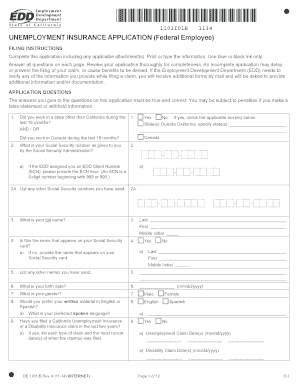
The Unemployment Insurance Application for Ex-Servicemembers and Federal Employees is a standardized claim form used to request unemployment benefits by individuals separating from military service or federal civilian employment. It collects identity, service/employment history, reason for separation, and eligibility details needed by state unemployment agencies to determine benefit entitlement and weekly benefit amounts. The form assists administrators in confirming service dates, verifying federal employment status where special rules apply, and applying any veteran-specific eligibility provisions or protections.

Why this form matters for transitioning service members and federal staff

Completing this application correctly helps preserve benefit rights and speeds adjudication by state unemployment programs; it flags federal or military service for applicable exceptions and protections under state and federal rules.

Why this form matters for transitioning service members and federal staff

Who should complete the application

Key claimants and administrators who interact with the form.

Proper selection of claimant type ensures correct application of military or federal employment rules during eligibility review.

Step-by-step: completing the application

Follow these sequential steps to prepare a complete submission and reduce requests for additional information.

  • 01
    Gather IDs: Collect government ID, DD-214 or SF-50, and SSN card
  • 02
    Confirm Employment History: List employers with dates and reasons for separation
  • 03
    Attach Supporting Docs: Upload DD-214 for military or SF-50 for federal employment
  • 04
    Sign and Submit: Sign electronically or in writing and file with state agency

How the application moves through the system

Understanding the routing clarifies where delays commonly occur and what each party reviews.

  • Applicant Submission: Claimant completes form and attaches supporting documents
  • State Intake: Unemployment office logs claim and checks basic eligibility
  • Verification: Agency verifies service/employment and wages
  • Adjudication: Decision issued and benefits scheduled if eligible

Configuring an online application workflow

If you process these applications electronically, set fields and routing to match adjudication stages.

Field Configuration
Identity Verification Require SSN + government ID upload
Service Verification Conditional: request DD-214 if 'Military' selected
Federal Employment Conditional: request SF-50 and agency code
Signature Enable ESIGN-compliant electronic signature and audit trail

Technical considerations for eSubmission

Choose a platform that supports secure uploads, conditional fields, and audit trails.

  • File formats: Accept PDF and DOCX for attachments
  • Authentication: Support email verification, SMS codes, or stronger methods
  • Storage: Encrypted at rest with role-based access

Ensure the platform complies with ESIGN/UETA, preserves an audit trail, and can produce printable PDFs for agency records.

Essential elements on a professional claim form

A clear, consistent form reduces processing time and avoids ambiguous responses that trigger follow-ups.

Claimant identity

Full legal name, SSN, contact details, and current mailing address required to match agency records and remit payments.
Employment/service history

Accurate start/end dates and employer or military unit identifiers are required for wage credits and service verification.

Separation reason

A precise reason (e.g., layoff, medical discharge) helps apply eligibility rules and any veteran-specific exceptions.

Income and wages

Provide gross wages and dates; agencies use wage data to calculate base period and weekly benefit amounts.

Attachments

DD-214 for veterans, SF-50 for federal employees, recent pay stubs, or separation notices strengthen the claim.

Declarations

Signature lines and attestations for truthfulness, authorization to verify records, and consent to electronic records when used.

Sensitive data elements included on the form

SSN: Nine digits
Date of birth: MM/DD/YYYY
Service ID: DD-214 info
Federal employer ID: Agency name/code
Banking details: For direct deposit
Medical info: Limited, if claiming medical separation

Consequences of inaccurate or fraudulent submissions

Benefit denial: False or incomplete info can cause denial of benefits
Repayment: Overpayments must be repaid and may accrue penalties
Criminal penalties: Intentional misrepresentation can lead to prosecution
Delay in payments: Verification requests postpone benefit start dates
Identity flags: SSN mismatches trigger fraud investigations
Employer records audit: Inconsistent employer data can prompt wage audits

Common preparation pitfalls to avoid

  • Using a nickname instead of your legal name which delays verification
  • Omitting DD-214 or SF-50 when required and receiving follow-up requests
  • Entering the wrong separation date and affecting benefit week eligibility
  • Failing to sign the declaration or improperly formatted signatures

Timing and filing expectations

Different states set specific claim-filing windows and weekly certification deadlines; timely filing affects benefit eligibility and retroactive payments.

Initial claim filing:

File as soon as possible after separation to avoid loss of retroactive weeks

Weekly certifications:

Certify weekly or biweekly per state rules to continue benefits

Appeal deadlines:

Typically 10–30 days after a determination; vary by state

Documentation requests:

Respond quickly—30 days common—to avoid denials

Reopen claims:

States allow reopenings with proof of continuing eligibility; rules vary

Key processing milestones for a typical claim

A standard claim moves through predictable stages from submission to payment; track each milestone to identify delays.

01

Submission completed

Claimant files application and uploads supporting documents

02

Intake verification

Agency confirms identity and basic eligibility

03

Employer/service contact

Agency requests separation and wage verification from employer or military unit

04

Final determination

Agency issues decision and schedules benefit payments if approved

Comparing eSignature vendor pricing and capabilities

The table outlines starting prices and key capability differences relevant when deploying electronic application and verification workflows. signNow is listed first as the product column required in vendor comparisons.

signNow DocuSign Adobe Sign PandaDoc HelloSign
Starting Price $8/user/mo $15/user/mo $14/user/mo $19/user/mo $15/user/mo
Free Trial 7-day free trial Varies by plan Varies by plan Varies by plan Varies by plan
Bulk Send Yes (Business Premium) Yes Yes Yes No
Audit Trail Yes Yes Yes Yes Yes
HIPAA Compliant Yes Yes Yes No No
Envelope Cap No cap 100 envelopes/user/year Varies by plan Varies by plan Varies by plan

Frequently asked questions about the application

Answers to common questions about eligibility, supporting documents, electronic signatures, and appeals for ex-servicemembers and federal employees.


Need help? Contact support

be ready to get more
Join over 28 million airSlate SignNow users