Establishing secure connection…Loading editor…Preparing document…

Usufruct Louisiana Form

This template is fully customizable. Edit the text, fill out the fields, and send it for signature. Give it a try!
Usufruct Louisiana Form

What the Usufruct Louisiana Form Is and why it matters

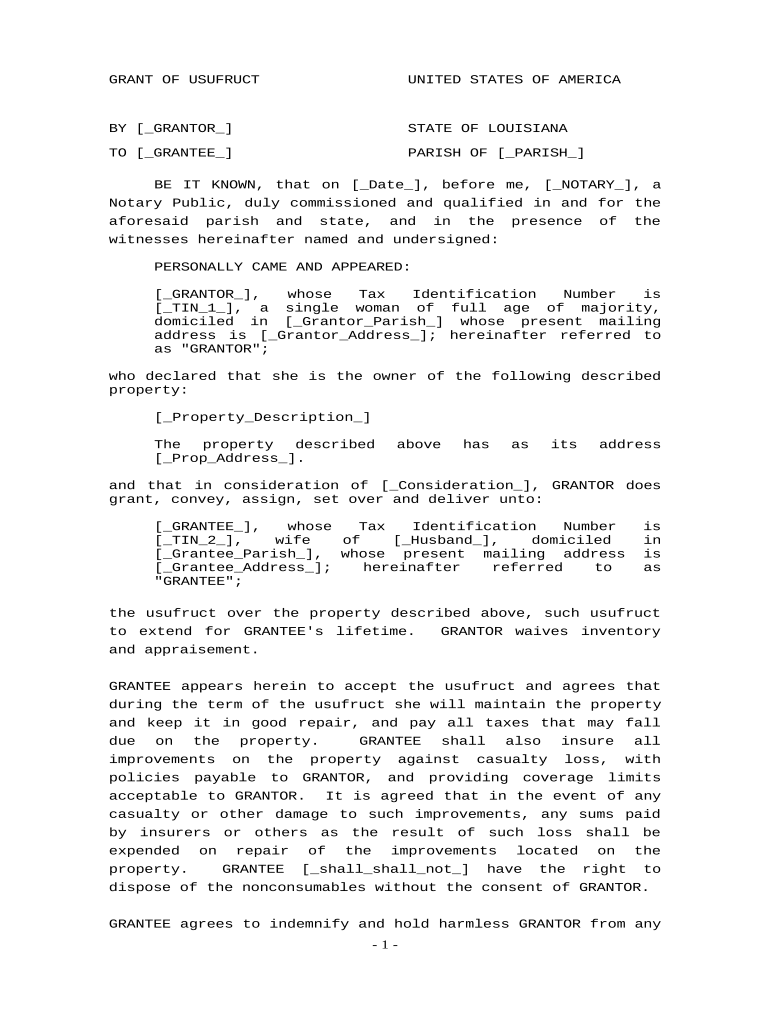
A Usufruct Louisiana Form documents a usufruct interest under Louisiana civil law, granting one party the right to use and enjoy property owned by another while preserving the owner’s naked title. The form specifies who holds the usufruct, the property described, permitted uses, obligations for maintenance and insurance, the term or triggering events that end the usufruct, and any transfer or succession rules. Proper execution, notarization, and recording protect both the usufructuary and the naked owner and help avoid later disputes over possession, repairs, or income derived from the property.

Why a clear Usufruct Louisiana Form reduces risk

A precise form clarifies rights, limits future disputes, preserves property value, and sets duration and obligations in writing; it also enables proper recording and third‑party notice under Louisiana property practice.

Why a clear Usufruct Louisiana Form reduces risk

Who typically prepares or signs this form

Typical parties include property owners granting a usufruct, individuals receiving use rights, and legal professionals preparing or reviewing the document.

  • Property owners creating limited-use rights for family or third parties
  • Heirs, trustees, or estate administrators managing succession of use rights
  • Attorneys and notaries drafting, advising, and authenticating the instrument

Use professional review when complex succession, tax, or creditor issues are present; clear drafting reduces litigation and recording errors.

Core components to include in a professional Usufruct Louisiana Form

A complete form sets parties, property, duration, permitted uses, obligations, and authentication to create an enforceable usufruct under Louisiana law.

Parties

Full legal names and capacity of the naked owner and the usufructuary, including corporate identifiers when an entity is involved.
Property Description

Precise legal description or title reference that matches public records so the usufruct can be recorded against the correct parcel or asset.

Duration

Clear term language specifying a fixed period, life of the usufructuary, or termination events to avoid ambiguity about when rights end.

Rights and Obligations

Specific permitted uses, maintenance duties, insurance, tax responsibilities, and limits on alienation or subletting by the usufructuary.

Consideration

If applicable, the form states any payment, services, or reciprocal obligations that support the creation of the usufruct.

Signatures & Notary

Signature blocks for parties, date, and notary acknowledgement plus witness fields when required by local rules to validate the record.

Essential information and required fields at a glance

Full Legal Name: As on government ID
Property Description: Parcel or deed reference
Effective Date: MM/DD/YYYY format
Duration Terms: Fixed term or life
Rights Enumerated: Usage and restrictions
Signature Block: Signed and dated

Step-by-step: completing the Usufruct Louisiana Form

Follow these core steps to prepare, execute, and record a usable usufruct instrument under Louisiana practice.

  • 01
    Gather Documents: Obtain deed, title report, and IDs for all parties.
  • 02
    Identify Parties: Enter full legal names and capacities for each party.
  • 03
    Define Terms: State duration, permitted uses, and maintenance duties.
  • 04
    Execute & Record: Sign before notary and record with the parish recorder.

Configuring an online workflow for the Usufruct Louisiana Form

Key field settings and optional automation to collect signatures, notarizations, and supporting attachments efficiently.

Field Online Setting
Signature field Standard eSign field | Required for each signer
Date field MM/DD/YYYY | Auto-fill on signature
Notary block Dedicated acknowledgement | Option to enable RON where allowed
Attachment: deed PDF required | Attach current deed or title report

Where to send, file, or record the completed form

A clear routing plan ensures the document becomes effective and gives public notice to third parties.

  • Prepare Document: Finalize form and attach deed or title report.
  • Signers Sign: Execute before notary in the required order.
  • Notary Acknowledgement: Notary signs and completes journal entry.
  • Record with Clerk: File at parish recorder’s or clerk’s office for public notice.

Digital signing and technical file requirements

Use file formats and authentication methods that meet recordkeeping and notarization standards when eSigning or transmitting the form.

  • File Formats: PDF or DOCX recommended; preserve exact printed layout
  • Integrations: Connect with cloud storage for attachments and recording receipts
  • Authentication: Email, SMS, or stronger KBA for signer verification

When using remote online notarization (RON), confirm the parish and state notary rules, verify audio‑video recording retention, and ensure the chosen eSignature provider supports notarization workflows and evidence capture.

Key risks and penalties from incorrect or incomplete forms

Invalid Execution: May render usufruct void
Notarization Failure: Unenforceable against third parties
Incorrect Parties: Title disputes possible
Recording Delay: Third-party claims risk
Tax Exposure: Reporting or withholding issues
Fraud Allegations: Civil and criminal risk

Common mistakes to avoid when preparing the form

  • Vague property descriptions that omit parcel numbers or deed references, which frequently cause recording rejection and later boundary or title disputes.
  • Mismatched or informal names for parties; using nicknames or initials can prevent acceptance by the recorder and complicate title searches.
  • Unclear duration language such as 'reasonable time' or unspecified termination events; courts interpret ambiguity against the drafter and may limit protections.
  • Failure to notarize or to follow parish recording procedures, including missing attachments like the underlying deed or a recorded mortgage subordination.

Timing and processing expectations for execution and recording

Timely execution and recording give notice to third parties; schedule notary and recording promptly after signatures to reduce risk.

Effective Date:

Specified in the form; controls when rights and obligations begin

Notary Scheduling:

Sign before a notary; allow time for notarization and identity proofing

Recording Promptly:

Record at the parish recorder soon after notarization to protect priority

Tax Filings:

Consider timing for any income reporting or property tax notifications

Document Retention:

Keep executed originals and recording receipts indefinitely or per retention requirements

Selected eSignature vendor comparison for completing and signing the form

Pricing and core capabilities vary by vendor and plan; signNow appears first to reflect direct plan comparisons for eSignature and notary-enabled workflows.

signNow DocuSign Adobe Sign PandaDoc HelloSign
Starting Price $8/user/mo $15/user/mo $14/user/mo $19/user/mo $15/user/mo
Free Trial Yes, 7-day trial Varies by plan Varies by plan Varies by plan Varies by plan
Bulk Send Yes Varies by plan Varies by plan Varies by plan Varies by plan
Audit Trail Yes Yes Yes Yes Yes
HIPAA Compliant Yes Yes Yes No No
Envelope Cap No cap 100 envelopes/user/year Varies by plan Varies by plan Varies by plan

FAQs and troubleshooting for the Usufruct Louisiana Form

Answers to common questions about validity, notarization, eSigning, recording, and revocation under Louisiana practice and U.S. eSignature law.


Need help? Contact support

be ready to get more
Join over 28 million airSlate SignNow users