Grant Clause
A clear statement of the rights being granted (install, access, repair) and to whom they are assigned, using precise legal language to avoid ambiguity.
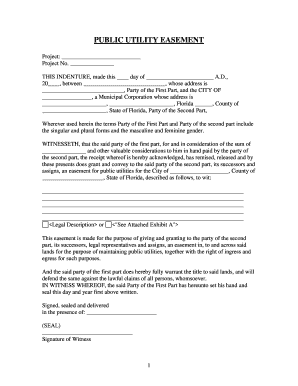
A well-drafted utility easement clarifies responsibilities, prevents disputes over access and maintenance, preserves utility service continuity, and protects both landowner and provider interests. Executed and recorded instruments reduce title risk and make obligations visible to future owners; electronic execution platforms such as signNow can provide secure audit trails and streamline multi-party execution while preserving legal enforceability under U.S. e-signature law.

Several parties commonly create, review, or sign utility easements depending on the project and ownership structure.
Each party has distinct priorities—developers focus on buildability, utilities on uninterrupted access, and owners on compensation and limitations—so early coordination reduces later conflicts.
A clear statement of the rights being granted (install, access, repair) and to whom they are assigned, using precise legal language to avoid ambiguity.
A metes-and-bounds description, recorded plat reference, or coordinates that unambiguously locates the easement area and ties it to the property parcel.
Explicitly list permitted infrastructure types (e.g., fiber, conduit, water lines) and any prohibited uses to limit future disputes or encroachments.
State whether the easement is perpetual, for a fixed term, or conditional; include renewal terms or termination triggers if applicable.
Allocate responsibility for repairs, vegetation control, restoration after work, and provide notice and access procedures for the holder.
Specify insurance minimums, indemnity obligations, and who bears costs of third-party claims arising from work within the easement.
| Field | Configuration |
|---|---|
| Signing Order | Set sequential signing to ensure provider or grantee signs after landowner signature. |
| Authentication Level | Require email plus SMS code or third-party ID verification for higher-assurance signers. |
| Attach Survey | Include recorded plat or survey exhibit as a required attachment for signature completion. |
| Notary & Recording | Add a notary block and, if supported, include instructions for county e-recording. |
Determine how parties will receive and sign the easement and what technical assurance is required for validity and recording.
Choose the delivery method that matches recorder requirements and the required authentication level; platforms like signNow integrate audit trails and advanced authentication to support legal defensibility without replacing local recording rules.
Set a firm date for all signatures to avoid conditional or partial grants.
Record promptly to establish priority against later encumbrances; county practices determine acceptance timing.
Specify whether effectiveness is upon execution, recording, or a future date to avoid ambiguity.
Align required insurance coverage to begin on the effective date of the easement.
Document periodic inspection or maintenance windows and notice periods for access.
Legal review, survey attachment, and stakeholder comments are finalized.
All parties execute the instrument using agreed authentication and notary processes.
Notary acknowledgment or RON is applied per jurisdictional requirements.
County recorder accepts, stamps, and assigns document book and page or instrument number.
| signNow | DocuSign | Adobe Sign | PandaDoc | HelloSign | |
|---|---|---|---|---|---|
| Starting Price | $8/user/mo | $15/user/mo | $14/user/mo | $19/user/mo | $15/user/mo |
| Free Trial | 7-day free trial | Varies | Varies | Varies | Varies |
| Bulk Send | Yes | Yes | Yes | Yes | No |
| Audit Trail | Yes | Yes | Yes | Yes | Yes |
| HIPAA Compliant | Yes | Yes | Yes | No | No |
A town needed a five-foot access corridor to extend water main
A telecom company required a long-term conduit route across multiple parcels