Establishing secure connection…Loading editor…Preparing document…

Virginia Divorce Form

This template is fully customizable. Edit the text, fill out the fields, and send it for signature. Give it a try!
Virginia Divorce Form

What the Virginia Divorce Form Is and when it applies

The Virginia Divorce Form is the set of court documents used to begin or respond to a divorce action in Virginia circuit or general district courts. It typically includes a petition or complaint, a summons, financial disclosure schedules, and parenting or custody worksheets when minor children are involved. Some forms differ by county; e-filing or local clerk procedures may apply. This guide explains core fields, filing destinations, typical timelines, and how to complete a fillable version so submissions meet court clerk expectations and minimize last-minute corrections.

Why an accurate Virginia Divorce Form matters

Accurate completion streamlines court processing, reduces the risk of default judgments, and clarifies custody, support, and property claims. Properly completed forms ensure the clerk can schedule hearings, notify the other party, and enforce deadlines without unnecessary delays or supplemental filings.

Why an accurate Virginia Divorce Form matters

Who typically completes or receives this form

The document serves both procedural and substantive functions: initiating a case and creating an official record used throughout the divorce process.

  • Self-represented litigants filing a petition without counsel; may need clerk assistance for local procedures.
  • Family law attorneys preparing pleadings, discovery, and settlement agreements for court submission.
  • Court clerks and process servers who accept filings, issue summonses, and manage service of process.

Core parts found in a professional Virginia Divorce Form package

A complete filing bundle typically groups the petition, summons, financial statements, child-related worksheets, service proof, and proposed decree. Each piece has a specific purpose in the court record and must be completed in the required format for that jurisdiction.

Caption

Court name, county, docket caption, and case number field. Use the exact county and court division where the petition will be filed to avoid routing delays.
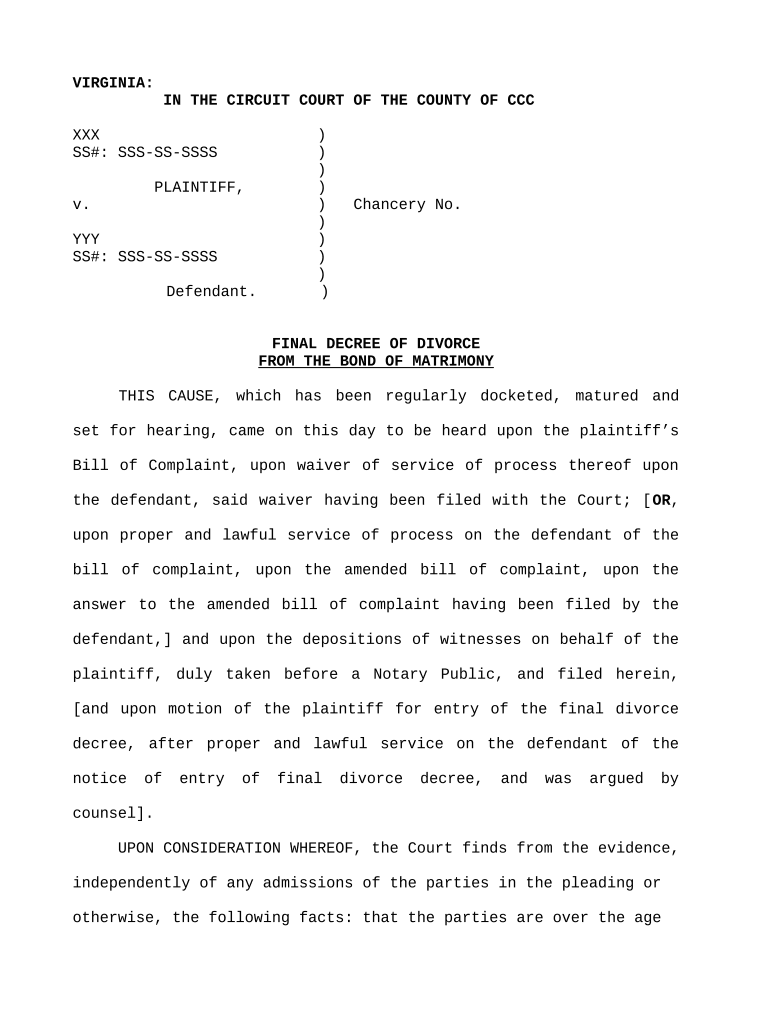
Petition

Sets out parties, marriage date, grounds for divorce, and relief requested. Be explicit about custody, support, spousal support, and property disposition to frame later orders.

Summons

Official notice to the respondent with filing date and response deadline. Proper service is required before the court can issue default or proceed to hearing.

Financial Disclosure

Schedules listing income, expenses, assets, and debts. Courts rely on complete financial disclosures when calculating support or dividing marital property.

Parenting Worksheet

Identifies children, proposed custody, visitation schedules, and school/medical arrangements. Attach supporting documents like school enrollment or pediatrician contacts where relevant.

Proposed Order / Decree

Draft judgment reflecting agreed or requested terms. If approved, the court signs the decree that finalizes divorce terms and becomes enforceable.

Step-by-step: completing and filing the Virginia Divorce Form

Follow a clear sequence to prepare, file, serve, and finalize a divorce filing. Accuracy at each step reduces the need for supplemental filings or court continuances.

  • 01
    Gather records: Collect marriage certificate, financial documents, and child data.
  • 02
    Fill the forms: Complete petition, disclosure, and worksheets carefully.
  • 03
    File with clerk: Submit documents in person or via permitted e-filing.
  • 04
    Serve the respondent: Arrange service per local rules and upload proof.

Where to file, how filings are routed, and service options

Filing destinations and service methods vary by county; confirm local clerk rules. Typical options include in-person filing, e-filing portals, mailed submissions, and certified service by a process server or sheriff.

  • Local Clerk’s Office: Accepts in-person and sometimes dropbox filings.
  • County e-Filing Portal: Use approved portals where available for faster processing.
  • Mail or Courier: Mail filings with tracking and return receipt for proof.
  • Service of Process: Use sheriff, private process server, or certified mail as allowed.

Common timelines and response deadlines to track

Timelines differ by jurisdiction and case specifics. Track service deadlines, mandatory waiting or separation periods, and hearing schedules to maintain procedural compliance.

Respondent Answer Window:

Typically 21–30 days from service depending on state

Mandatory Separation Periods:

Separation timelines vary; consult local practice for grounds

Hearing Scheduling:

Courts set hearings after service and filing are complete

Final Decree Effect:

Decree effective on entry date unless otherwise stated

Record Retention Start:

Retention obligations begin on the filing or entry date

Key milestones in the Virginia divorce timeline

Sequential milestones guide a case from initial filing to final decree; each step may require supporting documents or service proof.

01

Prepare Petition

Complete petition, disclosure, and child-related worksheets.

02

File Documents

Submit packet to the clerk and obtain a case number.

03

Complete Service

Serve the respondent according to local statutes and rules.

04

Attend Hearing

Appear at scheduled hearing or submit proposed decree for approval.

How to configure an online fill-and-sign workflow

A reliable online workflow uses fillable fields, signer authentication, and automated routing to ensure complete submissions and auditable evidence of signature events.

Field Configuration
Upload Document Accept PDF or DOCX and confirm pagination
Place Fields Add signature, date, and text fields where required
Authentication Use email or SMS code for signer verification
Routing Order Set sequential signing for petitioner then respondent

Technical requirements for e-signing and e-submitting divorce forms

Confirm format compatibility and audit-trail retention with the court clerk before submitting electronic filings.

  • File Formats: PDF and DOCX supported
  • Signer Authentication: Email, SMS, or stronger methods
  • Integrations: Works with case management systems

eSignature vendor comparison for handling the Virginia Divorce Form

Comparative pricing and feature overview for common eSignature providers. signNow is listed first as the baseline platform option; verify vendor plans for specific legal or enterprise features.

signNow DocuSign Adobe Sign PandaDoc HelloSign
Starting Price $8/user/mo $15/user/mo $14/user/mo $19/user/mo $15/user/mo
Free Trial 7-day trial Varies Varies Varies Varies
Bulk Send Yes Yes Yes Yes No
Audit Trail Yes Yes Yes Yes Yes
HIPAA Compliant Yes Yes Yes No No

Essential fields every Virginia Divorce Form should include

Petitioner Name: Full legal name as ID
Respondent Name: Full legal name or best-known name
Case Number: Clerk-assigned docket number
Grounds Stated: Specific legal grounds alleged
Relief Requested: Custody, support, property items
Signature Date: MM/DD/YYYY signature date

Common mistakes that delay divorce filings

  • Incomplete financial disclosures that require supplemental filings and can postpone hearings.
  • Incorrect court or county listed in the caption leading to rejected or misrouted filings.
  • Failure to serve the respondent according to local rules, creating grounds for dismissal.
  • Using inconsistent names or dates across documents that confuse clerks and opposing counsel.

Consequences of incorrect or incomplete filings

Service Failure: Risk of dismissal
Missing Signatures: Clerk rejection or delay
Wrong Jurisdiction: Transfer or dismissal
Incorrect Financials: Support miscalculations
Late Filing: Scheduling and enforcement issues
Improper Notarization: Document treated as invalid

Practical tips for accurate and efficient completion

Use a checklist, verify local clerk rules, and keep an organized record of service and filing proofs to reduce rework and support enforceability.

Use a pre-filing checklist
Confirm every page, signature, and supporting exhibit are present. Cross-check names, dates, and attachments to prevent clerk rejections and ensure complete service.
Confirm local clerk rules
Review county clerk e-filing and paper submission requirements before filing. Some counties require originals for certain affidavits or restrict electronic-only submissions.
Keep service proof
Retain stamped envelopes, affidavits of service, or process server receipts. Courts require proof of proper service to advance cases and to enter default judgments when appropriate.
Save signed copies securely
Store executed petitions and decrees with audit trails or notarizations in a secure location for enforcement or appeals.

Realistic filing scenarios to illustrate common workflows

Two representative examples show how different case types affect form completion and supporting attachments.

Contested Custody Case

A petitioner files detailed parenting worksheets and financial disclosure

  • court schedules temporary hearing within weeks
  • complete records, service proof, and counsel coordination reduce continuances and help the judge set interim custody orders.

Uncontested Agreement

Parties submit a signed separation agreement with the petition

  • both parties sign the proposed decree or consent order
  • the court enters the final decree sooner when documentation and service are complete and both parties appear or waive appearance.

Frequently asked questions about the Virginia Divorce Form

Answers to typical questions about electronic signatures, notarization, deadlines, and filing concerns for Virginia divorce proceedings.


Need help? Contact support

be ready to get more
Join over 28 million airSlate SignNow users