Establishing secure connection…Loading editor…Preparing document…

Waiver of Guardianship

This template is fully customizable. Edit the text, fill out the fields, and send it for signature. Give it a try!
Waiver of Guardianship

What a Waiver of Guardianship Is and when it applies

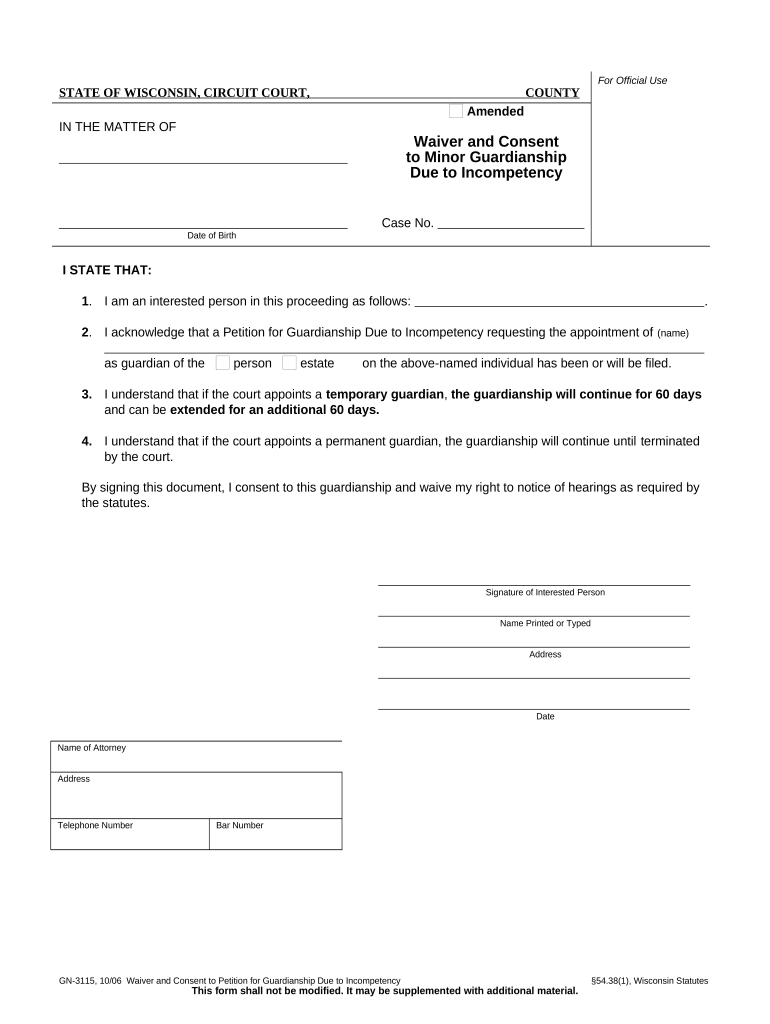
A Waiver of Guardianship is a signed document in which a person who might otherwise become a guardian formally declines the appointment or waives the right to act as guardian for a minor or incapacitated adult. The waiver clarifies who will assume care, streamlines court proceedings, and can be requested by courts, proposed guardians, or agencies when guardianship is being considered. The form is typically used in probate or family court contexts and may need notarization, witness signatures, or filing with the court depending on state law.

Why a clear Waiver of Guardianship matters

A properly completed waiver prevents misunderstandings about consent and reduces delays in guardianship proceedings. It documents an individual's choice not to serve, helps courts determine best placement or guardianship alternatives, and creates a permanent record for estate, healthcare, or school administrators who rely on legal decision-making authority.

Why a clear Waiver of Guardianship matters

Who commonly prepares or signs a Waiver of Guardianship

Typical parties associated with a waiver include the person asked to serve, immediate family members, attorneys, and the court clerk or probate office receiving the document.

  • Proposed guardian who declines — Documents voluntary decision not to accept appointment, clarifies consent status.
  • Parent or legal custodian — Confirms existing parental rights or declines transfer of guardianship to another party.
  • Court personnel or agency representative — Receives and files the waiver as part of the guardianship record.

Different jurisdictions and situations will change who must sign; consult the local probate rules or counsel to confirm the required parties for filing and acceptance.

Representative signer profiles

Declining Guardian

A close relative or fiduciary who is asked to serve but chooses not to accept guardianship. The waiver records voluntary refusal, prevents the court from assuming consent, and may include reasons to support court findings.

Custodial Parent

A biological or legal parent who signs to confirm they retain parental authority or decline transfer. The parent's waiver is often important evidence in family or probate court proceedings.

Core elements included in a professional Waiver of Guardianship

A clear waiver contains standardized sections so courts and third parties can rely on the document without additional clarification or re-signing.

Parties

Full legal names and relationships of the person waiving, the protected person (minor or incapacitated adult), and any proposed guardian or alternative caretaker.
Statement of Waiver

A concise declaration that the signer voluntarily declines appointment or waives the right to act as guardian, including the scope and limits of the waiver.

Effective Date

The date the waiver is executed, which governs when the waiver takes effect for court or administrative purposes.

Signatures

Signature block for the waiving party with printed name and date; space for witness or notary acknowledgment when required.

Notary or Witness Section

Notary acknowledgment or witness lines, including county, state, and commission information when notarization is required by statute or court rule.

Filing Instructions

A short block describing where to file or deliver the waiver (e.g., probate clerk, case file number) and any attachments the court expects.

Essential document and security metadata to include

Full name: Exact legal name
Date: MM/DD/YYYY format
Relationship: Role to protected person
Court file: Case number if known
Notary details: Commission info if notarized
Audit trail: Timestamp and signer IP

Step-by-step: filling and submitting a Waiver of Guardianship

Follow these sequential steps to prepare a waiver for court or administrative acceptance, from completion through filing.

  • 01
    Prepare form: Complete all required fields with accurate legal names.
  • 02
    Authenticate identity: Have signer provide ID for notary or use approved e-authentication.
  • 03
    Notarize or witness: Obtain notarization or witness signatures if the jurisdiction requires them.
  • 04
    File with court: Submit to the probate clerk or include with related guardianship filings.

Recommended digital workflow settings for online completion

Use a consistent online workflow to capture signatures, identity evidence, and filing metadata for courts and agencies.

Field Configuration
Signature Field Require signer signature and date; make mandatory
ID Verification Enable document ID check or upload of government ID
Notary Block Include notarization fields if state requires notarized waiver
Audit Trail Capture IP, timestamp, and email for all signer actions

Technical requirements for electronic completion and submission

Ensure the chosen platform supports identity verification, tamper-evident signatures, and formats courts will accept.

  • File formats: PDF/A or PDF/X for court compatibility
  • Authentication: Email OTP or ID credential analysis
  • Integrations: Connect to case management or storage systems

Use a platform that preserves an audit trail and provides a certified copy for the court; verify the court will accept e-filed copies or require an original paper filing.

Typical electronic signing flow for a Waiver of Guardianship

A standard e-signing workflow reduces friction while collecting required evidence of intent and identity for legal acceptance by courts or agencies.

  • Upload document: Sender uploads completed waiver PDF to the signing platform.
  • Place fields: Add signature, date, and optional ID upload fields.
  • Authenticate signer: Signer confirms identity with email link, SMS, or KBA.
  • Capture audit trail: Platform records timestamps, IPs, and completed actions.

Timing considerations and typical filing expectations

Processing and filing timeframes for a waiver depend on whether it accompanies a guardianship petition, is submitted in response to a court order, or is retained for administrative use.

Pre-petition submission:

Submit with guardianship petition as directed by local court rules; timing varies by county.

Court review period:

Courts may schedule review or hearing within weeks to months depending on docket and urgency.

Emergency guardianship:

Waivers may be accepted more quickly if submitted during expedited or emergency proceedings.

Remote notarization timing:

RON sessions can add scheduling steps; platform session availability affects turnaround.

Record retention timing:

Keep the executed waiver with case file until local retention requirements are met.

Common risks and legal consequences of incorrect waivers

Voidable Waiver: Court may deem waiver invalid
Delayed Proceedings: Requires additional filings
Identity Challenges: Leads to admissibility disputes
Improper Notarization: May be rejected by court
Missing Case Info: Clerks may refuse filing
Unauthorized Signer: Potential legal liability

Realistic scenarios showing how a waiver is used

These condensed examples show common situations where a signed waiver resolves a procedural issue without creating a guardianship.

Family Agreement Example

A sibling asked to serve declines to avoid relocation.

  • The sibling signs a waiver and the court names a local guardian.
  • The waiver reduced the need for a contested hearing and clarified immediate caregiving responsibilities while the court reviewed alternatives.

Medical Proxy Example

An adult relative declines guardianship but wants limited medical authorization for emergencies.

  • They sign a waiver and provide a separate limited medical consent.
  • The combined documents allowed hospital staff to treat the patient promptly while preserving the relative's decision not to assume full guardianship.

Typical eSignature vendor features and starting prices for waiver workflows

Compare entry pricing and common capabilities when selecting an e-signature vendor for executing and storing Waiver of Guardianship documents.

signNow DocuSign Adobe Sign PandaDoc HelloSign
Starting Price $8/user/mo $15/user/mo $14/user/mo $19/user/mo $15/user/mo
Free Trial 7-day free trial, no credit card Varies Varies Varies Varies
Bulk Send Yes Yes Yes Yes No
Audit Trail Yes Yes Yes Yes Yes
HIPAA Compliant Yes Yes Yes No No

Common questions about Waiver of Guardianship — quick answers

Answers address common procedural and technical questions about validity, signatures, notarization, and retraction of waivers.


Need help? Contact support

be ready to get more
Join over 28 million airSlate SignNow users