Establishing secure connection…Loading editor…Preparing document…

Wisconsin Petition for Sentence Adjustment

This template is fully customizable. Edit the text, fill out the fields, and send it for signature. Give it a try!
Wisconsin Petition for Sentence Adjustment

What the Wisconsin Petition for Sentence Adjustment Is

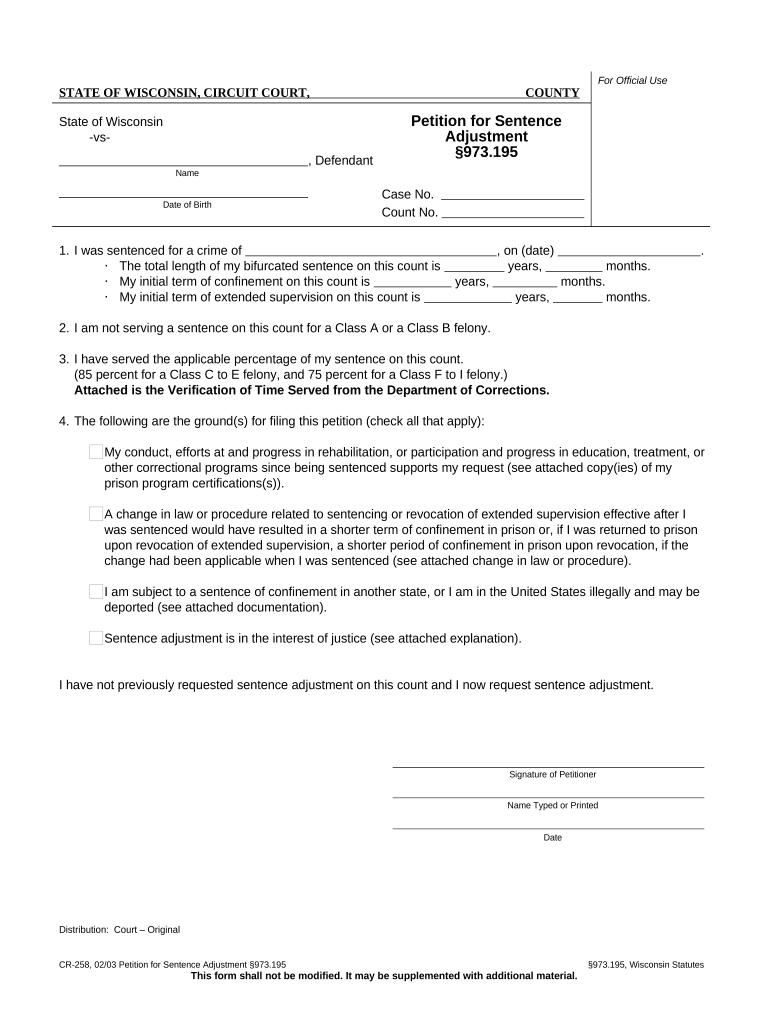
The Wisconsin Petition for Sentence Adjustment is a written request filed in the sentencing court asking a judge to modify, reduce, or otherwise adjust an existing criminal sentence. The petition typically explains changed circumstances, rehabilitation efforts, legal errors, or new evidence that may justify relief and asks the court to exercise statutory or equitable authority to alter the original sentence. Filings must comply with local court rules, include required supporting documentation, and be served on opposing parties as required by Wisconsin procedure.

Why Petitioning for a Sentence Adjustment Matters

A petition provides a formal channel to request shorter custody, alternative supervision, correction of sentencing errors, or eligibility for release programs when circumstances change.

Why Petitioning for a Sentence Adjustment Matters

Who Typically Prepares and Files This Petition

The petition is used by people who were sentenced in Wisconsin criminal courts and by their attorneys or authorized representatives.

  • Defendants filing pro se who seek sentence reduction or reconsideration following changed circumstances.
  • Defense attorneys preparing legal memoranda, records, and affidavits that support an adjustment request.
  • Post-conviction counsel and appointed representatives handling motions under state postconviction procedure.

Core Parts of a Professional Petition for Sentence Adjustment

A clear, well-structured petition organizes case data, factual background, legal grounds, and attachments so the court can assess the request without ambiguity.

Caption

Complete case caption with court name, county, cause number, judge, and party names so the petition is filed in the correct docket and routed properly.
Statement of Facts

Concise factual timeline describing the conviction, sentence imposed, post-sentencing events, and any new facts that justify the requested adjustment.

Legal Grounds

Cite specific statutory authority or procedural rule permitting modification and explain how facts meet those legal standards in neutral legal terms.

Sentencing History

Describe original sentence components (confinement, extended supervision, fines) and any credits, prior adjustments, or related court orders.

Supporting Evidence

Attach records such as medical reports, treatment certificates, prison disciplinary records, and affidavits showing rehabilitation or changed circumstances.

Certificate of Service

A statement that lists parties served, methods of service, and dates to validate procedural notice to the prosecutor and other interested parties.

Step-by-Step: Preparing and Filing the Petition

Follow a structured sequence to compile records, draft arguments, and meet filing rules so the court can consider the request promptly.

  • 01
    Gather Records: Collect judgment, sentencing transcript, medical and program records, and any new evidence.
  • 02
    Draft Petition: Prepare caption, factual statement, legal grounds, and specific prayers for relief.
  • 03
    Attach Evidence: Include affidavits, certificates, and supporting documents as labeled exhibits.
  • 04
    File and Serve: File with the sentencing court clerk and serve the district attorney and probation as required.

How to Configure an Online Petition Workflow

If using electronic filing or an eSignature platform, configure document settings, signer authentication, and format options before sending.

Field Configuration
Document Upload Accept PDF and DOCX; check OCR where available for searchable text.
Signature Placement Add signature and date fields for petitioner, counsel, and any declarants.
Authentication Use email link or SMS code; use stronger ID verification when required.
Export Format Save signed record as flattened PDF with audit trail attached.

Where to File and How the Submission Routes

Petitions are filed in the county circuit court that entered the sentence; submission options include in-person filing, mail, or electronic filing where supported.

  • Court Clerk Filing: File the original with the sentencing court clerk in the county of conviction.
  • Mail Filing: Mail a signed original and required copies by certified mail if permitted by local rules.
  • Electronic Filing: Use the court's e-filing system when available; confirm accepted file types and cover sheets.
  • Service on Parties: Serve the district attorney, probation, and any identified victims per procedural rules.

Digital Signing and eSubmission Requirements

Electronic submission requires platform support for signed PDFs, signer authentication, and secure transmission.

  • File Format: PDF/A or standard PDF preferred
  • Authentication: Email/SMS code or stronger KBA
  • Audit Trail: Time stamp, IP, and action log

Typical Timelines and What to Expect After Filing

Timing varies by court. Expect administrative review, potential response from prosecution, and a hearing if the court grants consideration.

Initial Filing Window:

File promptly after new circumstances arise; no universal statutory deadline

Service Deadline:

Serve opposing parties at or before filing per local rule; some courts require proof of service

Prosecutor Response:

Prosecutor typically has time to respond; response windows vary by jurisdiction

Hearing Scheduling:

If set, hearings are usually scheduled within 30–90 days depending on docket

Decision Timeframe:

Judicial rulings may be issued from the bench or in writing; post-hearing decisions timing varies

Key Milestones in the Petition Process

Track milestones from drafting through the court's decision so each procedural step is completed on time.

01

Draft and Compile

Assemble petition, exhibits, and certificate of service before filing.

02

File with Clerk

Submit original to the clerk and obtain stamped copies or e-filing confirmation.

03

Serve Parties

Ensure district attorney and others receive copies per local service rules.

04

Attend Hearing

Appear on the scheduled date with witnesses or additional evidence as ordered.

Common Preparation Mistakes to Avoid

  • Failing to include a complete case caption or accurate cause number, which delays clerical docketing and may lead to misfiling.
  • Attaching unsworn or uncertified documents without affidavit or foundation when courts require authenticated evidence.
  • Neglecting to serve the district attorney or probation officer properly, which can lead to dismissal for lack of service.
  • Using vague relief language like 'reduce sentence as appropriate' instead of specifying precise modification requested.

Risks and Consequences of an Incorrect Petition

Dismissal Risk: Improper service or incorrect caption may result in dismissal.
Perjury Exposure: False sworn statements can lead to criminal charges.
Lost Time: Clerical errors cause delays and scheduling setbacks.
Waived Grounds: Failure to preserve issues may limit later appeals.
Fee Forfeiture: Incorrect fee payment can delay filing acceptance.
Unaddressed Service: Missing service deadlines can forfeit court consideration.

Required Documentation and Security Considerations

Identity: Defendant legal name as on court records
Judgment: Certified copy of judgment of conviction
Supporting Records: Medical, program, or disciplinary records
Signature: Signed petition and dated signature blocks
Audit Trail: Keep filing confirmations and proof of service
Data Security: Encrypt electronic files for transmission and storage

Practical Examples of Electronic Petition Workflows

These examples illustrate how e-signature and digital records can simplify submission and tracking while preserving evidentiary trails.

Optica Ventures LLC

A legal team reduced administrative steps by digitizing exhibits and service proofs.

  • The interface is simple and easy-to-use for our team; more importantly, it is just as easy for our customers.
  • Digital filing allowed the team to attach certified records and retain an audit trail for subsequent court hearings and appeals.

Martin Properties

An office managing multiple case files standardized form templates and signatures for repeat filings.

  • I can process and execute all of these documents online with 100% compliance and built-in security.
  • Standardized digital templates helped reduce clerical errors and ensured consistent proof of service across filings.

eSignature Pricing and Feature Comparison for Filing and Signing

This table compares basic pricing and common features for platforms often used to sign and submit legal petitions; signNow appears first per vendor listing conventions.

signNow DocuSign Adobe Sign PandaDoc HelloSign
Starting Price $8/user/mo $15/user/mo $14/user/mo $19/user/mo $15/user/mo
Free Trial 7-day free trial Varies Varies Varies Varies
Bulk Send Yes Varies Varies Varies Varies
Audit Trail Yes Yes Yes Yes Yes
HIPAA Compliant Yes Yes Yes No No
Envelope Cap No cap 100 envelopes/user/year Varies Varies Varies

Frequently Asked Questions About the Petition

Answers to common procedural and technical questions about preparing, signing, and filing a Wisconsin Petition for Sentence Adjustment.


Need help? Contact support

be ready to get more
Join over 28 million airSlate SignNow users