Establishing secure connection…Loading editor…Preparing document…

Minnesota Writ of Prohibition

This template is fully customizable. Edit the text, fill out the fields, and send it for signature. Give it a try!
Minnesota Writ of Prohibition

What the Minnesota Writ of Prohibition Is

A Minnesota Writ of Prohibition is an extraordinary appellate remedy used to stop a lower court, administrative tribunal, or public officer from acting beyond its lawful authority. The writ asks an appellate tribunal to prohibit ongoing action that is ultra vires, lacks subject-matter jurisdiction, or otherwise exceeds statutory powers. A proper petition frames the jurisdictional defect, sets out concise supporting facts tied to the record, identifies the precise relief requested, and explains why ordinary appeals or remedies are inadequate.

Why a Minnesota Writ of Prohibition Matters

A Minnesota Writ of Prohibition preserves jurisdictional limits and prevents irreparable harm when a tribunal or official acts beyond authority. It offers a focused, expedited remedy where later appeal would not undo the ongoing, ultra vires conduct or its consequences.

Why a Minnesota Writ of Prohibition Matters

Who Typically Files a Minnesota Writ of Prohibition

Typical filers include parties seeking to stop ultra vires action by tribunals, government agencies, or officers.

  • Private litigants challenging administrative agency orders that exceed statutory authority.
  • Corporations disputing lower court jurisdiction or improper interlocutory procedures affecting business rights.
  • Public officials or counties seeking to clarify limits of regulatory enforcement or procedural jurisdiction.

Who May Sign or Authorize the Petition

Individual Petitioner

An individual petitioner must identify themselves precisely, present a clear account of the tribunal action being challenged, and sign the petition. If self-represented, ensure filings comply with appellate formatting and service rules to avoid dismissal for procedural defects.

Authorized Counsel

An attorney of record signs and files petitions on behalf of a client; include a contemporaneous notice of appearance and power of attorney if required. Counsel should certify factual support and ensure exhibit indexes match the record citations.

Core Components of a Professional Minnesota Writ of Prohibition

A complete writ organizes jurisdictional grounds, a concise factual record, legal argument, requested relief, exhibits, and proof of service so the appellate court can resolve urgency and authority issues efficiently.

Caption

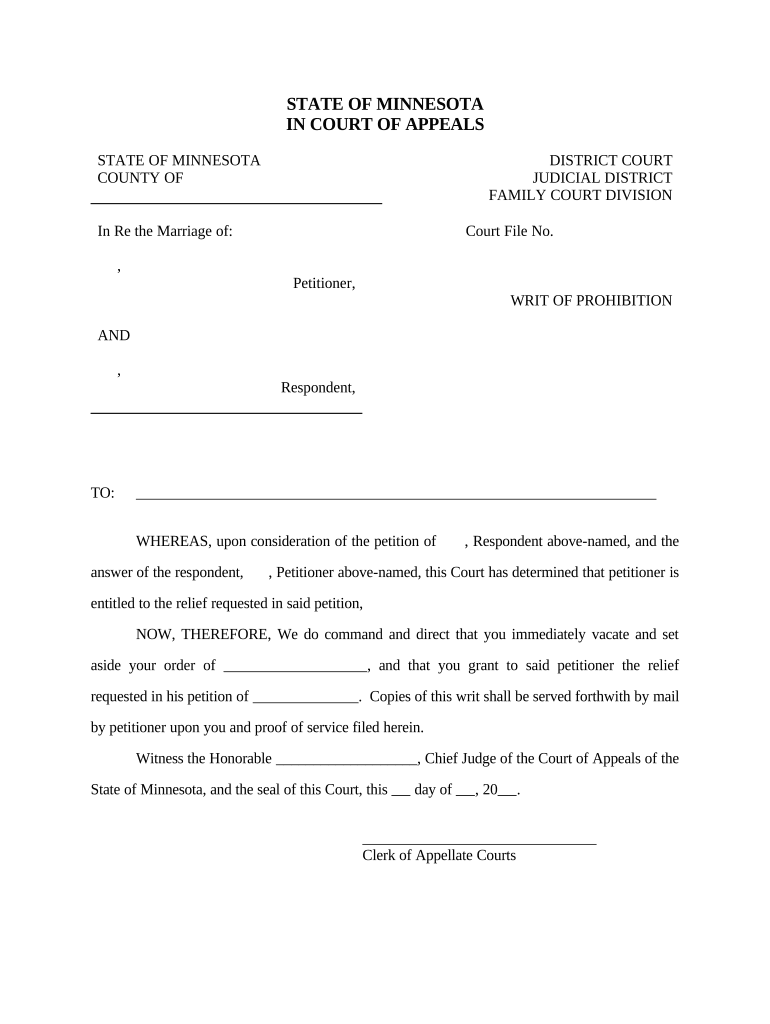
Complete court caption listing the trial court, case number, parties, and appellate court designation to ensure correct docketing and consistent service across documents.
Statement of Facts

Succinct, chronological facts focused on the jurisdictional act; cite record pages, orders, and dates so the court can verify the alleged ultra vires conduct quickly.

Grounds for Relief

Legal theory showing lack of jurisdiction or excess of authority with statutory and case law support, explaining why an ordinary appeal is inadequate.

Relief Requested

Precise request for prohibition, any interim stay, and scope of relief, including any limitations or conditions the court should impose.

Exhibits

Numbered attachments such as certified orders, transcripts, and agency records keyed to factual assertions; label pages and reference them in the petition.

Certificate of Service

Clear proof of service showing who was served, method, date, and recipient addresses to satisfy appellate and local rules.

Step-by-Step: Prepare and File the Writ

Follow this step-by-step checklist to prepare, sign, and submit a Minnesota Writ of Prohibition correctly and on time.

  • 01
    Identify Error: Pinpoint jurisdictional excess or lack of jurisdiction.
  • 02
    Gather Records: Collect orders, transcripts, and exhibits.
  • 03
    Draft Petition: State facts, law, and concrete relief.
  • 04
    File and Serve: File with appellate clerk and serve parties.

How to Customize and Submit the Petition Online

Set up an electronic workflow that matches filing and service requirements while preserving the certified record and proof of service.

Field Configuration
Document Format PDF/A is preferred for archival and redaction stability
Signature Method Typed, uploaded image, or authenticated e-signature per court allowance
Authentication Email or SMS code to verify signatory identity
Retention Maintain original signed PDF and audit trail for the record

Where to File and How Documents Are Routed

Routing depends on requested relief and court rules; some petitions go directly to the appellate clerk while others begin as filings in the trial court with immediate notice to the appellate court.

  • Appellate Court: File in Minnesota Court of Appeals or Supreme Court.
  • Trial Court Clerk: File notice or certified copy as required.
  • Opposing Parties: Serve petitioner and respondent with documents.
  • Clerk's Office: Provide required filing fee and copies.

Digital Filing and eSubmission Considerations

Electronic submission and e-signing support modern workflows for Minnesota filings when authorized by court rules or counsel.

  • File Formats: PDF and DOCX accepted by many platforms
  • Authentication: Email, SMS, or KBA options for signer verification
  • Integrations: Connects to cloud storage and case tools

Typical Timelines and Filing Expectations

Timing for a Minnesota Writ of Prohibition varies by court and urgency; emergency relief requires faster action and clear notice of immediate harm.

Emergency Stay Filings:

File immediately when irreparable harm is present

Ordinary Petitions:

File as soon as jurisdictional defect is discovered

Clerk Review Time:

Varies by court docket and caseload

Opposition Response:

Court may set short deadlines for responses

Decision Window:

Timing depends on case complexity and priority

Key Milestones in the Writ Process

A typical sequence from drafting to resolution includes distinct milestones that determine urgency and required court action.

01

Draft and Review

Prepare petition and compile exhibits for filing

02

File and Pay

Submit to appellate clerk with required fee

03

Service on Parties

Serve respondents and lower tribunal promptly

04

Court Disposition

Court issues order, stay, or denial

Common Mistakes to Avoid

  • Failing to tie factual assertions to record citations, which undermines the court's ability to verify the jurisdictional claim.
  • Submitting incomplete or unnumbered exhibits that make it difficult for judges to match evidence to petition assertions.
  • Missing service or filing requirements under appellate rules, resulting in dismissal or procedural delay.
  • Requesting overly broad relief without specifying scope, which may lead courts to deny emergency or interim relief.

Penalties and Risks of an Incorrect Petition

Dismissal Risk: Petition may be dismissed for procedural defects
Sanctions: Court may sanction frivolous or bad-faith filings
Waiver: Untimely claims can be deemed waived
Delay: Improper filings prolong relief and increase costs
Fee Forfeiture: Filing fees may be lost on dismissal
Record Gaps: Missing exhibits weaken appellate arguments

How a Writ of Prohibition Differs from Similar Remedies

Compare common writs to clarify when prohibition is the appropriate remedy versus other extraordinary writs like mandamus.

Criteria Writ of Prohibition Writ of Mandamus
Purpose stop action compel action
Typical Target tribunal or officer public official
Relief Type prevent enforcement order performance
Urgency high high

eSignature Vendor Pricing Comparison for Filing Workflows

Comparison of common e-signature vendors and capabilities to support petition preparation and internal approvals; signNow is listed first per platform reference.

signNow DocuSign Adobe Sign PandaDoc HelloSign
Starting Price $8/user/mo $15/user/mo $14/user/mo $19/user/mo $15/user/mo
Free Trial 7-day free trial Varies by plan Varies by plan Varies by plan Varies by plan
Bulk Send Yes Yes Yes Yes No
Audit Trail Yes Yes Yes Yes Yes
HIPAA Compliant Yes Yes Yes No No

Representative Use Cases

Two practical examples show how parties use a Minnesota Writ of Prohibition to protect jurisdictional boundaries and halt ultra vires enforcement.

Agency Enforcement Challenge

A county challenged an agency order that exceeded statutory limits and sought immediate relief.

  • The writ targeted jurisdictional overreach.
  • The appellate court considered record citations and issued a narrowly tailored prohibition preventing further enforcement while preserving appeal rights.

Court Procedure Dispute

A litigant faced an interlocutory order outside trial court authority and petitioned for prohibition.

  • The primary issue was lack of subject-matter jurisdiction.
  • The writ clarified jurisdictional boundaries, prevented prejudicial action, and expedited resolution on the legal question without full appeal.

Frequently Asked Questions About the Minnesota Writ of Prohibition

Answers to common procedural and practical questions about when to use a writ, service rules, electronic submissions, and timing considerations.


Need help? Contact support

be ready to get more
Join over 28 million airSlate SignNow users