Establishing secure connection…Loading editor…Preparing document…

Writ of Possession Form

This template is fully customizable. Edit the text, fill out the fields, and send it for signature. Give it a try!
Writ of Possession Form

What the Writ of Possession Form is and when it applies

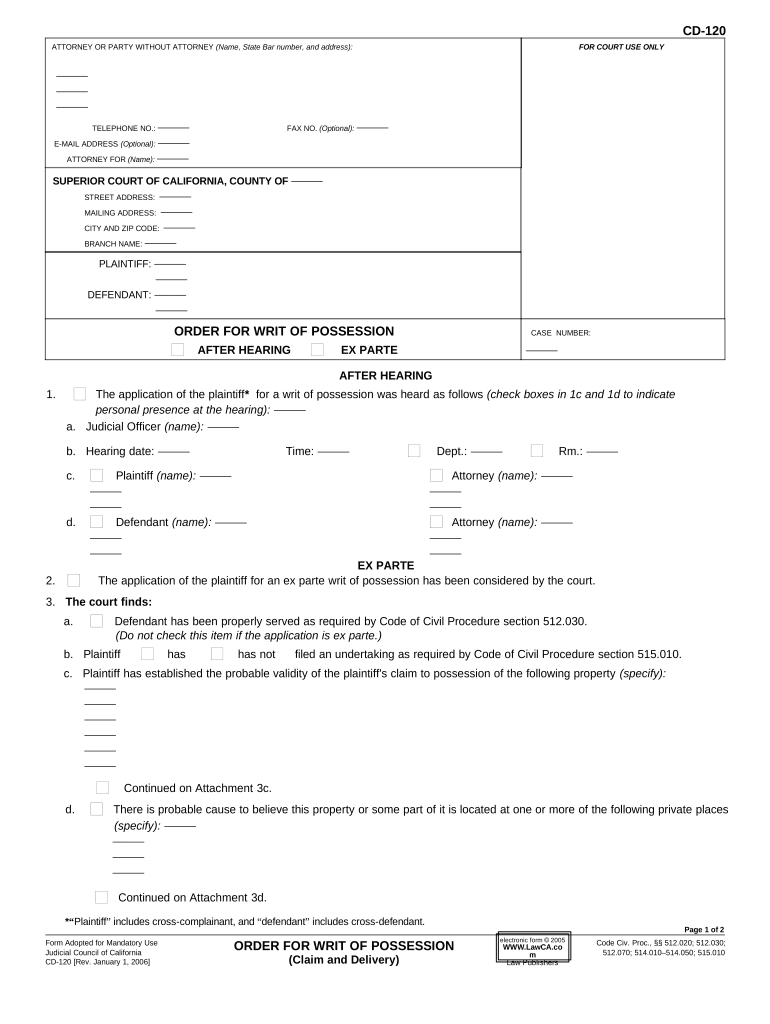
The Writ of Possession Form is a court-issued document that authorizes a landlord or property owner to regain physical control of real property following a final eviction judgment. It typically identifies the court, case number, judgment date, parties, property address, and enforcement instructions. Once issued, the writ directs local law enforcement or a sheriff to carry out removal and reentry under specified timelines. Because courts and counties vary, completing the form with exact local identifiers and following court procedures is essential to effective enforcement and to avoid delays.

Why a correct Writ of Possession Form matters

A properly completed writ provides legally recognized authority for enforcement, documents specific instructions for sheriffs, and reduces the likelihood of administrative delays or enforcement refusals by ensuring the court and enforcers have precise case details.

Why a correct Writ of Possession Form matters

Who prepares and files the Writ of Possession Form

Before filing, confirm local court forms and service rules; incomplete filings often delay enforcement or require additional hearings or supplemental filings.

  • Landlords seeking removal of holdover tenants after a court judgment
  • Property managers coordinating with sheriff's office for physical eviction logistics
  • Attorneys filing enforcement documents or preparing writs for client cases

Essential elements to include on a professional Writ of Possession Form

A compliant form clearly ties the writ to a specific judgment and provides actionable instructions for enforcement personnel, minimizing ambiguity and administrative refusal.

Case Header

Include court name, docket or case number, and judgment date so court clerks and the sheriff can match the writ to the underlying record without ambiguity.
Party Names

Record plaintiff and defendant full legal names exactly as used in the judgment; mismatched names may prevent enforcement or require supplemental affidavits.

Property Details

Provide the full street address, unit number, and parcel identifier where available so officers can locate the premises precisely during execution.

Judgment Summary

State the judgment date, nature of the judgment (possession only or possession plus monetary judgment), and any conditions affecting enforcement.

Execution Instructions

Specify whether personal property removal, lock change, or occupant escorting is authorized and any time-of-day or safety limitations for enforcement.

Issuing Signature

Show the judge or clerk signature, issuance date, and court seal or stamp as required by local court rules to validate the writ.

Key data fields every Writ of Possession Form must contain

Court Identifier: Court name and case number
Judgment Date: Judgment issuance date
Plaintiff: Full legal name
Defendant: Full legal name
Property Address: Complete street address
Execution Note: Sheriff or marshal instructions

Step-by-step: Filling out a Writ of Possession Form

Follow these ordered steps to prepare a complete writ that aligns with a final judgment and local court requirements.

  • 01
    Confirm Judgment: Verify final judgment and docket details.
  • 02
    Fill Identifiers: Enter court, case number, parties, and property address.
  • 03
    Add Execution Terms: Specify what enforcement actions are authorized.
  • 04
    File and Serve: Submit to court clerk and coordinate with sheriff.

Where to file and who receives the writ

The filing destination and distribution depend on local practice; use this routing guide to ensure the writ reaches enforcement authorities and interested parties.

  • Court Clerk: File the writ with the issuing court's clerk's office.
  • Sheriff or Marshal: Provide an executed copy to the county sheriff for service.
  • Defendant Service: Ensure the defendant receives required notice per court rules.
  • Plaintiff Records: Retain a stamped filed copy for your records.

How to configure an online completion and filing workflow

Set up fields, signer roles, and delivery steps before sending the form to avoid missing data or incorrect routing.

Field Configuration
Case Identifiers Required text fields, validated format
Issuing Signature Clerk or judge signature role assigned
Execution Instructions Conditional text block visible to clerks
Document Attachments Attach judgment and proof of service

Digital distribution and platform considerations

Ensure the platform meets legal and court requirements for record retention, audit trails, and any needed notarization; verify support for integrations like Salesforce or NetSuite where relevant.

  • File Formats: PDF and DOCX supported
  • Integrations: Connects with case management systems
  • Authentication: Email, SMS, or advanced methods

Typical timelines and what to expect after filing

Local rules determine specific deadlines. Expect a short post-judgment waiting period, then scheduling with law enforcement for execution; timelines commonly vary by county workload.

Post-judgment waiting period:

Often 3–14 days depending on court rules

Sheriff scheduling window:

May take 5–30 days to schedule execution

Notice to occupants:

Some jurisdictions require advance notice before execution

Revisit or stay:

Appeals or stays can pause enforcement immediately

Record retention:

Keep filed writ and proof of execution permanently

Key milestones from judgment to restored possession

Track these sequential milestones to ensure timely enforcement and to anticipate possible delays or required actions.

01

Judgment Entered

Court issues final judgment for possession and any money judgment

02

Writ Issued

Clerk prepares and signs the writ for enforcement

03

Sheriff Execution

County law enforcement schedules and carries out removal

04

Property Restored

Plaintiff regains possession and secures premises

Common mistakes that delay enforcement

  • Using a mismatched party name or case number that prevents the sheriff from matching the writ to the court record and halts execution.
  • Failing to attach the certified copy of the judgment or required proof of notice, prompting clerks to reject the writ for incomplete documentation.
  • Leaving execution instructions vague—unspecified authority for property removal or lock changes can cause law enforcement to decline enforcement.
  • Missing local filing steps or required clerk stamps that produce administrative rejections and require resubmission or supplemental hearings.

Risks and legal consequences of an incorrect writ

Enforcement Denied: Sheriff may refuse to execute
Civil Liability: Claims for wrongful eviction possible
Court Sanctions: Fines or corrective orders
Delay Costs: Additional hearings and fees
Reputational Risk: Tenant litigation or complaints
Extra Expenses: Refile costs and attorney fees

eSignature vendor comparison for completing and delivering the Writ of Possession Form

Common vendor differences in pricing and compliance can affect cost and suitability for court-related workflows; signNow appears first as a vendor option in this comparison.

signNow DocuSign Adobe Sign PandaDoc HelloSign
Starting Price $8/user/mo $15/user/mo $14/user/mo $19/user/mo $15/user/mo
Free Trial Yes, 7-day trial Varies by vendor Varies by vendor Varies by vendor Varies by vendor
Bulk Send Yes Yes Yes Yes No
Audit Trail Yes Yes Yes Yes Yes
Envelope Cap No cap 100 envelopes/user/year Varies Varies Varies

Frequently asked questions about preparing and enforcing a Writ of Possession

Answers below address common uncertainties about validity, e-signing, notarization, enforcement refusal, and how to update or withdraw a writ.


Need help? Contact support

be ready to get more
Join over 28 million airSlate SignNow users