Establishing secure connection…Loading editor…Preparing document…

California Unemployment Insurance Application

This template is fully customizable. Edit the text, fill out the fields, and send it for signature. Give it a try!
California Unemployment Insurance Application

What the California Unemployment Insurance Application Is

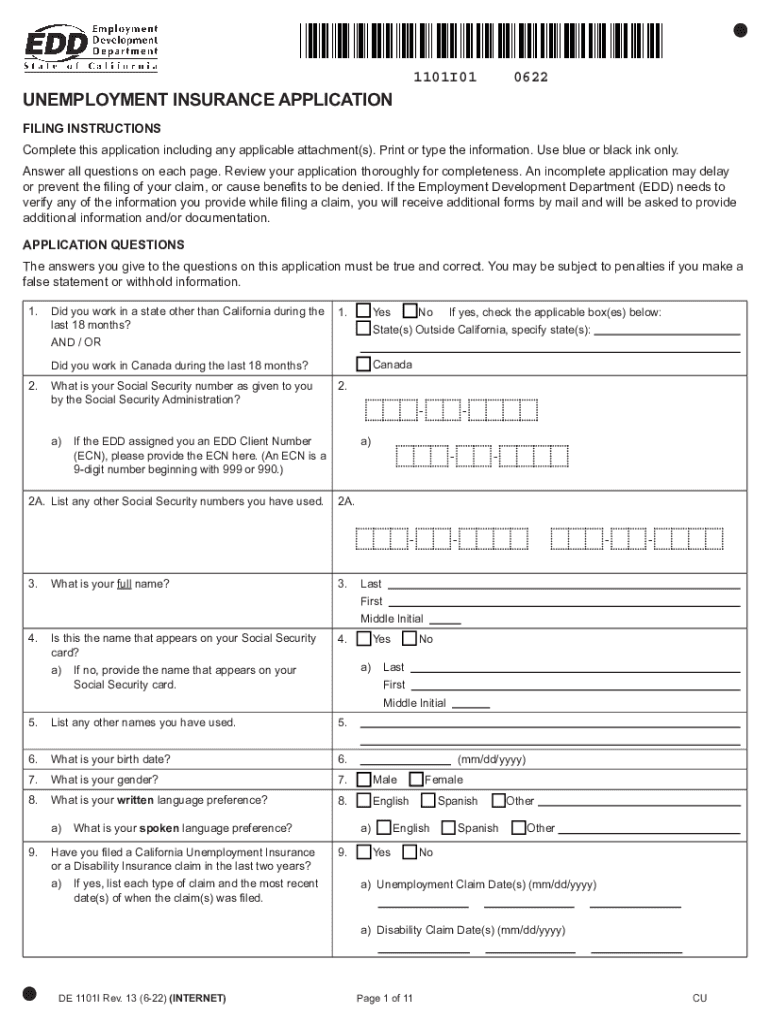
The California Unemployment Insurance Application is the official form individuals use to request state unemployment benefits administered by the California Employment Development Department (EDD). It gathers employment history, separation reasons, recent earnings, and claimant contact details so EDD can determine eligibility and weekly benefit amounts. Employers provide wage and separation information to support verification. The application may be submitted online, by phone, or by mail; EDD may request supporting documentation such as pay stubs or employer statements to resolve disputes and prevent overpayments.

Why accurate completion matters

A complete, accurate California Unemployment Insurance Application speeds eligibility determinations, reduces information requests, and lowers the risk of overpayment and appeals. Properly completed forms protect claimant benefits and help employers meet reporting obligations.

Why accurate completion matters

Who completes and relies on this application

The form is completed by claimants and used by employers, EDD adjudicators, payroll teams, and legal representatives when disputes arise.

  • Individual claimants seeking weekly benefit payments and eligibility confirmation.
  • Employers or HR teams supplying wage and separation information to EDD.
  • Payroll, unemployment auditors, and attorneys managing appeals and documentation.

Step-by-step: filing your application

A concise walk-through of the most common filing path to submit a valid claim to EDD.

  • 01
    Prepare documents: Collect SSN, pay stubs, employer contact information.
  • 02
    Start application: Open EDD online portal or request phone/mail form.
  • 03
    Complete fields: Enter employment history, separation reason, and earnings.
  • 04
    Submit and retain: Submit electronically or by mail and save a copy for records.

How the EDD processes an application

Overview of the typical processing path and interactions between claimant, employer, and EDD.

  • Claim Received: EDD logs claim and issues a confirmation number to claimant.
  • Employer Notified: EDD requests wage/separation details from the employer for verification.
  • Evidence Review: EDD compares claimant statements with employer records and supporting documents.
  • Determination: EDD issues eligibility decision and benefit amount or requests more information.

Configuring an online submission workflow

Settings to check when submitting the application electronically to ensure receipt and auditability.

Field Configuration
Claimant Email Verify email for confirmations and EDD notices.
Document Upload Accept PDF/JPG; attach pay stubs and separation letters.
Consent Disclosure Include ESIGN consumer disclosure for electronic consent.
Audit Trail Enable timestamps and IP logging when available.

Electronic filing and platform considerations

Choose a platform that preserves an audit trail, supports common file formats, and secures personal data during transmission.

  • File formats: Accept PDF, DOCX, JPG for supporting evidence.
  • Integrations: Works with HRIS, payroll, or document storage systems.
  • Security: TLS in transit and AES-256 at rest recommended.

Core elements of a professional submission

Include these components when preparing and submitting a California Unemployment Insurance Application to minimize follow-up requests.

Accurate identifiers

Full legal name, SSN, and contact details must match government records to avoid identity mismatches that slow processing.
Complete employment history

Provide employer names, addresses, and dates for the prior 18 months to ensure wages are correctly credited for benefit calculations.

Clear separation reason

Explain whether separation was layoff, termination, or voluntary; include supporting employer statements to reduce adjudication time.

Supporting documents

Attach pay stubs, termination notices, or separation letters to substantiate earnings and reason for job loss.

Signed declaration

Claimant signature affirms the truthfulness of statements; unsigned or undated forms risk rejection or delay.

Record retention

Keep copies of submissions and EDD notices for audits, appeals, and tax reporting needs.

Supporting materials commonly requested

EDD often requires additional documents to verify wage credits and separation circumstances; prepare these in advance.

Pay stubs

Recent pay statements showing earnings and employer identity help confirm wage credits and weekly benefit rate.

Separation letter

Employer termination or layoff notice clarifies reason for separation and whether disqualifying misconduct occurred.

Employer contact

Provide accurate HR or payroll contact information to speed employer response to EDD requests.

Proof of identity

Government ID or SSN confirmation may be requested to verify claimant identity for benefit payment.

Security and privacy controls to include

Encryption: TLS 1.2/1.3, AES-256
Audit Trail: Timestamp and IP log
Access Control: Role-based permissions
BAA Requirement: HIPAA BAA for PHI
Retention Policy: Legal retention schedule
Authentication: Multi-factor options

Consequences of errors or omissions

Claim Delay: Processing delay
Overpayment Liability: Repayment obligation
Penalty Exposure: Possible fines
Denial Risk: Benefits denied
Appeal Complexity: Lengthy disputes
Tax Reporting: 1099-G adjustments

Common preparation mistakes to avoid

  • Entering an incorrect or transposed Social Security number that prevents EDD from matching wage records and requires identity verification.
  • Providing vague or contradictory separation reasons (e.g., 'personal reasons' vs. employer termination) which lengthen adjudication and invite employer disputes.
  • Failing to attach or preserve pay stubs and separation letters, causing EDD to issue information requests and delay benefit determinations.
  • Using abbreviated employer names or outdated contact details that stop EDD from reaching the payroll department for verification.

Timing and reporting expectations

Key timing points for claimants and employers related to filing, reporting, and tax-year reporting.

Initial Filing:

File as soon as work stops; benefits typically effective from date of claim filing.

Employer Response:

Employers should respond promptly to EDD requests to avoid provisional payments or delays.

Tax Reporting:

Unemployment compensation is reported on Form 1099-G; recipients receive these by Jan 31.

Appeal Deadlines:

If denied, follow the EDD appeal deadline on the determination notice to preserve your rights.

Recordkeeping:

Keep supporting documents for the full tax year and beyond for audits or appeals.

Processing milestones from submission to decision

Sequential milestones claimants and employers typically encounter after application submission.

01

Submission

Claim is submitted and a confirmation is issued to the claimant.

02

Employer Notice

EDD notifies the employer requesting wage and separation details.

03

Adjudication

EDD reviews evidence and makes an eligibility determination.

04

Payment Decision

Benefits are approved, denied, or provisionally paid pending more information.

eSignature vendor comparison for document signing and submission

Cost and feature overview for common eSignature providers to assist organizations selecting a platform for unemployment-related workflows.

signNow DocuSign Adobe Sign PandaDoc HelloSign
Starting Price $8/user/mo $15/user/mo $14/user/mo $19/user/mo $15/user/mo
Free Trial 7-day free trial Varies by vendor Varies by vendor Varies by vendor Varies by vendor
Bulk Send Yes Yes Yes Yes No
Audit Trail Yes Yes Yes Yes Yes
HIPAA Compliant Yes Yes Yes No No

Frequently asked questions and troubleshooting

Answers to common questions about filing, verification, appeals, and e-signing for the California Unemployment Insurance Application.


Need help? Contact support

be ready to get more
Join over 28 million airSlate SignNow users