Establishing secure connection…Loading editor…Preparing document…

Wyoming Lien Form

This template is fully customizable. Edit the text, fill out the fields, and send it for signature. Give it a try!
Wyoming Lien Form

What the Wyoming Lien Form Is and when it applies

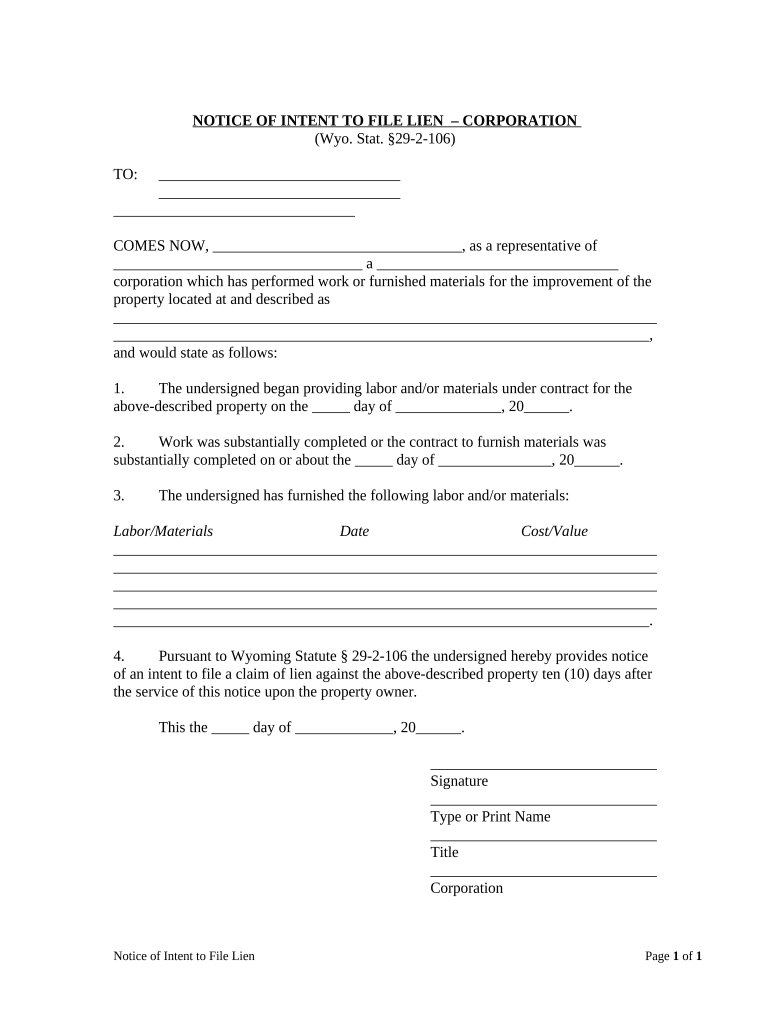
The Wyoming Lien Form is a formal document used to assert a claim against real property in Wyoming for unpaid work, labor, or materials. It records the claimant, property description, amount claimed, job dates, and statutory basis so the lien can be indexed by the county recorder and enforced if necessary. Completing the form correctly preserves statutory priority and starts deadlines for enforcement or release. The form is typically filed where the property is located and must reflect the legal property description and claimant contact information.

Why this form matters

A correctly completed Wyoming Lien Form preserves your statutory right to recover unpaid amounts and notifies interested parties of your claim. It creates recorded notice that can affect title transfers and supports subsequent collection or foreclosure steps under Wyoming law.

Why this form matters

Typical users who prepare or receive Wyoming lien forms

Each user should confirm local county filing rules and deadlines; professional counsel ensures the claim language, statutory citations, and legal descriptions meet Wyoming requirements.

  • Contractors and subcontractors who supplied labor or materials and need to protect payment rights.
  • Material suppliers and equipment lessors asserting unpaid balances for goods delivered to a project.
  • Real estate attorneys and title companies reviewing encumbrances during closings or disputes.

Essential components included on a professional Wyoming Lien Form

A complete Wyoming Lien Form combines claimant data, precise property details, claim calculations, statutory references, execution acknowledgements, and filing instructions to create an enforceable public record.

Claimant Info

Full legal name, business entity type, mailing address, and contact details for the party asserting the lien; accuracy ties the claim to the correct legal entity.
Property Description

Legal description or lot/block reference as recorded in county records plus street address; vague descriptions can cause rejection or invalidate priority.

Amount Claimed

Itemized dollar amount for labor, materials, and permitted interest or costs; totals must match supporting invoices or estimates where required.

Work Dates

Start and completion dates for labor or delivery of materials; these dates often determine filing windows and statute of limitations triggers.

Statutory Basis

Reference to the Wyoming lien statute or applicable chapter and a concise statement of the basis for the claim to establish legal standing.

Execution Block

Signature area for claimant or authorized agent plus notary acknowledgment or remote notary block when allowed; notarization requirements affect filing acceptance.

Step-by-step: completing and filing a Wyoming lien

Follow these sequential steps to assemble documentation, complete the form, and record the lien with the appropriate county office.

  • 01
    Gather Records: Collect contracts, invoices, delivery tickets, and proof of work.
  • 02
    Complete Form: Enter claimant, property, amounts, and dates accurately.
  • 03
    Notarize: Obtain required notarization or RON session if permitted.
  • 04
    Record: File with the county clerk/recorder where the property sits.

How filing and notice flow for a recorded Wyoming lien

This simplified flow shows document preparation through recording and notice to interested parties.

  • Prepare: Complete form and attach supporting invoices.
  • Authenticate: Sign and notarize or use approved RON steps.
  • Record: Submit to county recorder and pay filing fees.
  • Notify: Send copies to property owner and prime contractor.

Configuring an online workflow for the Wyoming Lien Form

Map form fields and signer steps before sending so the filing-ready document collects required data and signatures without delay.

Field Configuration
Signature Field Required for claimant; set mandatory
Notary Block Include acknowledgment; enable RON option where allowed
Date Field Use MM/DD/YYYY format and auto-fill option
Attachments Require invoices and proof-of-delivery PDFs

Digital signing and submission considerations

Confirm the chosen eSignature provider supports audit trails, tamper-evident PDFs, notarization workflows, and the integrations your county or legal team requires.

  • File Formats: PDF, DOCX supported
  • Authentication: Email, SMS code, or advanced 2FA
  • Integrations: Connect to storage and case systems

eSignature vendor comparison for preparing and sending lien documents

Basic plan and capability differences affect cost, HIPAA support, bulk send, and envelope or session limits for high-volume filing workflows.

signNow DocuSign Adobe Sign PandaDoc HelloSign
Starting Price $8/user/mo $15/user/mo $14/user/mo $19/user/mo $15/user/mo
Free Trial 7-day trial Varies Varies Varies Varies
Bulk Send Yes Yes Yes Yes No
Audit Trail Yes Yes Yes Yes Yes
HIPAA Compliant Yes Yes Yes No No
Envelope Cap No cap 100 envelopes/user/year No public cap No cap No cap

Key legal risks and consequences of errors

Loss of Priority: Failing to file timely forfeits lien priority.
Form Rejection: Incomplete or incorrect entries can be rejected.
Fraud Liability: False claims can lead to civil or criminal liability.
Invalid Service: Improper notice methods may prevent enforcement.
Increased Costs: Errors create litigation and title clearance expenses.
Loss of Remedies: Missed enforcement windows may bar foreclosure.

Common preparation mistakes to avoid

  • Using an informal property description rather than the recorded legal description leads to indexing and enforceability problems.
  • Listing a trade or DBA instead of the claimant’s legal entity results in mismatches during title searches and possible rejection.
  • Failing to notarize or to follow the county’s RON requirements can delay recording or void the filing.
  • Missing the statutory filing window or failing to serve required parties can permanently extinguish lien rights.

Representative signers and their roles

Contractor, Owner

A licensed general contractor or subcontractor signs on behalf of the business. That signer should be an authorized officer or agent with corporate authority, and the filing should include evidence of authorization and contract performance details for enforcement.

Attorney, Counsel

A licensed attorney or legal representative prepares and reviews lien language, verifies procedural compliance, and may execute filings under written client authorization to preserve statutory rights and manage enforcement strategy.

Real-world examples of digital document workflows in property and construction

These customer examples show how digital signing and organized workflows reduce friction when managing property-related documents.

Optica Ventures LLC

Optica simplified customer-facing document workflows using eSignature and digital forms.

  • "The interface is simple and easy-to-use for our team; more importantly, it is just as easy for our customers."
  • This reduced turnaround time and improved consistency when delivering signed notices and transactional documents across distributed projects.

Martin Properties

A property manager converted paper filing to online processes for property documents and notices.

  • "I can process and execute all of these documents online with 100% compliance and built-in security."
  • Centralized records and mobile signing improved closing speed and reduced delays in recording and notice distributions.

Practical tips for accurate and efficient lien filings

Adopt these practices to reduce rejections, protect priority, and simplify title clearance.

Verify Legal Names
Match claimant names to formation or tax records and avoid DBAs unless statute permits. Name discrepancies commonly trigger rejections or require affidavits to correct indexing.
Use Recorded Descriptions
Copy the legal description directly from county records or the deed. Short or colloquial addresses can prevent proper indexing and weaken enforceability.
Attach Supporting Documents
Include invoices, contracts, delivery receipts, and lien waivers where appropriate. Clear documentation shortens dispute timelines and supports enforcement.
Confirm Filing Office Rules
Check county clerk rules for RON acceptance, required cover sheets, fee schedules, and recording formats before submitting.

Frequently asked questions about the Wyoming Lien Form

Answers to common questions about filing, timing, e-signatures, and corrections for lien claims in Wyoming.


Need help? Contact support

be ready to get more
Join over 28 million airSlate SignNow users