
Quick answer: Sign the principal’s name first, then your own name, then a designation such as “Attorney-in-Fact” or “POA,” so the signature reads, for example, “Jane Doe, by John Smith, Attorney-in-Fact.” That single line is what separates a valid agent signature from one that a bank, title company, or government office can reject on sight.
The format matters because an agent who signs only their own name can end up personally liable for a document meant to bind the principal, and an inconsistent signature across pages of the same transaction is one of the most common reasons institutions send paperwork back. Think of it the way you’d sign a note “on behalf of” a manager who’s out of the office: the reader needs to see whose decision this represents, not just whose hand wrote it.
TL;DR
- Standard format: “[Principal’s name], by [Agent’s name], as Attorney-in-Fact” (or the shorter “…POA”).
- Never sign only your own name. Never sign only the principal’s name.
- To sign a check as POA, use the same “by…POA” pattern and confirm the bank’s own format preference first.
- Electronic signatures are generally valid for documents that an agent signs under an already-existing power of attorney.
- State rules vary; check the specific requirements before assuming one format works everywhere.
- Keep the POA document itself accessible when signing.
The correct POA signature format
Most institutions accept the pattern “[Principal’s name], by [Agent’s name], as Attorney-in-Fact” or the shorter “[Principal’s name], by [Agent’s name], POA.” Getting there takes five deliberate steps:
- Write the principal’s full legal name first, exactly as it appears on the POA document.
- Add “by” and your own full legal name.
- Add a designation: “Attorney-in-Fact,” “POA,” or “Agent.”
- Match the exact wording your POA document or the receiving institution specifies, if one is given.
- Sign every page of a multi-page transaction the same way.
Concrete examples drawn from current signing guidance include “Jane Doe, by Jack Robinson, as Attorney-in-Fact,” “John Henry by Larry Frank, POA,” and “Mary Smith by Frank Smith, Attorney-in-Fact.”
State law tends to allow more flexibility here than the uniform wording implies: the Indiana power of attorney signature statute lists several acceptable variants, including “agent,” “POA,” and “AIF” placed above, beside, or below the signature, and explicitly states the list is not exhaustive. If the principal’s own POA document was created with a template, a SignNow power of attorney template typically already includes the correct signature line for you to follow rather than freehand.
Signing as an agent is a bit like signing a permission slip “for” a parent who asked you to: the school needs to see both names and your role, not just a signature that could belong to either of you.
Related blog post: What is a power of attorney, and how does it work for signing documents?
How to sign a check as power of attorney
Write the account holder’s name, then “by” and your name, then “POA” or “Attorney-in-Fact” in the signature line, and confirm the bank’s own format preference before the first check clears.
- Call or visit the bank in advance. Institutions routinely apply their own internal standards on top of whatever the law technically requires.
- Use the abbreviated “POA” format if the signature line is too short for the full designation.
- Bring the original or a certified copy of the POA document to the branch the first time you sign.
- Keep a written record of every check you sign this way, including the date and purpose.
Why it matters: a bank that hasn’t seen your POA on file can freeze or reverse a transaction after the fact, not just reject it at the counter.
Learn more about how to sign as power of attorney (correct format for every document type) in our 2026 guide.
Signing electronically as a power of attorney agent
An agent’s electronic signature on a document signed under an existing power of attorney is generally valid under the ESIGN Act
 Open
OpenThat said, one distinction gets blurred in a lot of signing guidance: ESIGN and UETA cover the documents an agent signs *under* an already-valid power of attorney. The POA grant itself is a separate matter, and some states still require a wet or notarized signature to create the POA in the first place. An agent should confirm how their specific POA was executed rather than assuming “my POA can be signed electronically” covers every document connected to it.
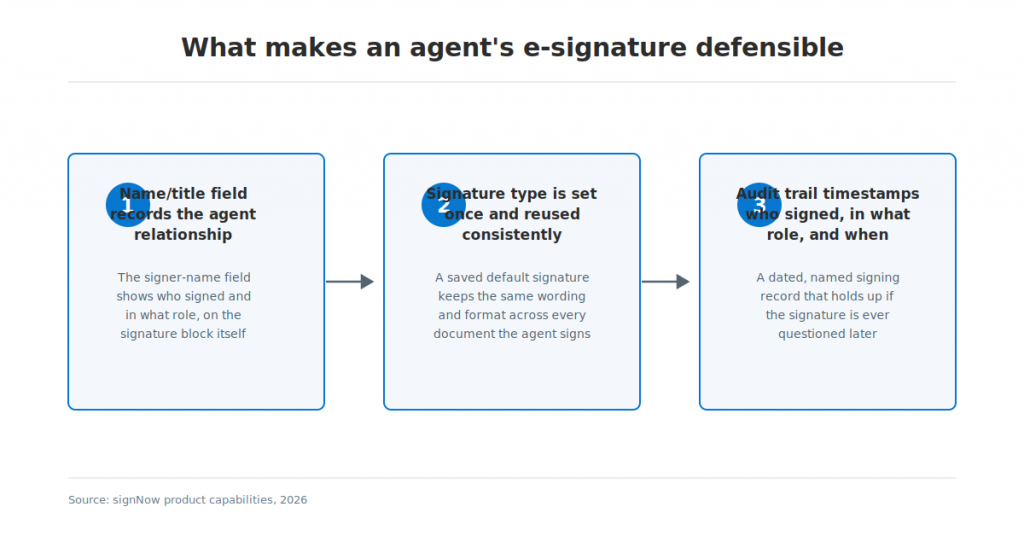
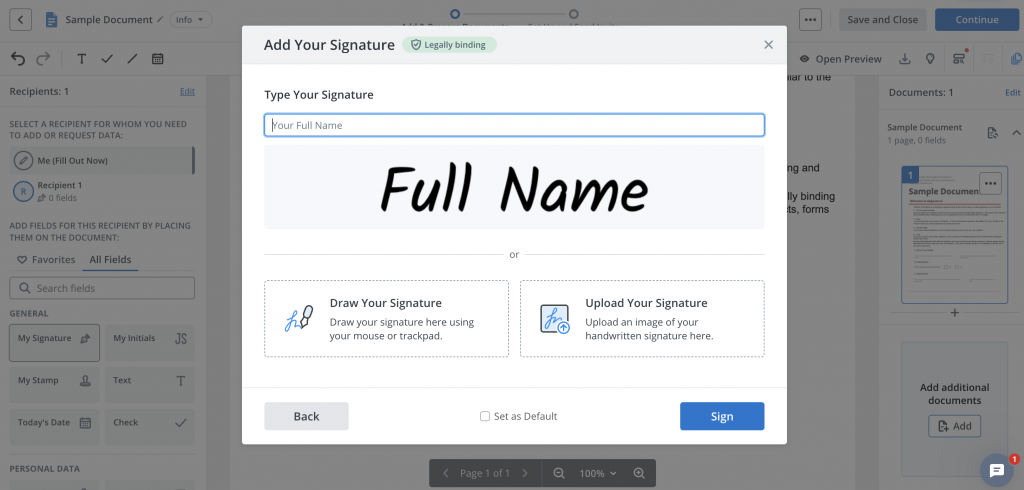
Inside an eSignature platform, this distinction shows up as a few concrete design choices rather than abstract legal theory. Entering your name and role into a recipient or signer-name field means the signature block itself records the agent relationship, instead of relying on you to type “as Attorney-in-Fact” correctly into the document body every time. Choosing a signature type once, whether typed, drawn, or uploaded, and reusing it as a saved default keeps every document you sign as agent visually consistent.
SignNow’s audit trail and authentication controls then create a timestamped record of who signed, in what role, and when, which matters if a signature is ever questioned later, and two-factor signer authentication adds a second identity check before that signature is captured (a step not included on SignNow’s entry-level Business plan). For document categories where regulatory backing matters most, such as healthcare-adjacent paperwork, SignNow’s 21 CFR Part 11 compliance is available as an add-on across its plans, layering FDA-recognized controls like e-signature timestamps and document history retention onto the signing record.
Where agents use this in practice
Agents most often apply this signature format on bank paperwork, insurance claims, and government benefit forms, where the receiving institution checks the format before accepting the document.
In financial services, an agent might complete a loan modification or account-maintenance form for a hospitalized parent who can no longer sign in person; SignNow for financial services is built around exactly this kind of document turnaround, where a form has to move between an agent, an institution, and a case file without a physical meeting. In government use, an agent signing a benefits application or a tax-related form on someone else’s behalf benefits from the same two-factor signer authentication mentioned above, since SignNow for government work often involves sensitive personal data that the receiving agency wants to see protected before it accepts a signed form.
Common mistakes to avoid when signing as POA
The most common rejection reasons are signing only your own name, signing only the principal’s name, and using an inconsistent designation across pages of the same document.
- Omitting the agent designation entirely, so the signature reads as if you signed for yourself.
- Signing after the POA has expired, been revoked, or the principal has died, none of which the signature format itself can fix.
- Signing outside the scope of the specific authority the document grants, even if the format is technically correct.
- Failing to have the POA document on hand when an institution asks to see it.
- Switching between “Attorney-in-Fact” on one page and “POA” on another within the same transaction.
Keeping a single, SignNow document history record of what you signed and when addresses the last point directly: once a default signature and designation are set, every document carries the same wording without you having to retype it correctly each time.
State rules to check before you sign
Most states permit more than one acceptable signature format, but a handful set specific requirements for notarization, witnesses, or recording that make it worth checking your state’s statute before your first signature.
Many states follow some version of the Uniform Power of Attorney Act, though not identically. Florida, for instance, requires the document to be signed by two subscribing witnesses and acknowledged before a notary public, and Texas requires notarization for any financial POA and separately requires recording with the county clerk, within 30 days, whenever the POA is used for a deed, mortgage, or other real-property transaction, since title companies typically won’t close without a recorded copy on file. Neither of these covers every state, so confirm the current requirement with your state or with whoever is requesting the signature before you rely on a format you’ve used elsewhere.
Setting up a consistent signature as an agent
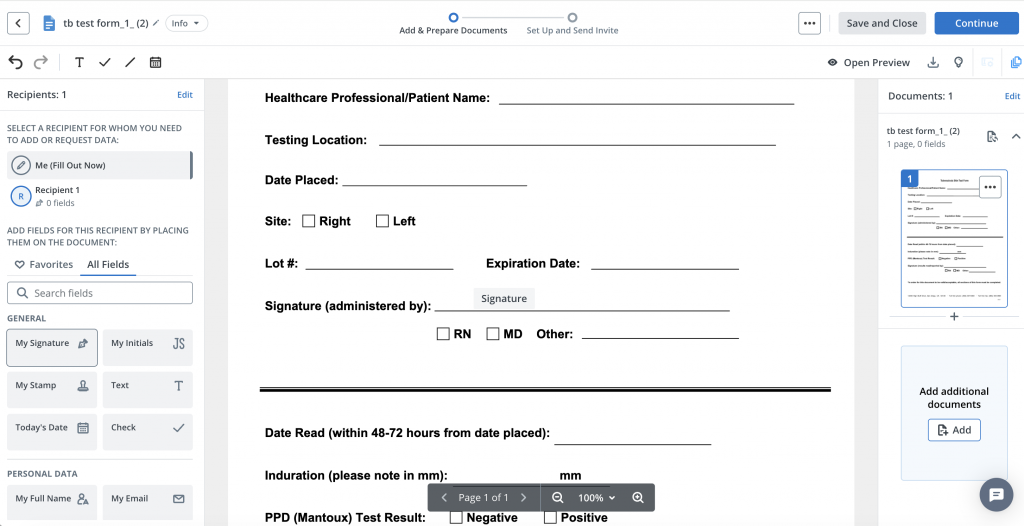
Saving one default signature format inside your e-signature account keeps every document you sign as agent consistent, which is one of the most common rejection points named above.
A saved default signature (your name plus your designation) means you don’t retype or reformat it differently on each document, and a saved signature type, whether typed, drawn, or uploaded, can be reused across a bulk-send or multi-document transaction so every page matches. This is the practical fix for the “inconsistent formatting” mistake: set it up once, and the formatting question doesn’t come up again for that principal.
Disclaimer: The information contained in this blog post is provided for general informational purposes only and does not constitute formal legal advice.
Final thoughts
Signing as power of attorney is less about the appearance of your signature and more about making your authority clear. Use the principal’s name, your own name, and a consistent designation such as “Attorney-in-Fact” or “POA,” and always check the requirements of the receiving institution and applicable state law.
When documents can be signed electronically, SignNow can help make the process more consistent and easier to track. Create and reuse your eSignature, send documents for signature, use authentication options when appropriate, and maintain a document history that records signing activity—all within one digital workflow.
Ready to simplify your eSignature workflow? Start using SignNow to prepare, send, sign, and manage documents online.
Glossary
- Agent / Attorney-in-Fact: the person named in a power of attorney document to act on behalf of another person.
- Durable power of attorney: a POA that remains valid even if the principal later becomes incapacitated, unless it states otherwise.
- ESIGN Act: the 2000 federal law giving electronic signatures the same legal standing as handwritten ones for most transactions.
- Principal: the person who grants authority to an agent through a power of attorney document.
- UETA: the Uniform Electronic Transactions Act, the state-level counterpart to the ESIGN Act, adopted in some form by most U.S. states, DC, and the U.S. Virgin Islands.
FAQ
1. How do you sign a document as power of attorney?
Write the principal’s full name, then “by” and your own name, then a designation such as “Attorney-in-Fact” or “POA.” Use the exact wording your POA document specifies if it gives one.
2. How do I sign a check as power of attorney?
Use the same pattern as any other document: the account holder’s name, “by” your name, then “POA.” Confirm the bank’s preferred format before the check is deposited, since banks often add their own requirements.
3. What is the correct POA signature format?
There is no single universal format, but “[Principal] by [Agent], as Attorney-in-Fact” and “[Principal] by [Agent], POA” are the two most widely accepted patterns across the sources reviewed for this guide.
4. Can a power of attorney sign electronically?
Generally yes, for documents signed under an already-valid POA, under the ESIGN Act and UETA. The POA grant itself may still require a wet or notarized signature in some states, which is a separate question from signing later documents electronically.
5. What happens if I sign a document incorrectly as POA?
The document can be rejected outright, delayed while the institution asks for a corrected signature, or in some cases expose the agent to personal liability if the signature reads as though they signed for themselves rather than the principal.
6. Is “POA” or “Attorney-in-Fact” the correct term to write after my name?
Both are accepted in most jurisdictions and by most institutions. The safer approach is to use whichever term the POA document itself specifies, and to use that same term consistently across every page of a transaction.
Sources
- Indiana Code 30-5-8-8, power of attorney signature requirements
- Florida Statute 709.2105, qualifications of agent and execution of power of attorney
- Texas Estates Code Title 2, Subtitle P, durable powers of attorney
- Uniform Power of Attorney Act
- Texas power of attorney recording requirements for real estate
- Caring.com 2025 wills and estate planning survey
- CFPB managing someone else’s money guides
- The correct POA signature format
- How to sign a check as power of attorney
- Signing electronically as a power of attorney agent
- Where agents use this in practice
- Common mistakes to avoid when signing as POA
- State rules to check before you sign
- Setting up a consistent signature as an agent
- Final thoughts
- Sources
