
A receipt template is a reusable document layout. You fill it in once, then reuse it for every transaction. You customize it, sign it, and download or send it to confirm a payment. Most receipt templates online are built for printing. They are not built for filling out and signing on screen. SignNow‘s free, ready-to-use receipt template fixes that. Fill it in, sign it, and download or send it in minutes. No printing or scanning required.
TL;DR
- A receipt needs the payer, payee, date, amount, and payment method.
- It also needs a short description of what was paid for.
- SignNow lets you fill, sign, and download a receipt template online.
- A receipt confirms a payment already made.
- An invoice requests a payment that has not happened yet.
- The IRS general rule is to keep receipts for 3 years.
- An e-signature carries the same legal weight as a handwritten signature.
Who uses a receipt template?
Receipt templates apply across nearly every industry that exchanges payment for goods or services. This covers individuals and large teams alike:
- A construction crew logs signed deposit and material receipts on-site. A property manager issues a rent receipt after each tenant’s payment. No trip back to the office is needed.
- A nonprofit sends a donation receipt the moment a gift clears. The donor keeps it for tax records.
- A healthcare practice records a copay receipt alongside other signed intake paperwork.
- A legal services firm can issue a signed retainer deposit receipt the same way.
An insurance agency can confirm a premium payment with the same fillable template.
In each case, the underlying template stays the same. Only a few fields change from one industry to the next.
What a receipt template needs to include
A compliant receipt records the payer, the payee, and the date. It also records the amount, the payment method, and a description of the purchase. The IRS lists sales slips, paid bills, and receipts as supporting documents. A business must keep these for its gross receipts, purchases, and expenses.
A working field list for a receipt template
A usable receipt template should include these fields, customized to suit your business:
- Business name, address, and logo
- Receipt number and issue date
- Payer and payee names
- Itemized description of goods or services
- Payment method: cash, card, check, or transfer
- Total amount paid
- A signature line, if one is required
SignNow’s calculated fields can total line items automatically to ensure accuracy. A saved template keeps the layout clean and identical every time you issue a receipt. Good record-keeping starts with accurate payment details. It makes accounting simpler and gives you a stored, signed receipt for added security.
Why fill it out online instead of by hand
A basic Word or Excel template still works for a single, informal transaction. Fill in the fields by hand and save them. The limits show up with volume. Manually retyping the same business details on every receipt is slow and error-prone. There is no signature audit trail, and no automatic sync to cloud storage. SignNow’s receipt template solves those three problems at once. There is no extra software to install, and the document format stays unchanged.
Fill, sign, and download your receipt template with SignNow
Start from SignNow’s receipt template, or upload your own PDF, Word, or Excel file. Follow these steps:
- Log in to SignNow, or start the 7-day free trial. No credit card required.
- Click + Create document to see options for document upload from a storage of your choice.
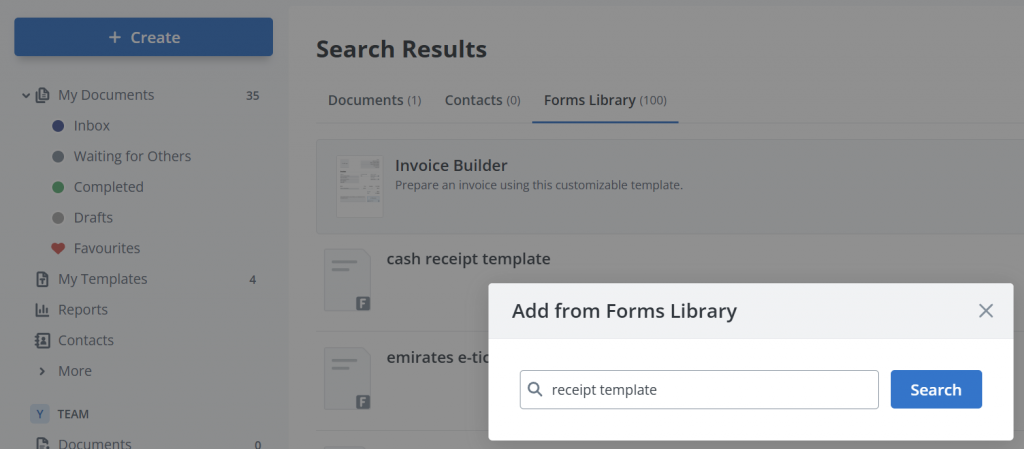
- Select Add from Forms Library, then enter the receipt template into the search field.
- Enter your business details into the fields.
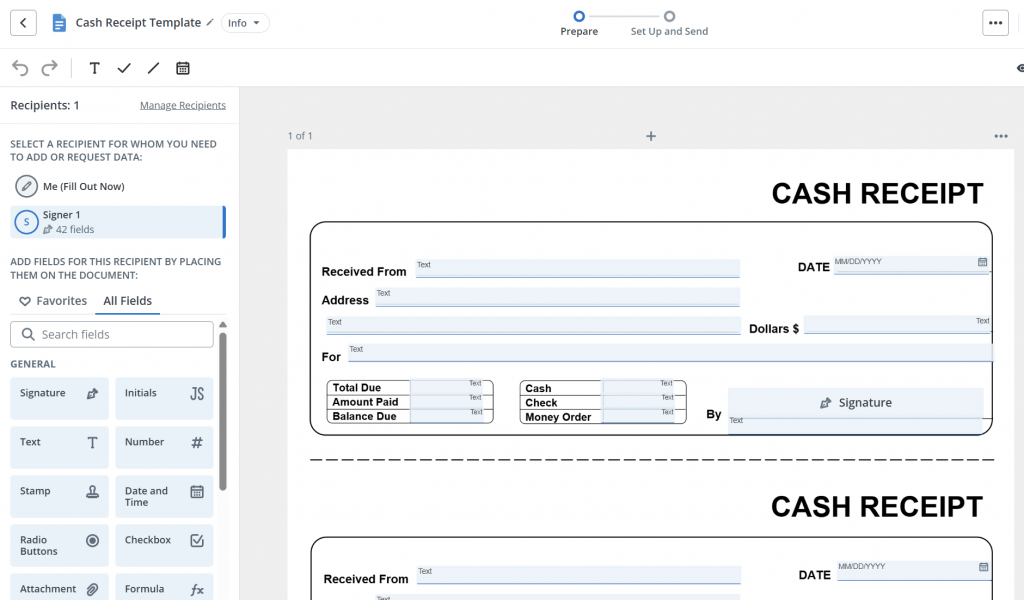
- Add fillable fields for the payer, payee, date, and description. Add a calculated field for the total and a signature field for your recipient.
- Click Continue to proceed to sign request creation.
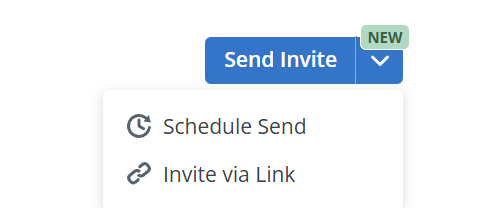
- Enter the recipient information, then send or schedule your invite to sign the document. You can also send a document via signing link .
SignNow logs every signing action in a court-admissible audit trail, included on every paid plan. Under 15 U.S.C. § 7001, a signature cannot be denied legal effect for being electronic.
SignNow also exports finished receipts to cloud storage services like Google Drive, Box, and Dropbox. A finished receipt lands directly in your existing filing system.
“SignNow has changed our workflows to be more streamlined and efficient. We saved more than 1500 pieces of paper converting to an electronic format.” — Nicholas Tovar, SHRM-CP
This shift is part of a broader move toward digital receipts. The market was valued at $750 million in 2024. It is projected to reach $5.2 billion by 2034.
What changes once receipts move online
Teams using SignNow for document workflows report measurable time savings.
| Metric | Reported figure |
| Time saved per employee, per week | Up to 6 hours |
| Average first-year return on investment | 700% |
| Document completion rate | 80% |
These figures come from SignNow’s own usage data across its customer base. A small team issuing a handful of receipts a week sees a smaller effect. A retail operation issuing hundreds sees more.
Receipt template vs. invoice template
An invoice requests payment before it happens. A receipt confirms payment after it happens. SignNow supports both, with the same fillable-field and signature workflow.
| Attribute | Invoice | Receipt |
| Purpose | Requests payment | Confirms payment received |
| Timing | Sent before payment | Issued after payment |
| Typical fields | Due date, terms, amount owed | Payment method, amount, date paid |
Common receipt template types
Explore the most common receipt template types below. Cash, rent, sales, and donation receipts share the same core fields, with a few extras:
- Cash receipt template: no card or check reference needed.
- Rent receipt template: adds the tenant’s name, property address, and rental period. Useful for landlords managing several units.
- Sales receipt template: adds an itemized list of goods and a running total.
- Donation receipt template: adds the organization’s tax-exempt status.
SignNow’s conditional fields show or hide these extras automatically. One template then covers every receipt type. A deposit receipt template is one example already built for a specific transaction. A service receipt template is another, built around billed hours rather than physical goods.
Common mistakes to avoid with receipt templates
- Missing payment method. Make payment method a required field on the template.
- Inconsistent receipt numbers. Use an auto-incrementing field instead of typing numbers by hand.
- No proof of delivery. Send the receipt through a signing link with a timestamped audit trail.
- Receipts scattered across email and paper. Export or sync finished receipts to one cloud folder automatically. This makes it easy to track every one.
- One template for every receipt type. Use conditional fields, or save a template per type.
- No backup of older receipts. Rely on cloud storage that keeps a synced copy by default.
Choosing a plan for receipt volume
A solo operator issuing a few receipts a week fits comfortably on the Business plan. It covers unlimited templates, fillable fields, and mobile access. A team issuing receipts across several staff members may want Business Premium instead. It adds bulk sending and payment collection. Compare all SignNow pricing plans and start the 7-day free trial on any of them.
Final thoughts
A receipt template turns a repeatable task into a five-minute job. The right fields, a clear payment method, and a signature are all it takes. SignNow adds the audit trail and storage most templates skip.
Ready to start? Try SignNow today and simplify your document workflows. It’s easy, free for 7 days, no credit card required.
Key terms
- Audit trail: A timestamped record of who signed a document, when, and from what device.
- Conditional field: A field that appears or hides based on another answer in the document. It helps adapt one template to several receipt types.
- Calculated field: A form field that automatically totals or computes a value. One example is adding line items on a receipt.
- ESIGN Act: A US federal law, codified at 15 U.S.C. § 7001. It states a signature cannot be denied legal effect for being electronic.
- Reusable template: A saved document layout with fields already placed. You fill it in again without rebuilding it.
- Fillable field: An editable area added to a document. Examples include a text box, a date field, or a signature line.
- Invoice: A request for payment sent before a transaction is complete. It is distinct from a receipt, which confirms payment already made.
- Payment method field: A field recording how funds changed hands. Options include cash, card, check, or transfer.
- Signing link: A shareable link that opens a document for signing. It replaces printing and hand-delivering a paper copy.
FAQ
How long should you keep business receipts?
The IRS general rule is to keep receipts for 3 years. That’s the IRS’s typical window for auditing a return. Keep records for 7 years if you’re claiming a bad debt or worthless securities loss. A signed, stored digital receipt makes it easy to find later.
Is there a fee to download a filled-out receipt?
When using SignNow, there aren’t any fees for document download. Downloading a completed receipt as PDF, Word, or Excel is included on every SignNow plan. That includes the 7-day free trial. There’s no extra charge, no matter how many receipts you download.
Can a receipt template be branded with a company logo?
Yes, you can set the branding in SignNow by adding your logo and brand colors to a saved template. Once it’s set, every receipt from that template looks consistent. You never have to redo the branding.
Does a receipt template work the same way on mobile?
SignNow’s mobile apps for iOS and Android support the same fillable fields and signature tools. This makes it easy to sign a receipt at the point of sale and work from anywhere. No laptop is needed.
What’s the difference between a fillable field and a calculated field?
A fillable field is any editable spot on a template. Text boxes and date fields are common examples. A calculated field is a special type that adds numbers automatically, like a receipt total. Use fillable fields for details, and calculated fields for totals.
Can I use one receipt template for both cash and card payments?
Yes. The payment method field on a receipt template covers cash, card, check, or transfer. Just select the option that matches each transaction. Only a dedicated cash receipt template skips the card and check reference entirely.
What happens if I need to correct a receipt after it’s been signed?
Once a receipt is signed, its audit trail keeps that record intact. Don’t edit the signed document itself. Instead, create a new, corrected receipt and send it as a fresh signing request.
Sources
- TL;DR
- Who uses a receipt template?
- What a receipt template needs to include
- Why fill it out online instead of by hand
- Fill, sign, and download your receipt template with SignNow
- What changes once receipts move online
- Receipt template vs. invoice template
- Common receipt template types
- Common mistakes to avoid with receipt templates
- Choosing a plan for receipt volume
- Final thoughts
- Key terms
- FAQ
- Sources
