Autenticación avanzada
Soporta múltiples métodos de verificación, incluidos SMS, correo, tokens y autenticación federada vía SAML o OIDC para acceso seguro.




Configurar ajustes organizativos mejora consistencia, reduce riesgos y acelera firmas; además permite aplicar controles de cumplimiento y conservar registros centralizados para auditoría interna y externa.

María es la administradora de cumplimiento y coordina políticas de retención, configuración de autenticación y auditorías. Supervisa la implementación de requisitos como ESIGN y UETA, y trabaja con TI para alinear controles con HIPAA cuando es necesario.
Carlos lidera el equipo de TI y gestiona integraciones, SSO y permisos. Configura plantillas compartidas, define roles y automatiza flujos para reducir trabajo manual y garantizar registros detallados en el rastro de auditoría.
Equipos de TI, administradores legales y responsables de cumplimiento suelen gestionar las configuraciones centrales antes de desplegar procesos.
La coordinación entre estas funciones garantiza que la plataforma soporte requisitos operativos, legales y de seguridad sin fricción para usuarios finales.
Soporta múltiples métodos de verificación, incluidos SMS, correo, tokens y autenticación federada vía SAML o OIDC para acceso seguro.
Registra cada acción sobre el documento con marcas temporales, direcciones IP y eventos, aportando evidencia para disputas y auditorías.
Permite usar certificados digitales para firmar electrónicamente con validez técnica y mayor certeza de identidad.
Funcionalidad de Bulk Send para distribuir el mismo documento a múltiples destinatarios en procesos de gran volumen.
Integración programática para automatizar envíos, recibir notificaciones y conectar con sistemas de backend.
Soporte multiplataforma para firmar y gestionar documentos desde dispositivos iOS y Android con seguridad.
Permite aplicar el logo, colores y mensajes legales en correos y páginas de firma para mantener coherencia corporativa sin alterar procesos técnicos.
Definición granular de permisos por rol para controlar quién puede enviar, revisar o administrar plantillas, con separación de funciones entre TI, legal y usuarios.
Creación y bloqueo de plantillas estandarizadas que incluyen campos obligatorios, validaciones y secuencias de firma para reducir errores y acelerar ciclos.
Conexiones listas para usar con servicios como Google Workspace, Dropbox y CRMs para sincronizar documentos, metadatos y eventos de firma.

| Feature | Value |
|---|---|
| Frecuencia de recordatorios por defecto | 48 horas |
| Caducidad de enlaces de firma | 30 días |
| Política de firma en cadena | Secuencial |
| Modo de envío masivo por defecto | Activado para roles aprobados |
La plataforma soporta navegadores modernos y aplicaciones móviles, pero algunas integraciones requieren configuraciones específicas del entorno.
Para integraciones con SSO, API o almacenamiento en la nube, valide versiones de TLS, permisos de firewall y credenciales de servicio; consulte a TI para autorizar IPs y dominios.
Un hospital centraliza permisos y requiere autenticación fuerte para firmas clínicas
Resulting in menor riesgo legal y mayor trazabilidad en auditorías clínicas.
Una universidad implementa SSO institucional y políticas de retención por programa
Leading to procesos más rápidos y cumplimiento con FERPA en solicitudes estudiantiles.
| Criteria | signNow | DocuSign |
|---|---|---|
| Autenticación multifactor | ||
| Integración SSO empresarial | ||
| Bulk Send (envío masivo) | ||
| Soporte HIPAA | Available | Enterprise-only |
7 años
7 años
5 años
1 año
Retención indefinida opcional
| Criteria | signNow (Recommended) | DocuSign | Adobe Sign | Dropbox Sign | PandaDoc |
|---|---|---|---|---|---|
| Plan inicial (mensual) | $8/user/mo | $10/user/mo | $15/user/mo | $10/user/mo | $19/user/mo |
| Firma ilimitada | Yes on plans | Limited | Yes | Limited | Yes |
| Integraciones CRM | Salesforce, HubSpot | Salesforce | Adobe CC | Dropbox, Google | Salesforce, HubSpot |
| API incluida | Yes | Yes | Yes | Yes | Yes |
| Opciones HIPAA | Available | Enterprise-only | Available | Limited | Enterprise-only |
Las Organizaciones de airSlate SignNow permiten a los equipos mejorar la colaboración, ahorrar tiempo en la gestión de documentos y usuarios, personalizar los flujos de trabajo de firma electrónica y más. Un Administrador y Moderadores pueden configurar la configuración de una Organización, que se aplicará a todas las cuentas de los miembros. Vamos a recorrer todo el proceso de cambiar la configuración de una Organización.
Nota: para configurar la configuración, debes iniciar sesión en tu cuenta de airSlate SignNow como Administrador o Moderador.
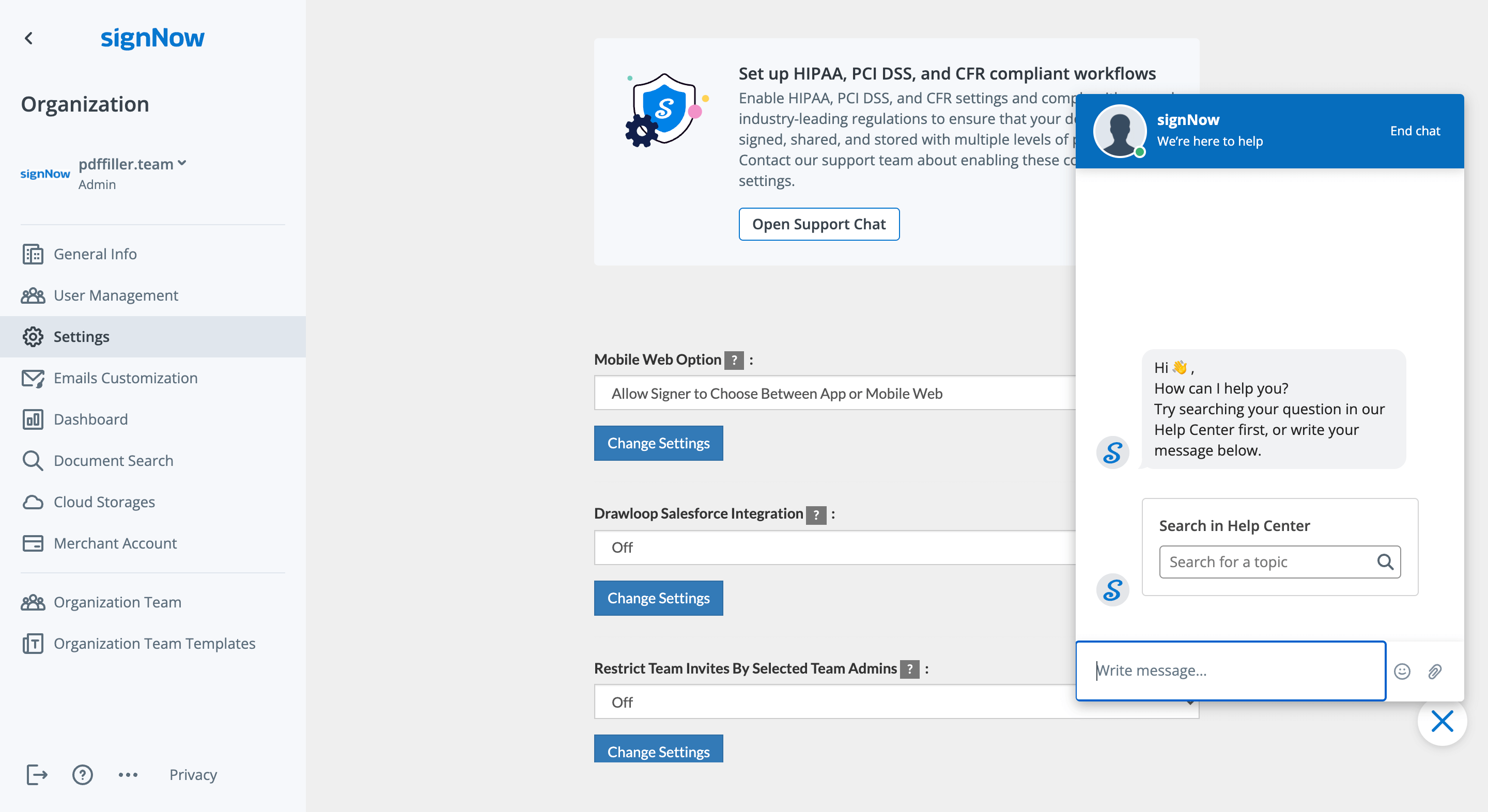
Selecciona Mis Organizaciones en la barra lateral izquierda.
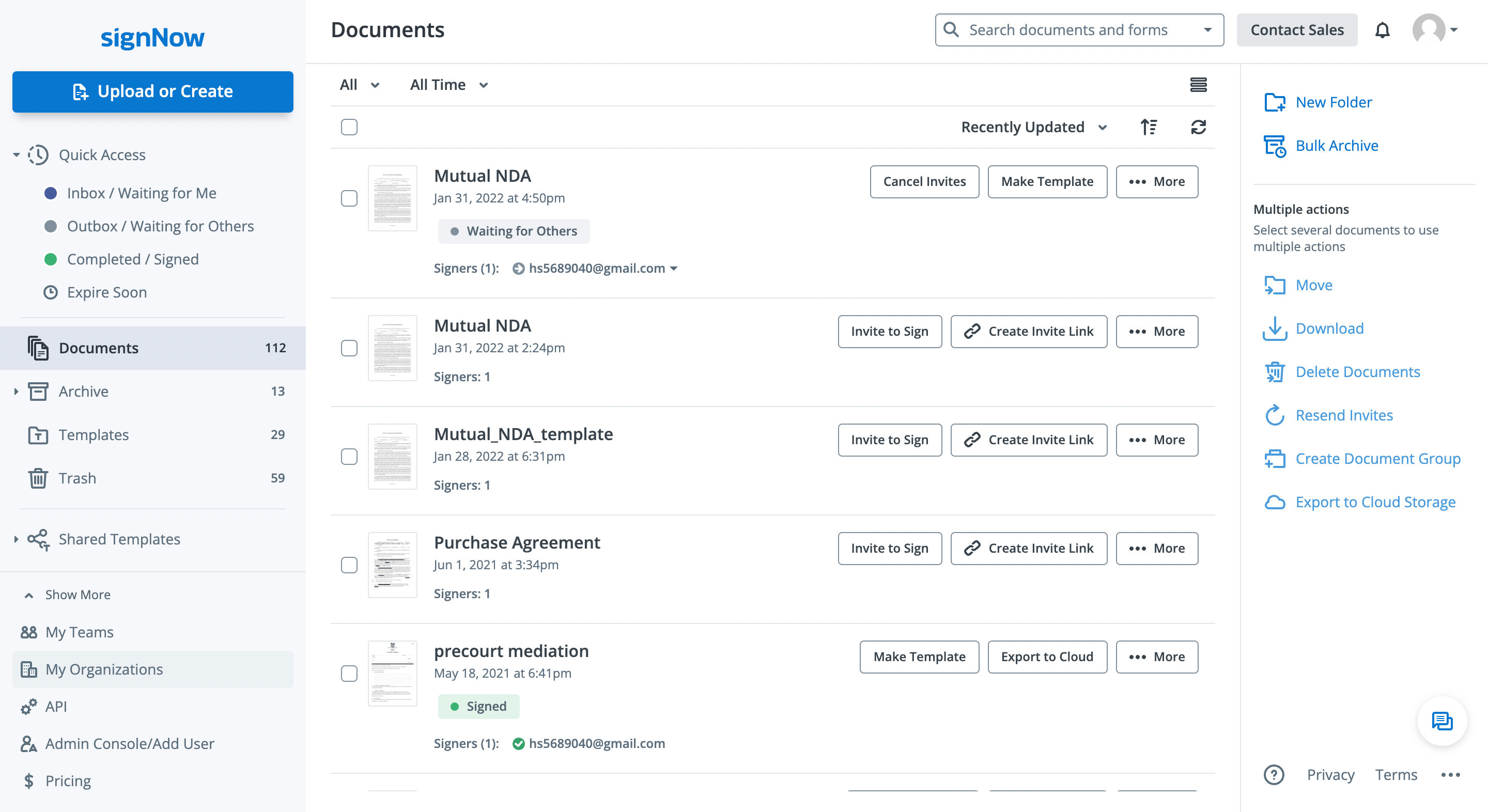
Alternativamente, selecciona tu perfil de usuario en la esquina superior derecha y haz clic en Mi Cuenta > Mis Organizaciones.
Selecciona Ir al Panel de Administración junto a tu membresía u organización actual.
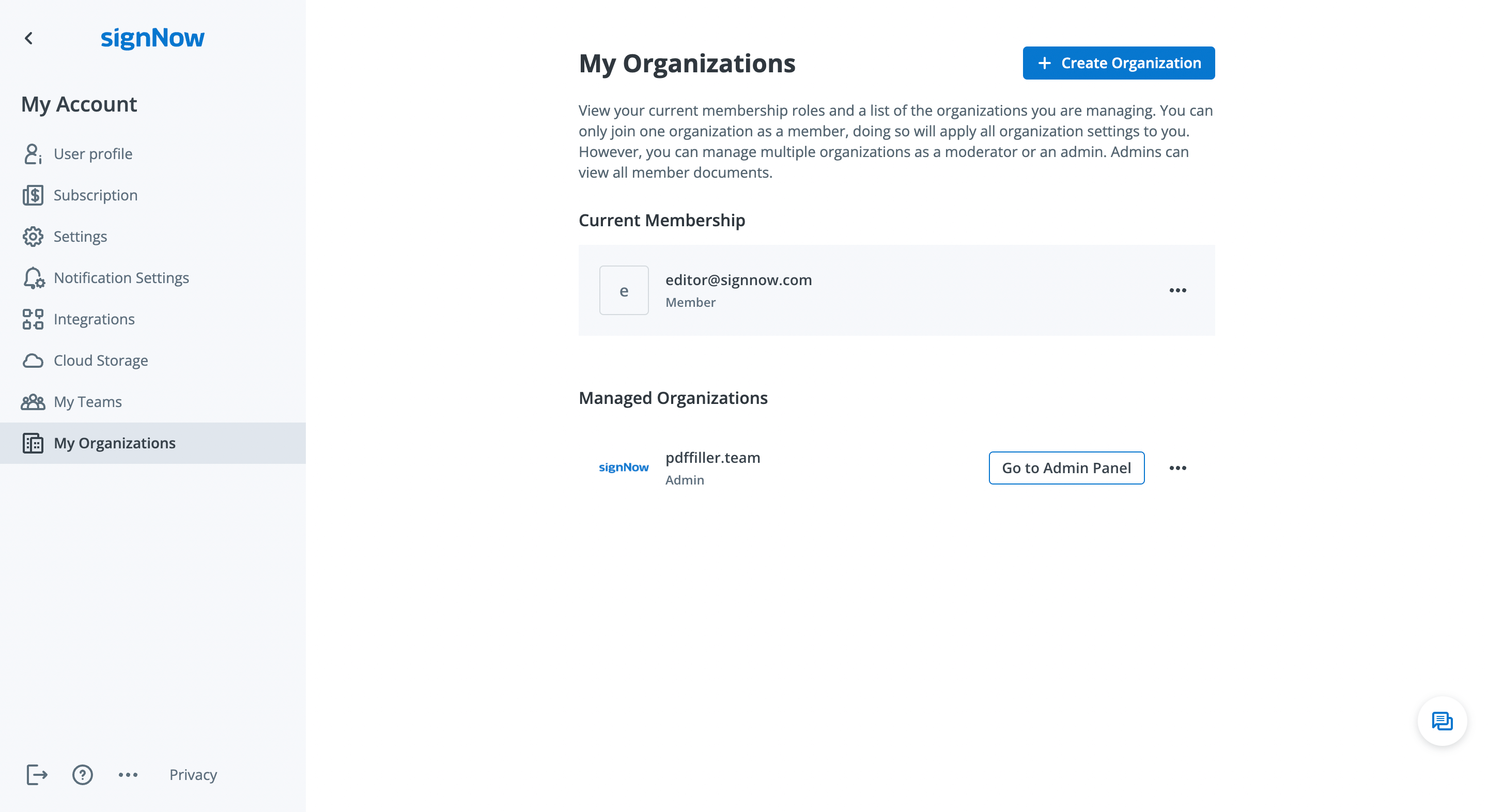
Haz clic en la pestaña Configuración en el Panel de Administración para acceder al modo de configuración.
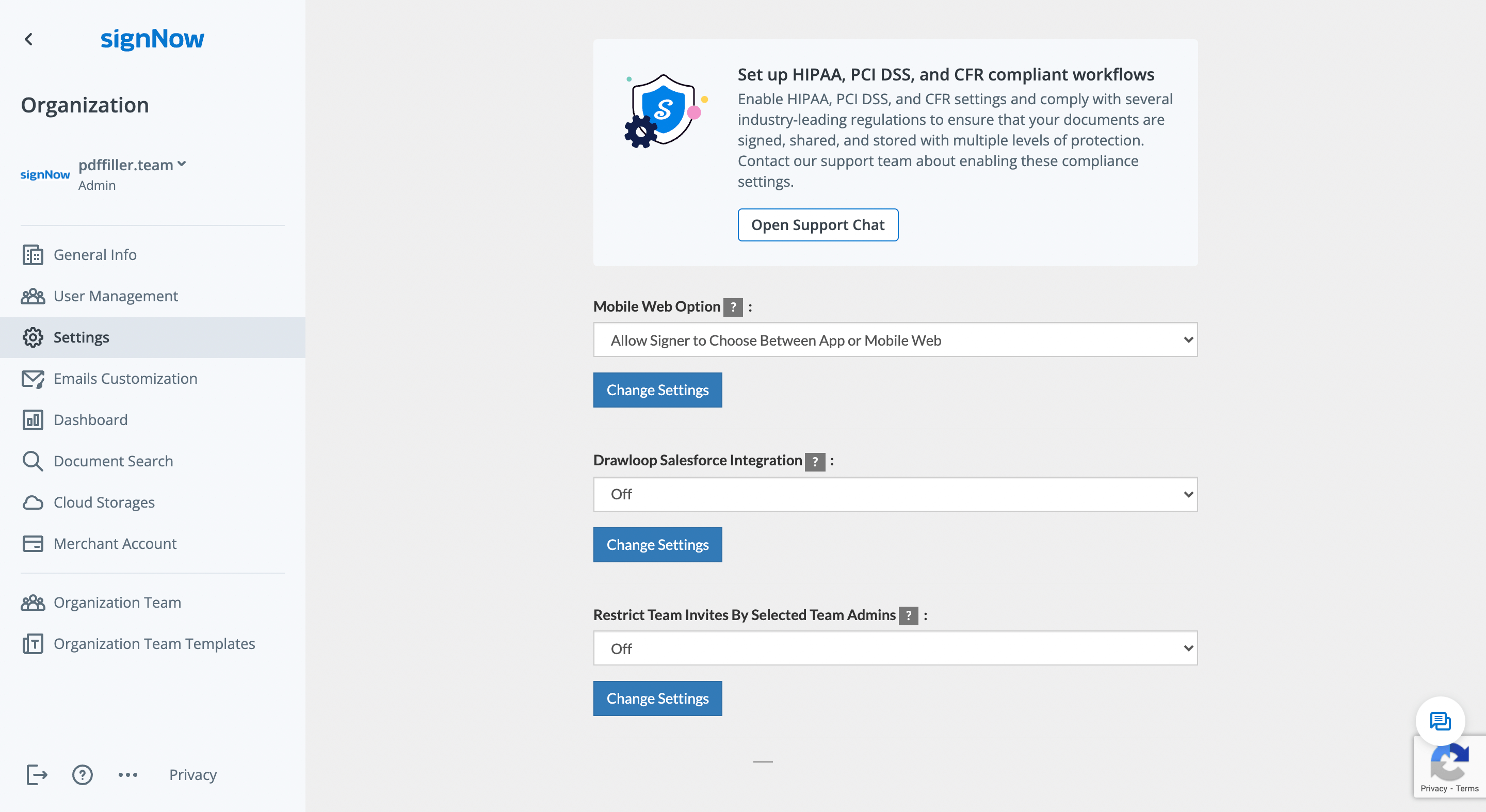
Aquí puedes cambiar las siguientes opciones en toda tu Organización:
Para cambiar una configuración, presiona el botón Cambiar Configuración o selecciona la opción en el menú desplegable.
airSlate SignNow ayuda a las Organizaciones a mantener estándares de seguridad y cumplimiento líderes en la industria, como HIPAA, PCI DSS, 21 CFR Parte 11 y SOC 2 Tipo II. Contacta a nuestro equipo de soporte haciendo clic en Abrir Chat de Soporte para aprender cómo habilitar estas configuraciones de cumplimiento para tu Organización.