Personnalisez Les Paramètres De Votre Organisation

Accédez à un panneau d'administration facile à utiliser pour configurer les paramètres de l'organisation pour tous les membres en même temps. Pas besoin de passer du temps à gérer chaque compte individuellement.

Solution eSignature primée

What it means to customize settings for your organization

Customizing settings for your organization means configuring account-level controls, roles, security policies, and workflow defaults to match internal procedures and regulatory obligations. In an eSignature platform this typically covers administrative roles, authentication methods, document retention and access controls, template libraries, branding, notification preferences, and integration endpoints. Proper configuration reduces manual steps, standardizes signature processes, and aligns system behavior with compliance frameworks such as ESIGN and UETA. Administrators should document chosen settings and periodically review them after policy or personnel changes.

Why customize settings across your organization

Centralized configuration enforces consistent security and signing workflows, simplifies audits, and reduces user errors by removing ad hoc workarounds.

Why customize settings across your organization

Common configuration challenges

  • Varying departmental needs can conflict with a single global policy and require granular exceptions.
  • Overly permissive defaults increase risk of unauthorized access or improper signature collection.
  • Lack of documented settings makes audits and incident investigations slower and more error-prone.
  • Integrations configured inconsistently can break automations when third-party systems update or change credentials.

Key administrator and user roles

IT Admin

IT Admins manage single sign-on, domain verification, API keys, and integration endpoints. They provision accounts, configure security settings, and resolve technical access issues to maintain operational continuity for the organization.

Compliance Lead

Compliance Leads define retention schedules, audit log requirements, and authentication policies. They coordinate with legal and operations to ensure document handling meets ESIGN, UETA, HIPAA, or other applicable U.S. rules and internal governance.

Who typically manages organization-level settings

Administrators and compliance leads are the primary users responsible for configuring organization settings and enforcing policies.

  • IT administrators who manage integrations, SSO, and domain controls.
  • Compliance officers who define retention, access, and signature policies.
  • Business unit managers who set templates and signing order for their teams.

Effective collaboration between IT, legal, and business teams ensures settings meet operational and regulatory requirements.

Additional settings that enhance organizational control

These supplemental settings give administrators more precision over behavior, visibility, and compliance across the signing lifecycle.

Audit trail settings

Configure the level of detail captured in audit records, choose which events are recorded, and set export formats to support legal discovery and internal reviews.

Branding controls

Apply organization branding to emails and signing pages, manage custom domains, and ensure consistent recipient-facing identity across all communications.

Recipient authentication

Enable additional signer verification methods such as SMS codes, knowledge-based authentication, or ID verification where higher identity assurance is required.

API access controls

Issue scoped API credentials, rotate keys on a schedule, and restrict endpoints by IP or OAuth scope to limit potential misuse.

Conditional fields

Define logic for showing or hiding form fields based on signer responses to simplify documents and reduce errors during completion.

Role-based template libraries

Organize templates by department or role and restrict editing rights to subject-matter owners to maintain consistency and accuracy.

soyez prêt à en obtenir plus

Choisissez une meilleure solution

Primary settings to prioritize when you customize

Focus on a few high-impact settings that balance security, usability, and compliance for most organizations.

User roles

Define administrative and user-level permissions to restrict access to sensitive actions and data. Granular roles let you limit who can change templates, access audit logs, or modify retention settings, reducing risk of unauthorized configuration changes.

Authentication

Select and enforce authentication methods per role, such as password policies, multi-factor authentication, or SAML single sign-on. Strong authentication reduces the chance of compromised accounts and supports reliable signature attribution.

Retention rules

Configure document retention and archival settings to meet legal and operational requirements. Automated retention reduces manual deletion errors and helps demonstrate compliance during audits or legal discovery.

Integrations

Control which third-party services can access documents and metadata, configure API keys and OAuth scopes, and set allowed storage locations for signed files to maintain a secure, auditable ecosystem.

How customizing settings affects signature workflows

Custom settings alter how users create, send, and access documents across web, mobile, and API channels.

  • Authentication: Determines required sign-in and verification steps
  • Templates: Predefined fields and signers streamline sending
  • Notifications: Controls email and in-app alerts for recipients
  • Integrations: Maps document storage and CRM behavior
Collecter les signatures
24x
plus rapide
Réduire les coûts de
$30
par document
Économisez jusqu'à
40h
par employé / mois

Step-by-step: initial configuration for organizational settings

A concise checklist to set up organization-level controls so administrators can enforce policies and enable secure signing.

  • 01
    Verify domain: Confirm email domains to control user sign-up
  • 02
    Configure SSO: Set SAML or OIDC with your identity provider
  • 03
    Set roles: Assign admin, user, and restricted roles
  • 04
    Define retention: Apply document retention and deletion rules

Quick checklist for maintaining organization settings

Use this checklist to validate configuration after initial setup and during periodic reviews.

01

Verify domain settings:

Confirm all organization domains are verified
02

Review admin accounts:

Ensure only current employees have admin rights
03

Test SSO flow:

Validate authentication with identity provider
04

Audit logs check:

Confirm recent changes are logged
05

Template audit:

Remove or update outdated templates
06

Backup configuration:

Export settings for disaster recovery
soyez prêt à en obtenir plus

Pourquoi choisir airSlate SignNow

  • Essai gratuit de 7 jours. Choisissez le forfait dont vous avez besoin et essayez-le sans risque.
  • Tarification honnête pour des forfaits complets. airSlate SignNow propose des abonnements sans frais supplémentaires ni frais cachés lors du renouvellement.
  • Sécurité de niveau entreprise. airSlate SignNow vous aide à respecter les normes de sécurité mondiales.
illustrations signature

Common workflow settings and typical configurations

Standard organization workflow settings map to operational requirements; administrators should set defaults that support compliance and efficiency.

Setting Name Configuration
Default signer order Sequential
Reminder Frequency 48 hours
Signature authentication method Email or SMS
Template sharing scope Organization-wide
Document retention period 7 years

Platform and device requirements when customizing settings

Confirm supported browsers, mobile OS versions, and administrative access methods before changing organization-level settings.

  • Browsers: Modern Chrome, Edge, Firefox
  • Mobile OS: iOS 13+ and Android 9+
  • Admin access: Web console and API endpoints

Ensuring administrators use supported platforms prevents unexpected behavior during configuration tasks and reduces support incidents across desktop and mobile environments.

Security controls to include in organizational settings

Encryption at rest: AES-256 encryption of stored documents
Encryption in transit: TLS 1.2+ for data transmission
Multi-factor authentication: Optional or required per role
Access logging: Comprehensive event recording
SAML single sign-on: Supports enterprise identity providers
IP allowlist: Restrict access by network ranges

How organizations apply customized settings

Two short examples showing configuration approaches for different use cases and the outcomes they deliver.

Healthcare clinic

A clinic implements role-based access and enforces strong authentication for PHI access

  • Required multi-factor authentication for clinicians
  • Ensures patient records remain secure and verifiable

Resulting in clearer audit records and HIPAA-aligned access controls.

Higher-education admissions

An admissions office standardizes templates and retention rules to match FERPA and institutional policies

  • Centralized templates for offer letters and waivers
  • Reduces drafting errors and enforces consistent retention schedules

Leading to streamlined audits and consistent student communications.

Best practices for customizing organization settings

Follow these recommendations to make settings effective, auditable, and maintainable without disrupting daily operations.

Document configuration decisions and change history
Maintain a configuration log describing why each setting was chosen, who approved it, and when it was changed. This helps during audits, onboarding, and incident response by providing context for administrative actions.
Apply least-privilege access and role separation
Grant only the permissions users need for their role. Separate duties where possible so administrators cannot both configure critical security settings and also act as primary signers on regulated documents.
Test settings in a sandbox before organization-wide rollout
Use a non-production environment to validate SSO, retention rules, templates, and integrations. Testing reduces the likelihood of unintended consequences when policies are applied to live data and users.
Review settings periodically and after major changes
Schedule reviews when personnel, regulations, or business processes change. Periodic checks ensure that policies still align with compliance obligations and operational needs.

FAQs About customizing settings for your organization

Answers to common questions administrators have when configuring organization-level settings for eSignature platforms.

Feature availability across leading eSignature providers

A concise comparison of organization-level customization features among common eSignature vendors used in the United States.

Feature signNow (Featured) Adobe Sign DocuSign
HIPAA-ready features
Bulk Send capacity Up to 5,000 Up to 1,000 Up to 3,000
Granular admin roles Detailed roles Role templates Limited roles
Native Google Workspace
soyez prêt à en obtenir plus

Obtenez des signatures juridiquement contraignantes dès maintenant !

Risks of improper configuration

Data exposure: Unauthorized access
Regulatory fines: Compliance violations
Invalid signatures: Authentication gaps
Business disruption: Integration failures
Reputational harm: Customer distrust
Legal disputes: Evidentiary challenges

Comment modifier les paramètres de l'organisation airSlate SignNow

Les Organisations airSlate SignNow permettent aux équipes d'améliorer la collaboration, de gagner du temps sur la gestion des documents et des utilisateurs, de personnaliser les flux de travail eSignature, et plus encore. Un administrateur et des modérateurs peuvent configurer les paramètres d'une Organisation qui s'appliqueront à tous les comptes des membres. Passons en revue tout le processus de modification des paramètres d'une Organisation.

Remarque : pour configurer les paramètres, vous devez vous connecter à votre compte airSlate SignNow en tant qu'administrateur ou modérateur.

Accédez à votre panneau d'administration

Sélectionnez Mes Organisations dans la barre latérale gauche.
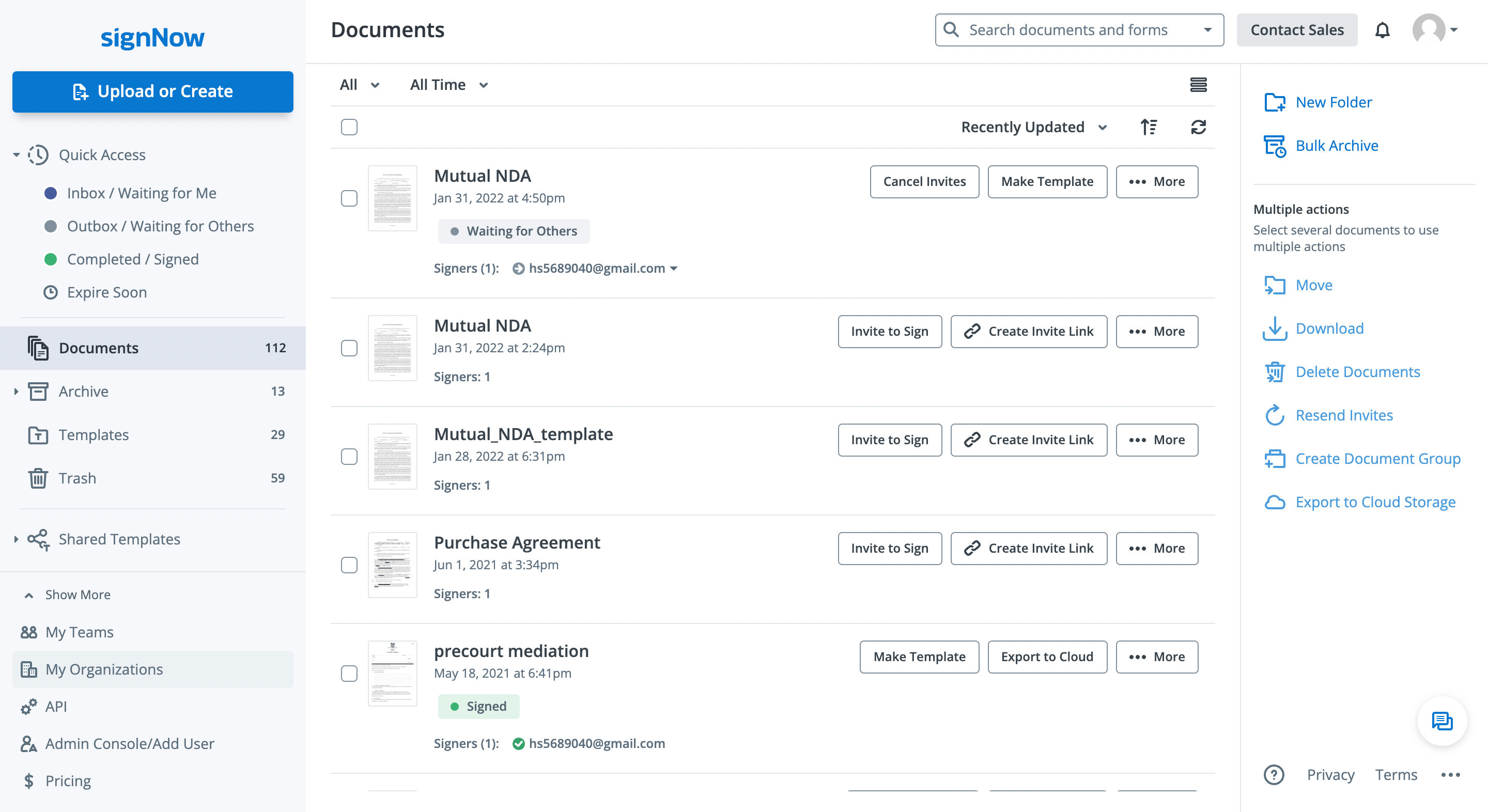
Alternativement, sélectionnez votre profil utilisateur en haut à droite et cliquez sur Mon Compte > Mes Organisations.

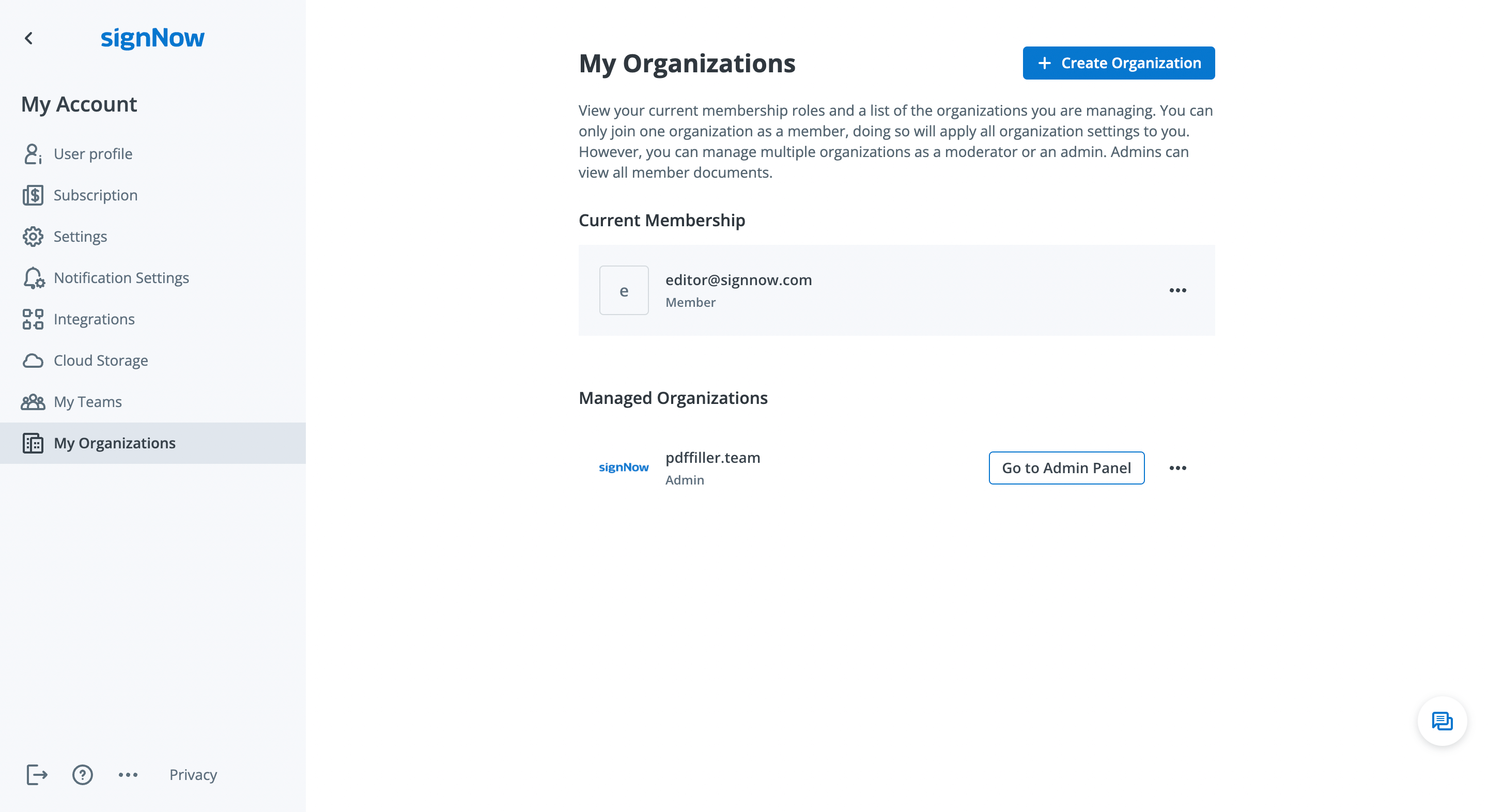
Sélectionnez Aller au panneau d'administration à côté de votre adhésion ou organisation actuelle.
Personnalisez les paramètres de l'organisation

Cliquez sur l'onglet Paramètres dans le Panneau d'administration pour accéder au mode de configuration.
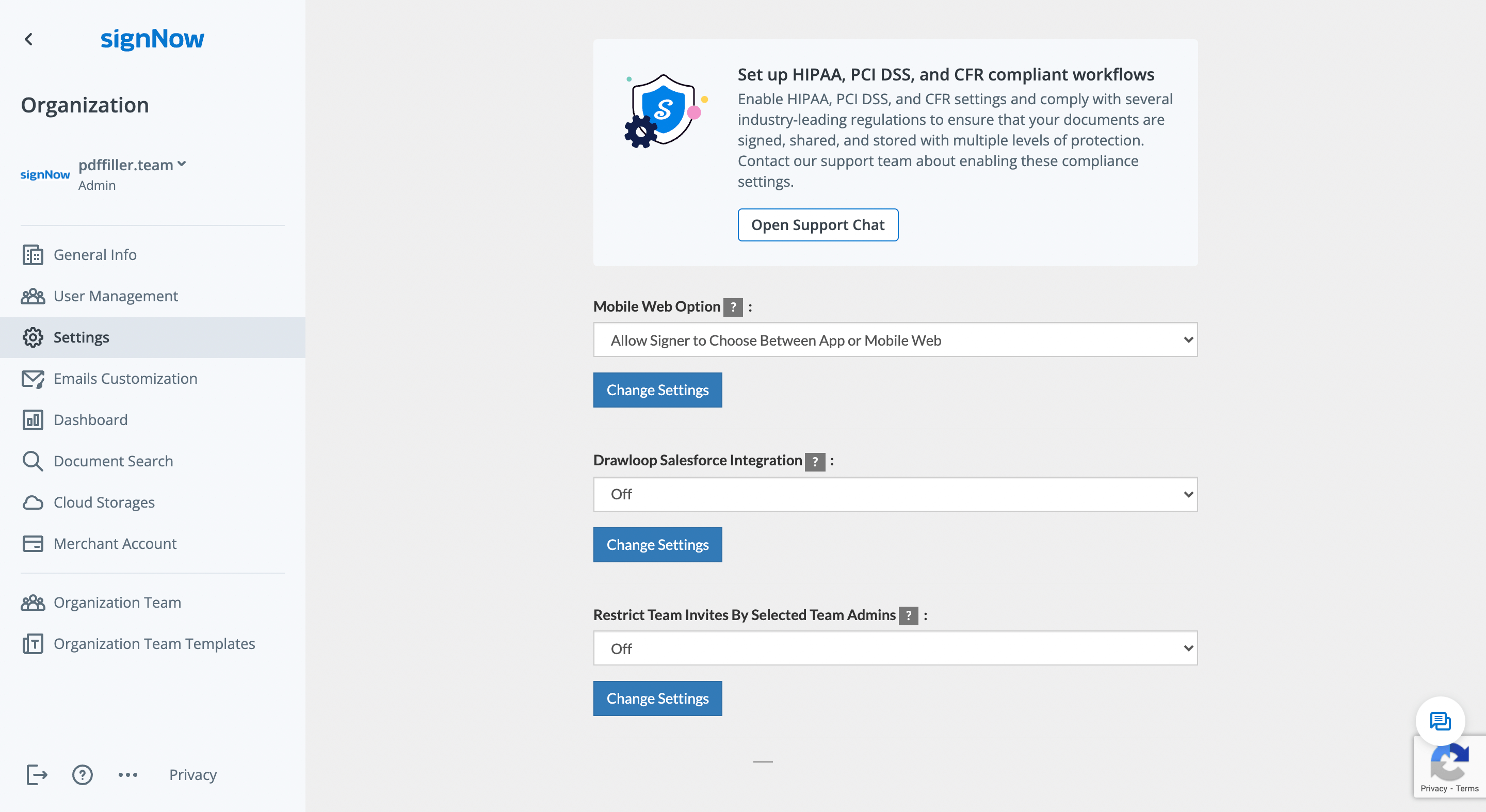
Vous pouvez modifier les options suivantes dans votre organisation :

  • Sélectionnez comment les signataires ouvriront les documents de votre organisation sur mobile – en utilisant l'application, le web mobile, ou les deux
  • Activer ou désactiver l'intégration avec Drawloop Salesforce
  • Restreindre les membres de l'organisation à accepter les invitations aux équipes uniquement des administrateurs d'équipe approuvés
  • Activer ou désactiver l'orientation de signature pour les signataires

Pour modifier un paramètre, appuyez sur le bouton Modifier les paramètres ou sélectionnez l'option dans le menu déroulant.

Configurer les flux de travail conformes à HIPAA, PCI DSS, et CFR

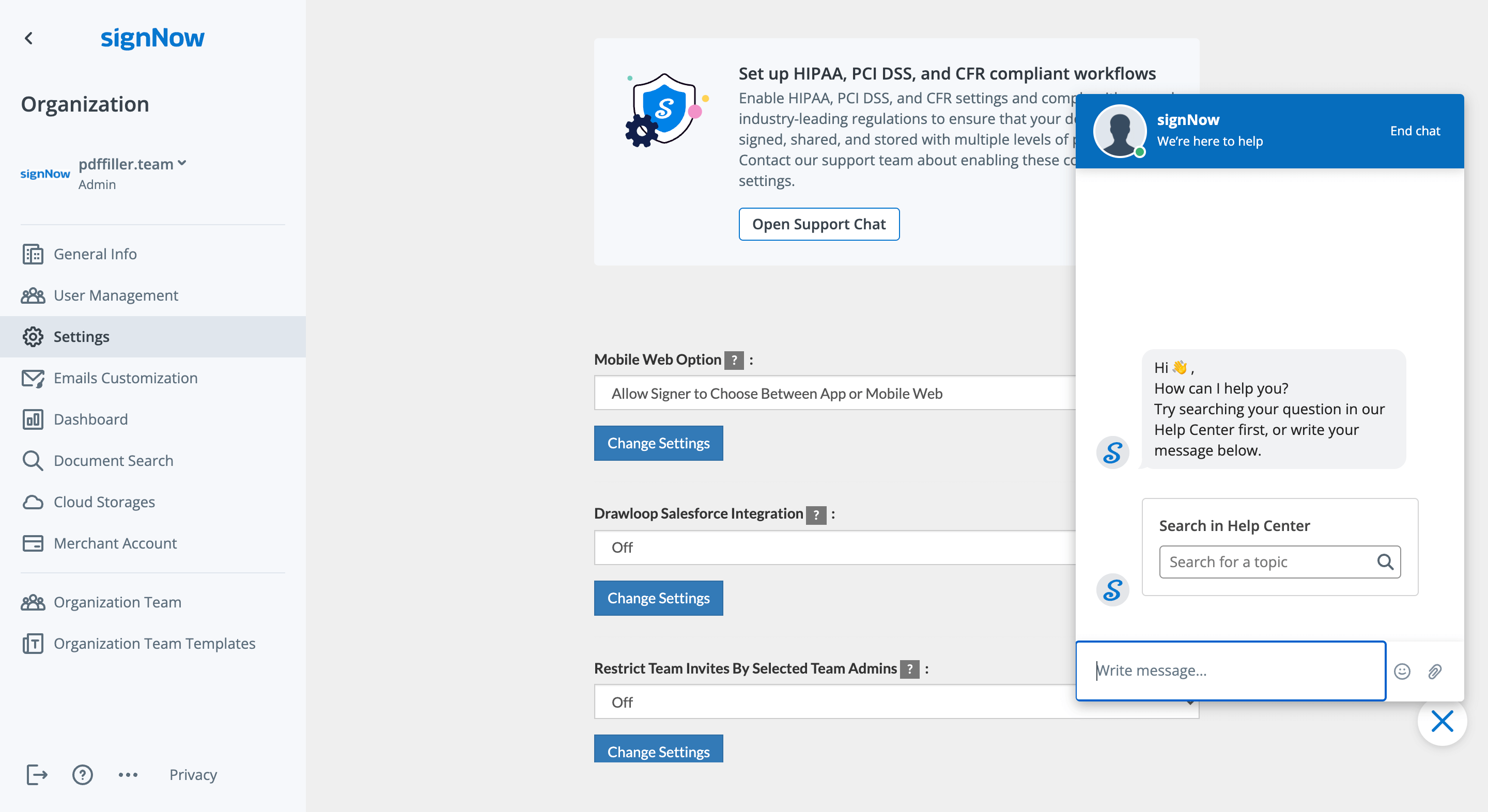
airSlate SignNow aide les organisations à maintenir des normes de sécurité et de conformité de premier ordre telles que HIPAA, PCI DSS, 21 CFR Part 11, et SOC 2 Type II. Contactez notre équipe de support en cliquant sur Ouvrir le chat de support pour apprendre comment activer ces paramètres de conformité pour votre organisation.

walmart logo
exonMobil logo
apple logo
comcast logo
facebook logo
FedEx logo
être prêt à en obtenir plus

Obtenez dès maintenant des signatures juridiquement contraignantes !









