Observer
Name, affiliation, contact, and permit number where applicable. Identifies data provenance and permits attribution in datasets and reports.
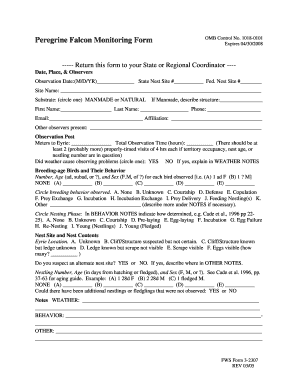
Using a single, well‑structured monitoring form improves data quality, ensures comparability across observers and sites, and simplifies reporting to agencies and permit holders.

The form is used by government biologists, university researchers, permitted consultants, facility managers, and trained volunteer observers.
Observers should follow any permit or institutional protocols when completing the form and retain records per regulatory or funding requirements.
A university team uses the form each breeding season to record nesting success and prey deliveries
A city facility manager documents rooftop nests observed during maintenance rounds
Name, affiliation, contact, and permit number where applicable. Identifies data provenance and permits attribution in datasets and reports.
Use MM/DD/YYYY and 24‑hour or AM/PM convention. Precise timing is critical for behavior and activity pattern analyses.
Provide GPS coordinates (decimal degrees preferred), site name, and a brief location description to enable mapping and repeat visits.
Record species confirmation, number of adults, juveniles, and fledglings. Note uncertain identifications and supporting evidence.
Document nest status, substrate, apparent activity, visible eggs or chicks, and any signs of disturbance or damage.
Space for behavioral notes, disturbance observations, photo file names, and permit-related comments or follow-up actions.
| Field | Configuration |
|---|---|
| Observer and Permit Fields | Required fields with validation and dropdowns for affiliation. |
| GPS Coordinate Field | Validation for decimal degrees and auto-formatting. |
| Photo Attachment Field | Allow image uploads and store filenames in metadata. |
| Reviewer Routing | Conditional routing to agency reviewer when permit number present. |
Choose file formats and integrations that match your recipients' systems and data policies.
Confirm that chosen formats preserve metadata (timestamps, GPS) and that recipients accept electronic records for compliance.
Report nest disturbances or mortality within 24–72 hours per many permits.
Submit breeding season summaries by the deadline specified in the permit.
Many state agencies require annual data submissions for population assessments.
Follow funding agreements for interim and final dataset delivery dates.
Allow time for QC and reviewer sign-off before public release.
| signNow | DocuSign | Adobe Sign | PandaDoc | HelloSign | |
|---|---|---|---|---|---|
| Starting Price | $8/user/mo | $15/user/mo | $14/user/mo | $19/user/mo | $15/user/mo |
| Free Trial | 7-day free trial | Varies by plan | Varies by plan | Varies by plan | Varies by plan |
| Bulk Send | Yes | Yes | Yes | Yes | Yes |
| Audit Trail | Yes | Yes | Yes | Yes | Yes |
| HIPAA Compliant | Yes | Yes | Yes | No | No |
| Envelope Cap | No cap | 100 envelopes/user/year | Varies | Varies | Varies |