Establishing secure connection…Loading editor…Preparing document…

Affidavit of Birth

This template is fully customizable. Edit the text, fill out the fields, and send it for signature. Give it a try!
Affidavit of Birth

What an Affidavit of Birth Is and When It’s Used

An Affidavit of Birth is a sworn written statement used to attest to a person’s birth facts when an official birth certificate is unavailable or incomplete. Commonly used in the United States to support applications for a passport, Social Security number, school enrollment, or delayed birth registration, the affidavit provides legal testimony from individuals with direct knowledge of the birth or family members. It typically must be signed under penalty of perjury and notarized or witnessed. Courts and government agencies treat it as secondary evidence and may require corroborating documents.

Why an Affidavit of Birth Matters

Use an Affidavit of Birth to provide admissible sworn evidence when an official birth record is missing, to satisfy identity or citizenship queries, and to enable access to benefits or services. It can expedite applications when accepted by agencies that permit secondary proof.

Why an Affidavit of Birth Matters

Who Typically Prepares or Requests This Affidavit

Families, registrars, and agency clerks use affidavits when a certified birth certificate cannot be located or when details are disputed.

  • Parents or close relatives who witnessed the birth or have direct knowledge.
  • Hospital staff or midwives present at delivery if available to provide firsthand statements.
  • Legal representatives or guardians submitting documentation for passports, Social Security, or delayed registration.

Core elements to include in a professional Affidavit of Birth

A professional Affidavit of Birth clearly states facts, identifies witnesses, cites supporting documents, includes a jurat, and meets notarization or witness requirements for agency acceptance.

Caption

Name the document and the declarant; include case or file numbers when used with government applications. Clear captioning helps clerks match the affidavit to the appropriate record or file.
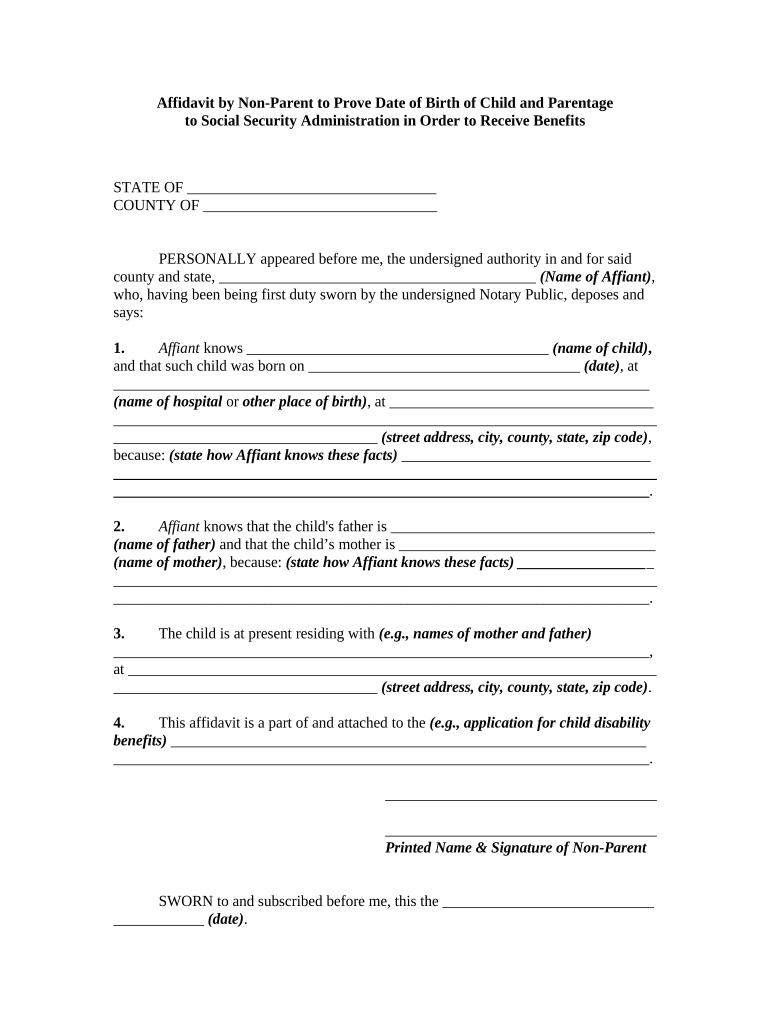
Declarant Details

Provide full legal name, date of birth, place of birth, current address, relationship to subject, and a statement of how the declarant knows the birth facts; avoid initials or nicknames.

Witness Information

List names, addresses, and contact details for witnesses who can corroborate the facts; include a brief description of each witness's connection to the event and whether they were present at delivery.

Supporting Documents

Attach any available hospital records, baptismal certificates, early medical records, affidavits from relatives, or school records. Agencies often require these documents to corroborate the sworn statement.

Jurat and Notary

Include a jurat that records the oath, the notary's signature, commission number, and commission expiration date; some agencies accept witness-only affidavits where notarization is unavailable.

Date and Venue

Record the exact signing date and the jurisdiction (city, county, state). The venue can affect notarization validity and the affidavit's acceptance by state agencies.

Security and record controls for affidavit handling

Encryption: AES-256 encryption at rest and TLS in transit.
Access Controls: Role-based access and audit trail.
HIPAA: HIPAA BAA required for PHI.
Retention: Retain per legal/agency requirements.
Notarization: Notary journal or RON session recorded.
Audit Trail: Record IP, timestamp, signer actions.

Step-by-step: prepare and submit an Affidavit of Birth

Follow these steps to prepare, verify, and submit an Affidavit of Birth that meets agency and legal requirements.

  • 01
    Gather Facts: Collect names, dates, places, and witness details.
  • 02
    Collect Docs: Assemble hospital records, baptismal or school records.
  • 03
    Draft Statement: Write clear sworn statements with dates and relationships.
  • 04
    Notarize & Submit: Sign before notary or record RON session, then file.

Typical workflow for completing and delivering the affidavit

Online and in-person workflows for an Affidavit of Birth include preparation, verification, notarization, and submission to requesting agencies.

  • Upload Document: Convert affidavit to PDF and upload.
  • Place Fields: Add signature, date, and witness fields.
  • Authenticate Signers: Use email, SMS, or knowledge-based checks.
  • Finalize Record: Capture audit trail and distribute final PDF.

Configuring an online signing workflow

Configure an online workflow that ensures identity checks, required fields, and evidence attachment for agency acceptance.

Field Configuration
Authentication Email link with optional SMS code or KBA for high-assurance.
Required Fields Signature, date, declarant name, witness fields, supporting attachments.
Supporting Docs Allow PDF uploads and attach file descriptions.
Retention Store signed PDFs and audit trails per retention policy.

Technical capabilities to support affidavits

Choose platforms that support PDFs, RON, and HIPAA controls as needed for your use case.

  • File Formats: PDF/A, DOCX, and scanned images accepted.
  • Integrations: Works with Box, Google Drive, NetSuite, Salesforce.
  • Authentication: Email, SMS, RON options; two-factor supported.

Timing considerations and agency deadlines

Deadlines vary by use: some agencies require affidavits for immediate processing, others accept them during delayed registration or appeals.

Passport:

Submit with passport application if birth certificate unavailable; State Department may request additional evidence.

Social Security:

Use to establish birth when applying for SSN; verifier may require supplementary records.

Delayed Registration:

File with state vital records per state timelines; some states set age-based limits.

School Enrollment:

Districts may accept affidavits temporarily; local policy determines whether permanent records need certified birth certificate.

Court Proceedings:

Courts may accept affidavits as evidence but reserve discretion to require live testimony.

Common preparation mistakes to avoid

  • Using incomplete witness information, such as missing addresses or ambiguous relationships, which prevents agencies from verifying the affidavit against other records.
  • Entering inconsistent names or dates that do not match supporting documents, triggering requests for corrections or outright rejection.
  • Failing to notarize where required or omitting essential notarization details such as commission number and expiration date.
  • Providing vague explanations for estimated birth dates instead of documenting the basis for the estimate and available corroboration.

Legal and administrative risks if the affidavit is incorrect

Perjury Risk: False statements may lead to criminal charges.
Application Delays: Agencies may delay processing pending verification.
Denial of Benefits: Eligibility or benefits could be denied.
Administrative Fines: State fines or sanctions possible.
Record Rejection: Affidavit may be rejected without corroboration.
Civil Liability: Subject or declarant may face lawsuits.

eSignature vendor feature and pricing snapshot for affidavit workflows

Comparison of common eSignature plan features relevant to Affidavit of Birth workflows, with signNow listed first per vendor data.

signNow DocuSign Adobe Sign PandaDoc HelloSign
Starting Price $8/user/mo $15/user/mo $14/user/mo $19/user/mo $15/user/mo
Free Trial 7-day free trial Varies by vendor Varies by vendor Varies by vendor Varies by vendor
Bulk Send Yes Yes Yes Yes No
Audit Trail Yes Yes Yes Yes Yes
HIPAA Compliant Yes Yes Yes No No

Frequently asked questions about Affidavit of Birth

Answers to common questions about using, notarizing, and filing an Affidavit of Birth in U.S. administrative and legal contexts.


Need help? Contact support

be ready to get more
Join over 28 million airSlate SignNow users