Establishing secure connection…Loading editor…Preparing document…

Affidavit of Survivor

This template is fully customizable. Edit the text, fill out the fields, and send it for signature. Give it a try!
Affidavit of Survivor

What the Affidavit of Survivor Is and when it’s used

An Affidavit of Survivor is a sworn, written statement by a surviving spouse, partner, or heir attesting that a named person has died and that the affiant is entitled to possession or transfer of specific personal property or accounts. Commonly used by banks, insurers, title companies, and government agencies, the affidavit supports nonprobate transfers when the estate is small or assets are held jointly. The document typically requires the decedent’s identifying details, proof of death, the affiant’s relationship, and a notarized oath; many states and organizations accept electronic versions when ESIGN and state law requirements are met.

Why an Affidavit of Survivor matters for estates and account access

A properly completed affidavit can shorten delays, avoid formal probate for certain assets, and serve as legal proof for institutions that require a sworn statement. It reduces administrative burden and clarifies title for specific accounts or personal property while creating a formal, recordable declaration of survivor status.

Why an Affidavit of Survivor matters for estates and account access

Who typically prepares, signs, or receives this affidavit

The Affidavit of Survivor is used by individuals and institutions that need a sworn statement of survivor status without opening full probate proceedings.

  • Surviving family members and beneficiaries who need to claim bank accounts or personal property within small-estate thresholds.
  • Financial institutions, insurers, and title companies that require a sworn declaration before releasing funds or transferring title.
  • Attorneys and estate administrators who prepare or verify the affidavit as part of settlement or transfer workflows.

Use the affidavit where accepted by the receiving organization; when in doubt, confirm the institution’s internal requirements or consult counsel to avoid rejection or delay.

Stepwise process to prepare and finalize the affidavit

Follow these practical steps to assemble, verify, and submit the Affidavit of Survivor with minimal delay.

  • 01
    Gather documents: Collect death certificate, ID, and account statements.
  • 02
    Complete affidavit: Fill all fields accurately and attach exhibits.
  • 03
    Notarize: Sign before an in-person or RON-qualified notary public.
  • 04
    Submit to institution: Provide affidavit and attachments to the bank or agency.

Typical eSubmission flow for an electronic Affidavit of Survivor

Electronic handling follows a straightforward upload, sign, and deliver sequence; institutions may require additional authentication.

  • Upload: Create a single PDF with affidavit and attachments.
  • Place fields: Add signature, date, and notarization fields where required.
  • Sign: Affiant signs and notary completes their block (in-person or RON).
  • Deliver: Send to the receiving institution with a certificate of completion.

Essential workflow settings for secure eSubmission

Configure signer order, authentication, and retention before sending to reduce rework and support institutional acceptance.

Field Configuration
Signer Order Affiant first | Notary second
Authentication Email + SMS code or stronger KBA
Notary Requirement In-person or RON per state rules
Document Retention Retain signed PDF and audit trail

Technical requirements and integration considerations

Verify that the eSignature platform supports notarization workflows, audit trails, and the file formats required by the receiving institution.

  • File Format: PDF (flattened) recommended
  • Notarization: Support for RON and in-person stamps
  • Integrations: Bank portals and document storage

Confirm that the institution accepts electronically notarized affidavits; when integrating with case or document management systems, choose platforms that preserve audit trails and provide long-term export options.

Core sections a professional Affidavit of Survivor should include

A complete affidavit follows a predictable structure so recipients can verify facts quickly and release or transfer assets with legal certainty.

Title and Caption

Clear document title, jurisdiction, and a brief caption identifying the decedent and date of death so institutions can route the record correctly.
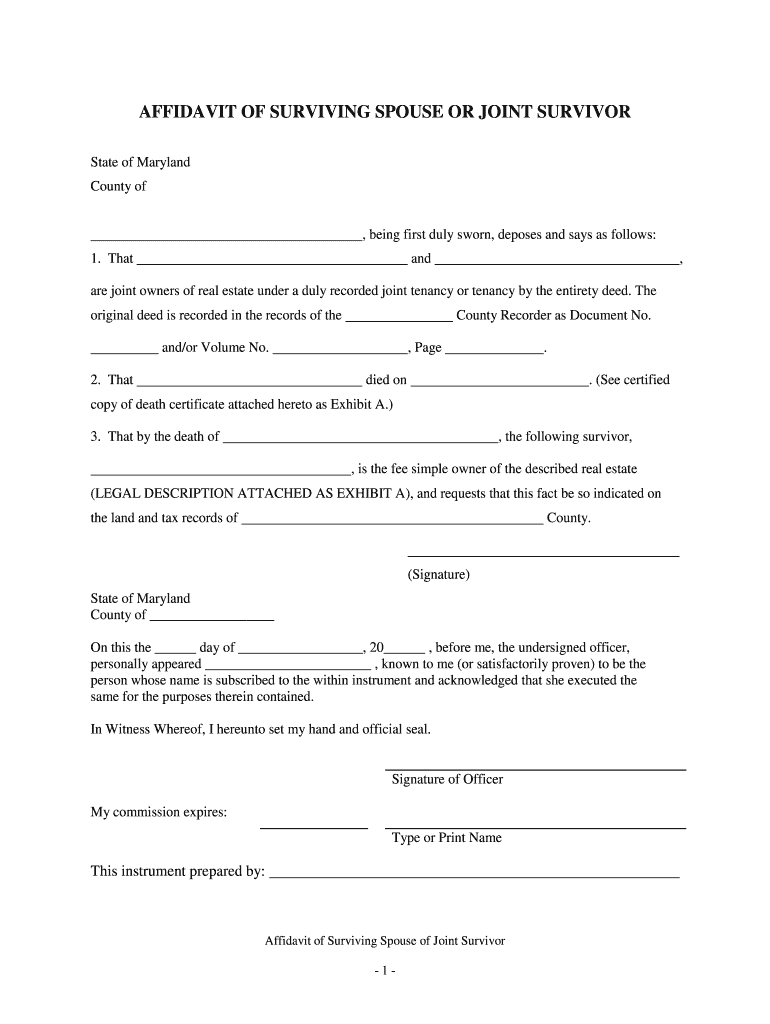
Statement of Survival

A concise sworn declaration stating the affiant survived the decedent and asserting the affiant’s entitlement to specified property or accounts.

Decedent Details

Full legal name, date of birth, social security or tax ID (if required), and last known address to uniquely identify the decedent.

Property Description

Specific account numbers, institution names, or tangible assets listed with sufficient detail for acceptance by the receiving party.

Oath and Notary

Affiant’s sworn signature, date, and official notarial acknowledgement or electronic notarization block compliant with state law.

Attachments

Certified or certified-copy death certificate and supporting ID for the affiant; include any required estate or probate documents.

Security and compliance features to look for with electronic affidavits

Encryption: TLS 1.2/1.3; AES-256 at rest
Certifications: SOC 2 Type II; ISO 27001 available
HIPAA BAA: Business Associate Agreement required
21 CFR Part 11: Support for regulated records
Audit Trail: Detailed timestamp and IP logs
Access Controls: Role-based permissions and SSO

Common risks and legal consequences of errors

Perjury Exposure: False statements can trigger criminal penalties
Document Rejection: Missing death certificate causes denial
Tax Implications: Incorrect reporting may trigger penalties
Probate Delay: Incomplete affidavits can force probate
Notary Defects: Wrong notarization invalidates the affidavit
Identity Mismatch: Name mismatches cause institutions to refuse

Timing expectations and typical processing windows

There is no universal filing deadline for an Affidavit of Survivor, but timely submission avoids interest, account holds, and probate triggers.

Provide Promptly:

Submit as soon as you have certified death proof

Bank Processing:

Institutions typically respond within 7–30 business days

RON Record Retention:

Audio-video recordings may be retained 5–10 years

Estate Tax Timing:

File estate tax returns per IRS deadlines when applicable

Notary Scheduling:

Allow extra time for notary appointments or RON sessions

Key milestones from preparation to acceptance

A sequential view of the process helps coordinate documents, notarization, and institutional review steps.

01

Document Preparation

Draft affidavit and gather certified death certificate and ID

02

Identity Verification

Affiant proves identity in-person or via RON procedures

03

Notarization Completed

Notary signs and, if remote, records session per state rules

04

Institution Review

Bank or agency verifies attachments and releases funds or title

Comparing eSignature providers for executing an Affidavit of Survivor

Platform choice matters for notarization support, audit trails, HIPAA compliance, and per-user cost; signNow is listed first for reference.

signNow DocuSign Adobe Sign PandaDoc HelloSign
Starting Price $8/user/mo $15/user/mo $14/user/mo $19/user/mo $15/user/mo
Free Trial Yes, 7-day free trial Varies by plan Varies by plan Varies by plan Varies by plan
Bulk Send Yes Yes Yes Yes No
Audit Trail Yes Yes Yes Yes Yes
HIPAA Compliant Yes Yes Yes No No
Envelope Cap No cap 100 envelopes/user/year Varies Varies Varies

Frequently asked questions about executing and submitting this affidavit

Answers to common issues when preparing, notarizing, or delivering an Affidavit of Survivor; consult the receiving institution for their exact form preferences.


Need help? Contact support

be ready to get more
Join over 28 million airSlate SignNow users