Establishing secure connection…Loading editor…Preparing document…

Alabama Consent for Relinquishment of Minor for Adoption

This template is fully customizable. Edit the text, fill out the fields, and send it for signature. Give it a try!
Alabama Consent for Relinquishment of Minor for Adoption

What the Alabama Consent for Relinquishment of Minor for Adoption is

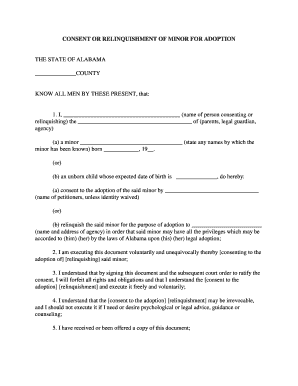
The Alabama Consent for Relinquishment of Minor for Adoption is a formal, written declaration by a parent or legal guardian surrendering parental rights and consenting to another person or agency adopting the minor under Alabama law. The document records identity details for the child and consenting adult, states the terms of consent, and typically includes venue, statutory citations, and acknowledgment blocks for a notary public or other authorized official. Proper execution ensures the consent is legally effective for court review during the adoption petition and finalization process.

Why a properly completed consent matters

A valid relinquishment consent creates the legal basis for an adoption petition and helps prevent later challenges to parental rights. It protects the rights of the child, clarifies legal custody transitions, and provides the court with written proof of voluntary consent signed under the required formalities.

Why a properly completed consent matters

Who typically completes this consent and why it matters

Accurate completion reduces delays in court processing and helps ensure the child's legal status can be resolved cleanly during the adoption proceeding.

  • Birth parents completing a voluntary relinquishment prior to or during an agency-arranged placement.
  • Adoptive parents or agencies collecting consent documentation required for court filing.
  • Attorneys and court clerks verifying that statutory formalities were observed before finalization.

Primary signers and professionals involved

Birth Parent

A birth parent is the individual surrendering parental rights. They must be identified clearly, sign knowingly and voluntarily, and follow any state-mandated waiting or counseling requirements to ensure consent is valid for court review.

Adoption Attorney

An adoption attorney or agency representative prepares the paperwork, explains legal consequences, and often coordinates notarization and court filing to ensure the consent conforms to Alabama statutory and procedural requirements.

Key parts of a professional Alabama relinquishment consent

A complete consent form contains specific sections required for legal sufficiency; each part helps the court determine voluntariness, identity, and whether procedural safeguards were met prior to terminating parental rights.

Caption

Court and case caption identifying the county, court, case number, and parties so the consent can be attached to the adoption petition and tracked by the clerk.
Child Details

Full legal name, birth date, sex, place of birth, and any identifying information used to match the consent to the child in the adoption record.

Consenting Party

Full legal name, address, relationship to the child, date of birth, and any identifying numbers required by the jurisdiction.

Consent Language

Clear statement that the consenting adult voluntarily relinquishes parental rights and intends to consent to the child’s adoption, including any conditions or limitations if applicable.

Notary Block

Acknowledgment, jurat, or notarization area for a commissioned notary public or other authorized official to verify identity and voluntary signing.

Court Acknowledgment

Signature lines, dates, and any required agency or attorney attestations the court requires before accepting the consent for filing.

Essential information fields to include

Child name: Full legal name
Child DOB: MM/DD/YYYY
Parent name: Full legal name
Parent contact: Address and phone
Consent date: MM/DD/YYYY
Notary details: Notary name and seal

Step-by-step: filling and signing the consent

Follow these sequential steps to prepare a complete, legally effective Alabama consent for relinquishment that is ready for notarization and court filing.

  • 01
    Prepare the form: Complete all identity and consent fields accurately.
  • 02
    Review rules: Confirm any state waiting periods or counseling requirements.
  • 03
    Notarize: Sign in front of a notary and any required witnesses.
  • 04
    File with court: Submit consent as part of the adoption petition or agency record.

How to customize the form for online workflows

Configure the document for e-signatures and automated routing to reduce manual steps while preserving legal formalities required by Alabama law.

Field Configuration
Signature field Require signer authentication and typed name
Conditional fields Show counseling or witness fields when applicable
Signer roles Assign birth parent, witness, notary roles
Audit trail Enable IP, timestamp, and certificate logging

Where to file and how the signed consent travels

After completion and notarization, the consent is routed to the adopting party’s attorney or agency and then filed with the probate or family court handling the adoption.

  • Prepare document: Ensure all fields and attachments are complete.
  • Sign and notarize: Notary validates identity and voluntary signature.
  • Deliver to attorney: Attorney or agency receives the executed consent.
  • File with court: Consent is included in the adoption petition packet.

Digital signing and e-submission considerations

Use a secure e-signature platform that supports audit trails, record retention, and notarization workflows to maintain evidentiary value and compliance.

  • Supported formats: PDF, DOCX
  • Integrations: Works with case management and cloud storage
  • Authentication: Email, SMS, or stronger methods

Typical timelines and processing expectations

Timing varies by county and whether agency review or court filing is required. Anticipate several business days for notarization plus agency or court processing time.

Execution timing:

Sign and notarize when consenting adult is present

Agency review:

Varies by agency; typically days to weeks

Court filing:

Included with adoption petition before hearing

Waiting periods:

Some jurisdictions impose counseling or cooling-off periods

Record retention:

Sealed record timing varies by state

Common mistakes to avoid when preparing the consent

  • Using incomplete identity details for the child or consenting parent, which can lead to mismatched records and delay court acceptance.
  • Failing to use the precise statutory consent language required by Alabama, which may render the instrument ineffective for adoption purposes.
  • Notarizing a document signed in a different name or before proper identification was presented, creating grounds for later challenge.
  • Omitting witness information when the jurisdiction or local practice expects witness attestations in addition to notarization.

Consequences and legal risks of improper consent

Invalid consent: May be voided
Delayed adoption: Court may reject filing
Reopening risk: Possible later challenges
Civil liability: Claims for coercion possible
Criminal risk: Fraud allegations possible
Record sealing issues: Access restrictions vary

eSignature vendor comparison for executing and storing consent forms

Common vendor capabilities for form execution and secure storage. signNow is listed first for direct comparison; verify current vendor plans and features with each provider.

signNow DocuSign Adobe Sign PandaDoc HelloSign
Starting Price $8/user/mo $15/user/mo $14/user/mo $19/user/mo $15/user/mo
Free Trial 7-day free trial Varies Varies Varies Varies
Bulk Send Yes Yes Yes Yes No
Audit Trail Yes Yes Yes Yes Yes
HIPAA Compliant Yes Yes Yes No No

Practical examples of using the consent form in workflows

Two typical scenarios illustrating how the consent is prepared, executed, and used during adoption proceedings.

Agency-Directed Relinquishment

An agency collects the consent and supporting records online to streamline case intake

  • Agency verifies identity, notarizes in person
  • The court receives a complete packet with notarized consent and agency reports, reducing back-and-forth and speeding docketing.

Attorney-Assisted Consent

An attorney drafts the consent using statutory language, meets the birth parent for in-person signing

  • Notary and witness attest to voluntariness
  • The attorney files the consent with the adoption petition and preserves the signed original for the sealed court file.

Frequently asked questions about Alabama relinquishment consent

Answers to common questions about who signs, notarization, electronic execution, and next steps after a consent is signed.


Need help? Contact support

be ready to get more
Join over 28 million airSlate SignNow users