Establishing secure connection…Loading editor…Preparing document…

Alabama Conservatorship

This template is fully customizable. Edit the text, fill out the fields, and send it for signature. Give it a try!
Alabama Conservatorship

What an Alabama Conservatorship Is and When It Applies

An Alabama conservatorship is a court-supervised legal arrangement placing responsibility for the personal affairs, financial affairs, or both of an adult who cannot manage them due to incapacity. The probate court reviews a petition, supporting medical evidence, and an inventory of assets before appointing a conservator and defining the scope of authority and required reporting.

Why an Alabama Conservatorship Matters

Conservatorship provides a legal mechanism to protect an incapacitated adult’s health, finances, and legal rights when they cannot manage matters themselves. It creates an accountable decision-maker subject to court oversight, reporting, and fiduciary duties which reduce risk of financial loss or medical neglect.

Why an Alabama Conservatorship Matters

Who Typically Prepares or Signs a Conservatorship Petition

Common parties who prepare, file, or sign Alabama conservatorship paperwork.

  • Family members or caregivers initiating the petition for a loved one
  • Attorneys representing petitioners or proposed conservators in probate court
  • County probate clerks and judges overseeing appointments and filings

Each party has distinct responsibilities: petitioners build the factual record, attorneys ensure compliance with local rules, and the court issues appointments and reporting orders.

Filing a Conservatorship Petition — Step-by-Step Overview

Follow these steps to prepare and submit an Alabama conservatorship petition to the probate court; local clerk procedures and scheduling vary by county.

  • 01
    Prepare Petition: Draft petition listing proposed conservator, protected person, and requested powers.
  • 02
    Gather Evidence: Attach medical certification, competency reports, and asset inventory.
  • 03
    File with Court: Submit at county probate court and pay required filing fee.
  • 04
    Attend Hearing: Appear for hearing where court evaluates capacity and bonds.

Where to File and How the Filing Process Moves

Conservatorship petitions are processed through the county probate court; filings, notifications, and follow-up steps follow local procedures.

  • File Location: County probate court clerk where the protected person resides.
  • Service: Serve notice to interested persons as required by local rules.
  • Hearing: Judge reviews evidence, hears objections, and may appoint counsel or guardian ad litem.
  • Appointment: Court issues letters of appointment and may set bond and reporting terms.

Customize an Online Conservatorship Workflow

Configure a digital workflow to collect signatures, medical reports, and inventories while preserving an audit trail for court review.

Field Configuration
Upload Document PDF or DOCX; use final court form template
Assign Roles Petitioner, proposed conservator, attorney, witness roles
Authentication Use email plus SMS or ID verification for signers
Audit Trail Enable IP, timestamp, and completion certificate

Digital Signing and Court-Ready Delivery

Electronic workflows should capture signer identity, consent, and an auditable history acceptable to courts.

  • File Formats: PDF, DOCX accepted by most clerks
  • Integrations: Works with case management and cloud storage
  • Authentication: Email, SMS, or stronger ID verification

Confirm with the county probate clerk whether the court accepts electronically signed filings or requires printed, notarized originals for submission.

Essential Components of a Complete Alabama Conservatorship Petition

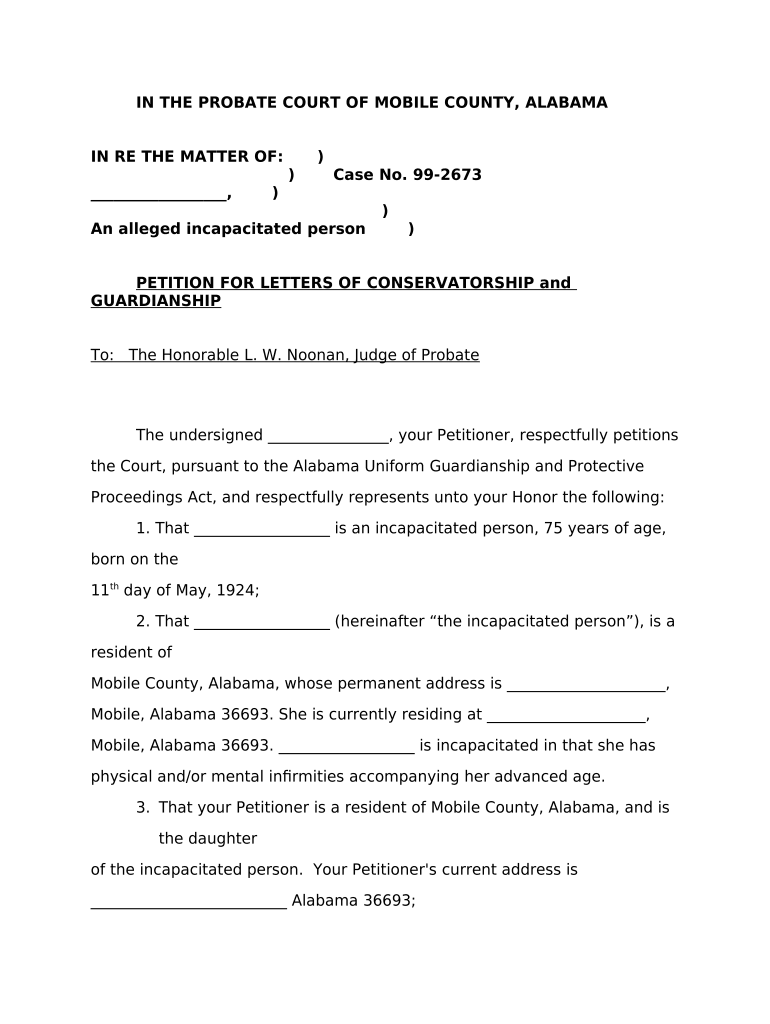
A court-ready petition bundles factual, medical, financial, and procedural elements the judge needs to evaluate incapacity and appoint a conservator.

Petition

Statement of facts, relationship, and specific powers requested; frames the court’s jurisdiction and relief sought.
Medical Report

Qualified physician or evaluator certifies incapacity, diagnosis, and capacity limitations supporting the petition.

Inventory of Assets

Detailed list of real and personal property, account numbers, and estimated values for fiduciary oversight.

Proposed Plan

Care plan or financial management plan demonstrating how the conservator will act in the protected person’s best interest.

Bond or Insurance

Court-ordered bond or fiduciary insurance to protect the estate from mismanagement or theft.

Service and Notice

Proof of proper service to interested parties and any required publication or notice forms.

Supporting Documents Commonly Submitted with the Petition

Courts typically expect corroborating evidence; include certified documents and proofs to prevent delays or objections.

Medical Evaluations

Physician reports, neuropsychological testing, or physician affidavits explaining incapacity and prognosis.

Financial Records

Bank statements, retirement account summaries, deeds, and recent tax returns as proof of assets.

Proof of Service

Affidavits or certificates demonstrating notice to interested parties per local rule.

Background Checks

Criminal background and credit checks for proposed conservator where required by the court.

Typical Deadlines and Court Timelines to Expect

Deadlines vary by county; some steps (service, bond posting, inventories) have statutory or court-ordered timeframes that must be met.

Filing to Hearing:

Time from filing to hearing depends on court calendar and local rule

Inventory Deadline:

Court often requires inventory within a set time after appointment

Bond Posting:

Bond must be posted when ordered, usually shortly after appointment

Annual Reports:

Conservators frequently must file periodic accounting reports as ordered

Service Deadlines:

Service of notice must follow timelines in local probate rules

Key Milestones in the Conservatorship Process

A typical conservatorship proceeds through discrete milestones from filing to final accounting and case closure.

01

File Petition

Petition submitted to probate court initiating the process

02

Court Hearing

Judge holds hearing to assess evidence and objections

03

Appointment Issued

Court appoints conservator and issues letters of authority

04

Accounting Filed

Conservator files periodic inventories and accountings as required

Common Preparation Challenges to Avoid

  • Incomplete financial inventories often lead to court continuances and requests for more documentation, delaying appointments and increasing costs.
  • Mismatched names or dates across medical records, IDs, and the petition create identity verification problems and potential rejection.
  • Missing or unclear medical evaluations can lead the judge to order additional assessments or appoint an independent evaluator.
  • Failure to follow local clerk formatting and service rules causes procedural objections and avoidable hearings.

Consequences of Errors or Omissions in Conservatorship Filings

Court Rejection: Filing rejected or continued
Delay: Extended processing and increased cost
Fiduciary Sanctions: Removal or disciplinary action possible
Financial Loss: Estate mismanagement risk
Criminal Exposure: Fraud allegations in extreme cases
Accounting Orders: Court-mandated detailed accounting

Data Protection and Compliance Considerations

Encryption: AES-256 at rest; TLS 1.2/1.3 in transit
Audit Trail: Complete timestamps, IP addresses, and activity logs
HIPAA: HIPAA-compliant workflows with BAA where required
ESIGN/UETA: Complies with ESIGN and UETA electronic signature rules
21 CFR Part 11: Support for regulated recordkeeping where applicable
SOC 2: SOC 2 Type II controls and reporting available

Who Can Sign or Consent on Conservatorship Documents

Petitioner — Individual or Attorney

The petitioner is the person who initiates the action; if represented, an attorney signs documents on the petitioner’s behalf and certifies service and accuracy to the court.

Court-Appointed Conservator — Guardian

Once appointed, the conservator signs accountings and filings required by the court and must act under fiduciary duties subject to judicial oversight.

Real-World Examples of Digital Document Use

These customer stories illustrate practical benefits of processing legal forms online while ensuring compliance and security.

Tim Martin — Founder, Martin Properties

Tim Martin used online signing to manage property-related legal forms efficiently.

  • The workflow supported mobile and offline signing.
  • "I can process and execute all of these documents online with 100% compliance and built-in security. Whether on mobile or working offline, I can get forms back to their necessary parties efficiently."

Dan Rotelli — CEO, BIS

Dan Rotelli selected a platform aligned with enterprise security and audit needs.

  • Integration and SOC 2 were key deciding factors.
  • "We felt most comfortable with airSlate SignNow given their SOC 2 certification and strict focus on ESIGN and UETA act compliance."

eSignature Pricing Comparison for Conservatorship Workflows

Compare starting price and key capabilities across common eSignature platforms; signNow is listed first per platform comparison standards.

signNow DocuSign Adobe Sign PandaDoc HelloSign
Starting Price $8/user/mo $15/user/mo $14/user/mo $19/user/mo $15/user/mo
Free Trial 7-day free trial Varies by plan Varies by plan Varies by plan Varies by plan
Bulk Send Yes (Business Premium) Varies by plan Varies by plan Varies by plan Varies by plan
Audit Trail Yes Yes Yes Yes Yes
HIPAA Compliant Yes Varies by plan Varies by plan Varies by plan Varies by plan
Envelope Cap No envelope cap 100 envelopes/user/year limit Varies by plan Varies by plan Varies by plan

Frequently Asked Questions About Alabama Conservatorship

Answers to common questions on filing, e-signing, notarization, timelines, and revocation for Alabama conservatorship petitions.


Need help? Contact support

be ready to get more
Join over 28 million airSlate SignNow users