Establishing secure connection…Loading editor…Preparing document…

Alabama Order for Change of Name

This template is fully customizable. Edit the text, fill out the fields, and send it for signature. Give it a try!
Alabama Order for Change of Name

What an Alabama Order for Change of Name Is and What It Does

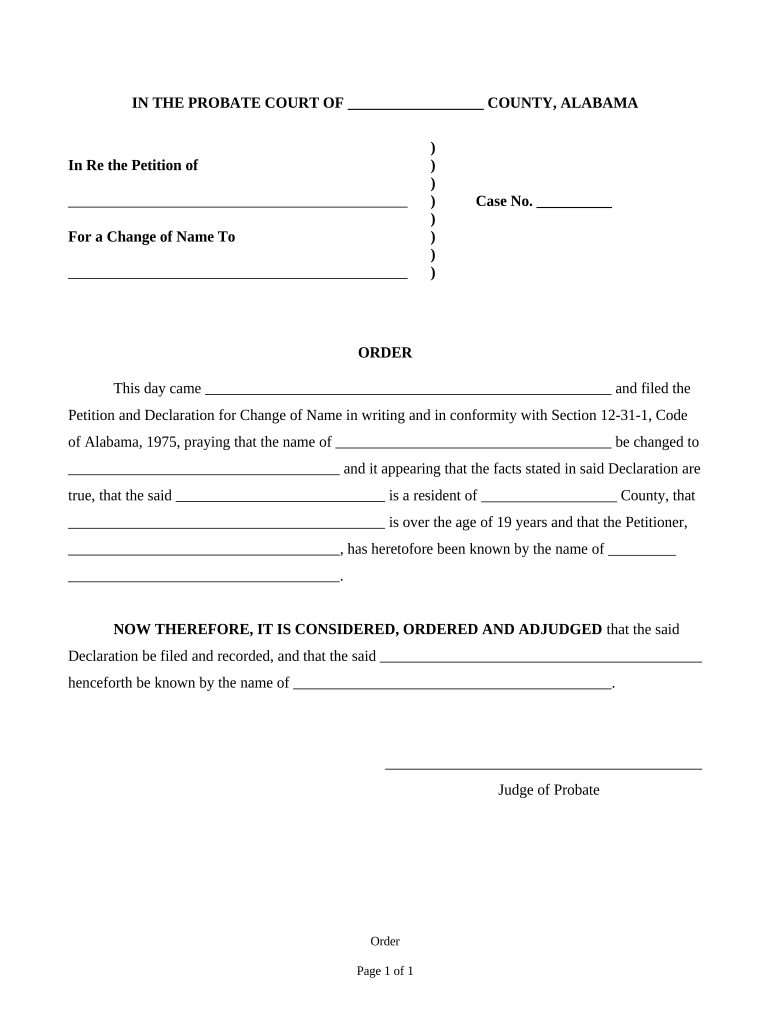
An Alabama Order for Change of Name is a judicial document issued by a county probate court that legally replaces an individual's current name with a new name. The process generally begins with a filed petition, required identification and supporting documents, public notice or service to interested parties where applicable, and a court hearing or judge's review. When entered, the order provides an official record to update state IDs, Social Security, financial accounts, educational and employment records, and other legal documents to reflect the new legal name.

When this Order Is Useful

A signed court order provides unambiguous legal proof of a name change for government records, identity documents, employer files, and private accounts, ensuring consistent identity across legal and administrative systems.

When this Order Is Useful

Who Typically Uses an Alabama Name-Change Order

Individuals, parents, and legal professionals initiate name-change petitions for adults and minors for personal, family, or administrative reasons.

  • Individuals seeking a new legal name after marriage, divorce, gender transition, or personal choice.
  • Parents or guardians petitioning to change the name of a minor child.
  • Attorneys or court clerks preparing, filing, and processing name-change petitions on behalf of clients.

Each user group follows similar forms but may have different supporting documents or consent requirements for minors and protected classes.

Step-by-Step: How to Prepare and File the Petition

Follow these core steps in order to prepare, file, and obtain an Alabama name-change order; local procedures vary by county.

  • 01
    Prepare Petition: Complete the petition form with accurate personal details and attachments.
  • 02
    File with Court: Submit the petition to the county probate court and pay the filing fee.
  • 03
    Provide Notice: Publish notice or serve interested parties as required by local rules.
  • 04
    Attend Hearing: Appear at the scheduled hearing or provide required documentation for judge review.

Where to File and What Happens Next

Filing and processing are handled by the probate court in the county where the petitioner resides; clerks can advise on local publication, service, and hearing schedules.

  • Filing Location: County probate court where you live handles petitions and records.
  • Clerk Review: Court clerk checks form completeness and issues case number.
  • Public Notice: Clerk confirms whether publication or service is required before a hearing.
  • Final Order: Judge signs order if statutory requirements are satisfied.

How to Complete and Submit the Order Online

Digital workflows can streamline preparation and submission; configure upload, fields, authentication, and storage before sending to court or notary.

Field Configuration
Document Upload PDF fillable | Use PDF/A or DOCX formats
Signer Roles Petitioner | Court clerk or notary where required
Authentication ID check or mobile code | Use for higher-assurance signers
Storage Secure PDF retention | Exportable audit trail

Technical Options for eSigning and File Formats

Use platforms that accept standard formats and support secure signer authentication when e-signatures or notary services are used.

  • Formats Supported: PDF, DOCX, HTML
  • Authentication: Email, SMS, or multi-factor
  • Integrations: Google Workspace, Microsoft 365, NetSuite, Box

Choose an eSignature workflow that preserves an audit trail and produces court-acceptable signed PDFs and notarization evidence when required.

Timing Considerations and Typical Deadlines

Deadlines vary by county; plan for publication windows, hearing scheduling delays, and processing time for certified copies after order entry.

Filing to Hearing:

Often 3–8 weeks depending on court calendar

Publication Window:

Publication frequency and length vary by county

Objection Period:

Local rules set the time to file objections

Order Issuance:

Judge signs order at hearing or after review

Certified Copies:

Allow additional days for certified copy requests

Key Milestones from Petition to Certified Order

Sequence and milestones help you track progress from the initial filing through final certified document collection.

01

File Petition

Submit completed petition and pay fees to the probate court.

02

Notice or Publication

Publish notice or serve interested parties in accordance with local rules.

03

Court Hearing

Attend scheduled hearing or provide required supporting evidence.

04

Order Entry

Judge signs order and clerk issues certified copies for record updates.

Essential Sections of a Professional Alabama Order for Change of Name

A complete order and petition package incorporates identifiable sections so clerks and judges can verify eligibility, service, and the basis for the requested change.

Caption

Case caption lists court, county, case number, and parties to create a unique, searchable official case record for court administration.
Petitioner Details

Full current name, new requested name, date of birth, residence address, and contact information so identity and jurisdiction are established.

Statement of Facts

Concise legal statement explaining the petitioner’s eligibility and any relevant prior name changes or criminal record disclosures required by local rule.

Notice and Service

Proof of notice or affidavit of publication, or proof of service on affected parties, showing compliance with procedural requirements.

Hearing Finding

Judge’s findings of fact and conclusions addressing statutory criteria, objections, and any minors’ consent where applicable.

Judicial Order

Signed order language that explicitly declares the old name replaced by the new name, with the judge’s signature and clerk’s entry stamp.

Common Mistakes That Cause Delays

  • Using nicknames or initials instead of the full legal name can cause identity mismatches and require corrected filings.
  • Failing to notarize a required signature or omitting the notary block invalidates the petition in many counties.
  • Skipping publication or incorrect proof of service often results in continuances or dismissal of the petition.
  • Providing incomplete addresses or an incorrect county of residence may lead the clerk to reject the filing.

Consequences of Incorrect or Incomplete Filings

Dismissal Risk: Court may dismiss petition for procedural defects.
Processing Delay: Incomplete records extend time to final order.
Denied Request: Judge can deny if statutory criteria unmet.
False Statement: Material misstatements may lead to sanctions.
Record Discrepancy: Mismatch across agencies can complicate ID updates.
Additional Costs: Refiling and extra publication raise out-of-pocket fees.

eSignature Platform Comparison for Completing and Submitting Forms

Comparison of common eSignature features and starting price points to consider when completing and sharing court petitions or certified orders electronically.

signNow DocuSign Adobe Sign PandaDoc HelloSign
Starting Price $8/user/mo $15/user/mo $14/user/mo $19/user/mo $15/user/mo
Free Trial 7-day free trial, no credit card required Varies by plan Varies by plan Varies by plan Varies by plan
Bulk Send Yes (Business Premium tier) Yes Yes Yes Yes
Audit Trail Yes Yes Yes Yes Yes
HIPAA Compliant Yes Yes Yes No No

Frequently Asked Questions and Troubleshooting

Answers to common procedural and technical questions encountered when preparing, filing, or obtaining certified copies of an Alabama name-change order.


Need help? Contact support

be ready to get more
Join over 28 million airSlate SignNow users