Establishing secure connection…Loading editor…Preparing document…

Amendment Trust

This template is fully customizable. Edit the text, fill out the fields, and send it for signature. Give it a try!
Amendment Trust

What an Amendment Trust Is and when it applies

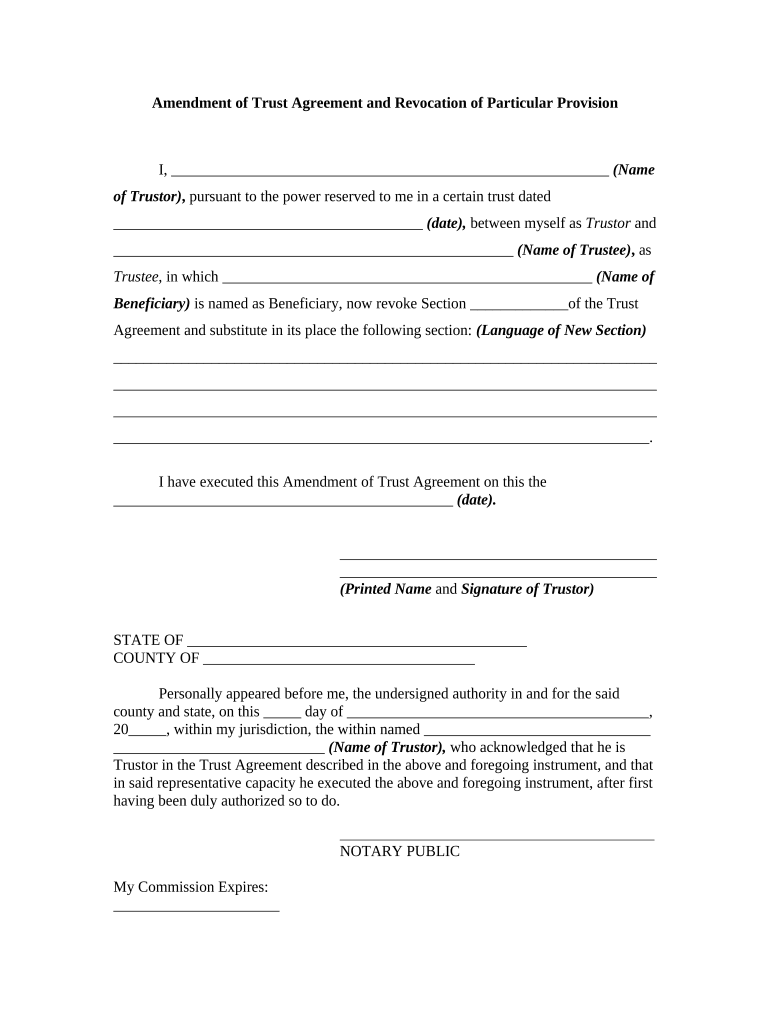
An Amendment Trust is a written legal instrument that modifies terms of an existing trust without creating a new trust. Typically used to change beneficiaries, trustees, the disposition of assets, or administrative provisions, an amendment must identify the original trust, specify the modifications, and be executed by the grantor according to state law. For revocable living trusts, amendments are usually effective immediately upon proper signature and any required notarization, and they should be attached to the trust document to maintain a clear chain of title and intent.

Why use an Amendment Trust instead of recreating the trust

An Amendment Trust lets a grantor update trust terms without reconstituting the trust, preserving continuity and minimizing probate exposure. It provides a concise, legally structured record of changes that beneficiaries, trustees, and institutions can rely on when administering assets.

Why use an Amendment Trust instead of recreating the trust

Who typically prepares or signs an Amendment Trust

Common users include estate planning attorneys, trustees, trust settlers, and family financial advisors who manage or alter trust terms.

  • Estate planning attorneys and law firms involved in drafting and validating amendments
  • Trustees who must accept, implement, or communicate amended provisions to beneficiaries
  • Financial institutions and title companies reviewing authority for asset transfers

Core elements to include in a professional Amendment Trust

Core components of a professional Amendment Trust emphasize clarity, identity, precise amendment language, execution formalities, and provisions for recording or notice where real property or third-party accounts are affected.

Trust ID

Include the trust's legal name, original date, and county of record if applicable; this ties the amendment to the correct trust and avoids ambiguity with similarly named instruments.
Amendment Text

Specify exact language to be added, removed, or replaced. Use precise article and section references and state the intent of each change to prevent later interpretation disputes.

Effective Date

State the effective date using MM/DD/YYYY format and indicate whether changes apply prospectively, retroactively, or upon a triggering event.

Grantor Signature

Name and signature of the grantor or all joint settlors; include printed names, signature lines, and dates to establish intent and execution.

Notary/Attestation

Notary acknowledgement or witness attestations where required by state law; include notary block and recording details if amendment affects real property.

Notice/Recording

Instructions on delivering the amendment to trustees, beneficiaries, and institutions; note whether recording or deed updates are necessary for titled assets.

Step-by-step: complete an Amendment Trust correctly

Complete the Amendment Trust in a defined sequence to ensure validity: identify the trust, draft precise modifications, secure required signatures, and distribute or record as applicable.

  • 01
    Identify Trust: Enter trust name, original date, and county of record.
  • 02
    Draft Amendment: Write exact replacement or addition language with section references.
  • 03
    Execute Properly: Sign in presence of required witnesses or notary.
  • 04
    Deliver Copies: Provide copies to trustees, beneficiaries, and financial institutions.

How to set up an online amendment workflow

Online completion requires configuring authentication, signature placement, notarization options, document fields, and final delivery to stakeholders.

Field Configuration
Authentication Email plus SMS code; optional KBA for higher assurance
Signature Fields Place grantor, trustee, and witness fields with dates
Notary Options Enable remote notarization or upload in-person acknowledgement
Delivery Automatic copies to signers and designated recipients

Typical routing for e-submission and internal processing

Routing the Amendment Trust online follows a simple path: author uploads, assigns signers, configures authentication, and records distribution with audit trail capture.

  • Upload Document: Add trust and amendment pages as single PDF
  • Assign Signers: List grantor, trustees, and required witnesses
  • Authenticate: Choose email, SMS, or ID verification
  • Record Audit: Save signed PDF and certificate of completion

Platform and format considerations for digital completion

Most platforms accept PDF and DOCX, provide signature and initial fields, support remote notarization options, and integrate with case management or title company systems.

  • Formats: PDF and DOCX accepted
  • Integrations: Salesforce, NetSuite, Google Workspace integration
  • Authentication: Email, SMS code, or ID verification

Required identification and core data fields

Grantor Name: Enter full legal name exactly
Trust Name: Provide formal trust title
Amendment Date: Use MM/DD/YYYY format
Amended Sections: List article and section identifiers
Signatures: Grantor and trustee signatures
Notary Block: Include notarization or witness details

Common mistakes to avoid when preparing an amendment

  • Failing to reference the original trust precisely creates ambiguity; omit original date, legal name, or county and trustees may dispute the amendment's applicability.
  • Using vague amendment language like 'reasonable discretion' or 'as needed' leaves terms open to conflicting interpretations and potential litigation among beneficiaries.
  • Neglecting required witnesses or notary acknowledgement invalidates execution in some states and hinders acceptance by banks or title companies.
  • Failing to deliver amendment copies to trustees, beneficiaries, and institutions delays administration, creates compliance gaps, and risks inconsistent enforcement.

Risks and legal consequences of deficient amendments

Invalid Amendment: May be unenforceable
Probate Exposure: Increased estate litigation risk
Title Issues: Property transfers may be delayed
Tax Consequences: Possible gift or income tax implications
Creditor Claims: Unsecured creditors may challenge changes
Notary Failure: Missing acknowledgment voids acceptance

Timing checklist: execution, notarization, recording, and distribution

Key timing considerations for Amendment Trusts address effective dates, notarization scheduling, delivery to institutions, recording when real property is affected, and retention of executed copies.

Effective Date and Triggering Conditions:

Effective when signed, dated, and delivered per amendment terms.

Notarization Scheduling and Requirements by State:

Arrange notarization before submitting to banks or title companies.

Institution Review and Acceptance Timeline:

Institutions may take up to 10 business days to verify changes.

Recording Deadlines for Property-Affecting Amendments:

Record deeds or title changes promptly to avoid title disputes.

Retention Period for Executed Originals:

Keep originals for at least seven years or per counsel advice.

Frequently asked questions and practical answers

Frequently asked questions clarify execution, e-signature permissibility, notarization, recording, revocation, and institutional acceptance for Amendment Trusts.


Need help? Contact support

be ready to get more
Join over 28 million airSlate SignNow users