Establishing secure connection…Loading editor…Preparing document…

Amendment Trust Form

This template is fully customizable. Edit the text, fill out the fields, and send it for signature. Give it a try!
Amendment Trust Form

What an Amendment Trust Form Is and When It’s Used

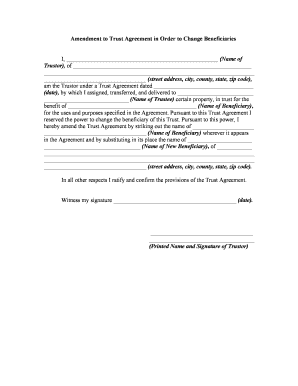
An Amendment Trust Form is a written document used to change one or more provisions of an existing trust without creating a new trust. It records the specific modifications — for example, successor trustee appointments, beneficiary changes, distribution terms, or administrative provisions — and is attached to the original trust instrument. Proper execution preserves the trust’s continuity and helps avoid disputes; some amendments are notarized or witnessed depending on state law or if the amendment affects real property. Keep the amendment with trust records and communicate changes to interested parties.

Why a Clear, Compliant Amendment Matters

A properly drafted and executed Amendment Trust Form documents intent, reduces beneficiary disputes, and preserves fiduciary protections. Electronic execution is legally valid under ESIGN (15 U.S.C. §7001) and most state UETA statutes when requirements are met, but consult counsel for substantive changes or where state formalities apply.

Why a Clear, Compliant Amendment Matters

Who Typically Prepares and Signs an Amendment

Notify beneficiaries and custodians of real property where required; retaining counsel reduces procedural errors and fiduciary risk.

  • Trustees and successor trustees responsible for preparing and ensuring proper execution and recordkeeping.
  • Grantors or settlors when alive and capable, to propose or sign amendments that alter trust terms.
  • Trust attorneys and estate planners who draft precise language and advise on tax or probate consequences.

Essential Parts of a Professional Amendment Trust Form

A complete Amendment Trust Form contains a header identifying the trust, specific amendment language, effective date, signatory blocks, and attestations such as notary or witness lines when required by law.

Trust Identification

Full trust name and original signing date to ensure the amendment attaches to the correct trust and avoids ambiguity among similarly named instruments.
Amendment Clause

Clear statement that the holder amends one or more numbered provisions of the original trust; cite section numbers or paragraphs using exact language.

Revised Language

Insert the new or replacement text verbatim and indicate whether removed language is deleted or superseded to prevent conflicting interpretations.

Effective Date

Specify the date the amendment takes effect and whether it applies prospectively or retroactively to trust actions or distributions.

Execution Block

Signature lines for the grantor/trustee, dates, and spaces for notary or witnesses, plus a statement of authority if signed by a corporate trustee.

Attachment Reference

Note that the amendment is attached to the original trust and list any exhibits, schedules, or recorded deeds affected by the change.

Step-by-Step: Completing and Executing an Amendment

Follow a consistent sequence from drafting to secure storage to ensure enforceability and clear records.

  • 01
    Draft Precisely: Identify the exact provisions to change and draft replacement language.
  • 02
    Review with Counsel: Confirm tax, probate, or creditor implications before finalizing.
  • 03
    Execute Properly: Sign with required witnesses or notary per state rules.
  • 04
    Distribute Notices: Provide copies to trustees, beneficiaries, and custodians of affected assets.

Where the Signed Amendment Should Travel and Be Filed

Understand common destinations for the executed amendment so each custodian has the authoritative version when needed.

  • Trustee Records: Primary copy retained with trust records and financial custodian files.
  • Beneficiary Notice: Provide signed copies to beneficiaries when state law or trust terms require notice.
  • Asset Custodians: Send copies to banks, title companies, or brokers if account or property control changes.
  • Recorder's Office: Record only if the amendment alters real property title; otherwise, do not record trust instruments in most jurisdictions.

Setting Up an Online Amendment Workflow

Configure an electronic workflow that enforces signature order, verifies identity, and captures an audit trail for each executed amendment.

Field Configuration
Signature Order Specify sequential or parallel signer order
Authentication Use email link, SMS code, or ID verification
Retention Policy Set secure storage and export formats
Notifications Enable signer and custodian copy delivery

Technical Requirements for eSigning an Amendment

Integrations with custody systems and secure cloud storage simplify distribution and retention while preserving chain-of-custody for amendments.

  • File formats: PDF, DOCX supported
  • Identity verification: Email, SMS, or ID proofing
  • Audit trail: Timestamps, IP, and action log

Common Timing Considerations and Recommended Deadlines

Amendments often have date-driven effects; tracking effective dates, notice periods, and recording deadlines avoids unintended legal consequences.

Effective Date Format:

Record as MM/DD/YYYY on the amendment and signature block.

Beneficiary Notice Period:

Provide notice per trust terms or state law; 30 days is a common practical window.

Recording Property Changes:

Record deeds promptly where title is affected; county fees and timelines vary.

Trustee Acceptance:

Document acceptance or resignation immediately to establish fiduciary chain.

Retention Start Date:

Retention often begins on the amendment effective date or signing date.

Risks and Legal Consequences of an Improper Amendment

Invalid Amendment: Court may refuse enforcement
Breach of Fiduciary: Trustee liability for improper changes
Tax Exposure: Unanticipated tax consequences for beneficiaries
Recording Errors: Defective deeds or title issues
Beneficiary Disputes: Increased litigation risk
Probate Complications: Possible probate claims despite trust intent

Recordkeeping and Security Considerations for Amendments

Encryption: TLS 1.2/1.3 in transit; AES-256 at rest
Access Controls: Role-based access and audit logging
Audit Trail: Timestamps, IP addresses, signer events
Compliance: ESIGN, UETA, SOC 2 Type II available
HIPAA Support: BAA required for protected health information
Retention Export: Secure PDF/A or original file formats

Practical Tips for Accurate and Efficient Amendments

Apply consistent drafting and execution practices to reduce ambiguity and downstream administrative burden.

Use Precise Language
Avoid vague terms; identify clauses by section number and quote original language where you replace or delete text. Clear drafting reduces litigation risk and ensures trustees and beneficiaries understand the intended change.
Document Chain of Custody
Record who drafted, reviewed, signed, and received copies. Maintain a signed distribution log or notarized acknowledgment to show proper notice and to protect trustees from fiduciary claims.
Initial Each Page
Have each signer initial every page of the amendment and the signature page. This practice prevents later claims of omitted pages and provides physical evidence of signer intent.
Coordinate Asset Updates
If the amendment affects title, beneficiary designations, or account ownership, update deeds, beneficiary forms, and custodian records promptly to align asset documents with the amended trust.

Example Scenarios Where an Amendment Trust Form Is Used

Two typical uses illustrate how and why amendments are executed and distributed in practice.

Successor Trustee Update

A grantor names a new successor trustee after incapacitation disclosure is updated.

  • The amendment replaces the prior successor clause.
  • The trustee records acceptance, distributes copies to beneficiary accounts, and retains the original with trust records to preserve fiduciary continuity and access to custodial authorities.

Beneficiary Allocation Change

A grantor redirects a specific bequest from one beneficiary to a charitable organization.

  • The amendment specifies the exact asset and allocation percentage.
  • Executors and custodians receive updated instructions, tax advisors note change for estate tax planning, and records are aligned to prevent conflicting payouts.

Pricing and Feature Comparison for eSignature Platforms

Compare common feature and pricing dimensions relevant to executing Amendment Trust Forms; signNow appears first in the vendor list for parity across columns.

signNow DocuSign Adobe Sign PandaDoc HelloSign
Starting Price $8/user/mo $15/user/mo $14/user/mo $19/user/mo $15/user/mo
Free Trial Yes, 7-day trial No No Yes, limited Yes, limited
Bulk Send Yes Yes Yes Yes No
Audit Trail Yes Yes Yes Yes Yes
HIPAA Compliant Yes Yes Yes No No

Frequently Asked Questions About Amendment Trust Forms

Answers to common execution, notice, and validity questions for Amendment Trust Forms in the United States.


Need help? Contact support

be ready to get more
Join over 28 million airSlate SignNow users