Establishing secure connection…Loading editor…Preparing document…

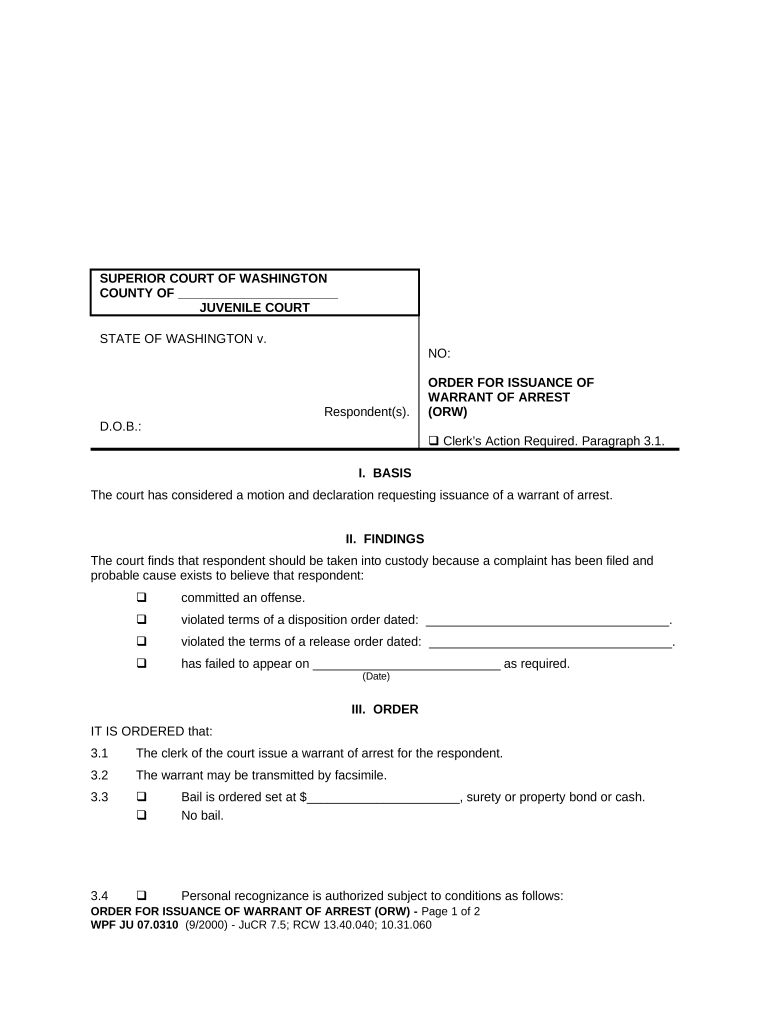
Washington Order for Issuance of Warrant of Arrest

This template is fully customizable. Edit the text, fill out the fields, and send it for signature. Give it a try!
Washington Order for Issuance of Warrant of Arrest

What the Washington Order for Issuance of Warrant of Arrest Is

The Washington Order for Issuance of Warrant of Arrest is a judicial instrument that authorizes law enforcement to take a named person into custody after a judge or magistrate finds probable cause. The order identifies the defendant, summarizes the alleged offense, sets execution limits or conditions, and directs the law enforcement agency responsible for service. It operates within Washington state procedural rules and must meet content, signature, and service requirements to be defensible in criminal proceedings and to reduce risk of exclusion or civil challenge.

Why Accurate Orders Matter for Courts and Public Safety

A properly prepared Washington Order for Issuance of Warrant of Arrest preserves due process, supports lawful detention, and reduces the risk of suppression motions or civil claims. Consistent form content and clear service instructions help courts, prosecutors, and officers coordinate responses and maintain evidentiary integrity.

Why Accurate Orders Matter for Courts and Public Safety

Primary Users and Stakeholders

Prosecutors, judges, magistrates, and law enforcement personnel commonly prepare, review, or execute the Washington Order for Issuance of Warrant of Arrest during criminal matters.

  • Prosecutors and county attorneys seeking judicial authorization for arrest based on probable cause.
  • Judges and magistrates reviewing affidavits and issuing the formal arrest order to law enforcement.
  • Police, sheriffs, and state patrol officers executing the warrant and documenting service per court instructions.

Typical Roles Involved

Prosecutor

Prosecutors draft the supporting affidavit or complaint, present facts to the judge for probable cause, and coordinate with court clerks to obtain the signed order. They provide executing agencies with statutory references and any constraints to reduce legal vulnerability.

Law Enforcement

Law enforcement officers identify the subject and location, confirm identity, execute the signed order, and record service details. Officers must follow court instructions and preserve contemporaneous records and evidence of execution for the prosecution file.

Core Elements of a Professional Arrest Warrant Order

A clear, complete order minimizes disputes and supports lawful enforcement. Include precise party identification, statutory citations, factual basis for probable cause, execution instructions, judicial attestation, and a clear return procedure so courts and officers can act consistently and defensibly.

Caption

Court name, case number, and caption placed prominently so the order is unambiguously tied to the underlying criminal matter and docket for clerk processing and recordkeeping.
Defendant Details

Full legal name, aliases, date of birth, physical descriptors, and any known identifiers to reduce the risk of misidentification and wrongful detention during execution.

Charge and Statute

Precise offense description with statutory citation and short narrative so the executing officer and records staff understand the legal basis for arrest without ambiguity.

Probable Cause Summary

Concise but specific factual statements supporting probable cause drawn from sworn affidavits or complaint that justify the judicial finding and withstand pretrial scrutiny.

Issuing Authority

Name, title, signature block, and date for the judge or magistrate who authorized the warrant, plus clerk validation fields where required by local rule.

Execution Instructions

Agency to execute, geographic limits, time-of-day restrictions, use-of-force guidance, and requirements for return of the warrant and service documentation to the issuing court.

Step-by-Step: Preparing and Obtaining the Order

Follow a consistent sequence to reduce defects: prepare affidavit, present to judge, secure signature, and deliver to executing agency with clear return instructions.

  • 01
    Draft Affidavit: Document facts and evidence supporting probable cause in sworn language.
  • 02
    Judicial Review: Present the affidavit for in-court or ex parte judicial consideration.
  • 03
    Issue Order: Judge signs and dates the warrant; clerk records the entry on the docket.
  • 04
    Deliver to Agency: Provide a certified copy and execution instructions to the designated law enforcement unit.

Configuring an Online Warrant Workflow

When digitizing the process, map document steps to roles, set authentication, and define retention so records remain auditable and compliant with law.

Upload Document Accept PDF/DOCX formats for court templates
Assign Signers Judge and clerk roles with role-based routing
Authentication Email, SMS code, or advanced signer verification
Audit Trail Enable timestamping, IP logging, and action history
Retention Policy Set automated archival per agency rules

Where the Order Goes After Issuance

A signed order flows from the issuing court to the executing agency, with clerks and prosecutors retaining copies to document service and case continuity.

  • Court Clerk: File-stamps and stores the original; provides certified copies as required.
  • Prosecutor's Office: Receives a copy for the case file and coordinates execution logistics.
  • Executing Agency: Receives the order, confirms identity, and plans execution per instructions.
  • Return of Service: Agency returns proof of service and arrest documentation to court.

Digital Signing and eSubmission Considerations

Use platforms that capture an auditable trail, support necessary signer authentication, and produce tamper-evident final documents for court records.

  • File Formats: PDF and DOCX are commonly accepted
  • Integrations: Connectors for case management systems
  • Authentication: Email, SMS, or stronger ID verification

Common Timelines and Processing Expectations

Processing speed varies by court and workload; courts generally prioritize probable cause reviews but local practice determines scheduling and service timelines.

Judicial Review Expectation:

Many courts aim to review sworn affidavits the same business day when timely presented.

Issuance Timing:

Once probable cause is found, the judge signs and the order is effective on the signature date.

Execution Window:

No universal statutory deadline; officers should execute promptly and lawfully within operational constraints.

Return Filing:

Agencies typically file a return of service or arrest report immediately after execution.

Record Retention:

Court and prosecution files store executed orders per local retention schedules and statutory requirements.

Key Processing Milestones

Track milestones from affidavit to execution to create a defensible chain of custody and demonstrate timely judicial oversight.

01

Affidavit Filed

Investigator or prosecutor files sworn supporting facts with the court.

02

Judge Review

Judicial officer evaluates the affidavit and determines probable cause.

03

Warrant Issued

Judge signs the formal order and clerk records issuance on the docket.

04

Warrant Executed

Law enforcement serves and executes the order, then returns proof to court.

Common Preparation Errors to Avoid

  • Failing to include clear probable cause facts can prompt suppression motions and delay prosecution for weeks or months.
  • Using inconsistent defendant identifiers, such as initials or nicknames, increases the risk of wrong-person arrests and civil liability.
  • Vague service instructions or missing executing agency details lead to confusion and operational delays in executing the warrant.
  • Omitting judicial signature blocks or incorrect dates undermines enforceability and can result in returned or invalidated orders.

Essential Data Elements for the Order

Defendant Full Name: Exact legal name as on ID
Date of Birth: Enter as MM/DD/YYYY format
Charged Offense: Statute citation and short description
Probable Cause Facts: Concise facts supporting probable cause
Issuing Judge: Name, title, and court identifier
Service Instructions: Agency, location, and execution constraints

Consequences of Incorrect or Defective Orders

Suppression Motion: Evidence may be suppressed
Civil Liability: Potential wrongful arrest suit
Invalid Warrant: Arrest may be void
Criminal Sanctions: Perjury or false affidavit risk
Prosecution Delay: Case timelines extended
Court Sanctions: Fines or procedural penalties

eSignature Pricing Snapshot for Warrant Workflow Support

Select a vendor based on required features, HIPAA/21 CFR needs, and volume; signNow is listed first for feature parity and cost comparison across typical plans.

signNow DocuSign Adobe Sign PandaDoc HelloSign
Starting Price $8/user/mo $15/user/mo $14/user/mo $19/user/mo $15/user/mo
Free Trial 7-day free trial Varies Varies Varies Varies
Bulk Send Yes Yes Yes Yes No
Audit Trail Yes Yes Yes Yes Yes
HIPAA Compliant Yes Yes Yes No No

Realistic Use Examples for the Order

Below are practical examples showing how courts and agencies typically use the order in routine and urgent situations.

County Prosecutor Example

A county prosecutor files a sworn affidavit seeking a warrant after a timely investigation.

  • The judge signs ex parte.
  • The signed order is delivered to county patrol with clear service instructions and the return is filed to preserve the prosecution record and support subsequent court proceedings.

Municipal Police Example

A municipal detective documents probable cause for a single misdemeanor and requests judicial review.

  • Judge issues the order same day.
  • Officers execute the warrant, complete a return of service, and upload certified copies to the court case management system for continuity and transparency.

Frequently Asked Questions

Common questions focus on electronic signature acceptance, identity mismatches, correction procedures, and retention; answers explain practical options and typical legal constraints.


Need help? Contact support

be ready to get more
Join over 28 million airSlate SignNow users