Establishing secure connection…Loading editor…Preparing document…

Assignment of Personal Property

This template is fully customizable. Edit the text, fill out the fields, and send it for signature. Give it a try!
Assignment of Personal Property

What an Assignment of Personal Property Is and when it’s used

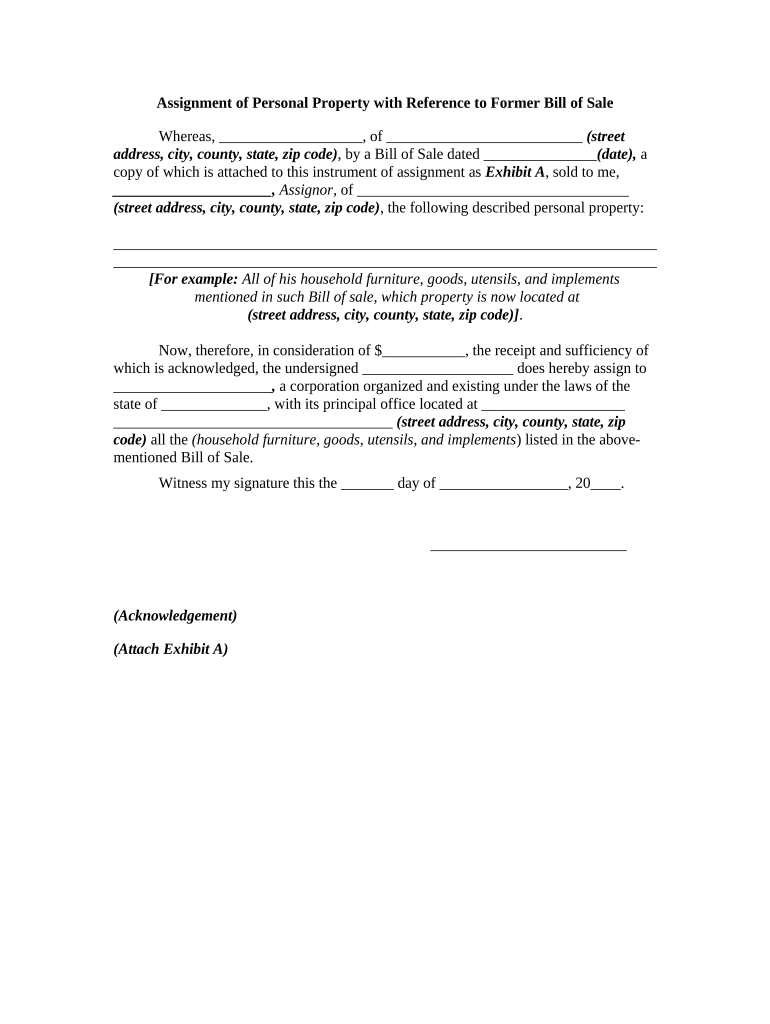
An Assignment of Personal Property is a written instrument that transfers ownership, possession, or specified rights in tangible or intangible personal property from one party (the assignor) to another (the assignee). It can cover goods, equipment, inventory, accounts receivable, intellectual property rights, or other personal assets and should describe the property, the scope of rights conveyed, consideration (if any), effective date, and any conditions or warranties. Properly drafted assignments help establish priority against third parties, enable financing arrangements, and clarify tax and liability treatment for both parties.

Why an Assignment of Personal Property matters

An assignment creates an auditable record of transfer, clarifies legal rights, and protects parties by documenting terms and effective dates. It is often required by lenders, buyers, or regulatory reviewers to establish chain of title and priority.

Why an Assignment of Personal Property matters

Who commonly prepares and receives this assignment

Typical users include sellers, buyers, secured creditors, trustees, attorneys, and corporate officers involved in asset transfers or collateral assignments.

  • Lenders and secured creditors who need collateral rights to enforce priority in insolvency or default.
  • Businesses selling equipment or accounts who need to document transfer of ownership and liability.
  • Legal and finance teams that prepare assignments to close transactions or support regulatory filings.

Use the assignment to avoid disputes, confirm consideration, and preserve rights for enforcement or resale.

Core elements to include in a professional Assignment of Personal Property

A thorough assignment identifies parties, describes property, states consideration and effective date, limits or warranties, signatory authority, and any required acknowledgements or filings. These elements reduce ambiguity and support enforceability.

Parties

Full legal names and business types for assignor and assignee, including state of formation when an entity.
Property Description

Detailed list or reference to schedules for tangible or intangible items, serial numbers, account IDs, or contract references.

Consideration

Specify monetary amount, assumption of liability, or statement of nominal consideration if applicable.

Effective Date

Exact date the rights transfer, or a trigger event description that activates the assignment.

Warranties & Covenants

Any seller statements about title, encumbrances, or authority to assign; disclaimers where appropriate.

Execution Details

Signature blocks, corporate attestations, and any notary or witness language required by jurisdiction.

Step-by-step: completing the Assignment of Personal Property

Follow these steps to prepare and finalize the assignment.

  • 01
    Prepare draft: List parties and precisely describe the property.
  • 02
    Confirm consideration: Record the payment or exchanged value clearly.
  • 03
    Review authority: Verify signatory has corporate or trustee authority to assign.
  • 04
    Execute and notarize: Sign in presence of required witnesses or notary where applicable.

Typical transfer flow for a personal property assignment

This sequence shows common routing steps from drafting to recordkeeping.

  • Drafting: Create initial assignment with schedules and recitals.
  • Internal approvals: Obtain corporate or trustee approvals as required.
  • Execution: Signatures, notarization, and witness steps completed.
  • Distribution: Provide executed copies to parties and record where necessary.

How to customize and complete the assignment online

Configure an electronic workflow to collect signatures, attach schedules, and preserve an audit trail.

Field Configuration
Description Field Use a long-text field for property schedules and attach supporting exhibits.
Signature Field Require signer name, date, and title; set required validation.
Authentication Choose email, SMS code, or stronger verification per transaction sensitivity.
Document Retention Enable automatic PDF export and secure archive after completion.

Digital signing considerations and integration needs

Decide authentication strength, audit requirements, and integrations before e-execution.

  • Authentication: Email link, SMS code, KBA, or advanced signer auth per document sensitivity.
  • Audit Trail: Capture timestamps, IP, email, and action logs for evidentiary support.
  • Integrations: Connect to document storage or ERP systems for recording and indexing.

Ensure the platform supports required security standards and produces a tamper-evident signed PDF for long-term records.

Key timing and processing expectations

Timing depends on the parties, required filings, and whether notarization or UCC filings are needed.

Effective date:

Enter MM/DD/YYYY; determines rights and tax timing.

UCC Filing windows:

File promptly to preserve priority against later creditors.

Notarization scheduling:

Allow additional days for remote or in-person notarization.

Delivery to third parties:

Send to lenders or counterparties immediately after execution.

Record retention:

Archive signed copy and attachments as permanent corporate records.

Milestone timeline from draft to recorded transfer

A typical timeline includes drafting, approvals, signature, public filings (if any), and retention steps.

01

Draft prepared

Parties create and review the assignment draft and schedules.

02

Internal approval

Obtain board or authorized officer sign-off where needed.

03

Execution and notarization

Signers complete signatures and any required notarization or witnessing.

04

UCC or third-party notice

File UCC-1 or send notices to counterparties to protect priority.

Security and compliance features to expect

Encryption: TLS 1.2/1.3 in transit; AES-256 at rest
Audit trail: Comprehensive timestamped action logs
HIPAA Support: BAA available where required
Regulatory: ESIGN and UETA compliance
Certifications: SOC 2 Type II and ISO 27001
Accessibility: WCAG 2.0 Level AA support

Common legal and practical risks from improper assignments

Priority Loss: Failure to file may reduce creditor priority
Fraud Claim: Incomplete disclosures can create fraudulent transfer exposure
Tax Consequences: Incorrect effective date can alter tax reporting
Enforceability: Missing signatures or authority may void transfer
UCC Errors: Incorrect UCC details harm perfection of security interest
Privacy Breach: Sensitive data sharing may trigger HIPAA/other obligations

Frequent drafting and execution mistakes to avoid

  • Using vague descriptions like 'all personal property' without schedules leads to disputes about scope and excluded items.
  • Failing to verify signatory authority for corporate or trust assignors can render the assignment unwritable in disputes.
  • Omitting effective dates or tying transfer to future conditions without clear triggers causes uncertainty about ownership timing.
  • Neglecting to file UCC-1 financing statements when property serves as collateral risks losing priority against subsequent secured parties.

Real-world examples of Assignments of Personal Property

These short examples show common contexts where an assignment clarifies rights and supports transactions.

Equipment Sale

A small manufacturer assigned specific CNC machines with serial numbers to a purchaser

  • The assignment described payment terms and inspection rights
  • After execution and delivery the purchaser recorded a UCC-1 to protect against later creditor claims and preserved resale rights.

Receivables Transfer

A services firm assigned accounts receivable to a lender as collateral

  • The assignment listed account ranges and invoices covered
  • The lender filed a financing statement and the assignment enabled quicker loan advances against billed amounts.

Comparing eSignature vendor pricing and core capabilities

Basic vendor differences affect cost and available features for executing and storing signed assignments. signNow is listed first for comparison.

signNow DocuSign Adobe Sign PandaDoc HelloSign
Starting Price $8/user/mo $15/user/mo $14/user/mo $19/user/mo $15/user/mo
Free Trial 7-day free trial, no credit card Varies by plan Varies by plan Varies by plan Varies by plan
Bulk Send Yes (Business Premium) Varies by plan Varies by plan Varies by plan Varies by plan
Audit Trail Yes Yes Yes Yes Yes
HIPAA Compliant Yes (BAA available) Varies by plan Varies by plan Varies by plan Varies by plan

Frequently asked questions about Assignments of Personal Property

Answers to common questions about drafting, signing, and enforcing assignments.


Need help? Contact support

be ready to get more
Join over 28 million airSlate SignNow users