Establishing secure connection…Loading editor…Preparing document…

Affidavit by Attorney-in-Fact as Court Appointed Receiver

This template is fully customizable. Edit the text, fill out the fields, and send it for signature. Give it a try!
Affidavit by Attorney-in-Fact as Court Appointed Receiver

What this affidavit is and when it applies

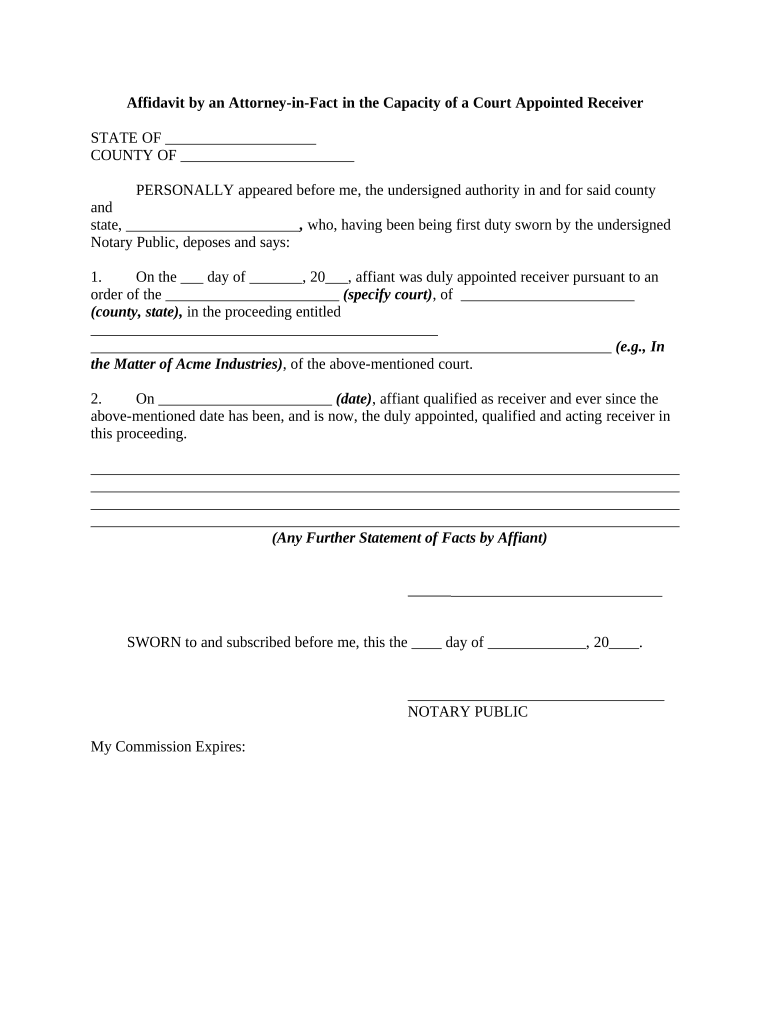
An Affidavit by Attorney-in-Fact as Court Appointed Receiver is a sworn written statement in which a designated attorney-in-fact confirms their authority and actions after being appointed by a court to act as receiver for specified property or estate. The affidavit documents the scope of the receiver role, dates of appointment, assets controlled, steps taken to preserve or liquidate property, and any transfers or agreements entered on behalf of the estate. It creates a formal, auditable record for courts, title companies, creditors, and other stakeholders assessing the receiver’s authority and acts.

Why a clear affidavit matters in receivership matters

This affidavit confirms the attorney-in-fact’s court-granted powers, creates a sworn record for third parties, and supports asset management, conveyances, or accounting required by the court. It reduces disputes about authority and supplies documentary evidence for title, banking, and creditor inquiries.

Why a clear affidavit matters in receivership matters

Who prepares and relies on this affidavit

Typical users who prepare or review this affidavit include attorneys, court-appointed receivers, trustees, and title officers involved in asset administration and transfers.

  • Court-appointed receivers: document activities, inventory assets, and report to the appointing court.
  • Attorneys-in-fact: confirm delegated authority and record acts taken under power of attorney.
  • Title companies and banks: verify authority for conveyances, releases, and account management.

Typical signers and reviewers

Attorney-in-Fact

An attorney-in-fact named in a durable power of attorney who accepts court appointment as receiver; they must document each act, maintain accurate records, and swear to the truth of the affidavit under penalty of perjury. Counsel should review entries for completeness.

Title Officer

A title officer or escrow agent uses the affidavit to confirm chain of title, determine whether conveyances executed by the receiver are valid, and ensure closing documents reflect judicial orders; they often require a certified copy of the appointment or court order.

Essential sections to include in the affidavit

A complete affidavit follows a consistent structure so courts and third parties can verify authority and the receiver’s actions without additional discovery or requests.

Caption

Include court name, case title, docket number, and date to link the affidavit to the underlying appointment order and simplify court or title searches and filings.
Authority Statement

Cite the power of attorney and the court order appointing the receiver, and state whether the authority is plenary, limited, or temporary to avoid ambiguity in third-party acceptance.

Appointment Date

Provide the effective appointment date and any termination date using MM/DD/YYYY format so the scope and timing of authority are clear for title and creditor review.

Inventory of Assets

List controlled assets with legal descriptions, account identifiers, or VINs; attach deeds, account statements, or bills of sale to substantiate ownership and reduce follow-up requests.

Actions Taken

Describe material acts performed—collections, payments, transfers, preservation measures—with dates, amounts, and counterparty names to support accounting and reasonableness assessments.

Certification & Notary

Include sworn certification language, signature block, and a notary acknowledgment or RON attestation as required by jurisdiction to create an enforceable sworn record.

Step-by-step: preparing and submitting the affidavit

Follow these sequential steps to assemble, authenticate, and distribute the affidavit in a manner acceptable to courts and third parties.

  • 01
    Gather Orders: Obtain certified court appointment and related orders.
  • 02
    Inventory Assets: List property, accounts, and liens with identifying details.
  • 03
    Draft Affidavit: State authority, dates, actions taken, and facts under oath.
  • 04
    Sign & Notarize: Sign before notary and include witness signatures if required.

Configuring an online affidavit workflow

Set up authentication, notary options, attachments, and audit logging before sending the affidavit for signature to meet court and third-party expectations.

Field Configuration
Signer Authentication Email link and SMS code; KBA optional
Notary Option In-person or RON audio-video session
Attachments Attach certified order and exhibits as PDFs
Audit Trail Enable full timestamp, IP, and action log

How affidavit processing typically flows

A reliable process collects supporting orders, authenticates the signer, completes notarization where required, and distributes certified copies to stakeholders.

  • Prepare: Assemble affidavit, exhibits, and certified court documents.
  • Authenticate: Sign under oath and complete notarization or RON session.
  • File/Serve: File with court or serve interested parties per orders.
  • Provide Copies: Deliver certified copies to banks, title companies, and insurers.

Delivery, formats, and integrations to consider

Choose delivery methods accepted by the court and third parties—paper filing, authenticated e-signatures with notarization, RON sessions, or certified electronic copies depending on jurisdiction.

  • Integrations: Salesforce, NetSuite, Microsoft 365 integrations
  • Formats: PDF, DOCX, and exportable audit file
  • Authentication: Email, SMS, and advanced signer verification

Security and compliance checkpoints

Encryption (Transit): TLS 1.2 and TLS 1.3
Encryption (At Rest): AES-256 encryption for stored data
Certifications: SOC 2 Type II, ISO 27001
Regulatory Compliance: ESIGN, UETA, HIPAA (BAA required)
FDA / 21 CFR: 21 CFR Part 11 compliant options
Accessibility: WCAG 2.0 Level AA support

Common preparation pitfalls to avoid

  • Failing to attach the certified court order or appointment often leads to refusals by banks and title companies and requires additional verification steps.
  • Omitting specific appointment dates or failing to describe the receiver’s authority creates ambiguity and can void transactions or require supplemental affidavits.
  • Using inconsistent names across the power of attorney, court order, and affidavit causes identity disputes and may trigger title holds or verification delays.
  • Not notarizing the affidavit or missing required witness statements for state filings can invalidate recorded deeds or delay probate and receivership accounting.

Consequences of an incorrect or incomplete affidavit

Perjury Risk: False statements may lead to criminal charges
Voidable Transfers: Conveyances may be reversed by court
Title Challenges: Closing delayed; title insurance risk
Creditor Claims: Unresolved claims can increase liability
Professional Liability: Attorney faces malpractice or sanctions
Financial Penalties: Fines and increased costs possible

Typical timing expectations and deadlines

Timelines for preparing, notarizing, filing, and distributing the affidavit depend on the appointing court’s orders and local filing practices.

Court Filing:

File within the deadline stated in the appointment order

Notarization Timing:

Complete notarization before filing or as ordered by court

Distribution:

Deliver certified copies within days specified by court or per practice

Record Retention:

Retain original affidavit per applicable retention schedules

Responding to Objections:

Allow reasonable time for courts or creditors to object

Key milestones from appointment to final reporting

A milestone timeline helps track appointment, inventories, actions taken, and the final affidavit and accounting to satisfy court and stakeholder obligations.

01

Appointment Issued

Court issues order naming receiver and specifying duties

02

Inventory & Notice

Inventory completed and notices sent to creditors and interested parties

03

Actions & Accounting

Receiver executes duties, preserves assets, and maintains records

04

Final Report

Affidavit and final accounting filed and served as ordered

Practical examples from real users

These examples show how documented affidavits and supporting orders resolved title issues and sped up closings in real receivership scenarios.

Optica Ventures

Optica Ventures used a documented affidavit after appointment to clear title and complete a property transfer without in-person signings.

  • Reduced verification friction for prospective buyers.
  • The structured affidavit and certified orders allowed title counsel to accept electronic evidence, shorten closing timelines, and reduce follow-up document requests across multiple stakeholders.

Martin Properties

Martin Properties prepared an affidavit documenting inventory and preservation actions after court appointment.

  • Reduced verification steps for lenders.
  • Detailed listing of assets and attached bank statements helped underwriters accept the record, which minimized delay and reduced questions from creditors and escrow agents.

eSignature vendor pricing and feature snapshot for affidavit workflows

A concise comparison of starting prices and selected capabilities across vendors commonly considered for affidavit and receivership workflows; signNow is listed first for reference.

signNow DocuSign Adobe Sign PandaDoc HelloSign
Starting Price $8/user/mo $15/user/mo $14/user/mo $19/user/mo $15/user/mo
Free Trial 7-day free trial Varies by vendor Varies by vendor Varies by vendor Varies by vendor
Bulk Send Yes Yes Yes Yes Yes
Audit Trail Yes Yes Yes Yes Yes
Envelope Cap No cap 100 envelopes/user/year Varies Varies Varies

Frequently asked questions and practical answers

Answers to common questions about signing, notarization, supporting exhibits, and jurisdictional acceptance of the affidavit.


Need help? Contact support

be ready to get more
Join over 28 million airSlate SignNow users