Establishing secure connection…Loading editor…Preparing document…

Authentic Act

This template is fully customizable. Edit the text, fill out the fields, and send it for signature. Give it a try!
Authentic Act

What the Authentic Act is and when it’s used

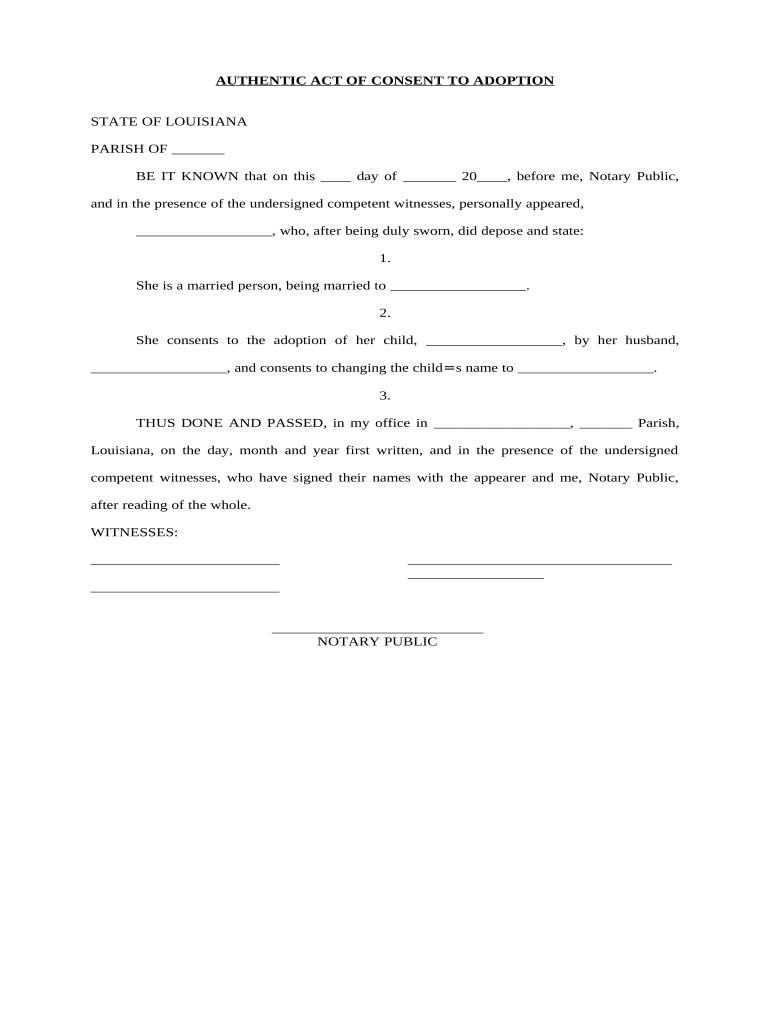
Authentic Act is a formal declaration used to verify that a person or organization attests to the authenticity of a document, signature, or specified facts. Typically drafted as a signed statement, the Authentic Act records parties, dates, the scope of authenticity being verified, and any supporting attachments. It is often used where a certification of genuineness is required for contracts, corporate records, archival transfers, or evidentiary purposes. When completed properly, it creates a clear record of intent and attribution suitable for electronic execution under U.S. e-signature law.

Why a clear Authentic Act matters

Use the Authentic Act to provide a concise, signed record that confirms genuineness, clarifies who made the declaration, and specifies the factual or documentary scope. This reduces ambiguity in transactions, supports chain-of-custody, and aids legal or administrative review under ESIGN/UETA.

Why a clear Authentic Act matters

Typical users and organizational roles

Professionals and administrators use the Authentic Act to formally attest to a record's authenticity when accuracy and provenance must be documented.

  • Legal counsel and paralegals managing evidentiary or corporate record attestations.
  • Records managers and archivists verifying chain-of-custody for transfers or archival ingestion.
  • Contract administrators and compliance officers documenting document origin and verification steps.

Essential elements that make an Authentic Act professional

Core elements of a professional Authentic Act define parties, scope, supporting evidence, signatures, dates, and any attestations or certifications required for legal reliability.

Parties

Identify each declarant and recipient by full legal name, role, and contact information; include organizational affiliation and authority to make the authenticity declaration to avoid later challenges.
Scope

Describe precisely which documents, records, or facts are certified as authentic, including dates, version numbers, page ranges, and any limitations on the certification's temporal or substantive scope.

Evidence

Attach or list supporting documents such as originals, certified copies, transaction logs, chain-of-custody records, or digital hash values; reference exhibits clearly to permit verification.

Attestation

Include a clear attestation clause stating the declarant's statement of truth under penalty of perjury when applicable, and whether any verification procedures were performed.

Signatures

Provide signature blocks for each declarant with printed name, title, date, and capacity; specify if electronic signatures are acceptable and the authentication method required.

Notary/Witness

Note any required notarization or witness statements, the jurisdiction for authentication, and retention instructions for notarized records or remote notarization session recordings.

Step-by-step: completing an Authentic Act

Follow these steps to complete and validate an Authentic Act for paper or electronic workflows, ensuring attribution and reproducibility.

  • 01
    Prepare: Gather documents, IDs, and evidence to attach.
  • 02
    Draft: State parties, scope, and attestation language clearly.
  • 03
    Authenticate: Choose signing method and complete signer verification.
  • 04
    Record: Save signed copy and audit trail for retention.

Typical eSubmission workflow for the Authentic Act

Typical eSubmission workflow for the Authentic Act aligns document placement, signer authentication, execution, and secure storage with an auditable trail.

  • Upload: Upload PDF or DOCX with exhibits attached.
  • Add Fields: Place declarant, scope, date, and signature fields.
  • Authenticate: Select authentication level (email, SMS, KBA).
  • Store: Save signed PDF and certificate of completion.

Configuring an electronic workflow for reliable execution

Configure an electronic workflow that enforces required fields, signer order, and retention for the Authentic Act to maintain compliance.

Field Configuration
Required Fields Declarant, scope, date, signature required.
Signer Order Define sequence when multiple signers are present.
Authentication Set email or SMS code; use KBA for high risk.
Attachments Require exhibit upload and naming convention.
Retention Apply retention policy and export PDF/A.

Platform capabilities to check before executing electronically

The Authentic Act can be shared and executed via multiple platforms, provided they support audit trails and secure storage.

  • Formats: PDF, DOCX, and PDF/A supported.
  • Integrations: Works with CRM, cloud storage, and ERPs.
  • Security: TLS in transit and AES-256 at rest.

Penalties, legal risks, and compliance consequences

Invalidation: Document may be deemed unenforceable.
Perjury Exposure: False attestations can trigger criminal penalties.
Authentication Failure: Weak signer verification reduces evidentiary weight.
Notary Defect: Missing notarization or improper RON invalidates acknowledgement.
Privacy Risk: PHI exposure may violate HIPAA rules.
Retention Lapse: Failure to retain records risks compliance fines.

Common preparation errors to avoid

  • Using informal language or vague scope descriptions that fail to identify specific documents, dates, or version numbers leads to ambiguity and possible dispute.
  • Mismatched names or titles between the Authentic Act and supporting IDs or corporate records often trigger re-execution or delay in administrative processing.
  • Failing to specify authentication methods or accepting guest signatures without verification weakens evidence and may be rejected in legal proceedings.
  • Neglecting to attach or reference supporting exhibits, hashes, or chain-of-custody records undermines the certification and complicates future verification.

Pricing and feature comparison for common eSignature platforms

Compare common e-sign features and pricing models relevant when executing an Authentic Act; signNow appears first per platform data.

signNow DocuSign Adobe Sign PandaDoc HelloSign
Starting Price $8/user/mo $15/user/mo $14/user/mo $19/user/mo $15/user/mo
Free Trial Yes, 7-day free trial No No Yes, limited Yes, limited
Bulk Send Yes Yes Yes Yes No
Audit Trail Yes Yes Yes Yes Yes
HIPAA Compliant Yes Yes Yes No No

Frequently asked questions about executing and preserving an Authentic Act

Answers to frequent questions about completing, authenticating, and preserving an Authentic Act in electronic and hybrid workflows.


Need help? Contact support

be ready to get more
Join over 28 million airSlate SignNow users