Establishing secure connection…Loading editor…Preparing document…

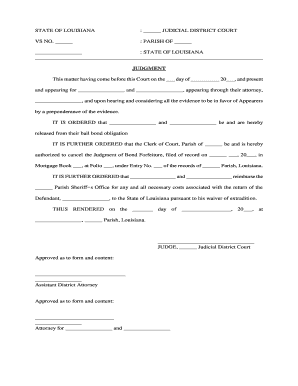
Louisiana Judgment of Bond Forfeiture

This template is fully customizable. Edit the text, fill out the fields, and send it for signature. Give it a try!
Louisiana Judgment of Bond Forfeiture

What the Louisiana Judgment of Bond Forfeiture Is

A Louisiana Judgment of Bond Forfeiture is a court-entered money judgment against a bail bond and its surety when the accused (the principal) fails to appear as required. The judgment fixes the amount owed under the bond, may include court costs and collection fees, and becomes enforceable like other civil judgments. It documents service of process on the surety, the court's forfeiture finding, and any stay or exoneration history. Parties use the judgment to pursue collection remedies, levy bank accounts, or place liens where permitted.

Why this Judgment Matters in Bond Cases

The judgment creates a formal, enforceable obligation that secures public interests, compensates the state or obligee, and clarifies the surety's liability. It expedites recovery, preserves legal remedies, and provides a written basis for enforcement actions such as garnishment, seizure, or offset.

Why this Judgment Matters in Bond Cases

Who typically prepares or receives this document

Multiple stakeholders prepare, file, or respond to a bond forfeiture judgment, including court staff, prosecutors, surety companies, and defense counsel.

  • Court clerks and judges who enter and docket the judgment.
  • Prosecutors or district attorneys seeking forfeiture and costs.
  • Surety companies and their agents who must respond or pay.

Each party has distinct procedural responsibilities — service, motions to set aside, appeals, and enforcement — governed by local court rules and state statute.

Key signatories and their roles

Judge / Clerk

The judge or court clerk enters and certifies the judgment; the clerk dockets and issues writs necessary for enforcement and records the judgment in court files.

Surety / Agent

The bail bond company or surety is the named debtor on the judgment; they may appear, move to set aside, post payment, or pursue subrogation against the principal.

Essential document details to preserve

Case ID: Court docket number
Party Names: Principal and surety names
Bond Amount: Original bond value
Forfeiture Date: Date court declared forfeiture
Judgment Amount: Total owed with costs
Service Proof: Affidavit of service

Consequences and enforcement risks

Monetary Judgment: Surety liable for bond amount
Collection Actions: Garnishment or levy possible
Interest & Costs: Court costs and interest apply
Credit Impact: Credit or surety rating affected
Subrogation Risk: Surety may seek reimbursement
Licensing Impact: Regulatory action against surety possible

Common preparation errors to avoid

  • Omitting the exact bond instrument details or bond number, which creates ambiguity about the obligation and may delay enforcement.
  • Failing to attach proof of service on the surety or agent, resulting in challenges to the judgment's procedural validity.
  • Misstating the judgment amount by excluding statutory costs or court-ordered fees, producing collection disputes or correction motions.
  • Using inconsistent party names between the bond, indictment, and judgment, which can complicate enforcement and require corrective filings.

How to prepare and submit the judgment — step by step

Follow this sequence to prepare a clear, enforceable Louisiana Judgment of Bond Forfeiture and reduce procedural objections.

  • 01
    Assemble file: Collect bond, arrest record, and forfeiture affidavit.
  • 02
    Draft judgment: State parties, bond terms, and amounts precisely.
  • 03
    Serve surety: Deliver notice per local rules; include affidavit of service.
  • 04
    File with court: Submit judgment and supporting exhibits to clerk.

Typical filing and processing flow

A streamlined filing process ensures the judgment is recorded, served, and available for enforcement through standard court channels.

  • Prepare package: Include judgment, bond, and affidavits.
  • File with clerk: Clerk accepts, dockets, and assigns judgment number.
  • Serve judgment: Effectuate service on surety per rules.
  • Enforce: Use writs, garnishment, or levy as allowed.

Digital workflow settings for online completion and submission

Configure an electronic workflow that matches judicial filing practices and preserves evidentiary audit trails.

Field Configuration
Document Format PDF/A recommended for long-term archival
Signer Authentication Email + SMS code or ID verification
Evidence Capture Include timestamp, IP, and audit trail
Storage Location Secure court or firm repository

Technical requirements for eSubmission and signing

Ensure any platform you use supports secure PDF handling, reliable audit trails, and required signer authentication for court admissibility.

  • File formats: PDF, PDF/A, DOCX accepted
  • Integrations: Connects to case management and cloud storage
  • Authentication: Email, SMS, and advanced ID proofing

Preserve the audit trail and original signed file; courts rely on intact metadata, certified copies, and accurate service records for enforcement.

Elements of a clear, enforceable judgment document

Include these elements to ensure the judgment is easily docketed, enforceable, and resistant to procedural challenge.

Caption and Docket

Full court caption and accurate docket number so clerk and enforcement agents identify the correct file.
Clear Parties

Precise legal names for principal, surety, bonding company, and obligee to avoid identity disputes.

Bond Reference

Cite the bond instrument, bond number, and original issuance date to tie the judgment to its source.

Forfeiture Finding

Recite the court's factual basis for forfeiture and any statutory authority relied upon for clarity.

Amount Calculation

Itemize principal, fines, costs, interest, and collection fees so totals are transparent and enforceable.

Service and Enforcement

Attach affidavits of service and note permissible enforcement remedies and any stay or appeal information.

Typical timelines and local deadlines to watch

Timelines vary by parish and local rules; treat these as common checkpoints and confirm applicable deadlines before filing or responding.

Time to File Judgment:

File promptly after forfeiture to preserve enforcement options; local rules govern exact timing.

Motion to Set Aside:

A defendant or surety must file a motion per court schedule; deadlines often measured in days to weeks.

Appeal Period:

Appeal windows vary; consult local appellate rules to preserve review rights.

Enforcement Actions:

Writs and garnishments can proceed after judgment becomes final under court rules.

Record Maintenance:

Retain served documents and filings through enforcement and any appeals.

eSignature vendor pricing and capability snapshot

Comparison of common eSignature plans and capabilities. Signer authentication, bulk send, audit trails, and HIPAA options affect suitability for court-related filings.

signNow DocuSign Adobe Sign PandaDoc HelloSign
Starting Price $8/user/mo $15/user/mo $14/user/mo $19/user/mo $15/user/mo
Free Trial 7-day trial Trial available Trial available Trial available Trial available
Bulk Send Yes (Business Premium) Yes Yes Yes Yes
Audit Trail Yes Yes Yes Yes Yes
HIPAA Compliant Yes (BAA available) Varies by plan Varies by plan Varies by plan Varies by plan
Envelope Cap No cap 100 envelopes/user/year Varies by plan Varies by plan Varies by plan

Frequently asked questions about this judgment

Answers to common questions about preparation, service, electronic handling, and enforcement of a Louisiana Judgment of Bond Forfeiture.


Need help? Contact support

be ready to get more
Join over 28 million airSlate SignNow users